Appcenter-sdk-dotnet: Errors in try/catch kill the app when using AppCenter
Description
My Xamarin.iOS app is sometimes crashing when an error is thrown inside a try/catch block.
It is not crashing when I don't start the AppCenter, so it is straightly related to AppCenter.
And of course, it is unacceptable.
Repro Steps
I've already spent a few hours trying to provide a sample project, but it's not that easy, it seems that it only happens in some very specific situations that I have a hard time replicating in a sample project. But I will keep trying.
What I have discovered so far, I am getting those errors in the log, when I start the AppCenter and not when I don't. I have googled it and it seems related to XCode 10. But you should definitely try to fix this error, even if it is related to an XCode bug. Crash reporting library just must not cause crashes no matter what.
2018-10-07 13:56:53.628592+0200 MyAppiOS[4017:44456] Failed to create remote object proxy: Error Domain=NSCocoaErrorDomain Code=4099 "The connection to service named com.apple.commcenter.coretelephony.xpc was invalidated." UserInfo={NSDebugDescription=The connection to service named com.apple.commcenter.coretelephony.xpc was invalidated.}
2018-10-07 13:56:53.629047+0200 MyAppiOS[4017:44460] Failed to ping server after delegate was set
2018-10-07 13:56:53.629463+0200 MyAppiOS[4017:44450] Failed to create synchronous remote object proxy: Error Domain=NSCocoaErrorDomain Code=4099 "The connection to service named com.apple.commcenter.coretelephony.xpc was invalidated." UserInfo={NSDebugDescription=The connection to service named com.apple.commcenter.coretelephony.xpc was invalidated.}
2018-10-07 13:56:53.632834+0200 MyAppiOS[4017:44450] [NetworkInfo] Descriptors query returned error: Error Domain=NSCocoaErrorDomain Code=4099 "The connection to service named com.apple.commcenter.coretelephony.xpc was invalidated." UserInfo={NSDebugDescription=The connection to service named com.apple.commcenter.coretelephony.xpc was invalidated.}
2018-10-07 13:56:53.634029+0200 MyAppiOS[4017:44450] Failed to create synchronous remote object proxy: Error Domain=NSCocoaErrorDomain Code=4099 "The connection to service named com.apple.commcenter.coretelephony.xpc was invalidated." UserInfo={NSDebugDescription=The connection to service named com.apple.commcenter.coretelephony.xpc was invalidated.}
2018-10-07 13:56:53.634471+0200 MyAppiOS[4017:44450] [NetworkInfo] Descriptors query returned error: Error Domain=NSCocoaErrorDomain Code=4099 "The connection to service named com.apple.commcenter.coretelephony.xpc was invalidated." UserInfo={NSDebugDescription=The connection to service named com.apple.commcenter.coretelephony.xpc was invalidated.}
2018-10-07 13:56:53.636754+0200 MyAppiOS[4017:44450] Failed to create synchronous remote object proxy: Error Domain=NSCocoaErrorDomain Code=4099 "The connection to service named com.apple.commcenter.coretelephony.xpc was invalidated." UserInfo={NSDebugDescription=The connection to service named com.apple.commcenter.coretelephony.xpc was invalidated.}
2018-10-07 13:56:53.637152+0200 MyAppiOS[4017:44450] [NetworkInfo] Descriptors query returned error: Error Domain=NSCocoaErrorDomain Code=4099 "The connection to service named com.apple.commcenter.coretelephony.xpc was invalidated." UserInfo={NSDebugDescription=The connection to service named com.apple.commcenter.coretelephony.xpc was invalidated.}
Details
- Xamarin.iOS
- AppCenter 1.9.0
- iPhone 5S emulator with iOS 12, on XCode 10.0
- What third party libraries are you using?
libraries.txt - Logs
log_with_appcenter.txt
log_without_appcenter.txt
Thanks!
 rihadavid
All 54 comments
Unfortunately, I will not be able to provide a sample project, I've spent about 7 hours on it and don't have time for more. I just can't replicate it in another project than the one that I am working on and I can't share this one.
I hope that the logs will help, if you come up with anything you'd want me to try, let me know.
But for now, I'll just remove the AppCenter from my project to avoid the unexpected crashes and continue working on other things.
rihadavid
on 7 Oct 2018
Hi @rihadavid,
Thanks for getting in touch!
It doesn't look like the errors with com.apple.commcenter.coretelephony.xpc is related to the case.
I cannot reproduce this issue, so could you please answer to the additional questions?
- What do you have in the catch block? Do you report handled exceptions?
- Do you have anything besides the AppCenter for catching crashes? For example subscribing to
UnhandledExceptionevent or "global" try/catch inMainfunction with log and re-throw or something like that. - Could you please provide a sample report for crash caused killing the app in try/catch block? In the logs above, the SDK sends crash from previous run, but I don't see any error codes or stack-traces of errors that caused crash.
Best,
Ivan
 MatkovIvan
on 9 Oct 2018
MatkovIvan
on 9 Oct 2018
& 2. I am attaching the sample project which has the exact same code in Main.cs, ViewController.cs, AppDelegate.cs etc. like my real project but unfortunately is not same enough to reproduce the issue. But you can look what code I use.
TestApp.zipOk, here is the log after previously crashed app:
log_after_previously_crashed.txt
rihadavid
on 9 Oct 2018
@rihadavid Sorry that you fell into this issue. Can you please provide the symbolicated crash from the AppCenter portal? It'll probably be easier to read.
 iamclement
on 10 Oct 2018
iamclement
on 10 Oct 2018
Sure, here it is. I have updated the crash log from my real project to match the corresponding line numbers in the provided sample project. As expected, the crash happens on the line inside the try/catch.
log_symbolicated.txt
rihadavid
on 10 Oct 2018
Forgot to mention - the log is not from the AppCenter portal, I got it from XCode. And this time it is on iPhone 5S device with iOS 11.4
rihadavid
on 10 Oct 2018
OK, this is NOT a .NET exception, so you cannot catch this by try/catch.
What version of Xamarin.iOS and VS for Mac do you use? Could you please try to update it to the latest?
MatkovIvan
on 10 Oct 2018
Wait, what is not a .Net exception? When I remove the AppCenter from the project, I just catch a usual NullReference exception on the var xx = dd.GetType(); line.
I am using Xamarin.iOS 12.0.0.15
rihadavid
on 10 Oct 2018
And VS 15.8.5, on Windows (on Mac there is 7.6.6)
rihadavid
on 10 Oct 2018
Yeah, I know, it _should_ generate a usual NullReference exception, but instead, it crashed.
The AppCenter doesn't intrude to usual exception handling, but it is only subscribed on unhandled ones and native crashes. So, currently it looks like a Xamarin.iOS bug for me.
We're investigating how AppCenter can indirectly affect it.
MatkovIvan
on 10 Oct 2018
@rihadavid Does upgrading to the latest versions change anything?
Does the behavior somehow depend on the build configuration and the optimizations enabled?
MatkovIvan
on 11 Oct 2018
Hi David,
I'm closing this issue because we haven't heard from you in a while. Please reopen and get back in touch in case you are still running into this.
Benjamin
 ElektrojungeAtWork
on 15 Oct 2018
ElektrojungeAtWork
on 15 Oct 2018
@ElektrojungeMS @MatkovIvan Sorry for the delay, I did not have time to update my environment.
I just updated to VS 15.8.9 and XCode 10.1 and AppCenter 1.10 and it is still happening.
Regarding the configuration, the only thing that it seems to depend on is the linker - it is only happening with 'Don't Link'.
But still, I can't reproduce it outside my real project.
rihadavid
on 6 Nov 2018
Hi again @rihadavid , I'll try to reproduce this again using the new information.
 thyeggman
on 6 Nov 2018
thyeggman
on 6 Nov 2018
Hi, I tried again on updated versions of Xcode, VS, and AppCenter. I wasn't able to reproduce the issue with your test application as you indicated, but I can see what code is crashing in your real app. I also tested on simulators for iPhone 5s and newer versions, with no luck.
Do you have a stack trace of the specific point that the code is crashing? I would like to see the stack trace for your app both with and without the AppCenter SDK, if possible. I am also going to try another version of Xcode to see if it's related to Xcode 10 somehow, so I'll try that out tomorrow.
thyeggman
on 7 Nov 2018
Unfortunately, when the app gets killed it does not create any stack trace because it does not throw the error, but you can try to look at the symbolicated crash log I provided earlier in the report. Is there anything else I could do?
rihadavid
on 7 Nov 2018
And if I change some code so that the issue does not happen and the error is catched, the stacktrace of the catched exception has just one line, pointing to that line in try/catch in ViewController.cs, nothing helpful
rihadavid
on 7 Nov 2018
@rihadavid As @MatkovIvan was saying, without a repro, we unfortunately can't really pinpoint a fix.
It seems that a line like the one you pointed out in the sample app which produces an error in your actual app may be compiled in a different way for the two projects. It's unlikely, but that's our suspicion based on the evidence.
If you are willing to share the project, you should open an intercom ticket via the AppCenter portal by using the button in the lower right and you can provide it privately.
Thanks for your report.
EDIT: Hadn't refreshed the page and missed your replies, removed some irrelevant information.
thyeggman
on 7 Nov 2018
I tried to simplify the project to the extent that I would be willing to share and it stopped happening, so I guess there is nothing else we can do..
rihadavid
on 7 Nov 2018
Sorry about that, I wish we could help more. It's frustrating for us too because it's obviously related to the presence of AppCenter.Crashes, but it's a very hard problem to pin down. If you ever discover anything else drop us a line and we'll take another look.
thyeggman
on 7 Nov 2018
@jwallra I tried with 1.12, it's still crashing but now the log ends with some [PLCrashReport] messages, could you look if it's useful?
rihadavid
on 22 Jan 2019
I'll take a look, I'll probably be able to get back to you tomorrow
thyeggman
on 23 Jan 2019
Hmm, it looks like PL Crash Reporter is not catching the crash for some reason. In your sample app you just caused a generic crash. Is there something specialized you could be doing in the try block which causes the error? Any code that could be flaky, code that could be suspicious, etc. would be good to know about.
Basically it's giving an "Unsupported Operation" return code, so I'm not exactly sure what that correlates to in your code. I'm not an expert on PLCR so I am going to wait for my colleague to take a look at it and see if he has any insights.
thyeggman
on 24 Jan 2019
I am still using the same code, just read the comments above and look at the TestApp.zip 😉
rihadavid
on 24 Jan 2019
So @ElektrojungeMS tells me this is happening because PLCR cannot unwind the stack properly, but it doesn't make sense to us why it would cause the app to crash, because it should only run if the app was already crashing. We're still looking at it, just wanted to give you an update.
thyeggman
on 24 Jan 2019
Thanks for the update. Would it be possible to use the appcenter not as a nuget but as a referenced project, using the source code? Maybe I would be able to tell you which line in the appcenter is the last executed line before the crash. Could you provide the project in zip, so that I just add it to my solution and reference it? I was thinking I would try it myself, but the structure of this repository seems a little too complicated.
rihadavid
on 24 Jan 2019
Sure! We do it the same way in our test app called "Contoso.Forms.Puppet" in the repo (under Apps/Contoso.Forms.Puppet/Contoso.Forms.Puppet (portable)), you can use that as a reference.
Generally the steps should be:
- Add the App Center projects to your solution
- Add references to the App Center projects and remove the NuGets
- Set breakpoints as needed
I would say using the Contoso.Forms.Puppet project as a reference is your best bet. Let me know if you run into any problems :)
thyeggman
on 25 Jan 2019
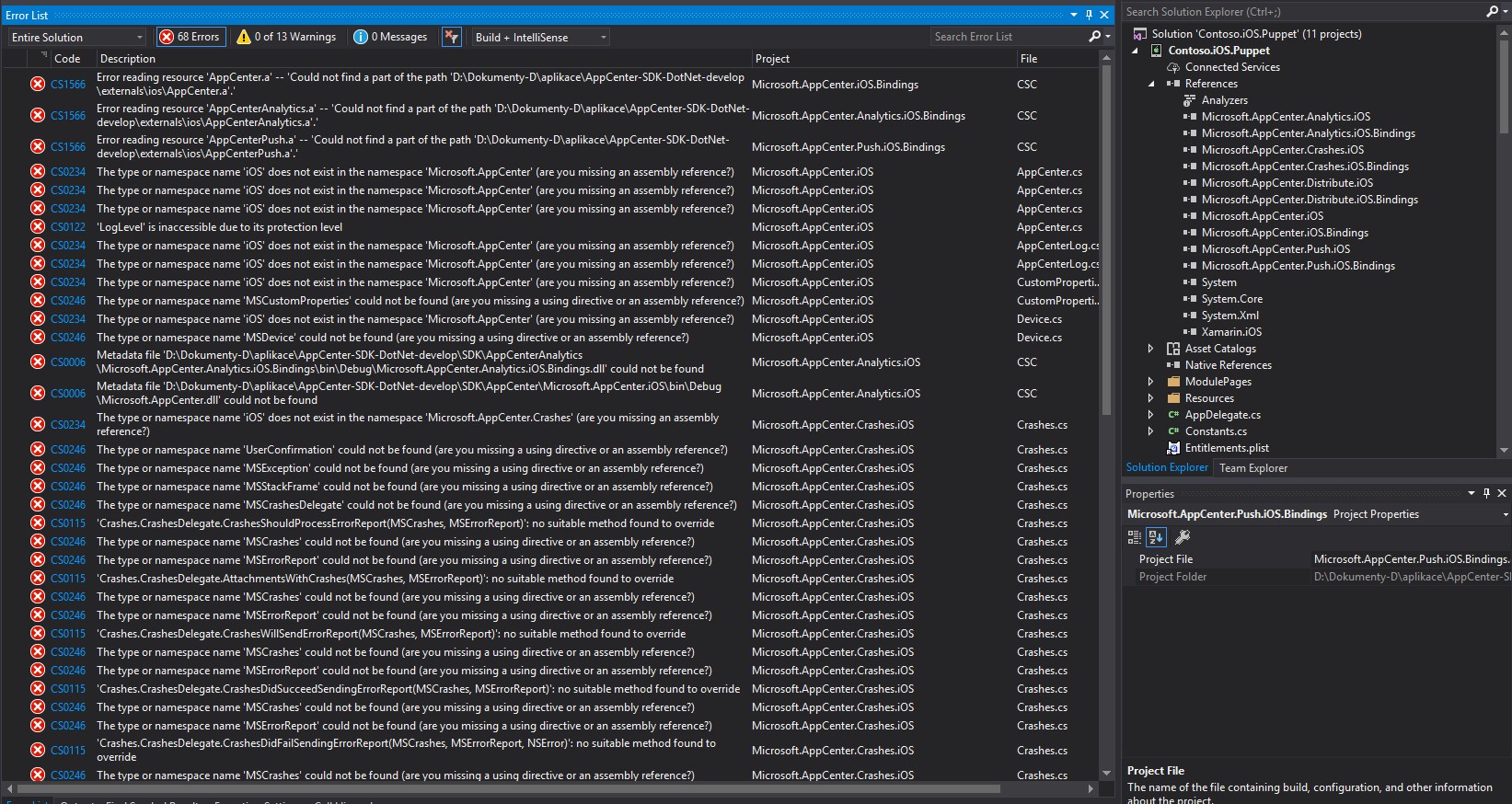
I've just spent an hour trying to add the projects but got tons of reference errors, I don't know, could you maybe share the zip or some list of projects I should reference or some more specific instructions? You were referring to Contoso.Forms.Puppet, but I am not using forms, this is a Xamarin.iOS app. So I tried to open the Contoso.iOS.Puppet.csproj and add all the missing projects, but still I am getting tons of referrence issues when I try to build this Contoso app.
rihadavid
on 25 Jan 2019
After digging for a while, it seems like we had fixed a behavior that sounds similar to yours back in October 2017 related to a newer version of Mono. Which version of Mono are you running? Also, do you know which architecture(s) the device(s) encountering the issue are on? If we have similar devices in our test locker it would be good to try on those.
As far as adding the project references, you could try the reverse and add your code to the Contoso.Forms.iOS, which is already set up correctly. You'll probably have to rip out a bunch of code but if you just want to execute something you can feel free to hook it up to a button that's already there.
thyeggman
on 25 Jan 2019
I am using latest Visual Studio / Xamarin and testing on iPhone 5s iOS 12.1 simulator. But as I said earlier, you will not reproduce this issue. It's hard to reproduce even in my own project, the conditions it depends on are ridiculous. And as I also said earlier, it's not happening if I try to simplify the project or use the same code in a sample project, so also adding the code to the Contoso.Forms.iOS project is not an option.
rihadavid
on 25 Jan 2019
And by the way, AppCenter-Demo.sln references the AppCenter as a nuget, I need it as the source code. Or if you meant that I should open \Apps\Contoso.Forms.Demo\Contoso.Forms.Demo.iOS, it does not have the source code neither. So I really don't know how to do this and your advice is not really helpful 😩
rihadavid
on 25 Jan 2019
Sorry for the trouble. It's frustrating for us too, because a crash reporting SDK that crashes isn't a very good one, so we'd like to get to the bottom of it too 😞
I'll go through the process again and write some more detailed instructions.
thyeggman
on 25 Jan 2019
Sorry for the confusion earlier, the Contoso.iOS.Puppet app in the AppCenter-Mac solution has project references. I double-checked and was able to debug the SDK code this way. You can use that as an example instead of forms.
I went through the steps to confirm, and the setup should be:
- Add the projects for the relevant modules to your solution
- For you, it should be at least
Microsoft.AppCenter,Microsoft.AppCenter.Shared,Microsoft.AppCenter.iOS,Microsoft.AppCenter.iOS.Bindings,Microsoft.AppCenter.Crashes,Microsoft.AppCenter.Crashes.iOS,Microsoft.AppCenter.Crashes.iOS.Bindings - Add similar projects for any other modules you're using
- For you, it should be at least
- Add project references for all the projects you added to your solution to your app
- Set breakpoints and run
thyeggman
on 25 Jan 2019
Thank you for the steps. The problem is, even in the AppCenter-Mac sln, that the bindings projects are opened as Miscellaneous Files and the other projects aren't able to use the code, hence the reference errors. If I create a new iOS Bindings project, I also see it as Miscellaneous Files. I don't know what might be wrong here, am I missing some VS extension for bindings projects?
rihadavid
on 26 Jan 2019
If you open AppCenter-Mac.sln on Windows you need to run this in powershell before:
./build.ps1 -t=externals in the root of the repository.
 guperrot
on 28 Jan 2019
guperrot
on 28 Jan 2019
Unfortunately, it did not help.
rihadavid
on 29 Jan 2019
Connecting a remote Mac in VS for windows and running this script prior to opening the solution should be enough to compile the iOS projects with no git modification. I would suggest git clean -xdf and try again running the externals scripts or try opening the solution on a Mac.
guperrot
on 29 Jan 2019
Ok so I've been able to add the AppCenter source code to the solution and it's still crashing. I will try to investigate, meanwhile do you have any suggestions on where I should put the breakpoints?
Edit: I am using the master branch
rihadavid
on 30 Jan 2019
So, I've added breakpoints to mostly all the methods that I think could be called before the crash and I haven't discovered anything suspicious. None of the breakpoints are hit after the last executed line in my code (the one that is creating the exception on purpose).
The only thing I've discovered is that if I remove iOSAppCenter.Start(parsedSecret, s); line from Microsoft.AppCenter.iOS\AppCenter.cs PlatformStart(string appSecret, params Type[] services) method, the app is no longer crashing, because the AppCenter is not started.
I think this could more likely be an issue within the binded project, so maybe this issue should rather be passed to AppCenter SDK Apple? Or is there something you would like me to try?
rihadavid
on 30 Jan 2019
What might also be useful is the fact that the [PLCrashReport] messages are the only thing that appears in the Output after the last line (the crashing line) in my project is reached.
rihadavid
on 30 Jan 2019
After googling the PLCrashReports, I got to this which led me to this which led me to this workaround and it's actually working, the app is no longer crashing when using this code. I'm gonna use it and I should finally be safe, but you should definitely solve this inside the SDK so that the workaround is not needed.
rihadavid
on 30 Jan 2019
Hi @rihadavid,
Currently, I'm looking at this issue. I thought about signal handling and it was the main version of it. Thanks to confirming.
But the SDK takes care of it. Also, please note that it's an incomplete solution for mono 4.8+, see Signals and third-party crash reporters for details.
My primary suspect is threading issue now. I noticed that you started AppCenter from the background thread. Is there still a problem if AppCenter starts in the main thread?
Thanks,
Ivan
MatkovIvan
on 30 Jan 2019
When I start it from the main thread, the app does not crash, but I'm not sure we can say it's the cause of the issue, because it changes how things are executed - the conditions for this to happen are quite delicate, like if I remove some await Task.Delay it also stops happening.
When I call it from the background thread, the AppCenter.Start() is finished and also the MSWrapperCrashesHelper.SetCrashHandlerSetupDelegate(new CrashesInitializationDelegate()) is called before I call the crashing line (there is the await Task.Delay(5000); line before the crashing line, so there is a lot of time for the initizalization). But strangely, the WillSetUpCrashHandlers() method of the delegate is never called, so the SIGSEV workarounds were not performed and that is the cause of the crash.
If you believe that it is really caused by calling it from the background thread, then you can probably close this, but you should add a warning about this to the docs.
But note that when I put the workaround code (from the SO answer) to my iOS app directly, I still call all of it (both the workaround code and the appcenter start) from the background thread and it works without the crash.
rihadavid
on 30 Jan 2019
BTW I just tried adding the TestApp project (that I provided earlier) to the 'AppCenter-Mac.sln' (master branch), removed the AppCenter nugets and added references to the source projects and I was able to reproduce the crash also in this project, so you might try.
rihadavid
on 30 Jan 2019
I did the same as you (except develop branch) and can confirm the TestApp crashes 100% of the time, and that moving AppCenter.start outside the Task.Run solves the issue.
AppCenter appears to have a deadlock when initialized from background on iOS. Because of this deadlock we cannot configure the signals properly and thus a nullreferenceexception would cause a native crash instead of being able to catch it.
Even if we fix the deadlock, there will still be a possibility of the crash to happen if from another thread you trigger a nullreference at the same time AppCenter is doing the sequence "remove signals", "init crash reporter", "restore signals", I also tested that. The second issue cannot be solved as this sequence cannot be atomic.
The best work around is to initialize from the main thread for now.
guperrot
on 31 Jan 2019
The deadlock I mentioned is a separate issue that affects our own testing apps if we try to reproduce your issue (like doing the same in Contoso.iOS.Puppet will deadlock instead of crashing). We are still investigating the deadlock.
But for your specific crash issue I definitely found a bug and fixed it in the native Apple SDK. To remove/setup signal handlers just before and after configuring PLCrashReporter, the Xamarin layer SDK set up a delegate (callback) on the native SDK (the will/did setup events).
As you already noticed, the callbacks were not called when starting in background and that was why the nullreferenceexception was causing a native crash as the setup was skipped.
The reason the setup was skipped is that the reference to the delegate in the native sdk was a weak one, freed even before it could be used. The fix is to use a non weak reference there.
Still, even with the fix we do not recommend the background usage of start with the current SDK because of 2 other issues we found with that approach (a possible deadlock, and the remote possibility of a nullreferenceexception occurring right between will/did events in one of the application threads).
guperrot
on 31 Jan 2019
Even if we fix the deadlock, there will still be a possibility of the crash to happen if from another thread you trigger a nullreference at the same time AppCenter is doing the sequence "remove signals", "init crash reporter", "restore signals", I also tested that. The second issue cannot be solved as this sequence cannot be atomic.
So then it means that running it on the main thread is not the only requirement - it must also be called before any background tasks start, which basically means at the start of
FinishedLaunchingmethod, otherwise it could potentially crash, right?
I believe those two requirements should be clearly stated in the getting started guide or people will continue to have unexpected crashes.
One more question - is the SDK safe before you release the fix in the Apple SDK? Did the weak reference issue only ocurr when initialized from background thread?
rihadavid
on 31 Jan 2019
which basically means at the start of FinishedLaunching method
The Start the Xamarin.iOS SDK document mentions exactly this method of integration:
Open your
AppDelegate.csand add theStart()call inside theFinishedLaunching()method
I believe those two requirements
We treat this as a bug, not a requirement for now, but sure, we'll consider adding this note, thanks.
is the SDK safe before you release the fix in the Apple SDK? Did the weak reference issue only ocurr when initialized from background thread?
Yes and yes. The SDK carefully tested with integration in a documented way.
MatkovIvan
on 31 Jan 2019
Yes, I meant the difference between "add the Start() call inside" and "add the Start() call at the start". Because someone could place some background tasks before the call to AppCenter Start() and it could cause a crash.
Anyway, thank you for the investigation of the issue, I'm glad I can finally safely use the AppCenter in my iOS app.
rihadavid
on 31 Jan 2019
We will probably add some notes to the documentation.
guperrot
on 31 Jan 2019
The documentation has been updated for notes about starting, even with the fix that was made the note still applies as the fix just reduces the risk.
guperrot
on 5 Feb 2019
Good, but I think it's still missing something. Almost every SDK you add to your iOS project asks you to add the init method to FinishedLaunching, for example my FinishedLaunching has about 300 lines of code, with lots of background tasks. When you tell me to "add the Start() call inside the FinishedLaunching() method", there is a relatively small chance that I will put it as the very first line, before all the other SDK inits, and before any background tasks.
It says If you need to move this initialization earlier to capture early crashes, you must call it from the UI/main thread. - but I don't need to move it earlier, so I will ignore this note. I usually want the opposite - move it to some later point in FinishedLaunching, which is the problem, because there can already be some tasks running. In my opinion, the first sentence should be replaced with It's recommended to call the initialization from the UI/main thread and also you should be careful with starting any background tasks before or during the Start() call.
Together with the explanation in the following sentence, it would make a perfect sense to me.
rihadavid
on 6 Feb 2019
I'll submit a docs PR soon with this suggestion then.
guperrot
on 6 Feb 2019
Replacing with
If using Crashes, you must call this method in the UI/main thread and avoid starting background tasks until the
Startmethod returns.
guperrot
on 6 Feb 2019
Related issues
 InquisitorJax
·
7Comments
InquisitorJax
·
7Comments
 diverdan92
·
9Comments
diverdan92
·
9Comments
 balivo
·
10Comments
balivo
·
10Comments
 MisterJimson
·
3Comments
MisterJimson
·
3Comments
 YZahringer
·
4Comments
YZahringer
·
4Comments
Most helpful comment
Yes, I meant the difference between "add the Start() call inside" and "add the Start() call at the start". Because someone could place some background tasks before the call to AppCenter Start() and it could cause a crash.
Anyway, thank you for the investigation of the issue, I'm glad I can finally safely use the AppCenter in my iOS app.