Appcenter-sdk-dotnet: Harmless warning: The referenced component 'Microsoft.AppCenter.Crashes.dll' could not be found
I can't seem to get rid of this error on projects referencing Microsoft.AppCenter.Crashes. Cleared NuGet cache, uninstalled, reinstalled the package, but it keeps coming back.
The referenced component 'Microsoft.AppCenter.Crashes.dll' could not be found
 myokeeh
All 9 comments
Strange, what platform are you building the application for? It won't work for AnyCpu.
Also, is it blocking your build? Or is it just a warning?
 achocron
on 11 Dec 2017
achocron
on 11 Dec 2017
If you are seeing this warning only in Visual Studio only in UWP apps but have no problem building, you can ignore it. We will try to remove the warning on our side.
Here is the warning that is harmless:
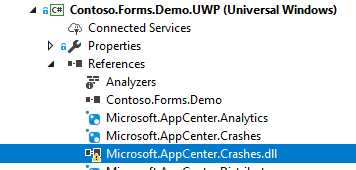
Please let us know if you are referring to a different issue.
 guperrot
on 13 Dec 2017
guperrot
on 13 Dec 2017
We are getting this issue with UWP targetting 16299 using AppCenter.Crashes 1.5. You've closed this issue. Does that mean it isn't going to be fixed?
 VagueGit
on 8 Mar 2018
VagueGit
on 8 Mar 2018
It's only harmless if you know it's harmless. We wasted time trying to fix our project because of this warning.
VagueGit
on 8 Mar 2018
Hi, we are sorry for the inconvenience, we just have not found a solution yet. The title was edited for other people in the future that would look at github in the meantime.
guperrot
on 8 Mar 2018
Based on my investigation, this warning message ("The referenced component 'Microsoft.AppCenter.Crashes.dll' could not be found") is not present in target platform Windows 10 Anniversary Edition 10.0.14393.0. It is only present in later versions--Windows 10 Creators Update 10.0.15063 and Windows 10 Fall Creators Update 10.0.16299. Unfortunately I was not able to find the root cause.
 dhei
on 10 Mar 2018
dhei
on 10 Mar 2018
I get the same issue, I think that something is wrong with Microsoft.AppCenter.Crashes.targets, maybe the HintPath of this ItemGroup:
<ItemGroup Condition=" ('$(TargetPlatformIdentifier)' == 'UAP') AND ('$(mc-crashes-IsCorrectArch)' == 'true')">
      <Reference Include="Microsoft.AppCenter.Crashes.dll">
        <HintPath>$(mc-crashes-ArchDir)\lib\uap10.0\Microsoft.AppCenter.Crashes.dll</HintPath>
      </Reference>
    </ItemGroup>
 asierpn
on 17 May 2018
asierpn
on 17 May 2018
@asierpn we removed that line from targets as part of the 1.7.0 release. However the warning will persist if just updating nuget in the app. To resolve the warning a full git clean might be necessary with visual studio being closed.
guperrot
on 20 Jun 2018
Hi, this is a different issue, your are mixing and matching versions of our nugets. All packages depends on the core of the same version: Microsoft.AppCenter and the error is telling you are trying to downgrade version.
If you update all packages to the same version it will fix this issue.
guperrot
on 25 Jun 2018
Related issues
 Marv51
·
10Comments
Marv51
·
10Comments
 diverdan92
·
9Comments
diverdan92
·
9Comments
 james1301
·
9Comments
james1301
·
9Comments
 nathanielcook
·
9Comments
nathanielcook
·
9Comments
 InquisitorJax
·
7Comments
InquisitorJax
·
7Comments