Appcenter-cli: failed to get release id with HTTP status: 403 - Forbidden
Description
I'm using appcenter-cli to upload builds from my CI using Bitrise, I have been using this CLI for 2 years+ with Bitrise. Today my CI builds were failing due to this error:
Release upload failed
Error: Loading release id failed with error: failed to get release id for upload id: 825a2f2c-8623-4b6c-bb73-0494e9ec6fab, error: {"succeeded":false,"errorCode":3,"errorMessage":"failed to get release id with HTTP status: 403 - Forbidden"}
Repro Steps
Please list the steps used to reproduce your issue.
- npm install -g appcenter-cli
- appcenter distribute release --token [REDACTED] --app MoneyMe/MoneyMeBeta --group Developers --file MoneyMe.ipa -R beta_releasenotes.txt
- Build was uploaded but was not able to release due to error:
Error: Loading release id failed with error: failed to get release id for upload id: 825a2f2c-8623-4b6c-bb73-0494e9ec6fab, error: {"succeeded":false,"errorCode":3,"errorMessage":"failed to get release id with HTTP status: 403 - Forbidden"}
Expected behavior
Should be able to upload and release a build.
Details
- Is there a particular beacon/command that you are having trouble with?
- appcenter distribute release
- Which version of the App Center CLI are you using?
- latest from npm install -g appcenter-cli
- Which OS version did you experience the issue on?
- macOS 10.15.6 (Catalina)
- What command line/shell are you using?
- BITRISE CI
 darkandchoco
All 8 comments
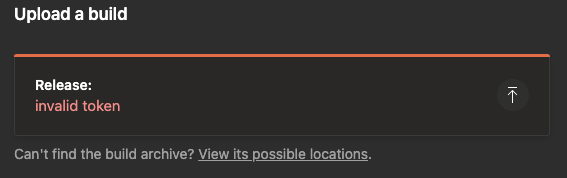
We tried to upload via the web and it failed due to the same error.
 oscarcv
on 16 Mar 2021
oscarcv
on 16 Mar 2021
The status page already reflects that they are having problems in distribution
oscarcv
on 16 Mar 2021
We are facing this issue too, since March 14, 2021
Command:
appcenter distribute release -f $IPA_FILE -a $APP_NAME -r "NOTES" --silent -g $TARGET_GROUP --token $APPCENTER_ACCESS_TOKEN
Tried with a newly generated token as well, no luck
AppCenter CLI version - 2.7.4
Node - latest LTS v14.16.0
MacOS - 10.15
Command Line - bash script
 sameeragrawal
on 16 Mar 2021
sameeragrawal
on 16 Mar 2021
Same issue with the latest release 2.8.0
 TimoPtr
on 16 Mar 2021
TimoPtr
on 16 Mar 2021
Hi guys, we're aware of the issue. It is related to the Azure Active Directory outage.
We apologize for the inconvenience while we work to resolve this issue.
 russelarms
on 16 Mar 2021
russelarms
on 16 Mar 2021
Use curl that seems to be working but it is a 4 step process to upload to the project but so far so good
 saikirangit
on 16 Mar 2021
saikirangit
on 16 Mar 2021
Closing this issue since it is already resolved. Thanks to those who worked on this issue.
darkandchoco
on 17 Mar 2021
Thanks!
 barneysbro
on 17 Mar 2021
barneysbro
on 17 Mar 2021
Related issues
 dvdsgl
·
5Comments
dvdsgl
·
5Comments
 snap608
·
6Comments
snap608
·
6Comments
 MicrosoftCSA
·
4Comments
MicrosoftCSA
·
4Comments
 john7doe
·
6Comments
john7doe
·
6Comments
 danidev-tempus
·
3Comments
danidev-tempus
·
3Comments
Most helpful comment
Hi guys, we're aware of the issue. It is related to the Azure Active Directory outage.
We apologize for the inconvenience while we work to resolve this issue.