Appauth-android: RedirectUriReceiverActivity not getting called
RedirectUriReceiverActivity is not getting called after authentication.Instead it opens browser.
Chrome version : 59.0
My code are below
 <activity android:name="net.openid.appauth.RedirectUriReceiverActivity">
  <intent-filter>
    <action android:name="android.intent.action.VIEW"/>
    <category android:name="android.intent.category.DEFAULT"/>
    <category android:name="android.intent.category.BROWSABLE"/>
    <data android:scheme="net.openid.appauth.demo"/>
    <data android:scheme="http://www.mygofer.com/lps-subscription/api/v1/subscription/digital/email/oauth2/callback"/>
  </intent-filter>
  <intent-filter android:autoVerify="true">
    <action android:name="android.intent.action.VIEW" />

    <category android:name="android.intent.category.DEFAULT" />
    <category android:name="android.intent.category.BROWSABLE" />

    <data
        android:host="www.mygofer.com"
        android:path="/lps-subscription/api/v1/subscription/digital/email/oauth2/callback"
        android:scheme="http" />
  </intent-filter>
</activity>
 sjenasears
All 25 comments
There are a few problems with your intent filters:
- You have an incorrect declaration in the first intent filter, specifying a full URI as a scheme. This can be removed.
- You must support HTTPS for your redirect URI.
- I don't see an asset links declaration at https://www.mygofer.com/.well-known/assetlinks.json so the system will not be able to verify your ownership of this domain.
Points 2 and 3 mean that Chrome will not hand over the redirect to your app.
 iainmcgin
on 6 Jul 2017
iainmcgin
on 6 Jul 2017
Thanks for your reply.
I don't understand the last point.Point no 3.
We are already supporting https.
sjenasears
on 6 Jul 2017
See the documentation for Android App Links here:
https://developer.android.com/training/app-links/index.html
In order for the Android system to recognize the association between your app and a particular domain, it must be able to find a digital asset links file on the domain that proves the association between the app and the site. For your www.mygofer.com domain, it will look for a digital asset links file at https://www.mygofer.com/.well-known/assetlinks.json that must list your app (by package name and signing key fingerprint) as able to handle URLs for that domain.
For an example, see the asset links file for my variant of the demo app here:
https://appauth.demo-app.io/.well-known/assetlinks.json
iainmcgin
on 6 Jul 2017
Hi iainmcgin ,
Could you please help me.
I am unable get a call from chrome for redirect.
sjenasears
on 6 Jul 2017
Oh, and if you already support HTTPS, add this as a support scheme to your intent filter, and use an HTTPS URI for the redirect URI.
iainmcgin
on 6 Jul 2017
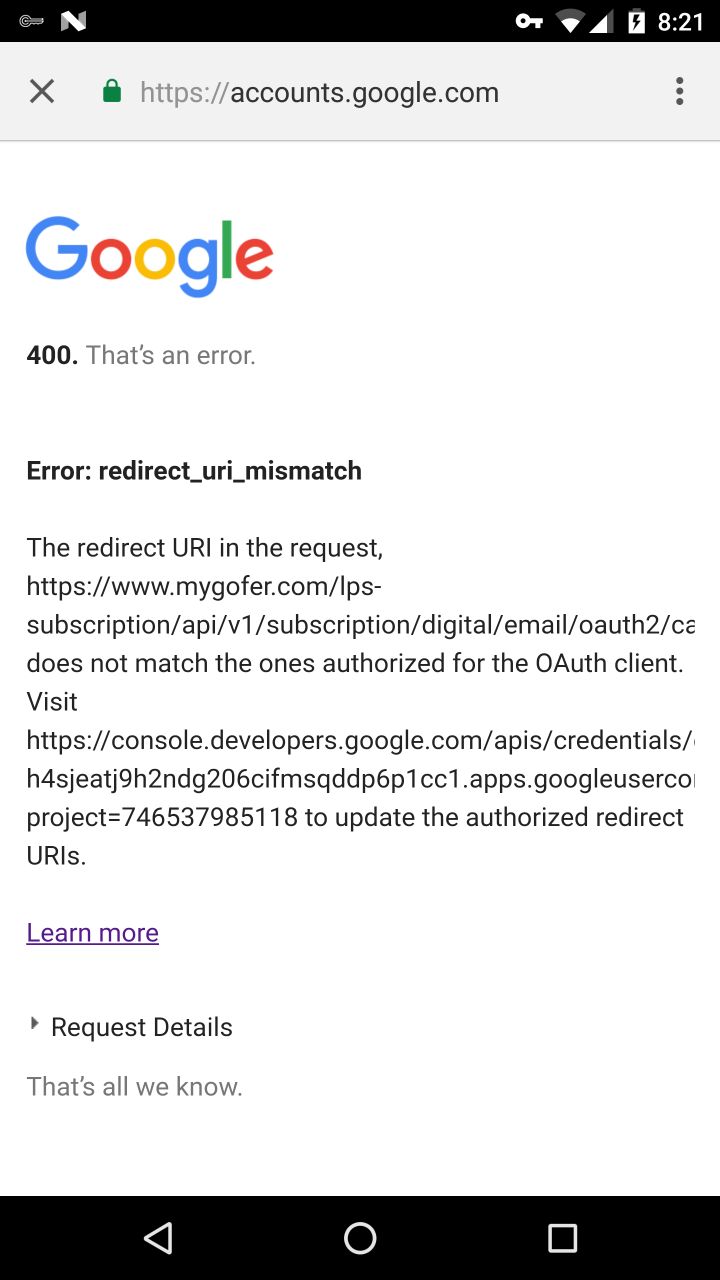
if i am changing to https in redirect url, i am getting error befor authentication.
I have attached the screenshot .
sjenasears
on 7 Jul 2017
I would suggest to follow the steps suggested in that screenshot, visit the dev console and whitelist your EXACT redirect_uri
 panva
on 7 Jul 2017
panva
on 7 Jul 2017
Hi,
Now i have tried to create a new project with my old api.
Using redirectUri = "com.sears.mybundle:/oauth2redirect";
com.sears.mybundle is my package name.
After authentication it is opening google.com in browser.
sjenasears
on 10 Jul 2017
If it redirects to google.com this is usually a sign that your custom scheme is not registered correctly in your app. Please double check your intent filter declaration.
iainmcgin
on 10 Jul 2017
 <intent-filter>
            <action android:name="android.intent.action.MAIN" />

            <category android:name="android.intent.category.LAUNCHER" />
        </intent-filter>

        <intent-filter android:autoVerify="true">
            <action android:name="android.intent.action.VIEW" />

            <category android:name="android.intent.category.DEFAULT" />
            <category android:name="android.intent.category.BROWSABLE" />

            <data
                android:scheme="https"
                android:host="com.sears.mybundle"
                android:path="/oauth2redirect" />
        </intent-filter>
This is my intent filter . my redirect url is below redirectUri = "com.sears.mybundle:/oauth2redirect";
sjenasears
on 11 Jul 2017
Hi iainmcgin,
Could you please help me.
Thanks
Sitansu
 sitannsu
on 12 Jul 2017
sitannsu
on 12 Jul 2017
The data declaration is incorrect - you have declared that you will intercept https://com.sears.mybundle/oauth2redirect, not your custom scheme. Use this instead:
<data android:scheme="com.sears.mybundle" />
Hi,
I'm getting a Not authorized error, #Authorization code exchange failed - invalid request. Can I know what is the reason for this error. My redirect URL and all is perfect. Can someone help?
 yokesht2s
on 12 Jul 2017
yokesht2s
on 12 Jul 2017
Hi ,
Thanks for reply.
But it never redirects. Always opens in CHrome browser.
I have now tried with localhost.
My device is Google nexus 6p.
my
client_secret.json has following data.
{"installed":{"client_id":"----------.apps.googleusercontent.com","project_id":"--------local","auth_uri":"https://accounts.google.com/o/oauth2/auth","token_uri":"https://accounts.google.com/o/oauth2/token","auth_provider_x509_cert_url":"https://www.googleapis.com/oauth2/v1/certs","redirect_uris":["urn:ietf:wg:oauth:2.0:oob","http://localhost"]}}
sitannsu
on 12 Jul 2017
@yokesht2s are you able to fix your issue.
sitannsu
on 13 Jul 2017
No @sitannsu , I couldn't able to open that in chrome browser, it just keep on loading.
yokesht2s
on 13 Jul 2017
@yokesht2s what is ur chrome version
sitannsu
on 13 Jul 2017
59.0.3071.125
sitannsu
on 13 Jul 2017
Yes the same version @sitannsu
yokesht2s
on 13 Jul 2017
Please open separate issues, I can't help when you all dogpile on the same issue when the causes are likely different.
If you are using Google Sign-in, please first try and make the demo application work with your client ID. Instructions are provided for the demo app that should help.
iainmcgin
on 13 Jul 2017
@sitannsu - use com.sears.mybundle in your json file for redirect_uri
 rajeshsse
on 4 Mar 2018
rajeshsse
on 4 Mar 2018
When using android intent filter, it will add the :// automatically, so if for example you want your App to intercept this URL "http://com.sears.mybundle" , then use code :
<data
            android:scheme="http"
            android:host="com.sears.mybundle" />
For this URL "http://com.sears.mybundle/oauth2redirect" , use this code :
<data
            android:scheme="http"
            android:host="com.sears.mybundle"
            android:path="/oauth2redirect" />
And don't forget in your code implementation to tell android that the URL string you want catch is :
CALLBACK_URL = "http://com.sears.mybundle/oauth2redirect";
And usually, when using "http" or "https" as scheme, Android Browser can ask you if you want to open the callback URL with your App or with your Browser, "ONCE" or "ALWAYS". So if you choose always before, then check on the Default App settings to remove it so it can ask for it again.
But if you use scheme like "oauth" or "oauth.passport" then it will directly open it with the App configured to intercept the Callback URL.
 KeitelDOG
on 12 Sep 2018
KeitelDOG
on 12 Sep 2018
Hi - I've tried almost everything.
Got the silly thing that the redirect-url on the server-side can only be http or https scheme.
<intent-filter>
                <action android:name="android.intent.action.VIEW" />
                <category android:name="android.intent.category.DEFAULT" />
                <category android:name="android.intent.category.BROWSABLE" />
                <data
                    android:host="app.myapp"
                    android:pathPrefix="/OAuth"
                    android:scheme="https" />
                    />
            </intent-filter>
redirectUrl: "https://app.myapp/OAuth"
I always get a "This site can't be reached" - DNS_PROBE_FINISHED_NXDOMAIN error
Yes I'm connected to the internet.
No app.myapp obviously isn't an internet domain I own.
Please help
 paulwillen
on 14 Sep 2018
paulwillen
on 14 Sep 2018
@paulwillen what IDP / OAuth2 implementation are you integrating with? Does the redirect occur automatically, i.e. as a JS redirect, or in response to user interaction such as clicking on a button? Automatic redirects to apps typically don't work and Chrome / most browsers on Android will attempt to handle that URL themselves, rather than checking to see if an app installed. This is generally justified for "security" reasons, to avoid CSRF / clickjack type attacks that send the user to apps.
iainmcgin
on 18 Sep 2018
Also, please open new issues rather than continuing to overload this one. Locking the conversation.
iainmcgin
on 18 Sep 2018
Related issues
 tekatool
·
3Comments
tekatool
·
3Comments
 Smedzlatko
·
7Comments
Smedzlatko
·
7Comments
 rafallopatka
·
5Comments
rafallopatka
·
5Comments
 geekarist
·
4Comments
geekarist
·
4Comments
 Write4Dinesh
·
3Comments
Write4Dinesh
·
3Comments