Appauth-android: Logout and Delete browser history
In the current example, Once open the browser then enter the username and password then redirect to permission page, after click on allow then gets the Access token and came back to our app activity.
If again open the app and click authorize button then again open the browser page on permission page means allow page. It means its save our credential and mail id.
But I don't want to save credential and mail-id anything in browser. So please suggest me how we can solve this problem.
 rahulsingh0089
All 7 comments
There's no way I know of to force an incognito or "stateless" custom tab or browser session. So, there is no solution to your "problem" - my only suggestion would be to contact the maintainers of the authentication endpoint you are interacting with to ask them for a way to perform a stateless sign in. If you are interacting with Google Sign-in, we will not provide such a facility.
 iainmcgin
on 13 Apr 2017
iainmcgin
on 13 Apr 2017
@rahulsingh0089, sorry for the late posting; and I know this might not be an ideal solution for your end users, but if you needed something to help you during the testing of your own application you can use this approach.
Chrome Custom Tabs used by AppAuth does give you the ability to clear the browser history (manually) through context menus. The following screen captures below walk you through what you need to do to clear it.
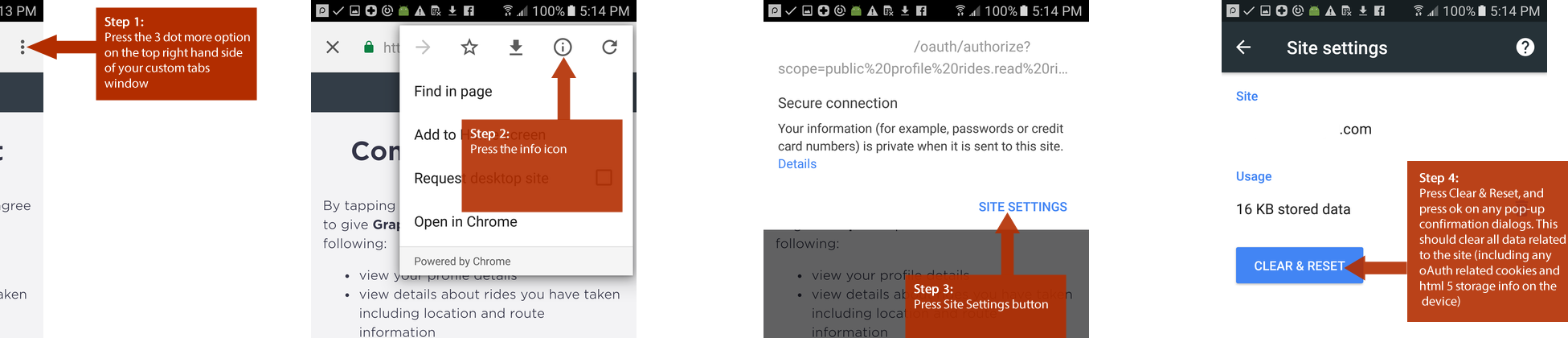
 awahnteh
on 29 Sep 2017
awahnteh
on 29 Sep 2017
Simply add .setPrompt("login") to AuthorizationRequest.Builder, and it will ask for credentials again.
P.S. According to OpenId docs
 alexeypodolian
on 20 Sep 2018
alexeypodolian
on 20 Sep 2018
hi setPrompt seems to work correctly and does ask for login everytime if set, unfortunately on certain device Google Pixel Running Oreo if we set this option after login user is not navigated back to app, if we simply remove setPrompt it starts working.
Anything i may be miss in configuring?
 silentsudo
on 9 Jan 2019
silentsudo
on 9 Jan 2019
The issue with using .setPrompt("login") is that it also overrides any parameters like login_hint.
Our identity server provides the login screen, and we also use external provider like Azure AD. This means that if you input the email for user A and log in and you login with the Azure AD on redirect, and then "log out", and then email for user B and login, then you will get logged in as user A anyway since it ignores the login_hint when using the .setPrompt hack.
If you do not setPrompt("login") you will be asked to login as the correct user (the user with the email provided in login_hint), but the issue for us is that there is no end session or logout in this library, so in that case we can never really log out..
 rvplauborg
on 19 Feb 2020
rvplauborg
on 19 Feb 2020
@alexeypodolian
I try setPrompt(AuthorizationRequest.Prompt.LOGIN) in my AuthorizationRequest, but it not work for me, my browser always record last account information. Please tell me what is problem.
 victor22325
on 1 Jul 2020
victor22325
on 1 Jul 2020
@alexeypodolian
I try setPrompt(AuthorizationRequest.Prompt.LOGIN) in my AuthorizationRequest, but it not work for me, my browser always record last account information. Please tell me what is problem.
Could be your IdentityServer. It should be configured for that prompt.
 loymtshali
on 30 Sep 2020
loymtshali
on 30 Sep 2020
Related issues
 hallerio
·
7Comments
hallerio
·
7Comments
 shahfaizal
·
7Comments
shahfaizal
·
7Comments
 sloosh
·
5Comments
sloosh
·
5Comments
 geekarist
·
4Comments
geekarist
·
4Comments
 Jawnnypoo
·
3Comments
Jawnnypoo
·
3Comments
Most helpful comment
Simply add
.setPrompt("login")toAuthorizationRequest.Builder, and it will ask for credentials again.P.S. According to
OpenId docs