Actual behavior:
Expected behavior:
How to reproduce it (as minimally and precisely as possible):
I shut down my computer while the Defi app was still shutting down. The next day as i started the app it wouldn't load to a 100% since. It seems that it comes to cerent Block and stops there. There was only one time since the malfunction where it loaded successfuly to 100%
What are your environment parameters?
- DeFi Wallet Version: 2.3.3
- Operating System (OS): Windows 10 Pro
– Current free storage capacity: 290 GB
app_logs.zip
Anything else we need to know?
 miromiro321
All 20 comments
@miromiro321: Thanks for opening an issue, it is currently awaiting triage.
The triage/accepted label can be added by foundation members by writing /triage accepted in a comment.
In the meantime, you can:
- Checkout DeFiChain’s Github issue page to see if your issue has already been reported
- Submit any logs if you have them, this will greatly expedite the process for us.
- You can also join our Telegram or Reddit community channels.
Details
I am a bot created to help the DeFiCh developers manage community feedback and contributions. You can check out my manifest file to understand my behavior and what I can do. If you want to use this for your project, you can check out the DeFiCh/oss-governance-bot repository.
 defichain-bot
on 13 May 2021
defichain-bot
on 13 May 2021
I guess you should backup your wallet.dat, update the defi wallet, download and apply the new snapshot.
 Faucet1313
on 13 May 2021
Faucet1313
on 13 May 2021
Thank you, already tried to download the snapshot a couple of times but it seems that it never integrates it
miromiro321
on 14 May 2021
Hi @miromiro321 , when shutting down the app, you need to let it close itself, there's loading screen to prompt the user that app is shutting down, if you close it before the app closes you'll likely face a corrupted blockchain issue.
v2.3.5 is out. Please read through the release notes before updating. Do give a thumbs up to this comment if your issue has been resolved, otherwise, please send new information (include screenshots) and app logs.
As @Faucet1313 suggested, please backup your wallet.dat before updating to v2.3.5. Thank you.
 izzycsy
on 16 May 2021
izzycsy
on 16 May 2021
I'm also unable to sync 100% the version 2.3.5 on my Windows server 2019 I tried few times but always freezing at some blocks near the end of the sync. I finally used the 2.3.3 to sync 100% then i installed again the 2.3.5 to get synchronized. I'm pretty sure the next update will resolve a lot of issues including this one.
Faucet1313
on 17 May 2021
Hi @Faucet1313 , during the last few blocks if there's no error thrown it is still syncing, it took me about an hour to sync the last few blocks as well. Try to let it sync without interruptions — computer going to sleep / firewall.
izzycsy
on 17 May 2021
Thank you, already tried to download the snapshot a couple of times but it seems that it never integrates it
Same here.
 Faith04Brave18
on 18 May 2021
Faith04Brave18
on 18 May 2021
Hi @Faith04Brave18 , can you send your logs please? It'll help with the investigation. In the mean time, do you have sufficient storage? Currently the app requires 120GB of storage excluding temporary storage should you apply snapshot (40.51GB). Kindly clear storage and try again or wait for the Light Wallet. Please keep your wallet.dat safe.
izzycsy
on 20 May 2021
Hi @Faucet1313 , during the last few blocks if there's no error thrown it is still syncing, it took me about an hour to sync the last few blocks as well. Try to let it sync without interruptions — computer going to sleep / firewall.
Yes thank you i have no issue now regarding sync.
Faucet1313
on 21 May 2021
I'm having the same issue in regards to syncing. I've been trying for days and can't get the wallet synced. The sync either never starts (stuck at block 0), takes forever and gets stuck prior to finishing. Unfortunately, this has been an issue for close to a week and I have not been able to access my wallet.
 jonho79
on 25 May 2021
jonho79
on 25 May 2021
Hi @jonho79 , are you on Mac / Windows?
Do you have sufficient storage?
What version are you on?
Please keep you wallet.dat safe.
Here some steps to synchronisation:
Option 1 — Reset & Reindex (sync from 0%)
1. Settings > Reset & Reindex
Option 2 — Snapshot (sync from 90%+)
1. Settings > Reset & Reindex
2.
Wait for app to start syncing
3.
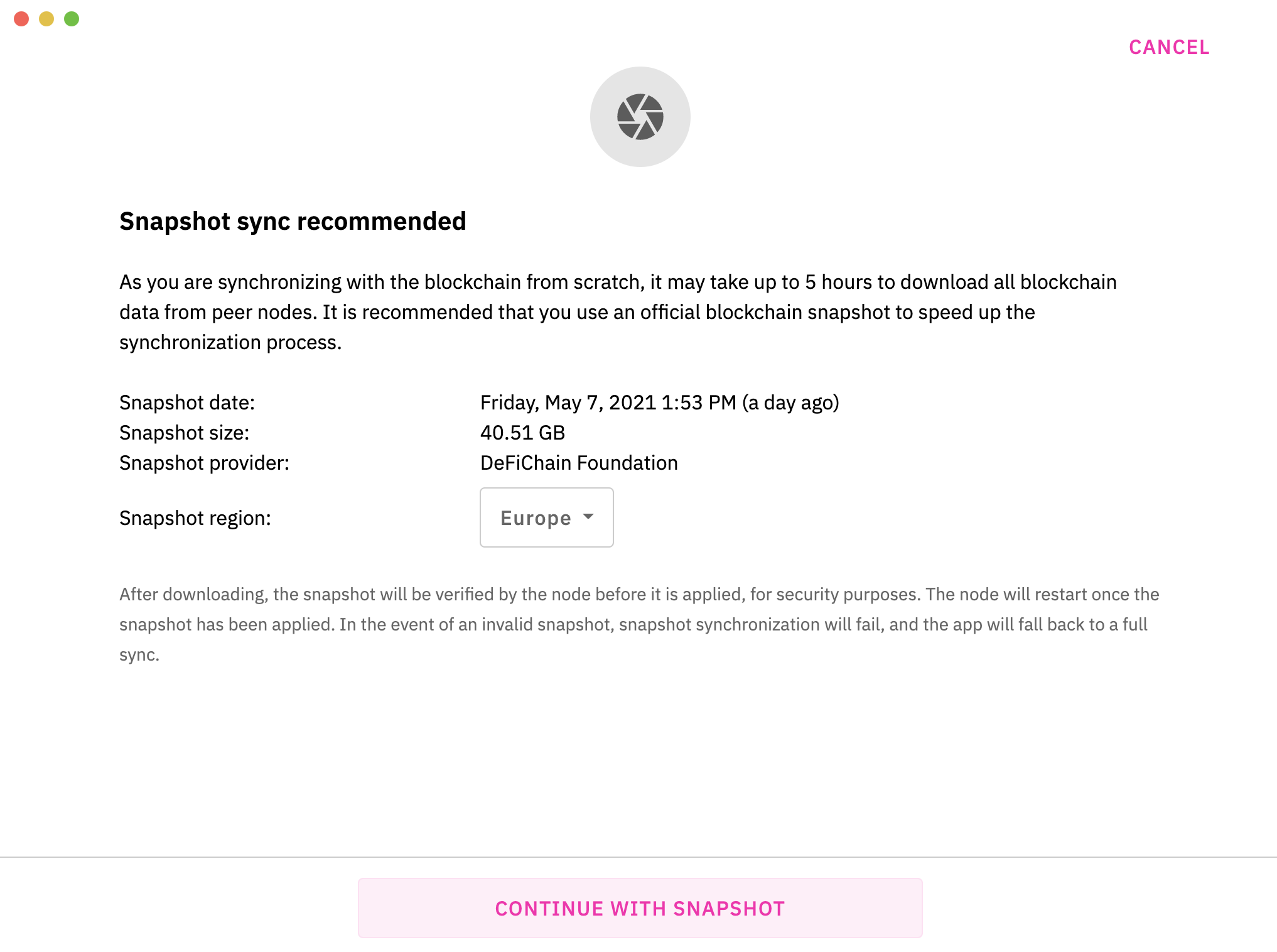
Ensure you’ve at least 40.51GB of extra space
4. Click on i located at bottom-left corner of app screen
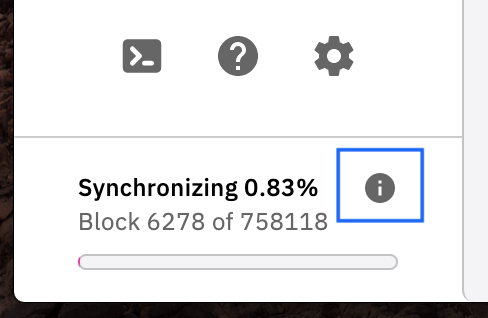
5. Download Snapshot
izzycsy
on 25 May 2021
Hi @miromiro321 @Faucet1313 @Faith04Brave18 @jonho79 @moneymining83 @helhimm @rolandwellinger @blackstormtrader @yungmann @jas32096 @SKapi1985 @pplin810 @waywardone1 @Ausafari @luzettemok1 @felik-panda , v2.4.0 is out, this is a mandatory update. Please read through the release notes before updating. Do give a thumbs up to this comment if your issue has been resolved, otherwise, please send new information (include screenshots) and app logs. Thank you.
izzycsy
on 28 May 2021
Hey Bella,
Thanks for always helping us out, i guess we all are really happy that someone is consistenly looking for solutions. I really appreciate that service.
Unfortently the app is still not sycing to 100%
First I upgraded to the new Software.
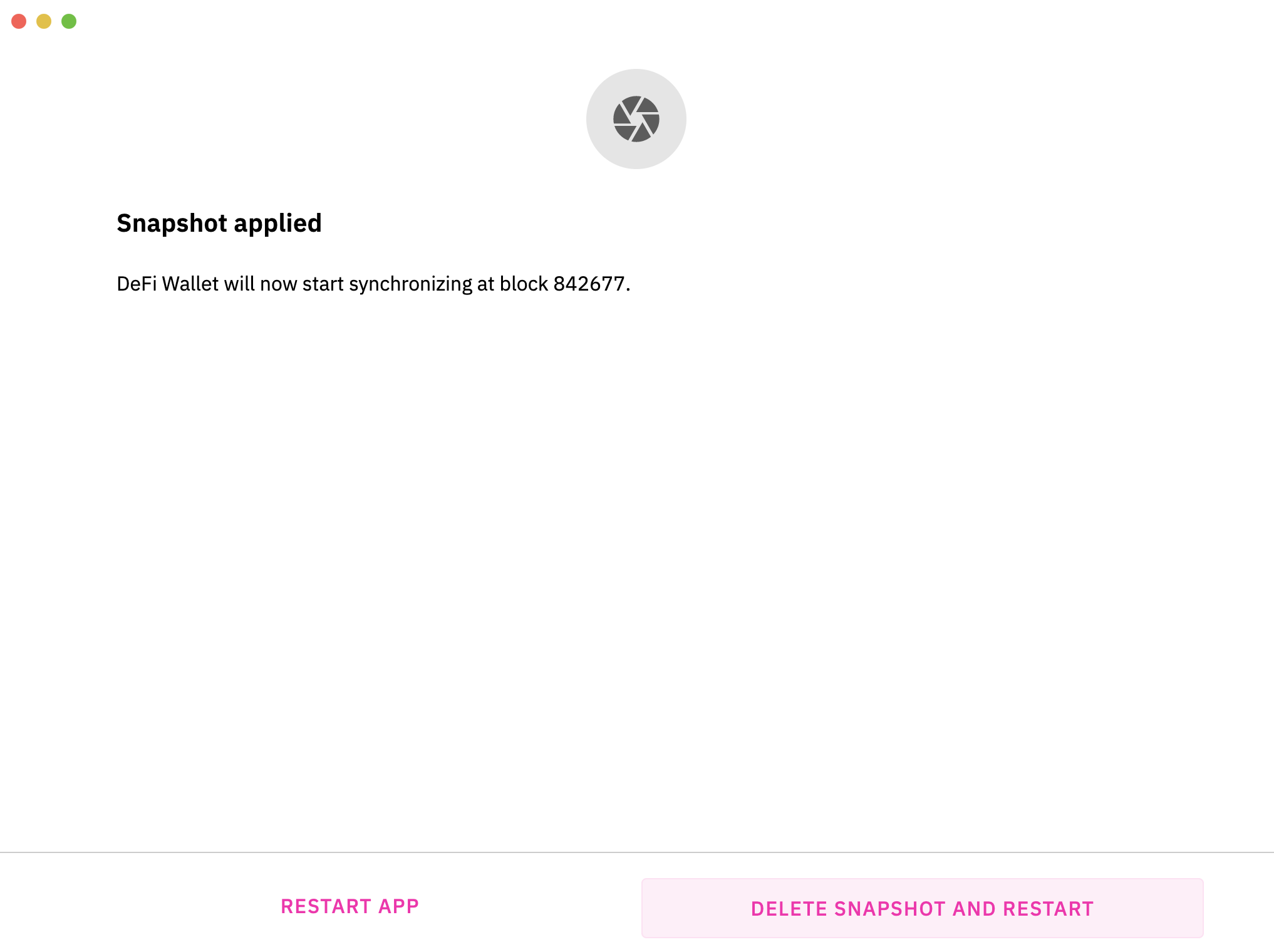
Secondly, I applied the snapshot what only took a couple of minutes. Then the app started syncing form the last block of the snapshot but it failed to surpass a sertent level, where it is stuck for a couple of hours i guess (I am not sure but I startet the sync 6 hours ago from the last block of the snapshot, im sure it should'nt take so long.)
Thirdly, I added more nodes as you suggested to with a comand in the console
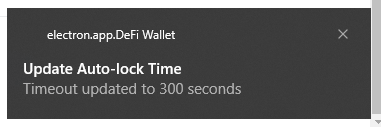
Here you have the app_logs and a info that pops up everytime i start the app, which started to occour first when the syncing problem started. It says: Update Auto-lock Time Timeout updated to 300 seconds, there is aswell a file which is named: .walletlock
let me know if you need it asweel, altough it shows to have 0 KB
Additon made later:
Since yesterday i let it sync the whole night am currently at 99.97% and it is not stuck at the block from yesterday where it was for a long time anymore. but still should it take that long considering that is still not at a 100%
miromiro321
on 31 May 2021
@miromiro321 Once you're running a version that uses 1.7.2+ you may need peers which have the full chain.
See https://chainz.cryptoid.info/dfi/#!network - click on node list for those with protocol 70017 and add the addnode= lines to your defi.conf and restart.
 defijeff
on 1 Jun 2021
defijeff
on 1 Jun 2021
Hi @miromiro321 , thanks for your patience and for updating to v2.4.1, regarding the notification Update Auto-lock Time, it means that your app has sync to 90%+ after snapshot application, is active and running, you just need to wait for it to reach 100%. It could be your internet connection that's causes the lag.
izzycsy
on 1 Jun 2021
Hi @miromiro321 @Faucet1313 @Faith04Brave18 @jonho79 @moneymining83 @helhimm @rolandwellinger @blackstormtrader @yungmann @jas32096 @SKapi1985 @pplin810 @waywardone1 @Ausafari @luzettemok1 @felik-panda , v2.4.2 is out, this is a mandatory update. Please read through the release notes before updating. _This comment is to notify you about the update._
izzycsy
on 2 Jun 2021
Thanks for the update, without your email I would have missed it.
It would be a good idea to send an automated email to all users. I am not
using Telegram unless I have a question and I believe that I am not
the only one.
Regards
Hh
On Wed, Jun 2, 2021, 14:24 Bella @.*> wrote:
Hi @miromiro321 https://github.com/miromiro321 @Faucet1313
https://github.com/Faucet1313 @Faith04Brave18
https://github.com/Faith04Brave18 @jonho79 https://github.com/jonho79
@moneymining83 https://github.com/moneymining83 @helhimm
https://github.com/helhimm @rolandwellinger
https://github.com/rolandwellinger @blackstormtrader
https://github.com/blackstormtrader @yungmann
https://github.com/yungmann @jas32096 https://github.com/jas32096
@SKapi1985 https://github.com/SKapi1985 @pplin810
https://github.com/pplin810 @waywardone1
https://github.com/waywardone1 @Ausafari https://github.com/Ausafari
@luzettemok1 https://github.com/luzettemok1 @felik-panda
https://github.com/felik-panda , v2.4.2
https://github.com/DeFiCh/app/releases/tag/v2.4.2 is out, this is a mandatory
update. Please read through the release notes before updating. This
comment is to notify you about the update.—
You are receiving this because you were mentioned.
Reply to this email directly, view it on GitHub
https://github.com/DeFiCh/app/issues/853#issuecomment-852982226, or
unsubscribe
https://github.com/notifications/unsubscribe-auth/ASUZQVPVVL2W6ACBXVFS54LTQYPHJANCNFSM442SV3PQ
.
 helhimm
on 2 Jun 2021
helhimm
on 2 Jun 2021
Hi @miromiro321 @Faucet1313 @Faith04Brave18 @jonho79 @moneymining83 @helhimm @rolandwellinger @blackstormtrader @yungmann @jas32096 @SKapi1985 @pplin810 @waywardone1 @Ausafari @luzettemok1 @felik-panda @helhimm , should you face the same issue regarding Unable to start blockchain, we can further discuss on the issue there respectively. The team is investigating. Thank you.
Mac: 2.4.4 unable to start blockchain #921
Windows: 2.4.4 Sync stalled #922
Please refer to DeFiChain Announcements (EN) for the latest updates.
@helhimm , you can publish your idea on DeFiChain Discussions, garner some support from the community, and the team can decide whether to implement the feature in the future. We'll continue to update users with bug related issues on Github as well.
izzycsy
on 4 Jun 2021
Hi Bella,
I'm getting the same "unable to start blockchain" when trying to start
Window 2.4.5 for the first time.
Any thoughts on how to resolve?
On Fri, Jun 4, 2021 at 1:32 PM Bella @.*> wrote:
Hi @miromiro321 https://github.com/miromiro321 @Faucet1313
https://github.com/Faucet1313 @Faith04Brave18
https://github.com/Faith04Brave18 @jonho79 https://github.com/jonho79
@moneymining83 https://github.com/moneymining83 @helhimm
https://github.com/helhimm @rolandwellinger
https://github.com/rolandwellinger @blackstormtrader
https://github.com/blackstormtrader @yungmann
https://github.com/yungmann @jas32096 https://github.com/jas32096
@SKapi1985 https://github.com/SKapi1985 @pplin810
https://github.com/pplin810 @waywardone1
https://github.com/waywardone1 @Ausafari https://github.com/Ausafari
@luzettemok1 https://github.com/luzettemok1 @felik-panda
https://github.com/felik-panda @helhimm https://github.com/helhimm ,
should you face the same issue regarding Unable to start blockchain, we
can further discuss on the issue there respectively. The team is
investigating. Thank you.Mac: 2.4.4 unable to start blockchain #921
https://github.com/DeFiCh/app/issues/921Windows: 2.4.4 Sync stalled #922
https://github.com/DeFiCh/app/issues/922Please refer to DeFiChain Announcements (EN)
https://t.me/defichain_announcements for the latest updates.@helhimm https://github.com/helhimm , you can publish your idea on DeFiChain
Discussions https://github.com/DeFiCh/app/discussions/categories/ideas,
garner some support from the community, and the team can decide whether to
implement the feature in the future. We'll continue to update users with
bug related issues on Github as well.—
You are receiving this because you were mentioned.
Reply to this email directly, view it on GitHub
https://github.com/DeFiCh/app/issues/853#issuecomment-854983018, or
unsubscribe
https://github.com/notifications/unsubscribe-auth/ASJJS7AOYEIMKOY62RLP5WDTREZ4VANCNFSM442SV3PQ
.
jonho79
on 6 Jun 2021
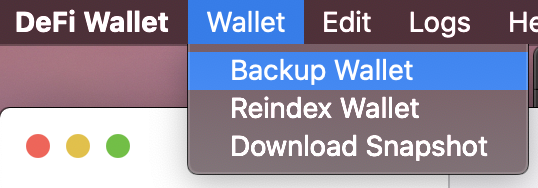
Hi @jonho79 , restart your PC and try again. If it still does not work, then delete the app and reinstall. Please backup wallet first before deleting anything. There's a guide in DeFiChain Telegram (EN).
izzycsy
on 14 Jun 2021
Related issues
 adrian-schnell
·
3Comments
adrian-schnell
·
3Comments
 jpressler
·
7Comments
jpressler
·
7Comments
 SKapi1985
·
5Comments
SKapi1985
·
5Comments
 RobinTorque
·
7Comments
RobinTorque
·
3Comments
RobinTorque
·
7Comments
RobinTorque
·
3Comments
Most helpful comment
Hi @Faith04Brave18 , can you send your logs please? It'll help with the investigation. In the mean time, do you have sufficient storage? Currently the app requires 120GB of storage excluding temporary storage should you apply snapshot (40.51GB). Kindly clear storage and try again or wait for the Light Wallet. Please keep your
wallet.datsafe.