Apollo: The real-time relative map can't be displayed correctly in Dreamview for Apollo master branch (May 8, 2019)
Describe the bug
A bag file (csc_hw_right.bag) was recorded using the rosbag command. The bag file was converted to a record file (csc_hw_right.record) using the rosbag_to_record csc_hw_right.bag csc_hw_right.record command . The real-time relative map was generated using this record file. However, the map is displayed in chaos in Dreamview and the web page shows nothing when the F5 key is pressed to refresh the display. The source code was downloaded from the latest master branch (May 8, 2019, commit id 2f308aac31e13a4c234e3b12010116333af398e6) based on the Cyber RT framework. The /apollo/relative_map topic is displayed properly through the cyber_monitor tool.
To Reproduce
Steps to reproduce the behavior:
- download the latest master branch source code.
git pull --rebase upstream master
git reset --hard git reset --hard 2f308aac31e13a4c234e3b12010116333af398e6
- start and enter the docker.
bash docker/scripts/dev_start.sh
bash docker/scripts/dev_into.sh
- build the apollo project.
bash apollo.sh build -j 8
- convert the bag file to a record file.
rosbag_to_record data/bag/csc_hw_right.bag data/bag/csc_hw_right.record
- modify the
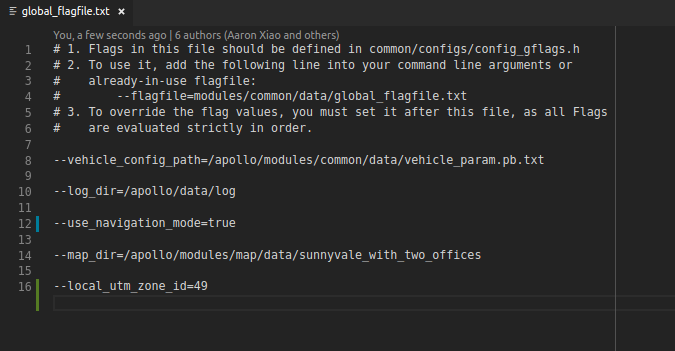
modules/common/data/global_flagfile.txtfile as follows:
change
--use_navigation_mode=false
to
--use_navigation_mode=true
and add a line:
--local_utm_zone_id=49
- modify the
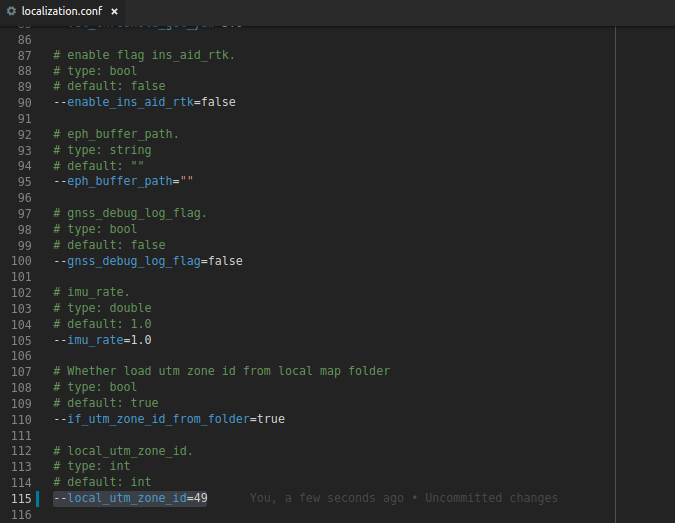
modules/localization/conf/localization.conffile as follows:
change
--local_utm_zone_id=10
to
--local_utm_zone_id=49
- start Dreaview:
bash scripts/bootstrap.sh
On the Dreamview web page, enable the
Relative Mapmodule and confirm that it is currently inNavigationMode.

Replay the record file:
cyber_recorder play -f data/bag/csc_hw_right.record -l
- Send a navigation line:
bash scripts/navigator.sh data/bag/csc_hw_right.smoothed
Expected behavior
The real-time relative map with one lane is correctly displayed in Dreamview and the web page can be updated correctly when the F5 key is pressed to refresh the display.
Actual results
The real-time relative map with one lane is displayed in chaos in Dreamview and the web page shows nothing when the F5 key is pressed to refresh the display.
Screenshots

The real-time relative map with one lane is displayed in chaos

The web page shows nothing when the F5 key is pressed to refresh the display.
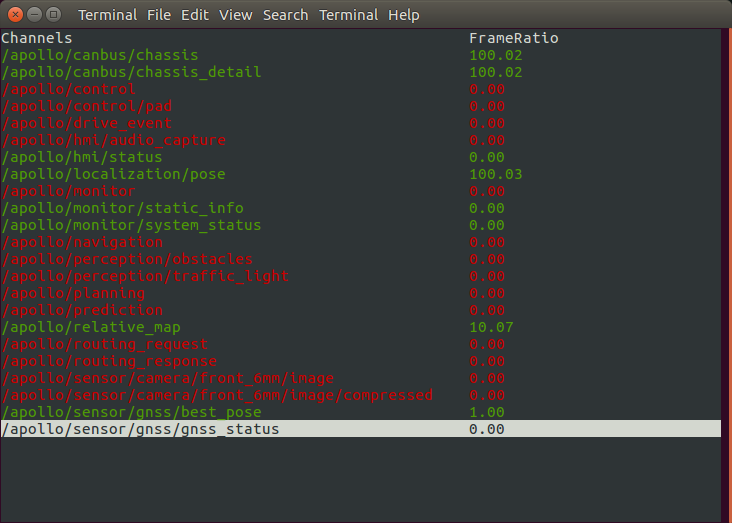

The /apollo/relative_map topic is displayed properly through the cyber_monitor tool.
Desktop (please complete the following information):
- OS: Ubuntu 16.04
- Browser: Chrome 68.0.3440.106 (Official Build) (64-bit)
- Apollo Version: master branch (May 8, 2019, commit id
2f308aac31e13a4c234e3b12010116333af398e6)
Data file
URL: https://pan.baidu.com/s/1qyXyR94Yhhug28ahzkZtuw
Key: t95z
 davidhopper2003
All 6 comments
@natashadsouza Thank you.
It's a problem not for Apollo 2.5 but for Apollo master branch (above Apollo 3.5). In fact, the real-time relative map is displayed correctly with Dreamview for Apollo prior to 3.0. However, there are some displaying problems with Dreamview for Apollo master branch (above Apollo 3.5).
davidhopper2003
on 10 May 2019
@davidhopper2003 noted. Thank you very much for explaining the requirements so clearly. Waiting on @vlin17 for a response.
 natashadsouza
on 10 May 2019
natashadsouza
on 10 May 2019
@natashadsouza Sure. Thanks once more.
davidhopper2003
on 10 May 2019
Thank you for always providing reproduction steps in details, that definitely speed up the debugging process. The code was assuming map_geometry's CurveSegment always has start_position defined, we have updated our code to consider the situation where no start_position is given. Please try again after https://github.com/ApolloAuto/apollo/pull/8276 is delivered.
 vlin17
on 11 May 2019
vlin17
on 11 May 2019
@vlin17 Thank you very much. You are awesome. The contribution of the Apollo team is gorgeous and it is a great honour to submit a bug for your team.
davidhopper2003
on 11 May 2019
Thank you @davidhopper2003 for your encouraging words. We truly appreciate your support in reporting new bugs to us!
Closing this issue currently.
natashadsouza
on 13 May 2019
Related issues
 chasingw
·
3Comments
chasingw
·
3Comments
 YaoQii
·
3Comments
YaoQii
·
3Comments
 JSnobody
·
3Comments
JSnobody
·
3Comments
 lyletbjohnson
·
3Comments
lyletbjohnson
·
3Comments
 Wsine
·
3Comments
Wsine
·
3Comments