Apollo: Ubuntu16.04 dreamview vehicle won't move
System information
- OS Platform and Distribution (e.g., Linux Ubuntu 14.04): Ubuntu 16.04
- Apollo installed from (source or binary): source
- Apollo version (1.0, 1.5, 2.0, 2.5, 3.0): 3.5
Steps to reproduce the issue:
- Please use bullet points and include as much details as possible:
- bash ./docker/scripts/dev_start.sh
- bash ./docker/scripts/dev_into.sh
- bash ./apollo.sh build
- bash scripts/bootstrap.sh
- Tasks: Sim Control: ON
- Module Controller: Routing: ON
- Module Controller: Planning: ON
- Default Routing Sunnyvale Loop: ON
- Gives me the screen shot below. Planning automatically OFF.
Supporting materials (screenshots, command lines, code/script snippets):
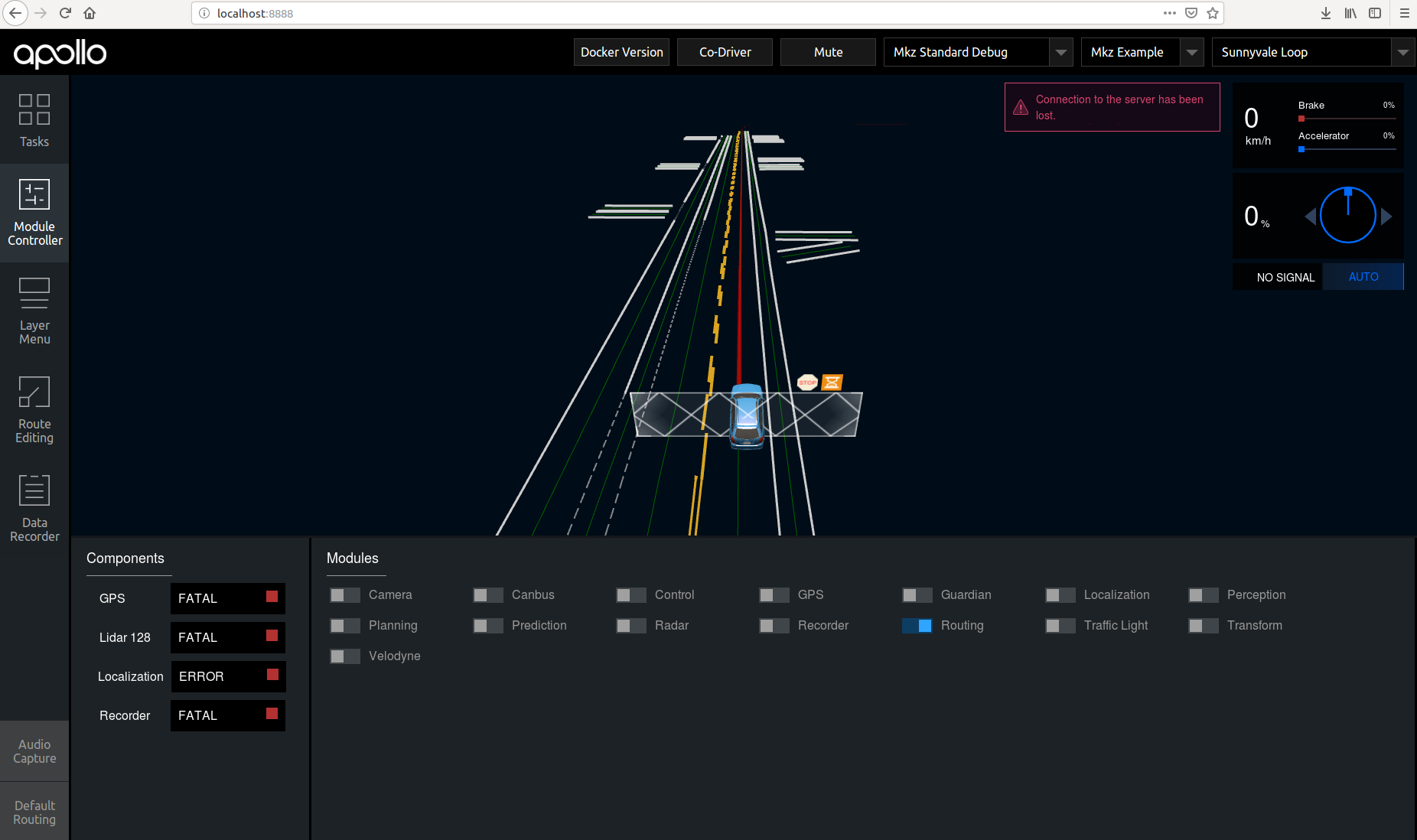
 kttnk
kttnk
All 3 comments
One of my machines worked after following #6811 !
The main case seems "git lfs" issue.
- Outside of the docker
cat modules/dreamview/frontend/dist/app.bundle.js
git lfs fetch --all
git lfs pull
cat modules/dreamview/frontend/dist/app.bundle.js
bash docker/scripts/dev_into.sh
- Inside of the docker
bash apollo.sh build
bash scripts/bootstrap.sh
I will check the another machine also.
If it works, I will close this issue.
Thank you in advance!
kttnk
on 28 Apr 2019
👍1
@kttnk thank you for posting a possible fix. If it is a Git LFS issue, we do recommend cleaning your system of the download, and re-downloading Git LFS before downloading Apollo once again. Let us know if you have any issues in the mean time. Thanks!
 natashadsouza
on 7 May 2019
natashadsouza
on 7 May 2019
👍1
I conformed this solution works with another machine.
Closing...
kttnk
on 8 May 2019
Was this page helpful?
0 / 5 - 0 ratings
Related issues
 Wsine
·
3Comments
Wsine
·
3Comments
 zmsunnyday
·
3Comments
zmsunnyday
·
3Comments
 xinwf
·
3Comments
xinwf
·
3Comments
 lql7595
·
3Comments
lql7595
·
3Comments
 lyletbjohnson
·
3Comments
lyletbjohnson
·
3Comments