Apollo: Is there an up to date guide on how to start the perception module?
Me and my friend are having problems getting the perception module up and running. We've followed various guides but not found one that works. We noticed that all of the guides we've found are quite old. Is there a guide on how to start the perception module which works with Apollo3.5?
 vattenbuffel
All 12 comments
@vattenbuffel could you give us details on what you were trying to run using the perception module? Was it algorithm testing or something else? Also, which guides have you referred to that did not help?
 natashadsouza
on 18 Mar 2019
natashadsouza
on 18 Mar 2019
@natashadsouza We've followed two guides. Guide 1, guide 2, we followed the steps under "setup instructions", the third guide was under issues here on github but I can't seem to find it.
I don't understand what you mean by "what you were trying to run using the perception module". We want to start the module so that we can use the cyber visualizer to see if Apollo can identify a human. Is this wrong?
vattenbuffel
on 19 Mar 2019
Obviously the instruction was outdated. Please follow this instruction
- Get into the docker by
> $APOLLO_HOME/docker/scripts/dev_start.sh
> $APOLLO_HOME/docker/scripts/dev_into.sh - Build
> ./apollo.sh build_opt_gpu - Run bootstrap.sh
> bootstrap.sh - Launch Dreamview from your web browser by typing following address
http://localhost:8888/ Select car and map in the dreamview
Select transform button in Dreamview or type command
cyber_launch start /apollo/modules/transform/launch/static_transform.launch
If image is compressed launch image decompression module
cyber_launch start /apollo/modules/tools/image_decompress/launch/image_decompress.launch
Launch perception modules
cyber_launch start /apollo/modules/perception/production/launch/perception_all.launch
Play recorded bag
cyber_recorder play -f /apollo/data/bag/anybag -r 0.2
 techoe
on 20 Mar 2019
techoe
on 20 Mar 2019
Obviously the instruction was outdated. Please follow this instruction
- Get into the docker by
$APOLLO_HOME/docker/scripts/dev_start.sh
$APOLLO_HOME/docker/scripts/dev_into.sh
- Build
./apollo.sh build_opt_gpu
- Run bootstrap.sh
bootstrap.sh
- Launch Dreamview from your web browser by typing following address
http://localhost:8888/- Select car and map in the dreamview
- Select transform button in Dreamview or type command
cyber_launch start /apollo/modules/transform/launch/static_transform.launch
- If image is compressed launch image decompression module
cyber_launch start /apollo/modules/tools/image_decompress/launch/image_decompress.launch
- Launch perception modules
cyber_launch start /apollo/modules/perception/production/launch/perception_all.launch
- Play recorded bag
cyber_recorder play -f /apollo/data/bag/anybag -r 0.2
@techoe, hi, thanks a lot. Could you please update the instruction carefully once you release the new version? Since there is little information on it, the official instruction would be only way to us. Thank you.
 michaelowenliu
on 21 Mar 2019
michaelowenliu
on 21 Mar 2019
@techoe We tried your instructions and got errors. Firstly it told us that the file "/apollo/modules/perception/production/launch/perception_all" don't exist so we change it into "/apollo/modules/perception/production/launch/perception". That gave us the following error on step 6. 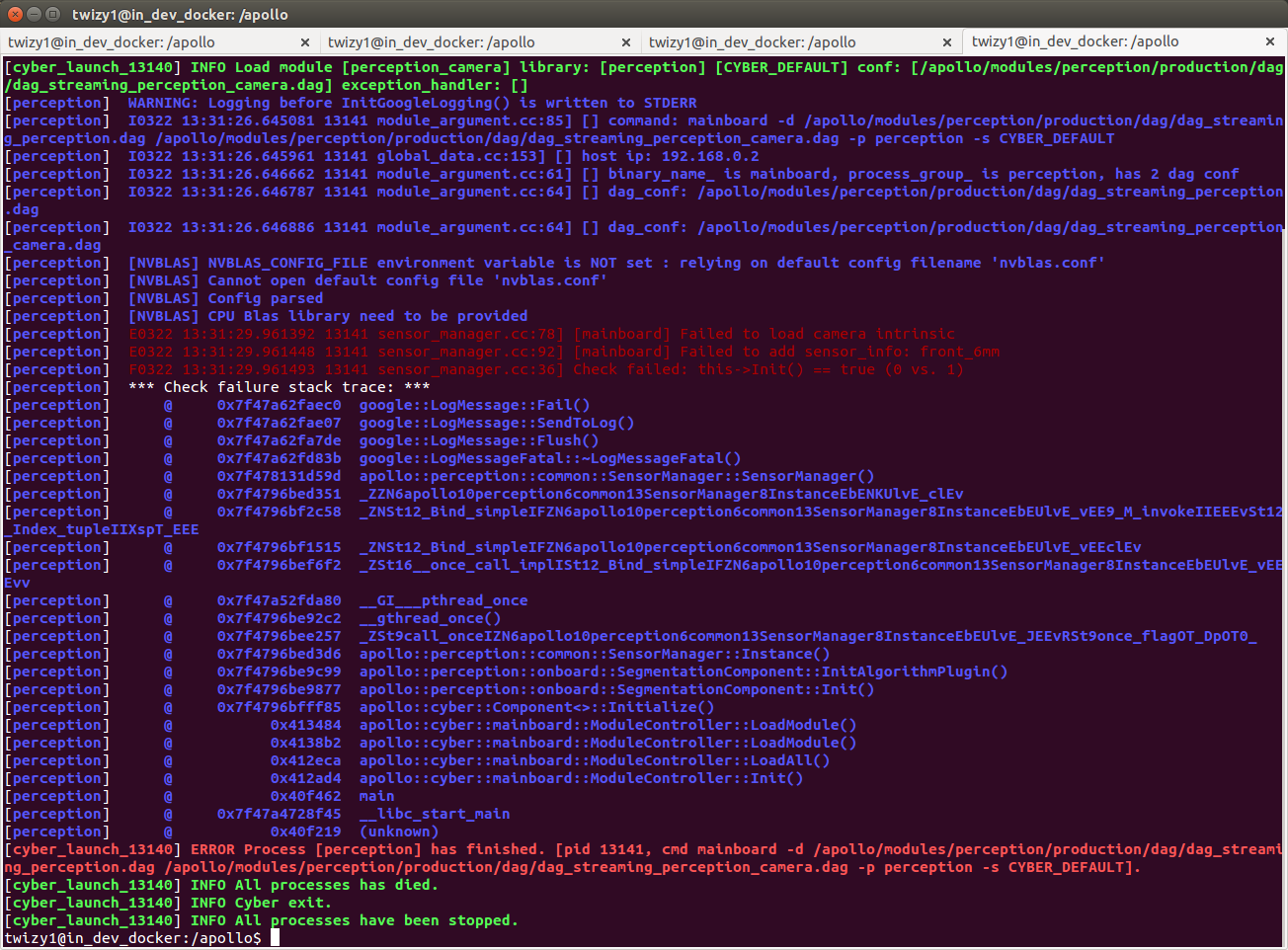
We tried with "/apollo/modules/perception/production/launch/perception_camera" as well and that gave the same error.
We checked which path it used to load the camera intrinsic file and indeed there was no file at that path. The block of code which failed and the path it used to fail is shown here:

We tried to locate the file ourselves and found at this path "/home/twizy1/apollo_3.5_test/apollo/modules/perception/production/data/perception/camera/params/front_6mm_intrinsics.yaml".
How we added the camera. (its a camera form leopard imaging)
We tried to symlink our cameras into Apollo with the 99-webcam.rules and changed the ATTR{name} to ATTR{ID_MODEL} and got an error where the command ATTR{} was not found. We also tried the setuphost script but where not sure if it should be run inside or outside docker, outside doocker it did not seam to do much and inside docker we got the error: VIDIOC_S_FMT from the file usb_cam.cc: 333. So we tried to "manually" link the camera to /dev/camera/front_6mm which seamed to work. But we are uncertain if this is the correct way to add a camera.
It might be worth noting that we're trying to start the perception module only using a camera, not using radar or lidar.
vattenbuffel
on 22 Mar 2019
Hi,
The screenshot of the code doesn't seem to be the code in the repo. It should be
if (!LoadBrownCameraIntrinsic(intrinsic_file, distort_model.get())) {
AERROR << "Failed to load camera intrinsic:" << intrinsic_file;
return false;
}
Please check cyber_monitor if front_6mm camera is correctly published.
techoe
on 1 Apr 2019
@techoe Thanks for the response. We've resolved this problem.
vattenbuffel
on 2 Apr 2019
@vattenbuffel We encountered this problem too. Could you please tell me how you get this problem solved?
 yfzm
on 27 May 2019
yfzm
on 27 May 2019
We stopped using Apollo. Apollo proved far too difficult to get running.
Från: Li Hao notifications@github.com
Skickat: den 27 maj 2019 09:52:29
Till: ApolloAuto/apollo
Kopia: Noa Lindén; Mention
Ämne: Re: [ApolloAuto/apollo] Is there an up to date guide on how to start the perception module? (#7320)
@vattenbuffelhttps://github.com/vattenbuffel We encountered this problem too. Could you please tell me how you get this problem solved?
—
You are receiving this because you were mentioned.
Reply to this email directly, view it on GitHubhttps://github.com/ApolloAuto/apollo/issues/7320?email_source=notifications&email_token=AB2KGDW5WBFNCKE3NBRVT5DPXOHL3A5CNFSM4G7IA5M2YY3PNVWWK3TUL52HS4DFVREXG43VMVBW63LNMVXHJKTDN5WW2ZLOORPWSZGODWJCBSY#issuecomment-496115915, or mute the threadhttps://github.com/notifications/unsubscribe-auth/AB2KGDTTY4VVP4K6GIEZRCLPXOHL3ANCNFSM4G7IA5MQ.
vattenbuffel
on 27 May 2019
@vattenbuffel I am very sorry to hear you had such a difficult time to get Apollo up and running. We take our developer experience very seriously, and I'd love to connect with you and hear more about your experience. Please send me an email at [email protected] and I'd love to learn more about your experience.
 Zhenni17
on 28 May 2019
Zhenni17
on 28 May 2019
We're almost done with our bachelor thesis now so there's no point in sending you an email. We've recommended our supervisor not to use Apollo in the future because of the lack of guides, up to date documentation and help.
Från: Zhenni Wu notifications@github.com
Skickat: den 28 maj 2019 22:53:09
Till: ApolloAuto/apollo
Kopia: Noa Lindén; Mention
Ämne: Re: [ApolloAuto/apollo] Is there an up to date guide on how to start the perception module? (#7320)
@vattenbuffelhttps://github.com/vattenbuffel I am very sorry to hear you had such a difficult time get Apollo up and running. We take our developer experience very seriously, and I'd love to connect with you and hear more about your experience. Please send me an email at [email protected]wuzhenni01@baidu.com and I'd love to learn more about your experience.
—
You are receiving this because you were mentioned.
Reply to this email directly, view it on GitHubhttps://github.com/ApolloAuto/apollo/issues/7320?email_source=notifications&email_token=AB2KGDQPM5IXYQX4SNYV7QDPXWLTLA5CNFSM4G7IA5M2YY3PNVWWK3TUL52HS4DFVREXG43VMVBW63LNMVXHJKTDN5WW2ZLOORPWSZGODWNNASY#issuecomment-496685131, or mute the threadhttps://github.com/notifications/unsubscribe-auth/AB2KGDWOC5PS7QRQU4S3VETPXWLTLANCNFSM4G7IA5MQ.
vattenbuffel
on 29 May 2019
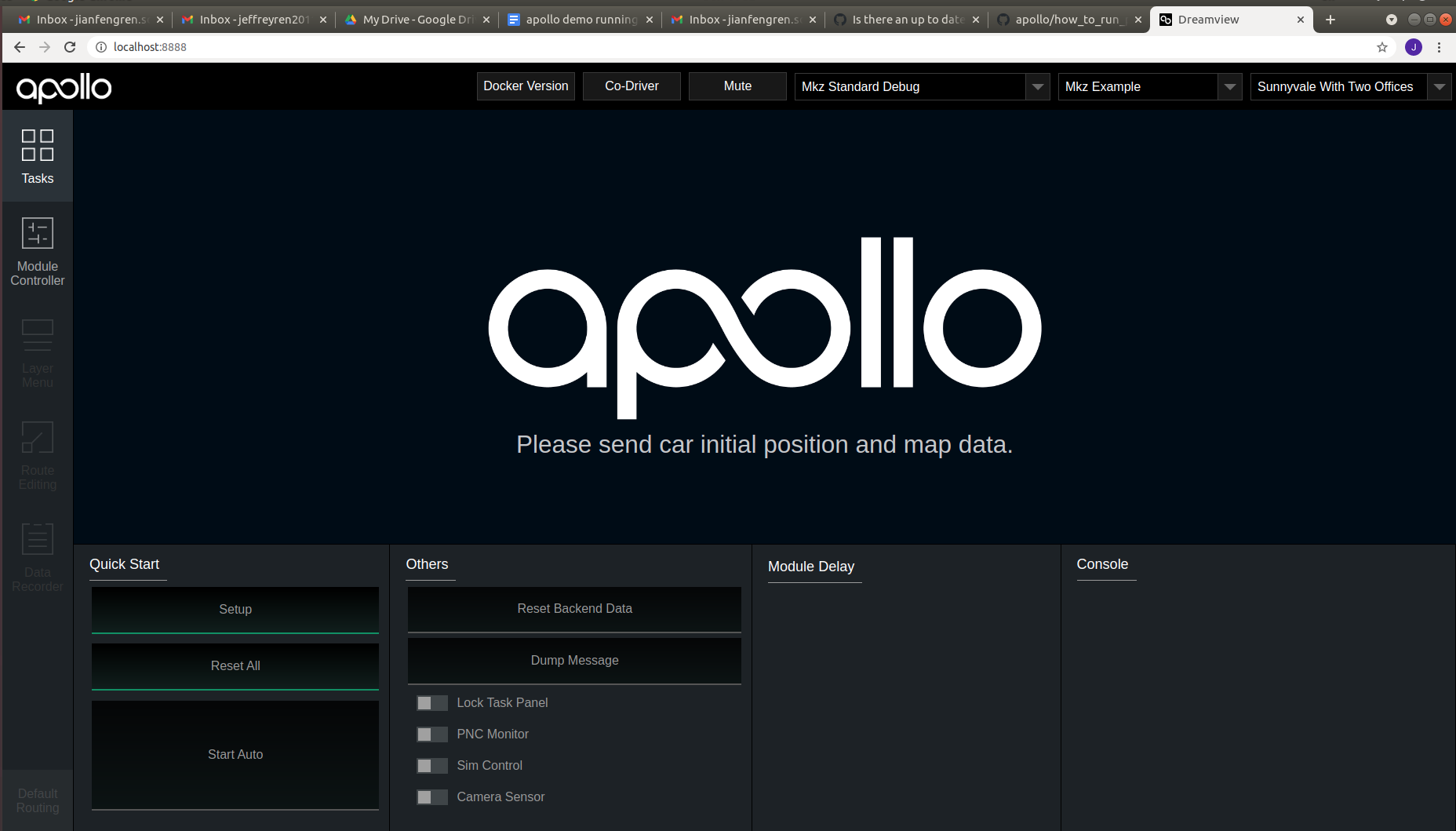
I have followed the instructions and play perception module, but from dreamview does not show any perception result.
cyber_launch start /apollo/modules/transform/launch/static_transform.launch
cyber_launch start modules/drivers/tools/image_decompress/launch/image_decompress.launch
cyber_launch start /apollo/modules/perception/production/launch/perception_all.launch
cyber_recorder play -f /apollo/data/bag/2021-03-18-21-39-11/20210318213911.record.00000 -r 0.2
 jxr041100
on 28 Mar 2021
jxr041100
on 28 Mar 2021
Related issues
 chilihua
·
3Comments
chilihua
·
3Comments
 Triangle001
·
3Comments
Triangle001
·
3Comments
 CCodie
·
3Comments
CCodie
·
3Comments
 lesun90
·
3Comments
lesun90
·
3Comments
 ahuer2435
·
3Comments
ahuer2435
·
3Comments
Most helpful comment
Obviously the instruction was outdated. Please follow this instruction
> $APOLLO_HOME/docker/scripts/dev_start.sh
> $APOLLO_HOME/docker/scripts/dev_into.sh
> ./apollo.sh build_opt_gpu
> bootstrap.sh
http://localhost:8888/
Select car and map in the dreamview
Select transform button in Dreamview or type command
If image is compressed launch image decompression module
Launch perception modules
Play recorded bag