Apollo: hwo to use cyber_visualizer to play channle msg
I want to use cyber_visualizer to visualize channle msgs, like camera images. How to Play a channle?
In cyber_monitor ,I can watch the data is growing in a normal framerate.
System information
- OS Platform and Distribution (e.g., Linux Ubuntu 14.04): ubuntu 14.04
- Apollo installed from (source or binary): souce
- Apollo version (1.0, 1.5, 2.0, 2.5, 3.0): 3.5
Steps to reproduce the issue:
- Please use bullet points and include as much details as possible:
build
launch bootstrap
launch camera
launch perception
cyber_visualizer
Supporting materials (screenshots, command lines, code/script snippets):
 sinopec
All 11 comments
@sinopec You can add images, and then click play.
 luqiang21
on 31 Jan 2019
luqiang21
on 31 Jan 2019
when I click add image , program crashed.
I got the following msg:
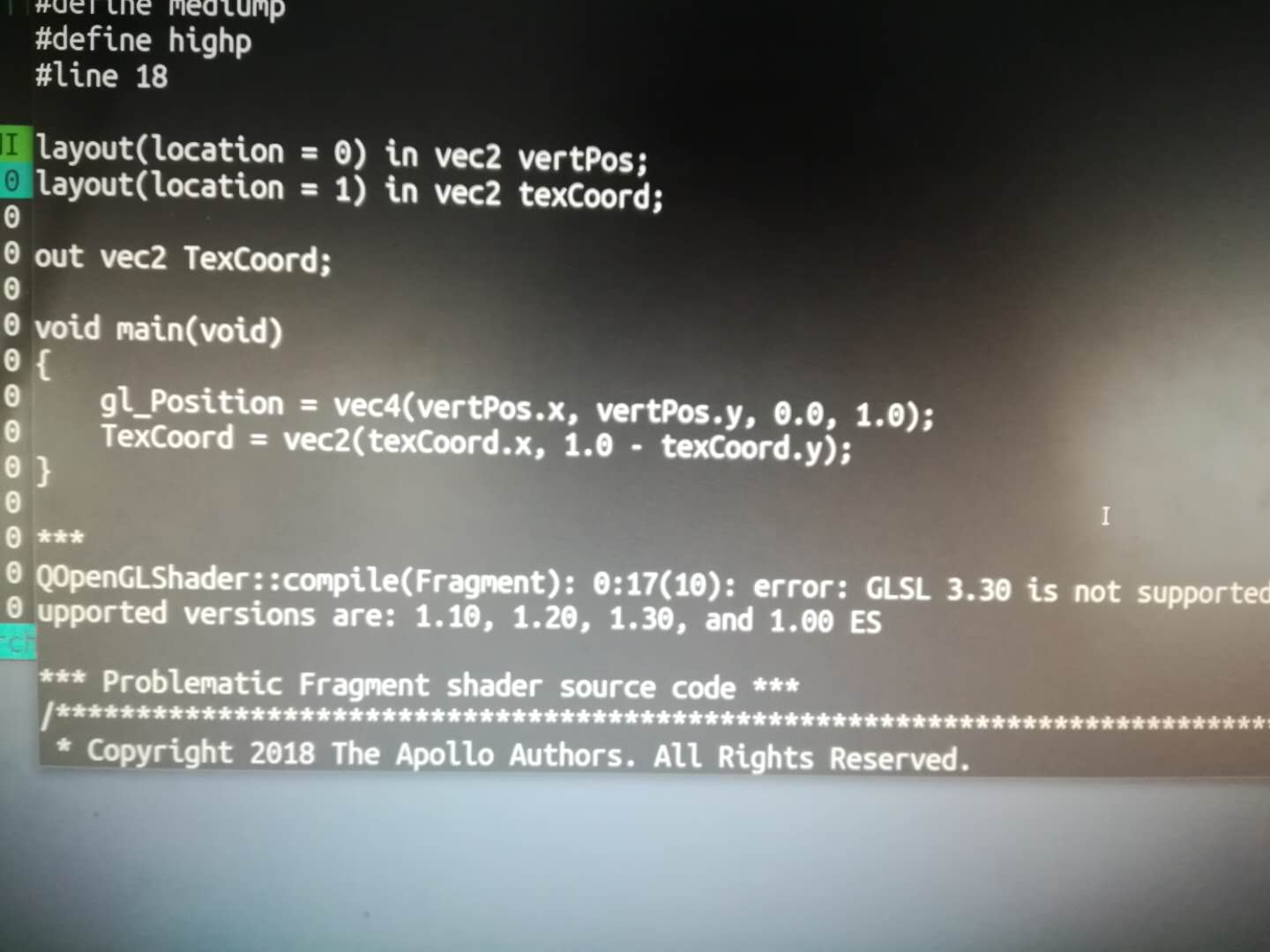
My nvidia driver version is 375.39,SHould I update my Nvidia driver version?
sinopec
on 1 Feb 2019
Are you inside docker? Have you followed the manual to setup Nvidia driver?
 quning18
on 2 Feb 2019
quning18
on 2 Feb 2019
Are you inside docker? Have you followed the manual to setup Nvidia driver?
Yes, I am In docker. And It works very well while i am using Apollo 3.0,In fact I just upgrade from 3.0 to 3.5 in this machine,So, I'm sure I have corrctly installed the NVIDIA driver.
sinopec
on 2 Feb 2019
I have the same issue and the same setup, and same driver.
 snuffysasa
on 5 Feb 2019
snuffysasa
on 5 Feb 2019
Please use the following command for checking OpenGL Version if you have correctly installed the NVIDIA driver:
sudo apt install mesa-utils
glxinfo -v | grep -i opengl
cyber_visualizer needs that the OpenGL core profile version is 3.3 or higher
 ZeusJupiter
on 28 Feb 2019
ZeusJupiter
on 28 Feb 2019
Please use the following command for checking OpenGL Version if you have correctly installed the NVIDIA driver:
sudo apt install mesa-utils
glxinfo -v | grep -i openglcyber_visualizer needs that the OpenGL core profile version is 3.3 or higher
Mine says
server glx version string: 1.4
client glx version string: 1.4
GLX version: 1.4
Version: 18.0.5
Max core profile version: 3.3
Max compat profile version: 3.0
Max GLES1 profile version: 1.1
Max GLES[23] profile version: 3.1
OpenGL core profile version string: 3.3 (Core Profile) Mesa 18.0.5
OpenGL core profile shading language version string: 3.30
OpenGL version string: 3.0 Mesa 18.0.5
OpenGL shading language version string: 1.30
OpenGL ES profile version string: OpenGL ES 3.1 Mesa 18.0.5
OpenGL ES profile shading language version string: OpenGL ES GLSL ES 3.10
And I have the same issue here..
 AOIlunar
on 3 Mar 2019
AOIlunar
on 3 Mar 2019
I have the same issue. My nvidia driver is 375.39.
@in_dev_docker:/apollo$ glxinfo -v | grep -i opengl
OpenGL vendor string: VMware, Inc.
OpenGL renderer string: Gallium 0.4 on llvmpipe (LLVM 3.4, 256 bits)
OpenGL version string: 2.1 Mesa 10.1.3
OpenGL shading language version string: 1.30
OpenGL extensions:
 tpengchang
on 4 Mar 2019
tpengchang
on 4 Mar 2019
You have not correctly installed NVIDIA driver.
$: glxinfo -v | grep -i opengl
OpenGL vendor string: NVIDIA Corporation
OpenGL renderer string: Quadro K620/PCIe/SSE2
OpenGL core profile version string: 4.6.0 NVIDIA 415.27
OpenGL core profile shading language version string: 4.60 NVIDIA
OpenGL core profile context flags: (none)
OpenGL core profile profile mask: core profile
OpenGL core profile extensions:
OpenGL version string: 4.6.0 NVIDIA 415.27
OpenGL shading language version string: 4.60 NVIDIA
OpenGL context flags: (none)
OpenGL profile mask: (none)
OpenGL extensions:
OpenGL ES profile version string: OpenGL ES 3.2 NVIDIA 415.27
OpenGL ES profile shading language version string: OpenGL ES GLSL ES 3.20
OpenGL ES profile extensions:
if you have correctly installed nvidia driver, the string "NVIDIA" will be in the result of "glxinfo -v | grep -i opengl"
You also can use nvidia-smi for checking whether your nvidia driver is installed correctly or not.
$ nvidia-smi
Tue Mar 12 19:35:25 2019
+-----------------------------------------------------------------------------+
| NVIDIA-SMI 415.27 Driver Version: 415.27 CUDA Version: 10.0 |
|-------------------------------+----------------------+----------------------+
| GPU Name Persistence-M| Bus-Id Disp.A | Volatile Uncorr. ECC |
| Fan Temp Perf Pwr:Usage/Cap| Memory-Usage | GPU-Util Compute M. |
|===============================+======================+======================|
| 0 Quadro K620 Off | 00000000:03:00.0 On | N/A |
| 34% 41C P8 1W / 30W | 464MiB / 1999MiB | 1% Default |
+-------------------------------+----------------------+----------------------+
+-----------------------------------------------------------------------------+
| Processes: GPU Memory |
| GPU PID Type Process name Usage |
|=============================================================================|
| 0 1440 G /usr/lib/xorg/Xorg 145MiB |
| 0 4604 G /usr/lib/vmware/bin/vmware-vmx 67MiB |
| 0 5689 G ...uest-channel-token=11940228623719793151 38MiB |
| 0 11206 G /usr/bin/gnome-shell 208MiB |
+-----------------------------------------------------------------------------+
Note: OpenGL Shading Language Version >= 3.3
"OpenGL shading language version string: 1.30." indicates that now your system cannot support OpenGL Shading Language 3.3 or higher. You should update your OS driver and enable OpenGL Shading Language 3.3 or higher
If OS is running in virtual machine, it should support OpenGL Shading Language 3.3 or higher, too
ZeusJupiter
on 12 Mar 2019
Closing this issue as it appears to be resolved. Feel free to reopen this issue if you have additional questions.
 natashadsouza
on 27 Mar 2019
natashadsouza
on 27 Mar 2019
@tpengchang, @sinopec, now I got one simple way,and please reference to "https://github.com/ApolloAuto/apollo/issues/7656"
ZeusJupiter
on 22 Apr 2019
Related issues
 BenBaek
·
3Comments
BenBaek
·
3Comments
 Wsine
·
3Comments
Wsine
·
3Comments
 xinwf
·
3Comments
xinwf
·
3Comments
 poutyface
·
3Comments
poutyface
·
3Comments
 CCodie
·
3Comments
CCodie
·
3Comments