We appreciate you go through Apollo documentations and search previous issues before creating an new one. If neither of the sources helped you with your issues, please report the issue using the following form. Please note missing info can delay the response time.
System information
- OS Platform and Distribution (e.g., Linux Ubuntu 14.04): Linux Ubuntu 14.04
- Apollo installed from (source or binary): source
- Apollo version (1.0, 1.5, 2.0, 2.5, 3.0): Offline demo
Steps to reproduce the issue:
- Please use bullet points and include as much details as possible: I tried to run demo of the Apollo. I installed apollo and apollo-kernel. But I tried to run demo in code by bash scripts/bootstrap.sh, the program said
nohup: appending output to 'nohup.out'
Could not launch module monitor. Is it already built?
nohup: appending output to 'nohup.out'
Launched module dreamview.
Failed to start Dreamview. Please check /apollo/data/log or /apollo/data/core for more information
Supporting materials (screenshots, command lines, code/script snippets):
I tried in this.
- bash docker/scripts/dev_start.sh
fetch: Fetching reference refs/heads/master
[INFO] Start pulling docker image apolloauto/apollo:dev-x86_64-20181210_1500 ...
dev-x86_64-20181210_1500: Pulling from apolloauto/apollo
Digest: sha256:283773f0c1ee31e7615db642f0973a6d443453e335355ca0ac0030d56d2b69f4
Status: Image is up to date for apolloauto/apollo:dev-x86_64-20181210_1500
map_volume-sunnyvale_big_loop-latest: Pulling from apolloauto/apollo
Digest: sha256:4bd59bffdf105c52b11a5663a6342d9f70d42d5f1beb9dc7ae68884ae5ea32fd
Status: Image is up to date for apolloauto/apollo:map_volume-sunnyvale_big_loop-latest
a8ba14e22cd30e3b427a0bc522127d0bb217edb24c0d40dc7d22665774243763
map_volume-sunnyvale_loop-latest: Pulling from apolloauto/apollo
Digest: sha256:1337ca5d357f33318e38368b6218d343f6138c63a9bb491175ca7cdd39c1a789
Status: Image is up to date for apolloauto/apollo:map_volume-sunnyvale_loop-latest
025926d690ea73bbfbba4a1b7fa7a92c0c607ccc007ed642ff487b161898915b
localization_volume-x86_64-latest: Pulling from apolloauto/apollo
Digest: sha256:94af1ac560730db7daf192ebf7b091f88059e62e425ceccd6375fbf4578e7f3f
Status: Image is up to date for apolloauto/apollo:localization_volume-x86_64-latest
7ec1fef1217d441704f5faf16a2b0660369188489fcf305f7e49684a5fcdba5e
yolo3d_volume-x86_64-latest: Pulling from apolloauto/apollo
Digest: sha256:33add717a675be26c86f817d2207c1ab1ec25694f0decb63e55f0fc3d14b1397
Status: Image is up to date for apolloauto/apollo:yolo3d_volume-x86_64-latest
fd16d449f41686f50c61b8620daaa0ed2ab91fab75a37f9369572ffd32120345
[INFO] Starting docker container "apollo_dev_deepdrive" ...
5ea68a7f395120f383bb35d1798e54e04e3d9a37ed305bbbe5e39d5e9269e07c
Adding groupdeepdrive' (GID 1000) ... Done. Adding userdeepdrive' ...
Adding new userdeepdrive' (1000) with groupdeepdrive' ...
The home directory/home/deepdrive' already exists. Not copying from/etc/skel'.
[ OK ] Finished setting up Apollo docker environment. Now you can enter with:
bash docker/scripts/dev_into.sh
[ OK ] Enjoy!
bash docker/scripts/dev_start.sh
./apollo.sh
Usage:
./apollo.sh [OPTION]Options:
build: run build only
build_opt: build optimized binary for the code
build_cpu: dbg build with CPU
build_gpu: run build only with Caffe GPU mode support
build_opt_gpu: build optimized binary with Caffe GPU mode support
build_fe: compile frontend javascript code, this requires all the node_modules to be installed already
build_planning: compile planning and its dependencies.
build_control: compile control and its dependencies.
build_prediction: compile prediction and its dependencies.
build_pnc: compile pnc and its dependencies.
build_no_perception [dbg|opt]: run build, skip building perception module, useful when some perception dependencies are not satisified, e.g., CUDA, CUDNN, LIDAR, etc.
build_prof: build for gprof support.
buildify: fix style of BUILD files
check: run build/lint/test, please make sure it passes before checking in new code
clean: run Bazel clean
config: run configurator tool
coverage: generate test coverage report
doc: generate doxygen document
lint: run code style check
usage: print this menu
release: build release version
test: run all unit tests
version: display current commit and date
- ./apollo.sh clean
System check passed. Build continue ...
[WARNING] ESD CAN library supplied by ESD Electronics does not exist. If you need ESD CAN, please refer to third_party/can_card_library/esd_can/README.md.
INFO: Reading 'startup' options from /apollo/tools/bazel.rc: --batch_cpu_scheduling --host_jvm_args=-XX:-UseParallelGC
INFO: (01-04 13:53:05.026) Starting clean.
INFO: (01-04 13:53:05.034) Output tree moved to /home/deepdrive/.cache/bazel/_bazel_deepdrive/540135163923dd7d5820f3ee4b306b32/execroot_tmp_6234 for deletion
- bash apollo.sh build
###
System check passed. Build continue ...
[WARNING] ESD CAN library supplied by ESD Electronics does not exist. If you need ESD CAN, please refer to third_party/can_card_library/esd_can/README.md.
Running build under GPU mode. GPU is required to run the build.
[INFO] Start building, please wait ...
INFO: Reading 'startup' options from /apollo/tools/bazel.rc: --batch_cpu_scheduling --host_jvm_args=-XX:-UseParallelGC
____Loading package: modules/common/configs/proto
____Loading package: modules/perception/camera/app
____Loading package: modules/dreamview
____Loading package: cyber/timer
____Loading package: cyber/io
[INFO] Building on x86_64...
[INFO] Building with --jobs=8 --ram_utilization_factor 80 for x86_64
INFO: Reading 'startup' options from /apollo/tools/bazel.rc: --batch_cpu_scheduling --host_jvm_args=-XX:-UseParallelGC
INFO: (01-04 14:37:58.360) Found 3211 targets...INFO: (01-04 14:55:30.722) Elapsed time: 1056.567s, Critical Path: 233.21s
[ OK ] Build passed!
[INFO] Took 1060 seconds
And I opend http://localhost:8888. Selected "Navigation" mode.
Download demo_2.5.bag
rosbag play -l demo_2.5.bag
bash: rosbag: command not found
And I tried "source /home/tmp/ros/setup.bash"
the rosbag played
[ INFO] [1546616066.462483138]: Opening demo_2.5.bag
Waiting 0.2 seconds after advertising topics... done.
Hit space to toggle paused, or 's' to step.
[RUNNING] Bag Time: 1523917548.158651 Duration: 12.155525 / 19.995227
- But there is no running in "http://localhost:8888".
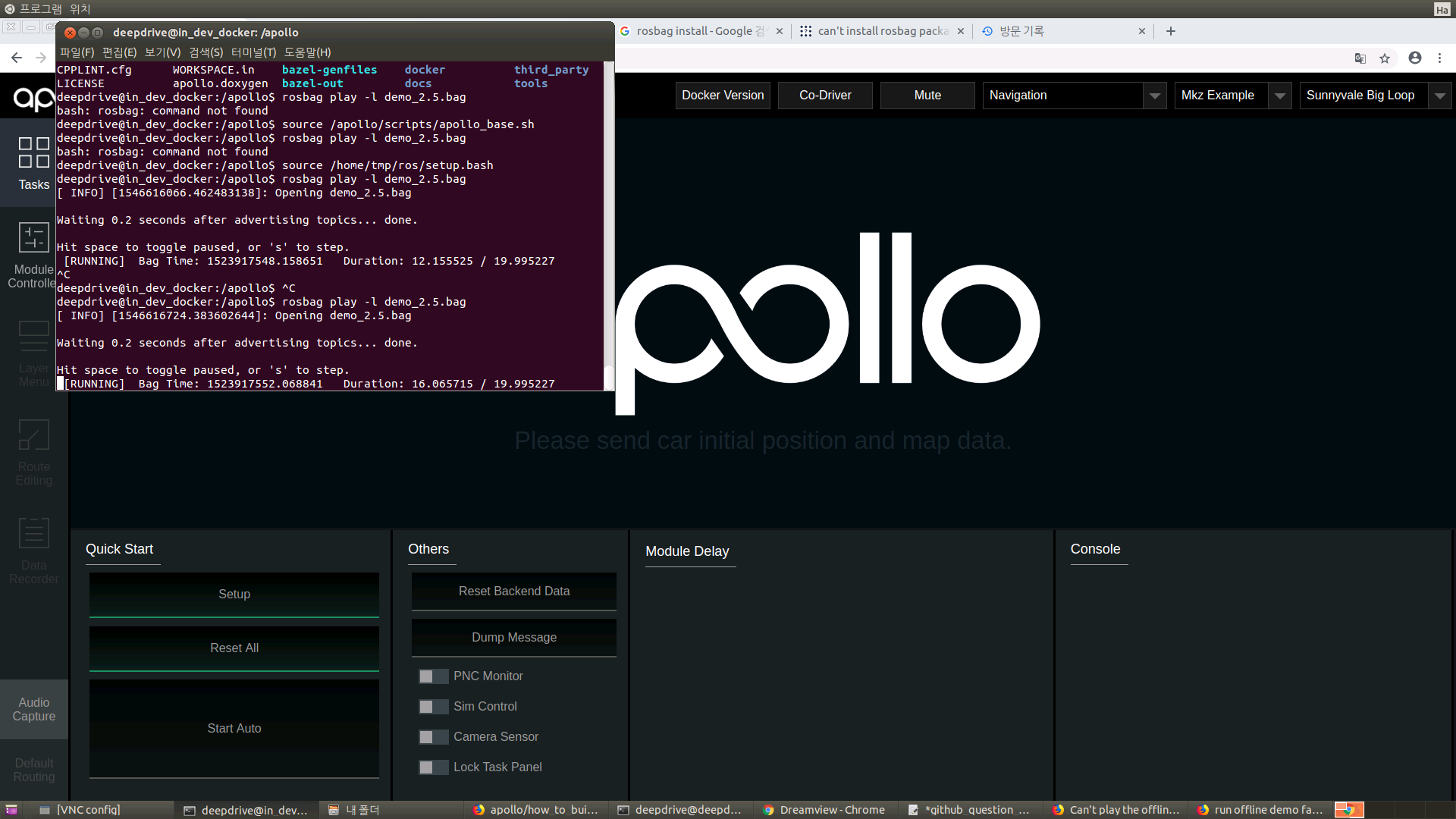
I don't know where I did wrong.
 MinseokKim-KR
All 8 comments
You use the latest master branch that based on cyber, will not be compatible with the rosbag. so you can wait for released record file for demo and play .
 mickeyouyou
on 5 Jan 2019
mickeyouyou
on 5 Jan 2019
You use the latest master branch that based on
cyber, will not be compatible with therosbag. so you can wait for released record file for demo and play .
I have questions.
What is the difference with
cyberandrosbag?Then how can I run off-line demo?
In the form shown on the photo, is it impossible to route or do other work without attaching hardware?
Thanks.
MinseokKim-KR
on 5 Jan 2019
You use the latest master branch that based on
cyber, will not be compatible with therosbag. so you can wait for released record file for demo and play .I have questions.
1. What is the difference with `cyber` and `rosbag`?

2. Then how can I run off-line demo?

3. In the form shown on the photo, is it impossible to route or do other work without attaching hardware?
Thanks.
Here is the official documents about cyber https://github.com/ApolloAuto/apollo/blob/master/cyber/README.md
 fzd9752
on 7 Jan 2019
fzd9752
on 7 Jan 2019
We have updated the record bag. Please try again now (with most recent code).
 lianglia-apollo
on 8 Jan 2019
lianglia-apollo
on 8 Jan 2019
@kimhyoungseok has your issue been resolved?
 natashadsouza
on 15 Jan 2019
natashadsouza
on 15 Jan 2019
Closing this issue as it appears to be resolved. Feel free to reopen if you have additional questions. Thanks!
natashadsouza
on 27 Apr 2019
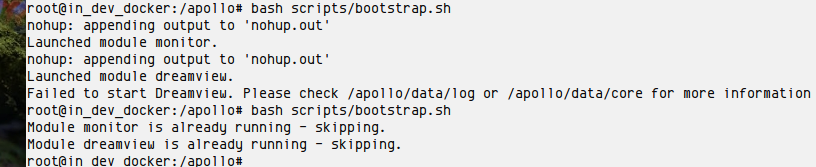
Hello, I'm trying to launch the offline demo and following this guide:
https://github.com/ApolloAuto/apollo/tree/master/docs/demo_guide
The last line launches a record and everything seems ok but when I try to open UI in chrome I get nothing.

What do I do wrong?
Thanks.
 NickoDema
on 6 Jul 2019
NickoDema
on 6 Jul 2019
NickoDema
on 7 Jul 2019
Related issues
 poutyface
·
3Comments
poutyface
·
3Comments
 lyletbjohnson
·
3Comments
lyletbjohnson
·
3Comments
 Triangle001
·
3Comments
Triangle001
·
3Comments
 lesun90
·
3Comments
lesun90
·
3Comments
 freeclouds
·
3Comments
freeclouds
·
3Comments