Apollo: Failed to start the cyber_visualizer tool
Hi, folks.
When I started the cyber_visualizer tool, I got the following error:

Could you give me some advice? Thanks.
System information
- OS Platform and Distribution (e.g., Linux Ubuntu 14.04): Linux Ubuntu 16.04
- Apollo installed from (source or binary): from source
- Apollo version (1.0, 1.5, 2.0, 2.5, 3.0): > 3.0, latest master branch
- Graphics card: GeForce GTX 1050 Ti
- Graphics card driver information:
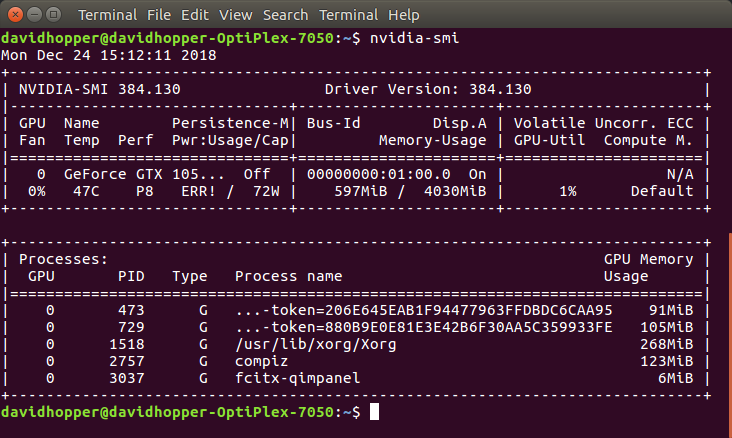

Steps to reproduce the issue:
# Start the docker.
bash docker/scripts/dev_start.sh -C
# Step into the docker.
bash docker/scripts/dev_into.sh
# Build the apollo project in the docker.
# "-j 16" depends on the number of CPU cores on your machine.
bash apollo.sh build -j 16
source /apollo/cyber/setup.bash
cyber_visualizer
Supporting materials (screenshots, command lines, code/script snippets):
Here is the output of my computer:
# Out of the docker.
lspci -vnn | grep "VGA"
pacman -Qs libgl


 davidhopper2003
All 6 comments
Try
bash docker/setup_host/install_nvidia_docker.sh
and then restart docker.
Hope it will be helpful.
 GoLancer
on 26 Dec 2018
GoLancer
on 26 Dec 2018
@GoLancer
Thanks for your amazing advice. After I ran the following command:
# Out of the docker.
bash docker/setup_host/install_nvidia_docker.sh
An error is shown as follows when I restarted the Docker. In other words, the Docker can't be started because of the inconsistentence of the NVidia graphics driver version.

By the way, the NVidia graphics driver version of my machine is 384 and I can't install the 375 version recommended by Apollo.
davidhopper2003
on 27 Dec 2018
@davidhopper2003
If you want to install nvidia driver 384.130 in docker, you can try below steps.
wget http://us.download.nvidia.com/XFree86/Linux-x86_64/384.130/NVIDIA-Linux-x86_64-384.130.run
chmod +x ./NVIDIA-Linux-x86_64-384.130.run
sudo ./NVIDIA-Linux-x86_64-384.130.run --no-opengl-files -a -s
 simon750324
on 27 Dec 2018
simon750324
on 27 Dec 2018
@simon750324
Thank you. I'll try it.
davidhopper2003
on 28 Dec 2018
@davidhopper2003
If you want to install nvidia driver 384.130 in docker, you can try below steps.
wget http://us.download.nvidia.com/XFree86/Linux-x86_64/384.130/NVIDIA-Linux-x86_64-384.130.run chmod +x ./NVIDIA-Linux-x86_64-384.130.run sudo ./NVIDIA-Linux-x86_64-384.130.run --no-opengl-files -a -s@simon750324
This method doesn't work. I used the following command to install the NVIDIA driver inside Docker.
# 1. Out of Docker
# Uninstall nvidia-docker to get rid of the error message
# "Error response from daemon: create nvidia_driver_384.130..."
sudo dpkg -r nvidia-docker

# 2. In Docker
# Install the nvidia-384 driver.
sudo apt update
apt search nvidia-384
sudo apt install nvidia-384
nvidia-smi
cyber_visualizer

davidhopper2003
on 3 Jan 2019
The problem has been resolved.
davidhopper2003
on 4 Jan 2019
Related issues
 ahuer2435
·
3Comments
ahuer2435
·
3Comments
 chasingw
·
3Comments
chasingw
·
3Comments
 c-xyli
·
3Comments
c-xyli
·
3Comments
 lyletbjohnson
·
3Comments
lyletbjohnson
·
3Comments
 chilihua
·
3Comments
chilihua
·
3Comments
Most helpful comment