Apollo: Could not launch module monitor. Is it already built?
System information
Ubuntu 14.04.5 LTS
Apollo installed from source
Apollo version 3.0
Steps to reproduce the issue:
git clone [email protected]:ApolloAuto/apollo.git
cd apollo
bash docker/scripts/dev_start.sh
bash docker/scripts/dev_into.sh
bash apollo.sh build
bash scripts/bootstrap.sh
I try to do this:
docker rm [container id]
docker rmi [image id]
git pull origin master
bash docker/scripts/dev_start.sh
bash docker/scripts/dev_into.sh
bash apollo.sh build
It's not work. And I try to do this:
bash apollo.sh clean
bash apollo.sh build
It's still not work.
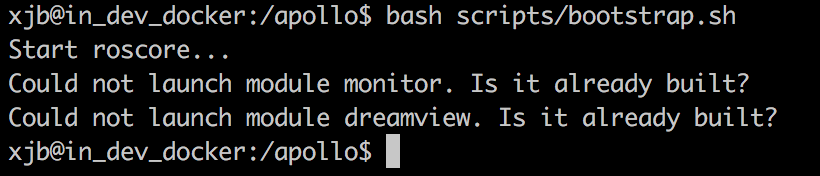
The error:
Start roscore...
Could not launch module monitor. Is it already built?
Could not launch module dreamview. Is it already built?
Please help me.
 qinhuan
All 11 comments
same question
 yangbo524
on 30 Oct 2018
yangbo524
on 30 Oct 2018
Check the environment variable APOLLO_BASE_SOURCED.
If this variable is defined, module binary path is not set correctly.
 poutyface
on 30 Oct 2018
poutyface
on 30 Oct 2018
Check the environment variable APOLLO_BASE_SOURCED.
If this variable is defined, module binary path is not set correctly.See
apollo/scripts/apollo_base.shLine 429 in 23b7265
export APOLLO_BASE_SOURCED=1
Check the environment variable APOLLO_BASE_SOURCED.
If this variable is defined, module binary path is not set correctly.See
apollo/scripts/apollo_base.shLine 429 in 23b7265
export APOLLO_BASE_SOURCED=1
There is no environment variable APOLLO_BASE_SOURCED in ~/.bashrc file.
qinhuan
on 30 Oct 2018
Same question,look forward to solution!
 HongweiSunny
on 30 Oct 2018
HongweiSunny
on 30 Oct 2018
@yangbo524 @HongweiSunny
I changed the system. Previous system:
uname -r 3.13.0-24-generic
cat /etc/issue Ubuntu 14.04.5 LTS \n \l
and Current system:
uname -r 4.13.0-32-generic
cat /etc/issue Ubuntu 16.04.3 LTS \n \l
The same operation, it's not work at the beginning. The same results: 'Could not launch module monitor. Is it already built?……'
And I repeat this operation again and again:
docker rm [container id]
docker rmi [image id]
git pull origin master
bash docker/scripts/dev_start.sh
bash docker/scripts/dev_into.sh
bash apollo.sh build
And this operation:
bash apollo.sh clean
bash apollo.sh build
I don't know what happened, it suddenly worked.

https://github.com/ApolloAuto/apollo/blob/master/docs/demo_guide/README.md
qinhuan
on 1 Nov 2018
After you run bash apollo.sh build, verify if you have these 2 binaries built out:
- bazel-bin/modules/dreamview/dreamview
- bazel-bin/modules/monitor/monitor
If you do not have this binaries, please restart the build process. Should you have them and you see the error, please give us a screenshot of your output so that we could debug it further.
Thanks!
 natashadsouza
on 8 Nov 2018
natashadsouza
on 8 Nov 2018
After you run
bash apollo.sh build, verify if you have these 2 binaries built out:1. bazel-bin/modules/dreamview/dreamview 2. bazel-bin/modules/monitor/monitorIf you do not have this binaries, please restart the build process. Should you have them and you see the error, please give us a screenshot of your output so that we could debug it further.
Thanks!
How do we check if these binaries are built out? Having same issue...
 TaOsman
on 14 Nov 2018
TaOsman
on 14 Nov 2018
Same question. Dose it have a official solution now?
 AegonWei
on 23 Nov 2018
AegonWei
on 23 Nov 2018
@natashadsouza I found the 2 binaries exactly in the path you said, but the scripts/bootstrap.sh seem to look up in /modules/{dreamview,monitor} path to run the modules. By brute force, I manually copied the binaries in their respective path and it worked. However, I have no idea if the bazel-bin/modules path should be a symlink to /modules or if something went wrong and the binaries aren't get copied.
So just to make things simpler to anyone facing this issue:
cp /apollo/bazel-bin/modules/monitor/monitor /apollo/modules/monitor
cp /apollo/bazel-bin/modules/dreamview/dreamview /apollo/modules/dreamview
Then just run bash scripts/bootstrap.sh again and it will work.
 rimolive
on 19 Jan 2019
rimolive
on 19 Jan 2019
It actually looks for "${APOLLO_BIN_PREFIX}/modules/" (https://github.com/ApolloAuto/apollo/blob/r3.0.0/scripts/apollo_base.sh#L232)
And the APOLLO_BIN_PREFIX is determined here: https://github.com/ApolloAuto/apollo/blob/r3.0.0/scripts/apollo_base.sh#L118
I guess that in your environment it's somehow unset, so it becomes "/modules/..."
 xiaoxq
on 21 Mar 2019
xiaoxq
on 21 Mar 2019
Closing this issue as it appears to be resolved. Feel free to reopen if you have additional questions. Thanks!
natashadsouza
on 27 Apr 2019
Related issues
 ahuer2435
·
3Comments
ahuer2435
·
3Comments
 lql7595
·
3Comments
lql7595
·
3Comments
 BenBaek
·
3Comments
BenBaek
·
3Comments
 c-xyli
·
3Comments
c-xyli
·
3Comments
 lesun90
·
3Comments
lesun90
·
3Comments
Most helpful comment
@natashadsouza I found the 2 binaries exactly in the path you said, but the
scripts/bootstrap.shseem to look up in /modules/{dreamview,monitor} path to run the modules. By brute force, I manually copied the binaries in their respective path and it worked. However, I have no idea if the bazel-bin/modules path should be a symlink to /modules or if something went wrong and the binaries aren't get copied.So just to make things simpler to anyone facing this issue:
Then just run
bash scripts/bootstrap.shagain and it will work.