Apollo: Newbie questions:Contributing to Apollo software
System information
- OS Platform and Distribution (e.g., Linux Ubuntu 14.04):Linux Ubuntu 18.04.1 LTS
Apollo version (1.0, 1.5, 2.0, 2.5, 3.0):If there is a file or query I can run to find the Apollo version I am running please let me know.I followed the instructions to install without hardware.
Question 1
Can I contribute to the software without having a vehicle?
- If yes, I was wondering if there are issues which I can look at as a newbie to this repository.
- The Help Wanted tag appears to mostly be other developers having questions like me.
- Are there other tags I can search for ?A module you can recommend for beginners?
- If not,other than Lincoln MKZ ,is there a list of other vehicles you recommend?
NOTE:
-I found the read me docs in the repository useful and also took a look at open issues before opening this issue.
-I have installed Apollo on my machine and am able to build it as well run unit tests.- If yes, I was wondering if there are issues which I can look at as a newbie to this repository.
- Not expecting a lot of handholding but would appreciate if you had some getting started advice.
About me(info if needed)
- 3 years of professional experience in C#/.NET development.
- Familiar with Machine learning basics and interested in perception.
- Currently enrolled in Udacity's course for Apollo.
Supporting materials (screenshots, command lines, code/script snippets):
[How to contribute.md](https://github.com/ApolloAuto/apollo/blob/ca66ba5244f9a77fa1218f3dfcf27707932b3aae/CONTRIBUTING.md)
 SohamGhormade
All 6 comments
Question 2
- What are the recommended computer specifications to build locally?
- I have a 8GB RAM and ~45 GB memory with i5 processor.It took around 90 minutes to build the code
locally. But my pull request took only 20 minutes to build! Note I have used the following command:
bash apollo.sh build bash
I will give the recommended a try after confirming the specs from you:
apollo.sh build --local_resources 2048,1.0,1.0It is possible that the server build machines have better specs so wanted to check with you what your recommendations were.
Kindly reply when you get a chance.Thanks in advance for your time.
SohamGhormade
on 19 Aug 2018
Question 3
- I am having trouble with getting DreamView to start .
- After building all modules in debug mode ,I see a build passed message,when I run the script for
DreamView,I get the error stating that dreamview module has not been built.Does it have to be built in release ?
- After building all modules in debug mode ,I see a build passed message,when I run the script for
SohamGhormade
on 19 Aug 2018
Hey Soham,
It's more than welcome to contribute to Apollo! About your question, please see the following:
1) 14.04 release it recommend to run with Apollo, but you can try 16.04 or even newer.
Execute 'git branch -a' could find out the details upon every release or other developement target,
and write code against the master as the newest code base.
Yes, you can contribute without an vehicle, like add the test cases to enlarge the test coverage.
2) It sounds good in terms of your development machine, please build it within docker. :)
3) Could you please kindly show your error message of Q3?
 freeHackOfJeff
on 20 Aug 2018
freeHackOfJeff
on 20 Aug 2018
Thanks for replying @freeHackOfJeff .
I followed the instructions from here i.e I did build with docker and it took around 90 minutes.
Regarding Q3 I am going to try out building again with docker.
Edit:using bash apollo.sh build --local_resources 2048,1.0,1.0 this time.
SohamGhormade
on 21 Aug 2018
Hi Jie,
Questions:
With$ bash docker/scripts/dev_start.sh I see the following errors:
modprobe: FATAL: Module nvidia not found in directory /lib/modules/4.15.0-32-generic
modprobe: FATAL: Module nvidia-uvm not found in directory /lib/modules/4.15.0-32-generic
Q1:Is this error expected?
With I see soham@in_dev_docker:/apollo$ bash apollo.sh release_noproprietary
System check passed. Build continue ...
[WARNING] ESD CAN library supplied by ESD Electronics does not exist. If you need ESD CAN, please refer to third_party/can_card_library/esd_can/README.md.
INFO: Reading 'startup' options from /apollo/tools/bazel.rc: --batch_cpu_scheduling
.
cp: cannot stat '/apollo/bazel-apollo/bazel-out/local-opt/bin/modules/perception/cuda_util/libintegrated_cuda_util.so': No such file or directory
Q2:Is this output expected?
Basically it looks like I am missing CUDA and NVIDIA related things?
Here is my system configuration for your reference:
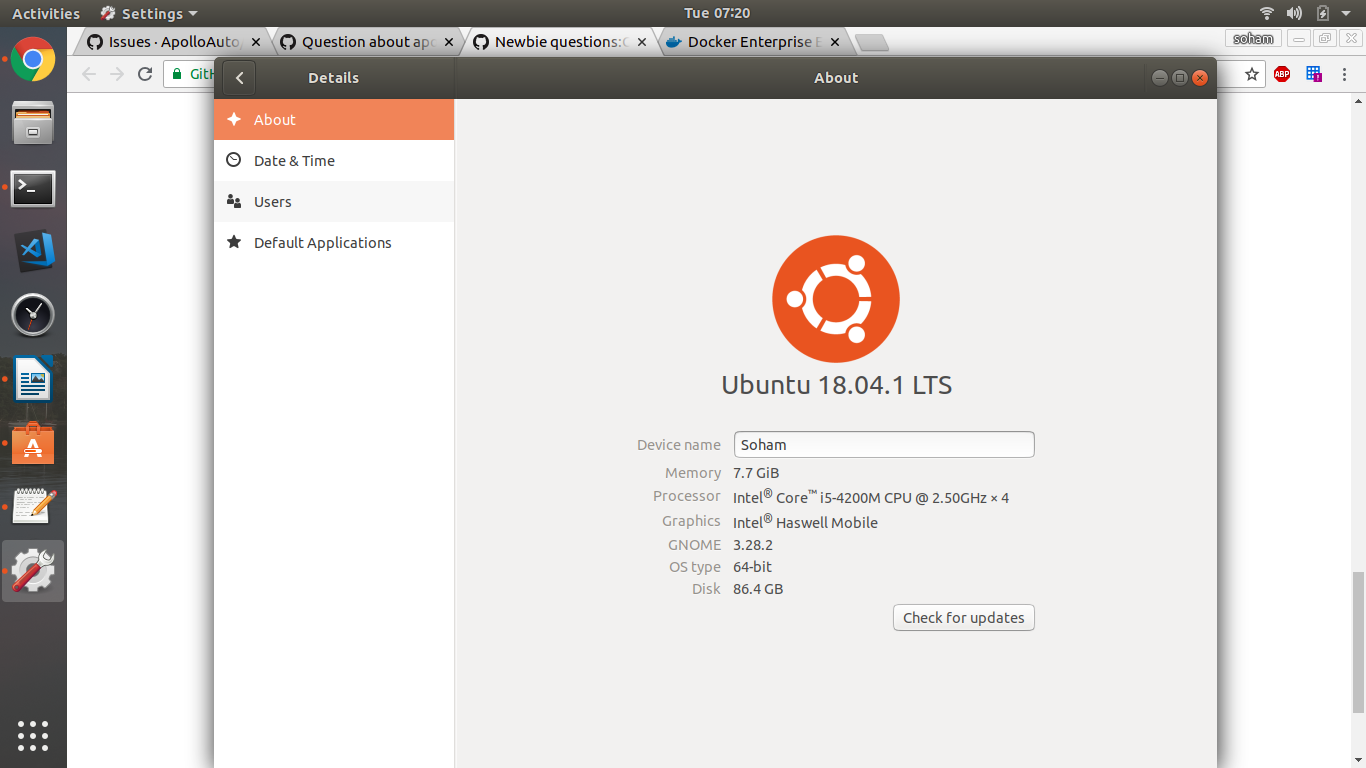
Note that I have a Windows machine with NVIDIA GFX card but that card is not visible for Apollo which I have setup in the partitioned Ubuntu system.
For your reference ,terminal_output.txt is the output from my terminal after I followed the build and release steps from the linked article in my comment above:
SohamGhormade
on 21 Aug 2018
Hi SohamGhormade.
Q1: This is an abnormal phenomenon.Please check your path.
Q2: I think you should install cuda-8.0. Otherwise, you may not use your GPU
 muleisheng
on 22 Aug 2018
muleisheng
on 22 Aug 2018
Related issues
 lyletbjohnson
·
3Comments
lyletbjohnson
·
3Comments
 freeclouds
·
3Comments
freeclouds
·
3Comments
 chasingw
·
3Comments
chasingw
·
3Comments
 c-xyli
·
3Comments
c-xyli
·
3Comments
 lql7595
·
3Comments
lql7595
·
3Comments
Most helpful comment
Hey Soham,
It's more than welcome to contribute to Apollo! About your question, please see the following:
1) 14.04 release it recommend to run with Apollo, but you can try 16.04 or even newer.
Execute 'git branch -a' could find out the details upon every release or other developement target,
and write code against the master as the newest code base.
Yes, you can contribute without an vehicle, like add the test cases to enlarge the test coverage.
2) It sounds good in terms of your development machine, please build it within docker. :)
3) Could you please kindly show your error message of Q3?