Apollo: how to run perception module with rosbag playing?
Hi all, I'm trying to do some offline test regarding the traffic light detection function of Apollo.
Since I don't have cameras, I download the bag files provided by Apollo(demo-2.0, 3.2G).
Here is what I do:
- scripts/bootstrap.sh
- chose map sunnyvale_loop and vehicle mkz8 in dreamview
- rosbag play -l demo2.0.bag
- check all the topics the traffic light detection needs:/tf, /tf_static, /apollo/sensor/camera/traffic/image_short(long), /apollo/localization/pose
- enable the perception module in dreamview
I can see that the obstacle detection of perception works, since I can see obstacles in dreamview(there is no obstacle topic in bag file, only PointCLoud2 topic).But the traffic detection is not working, since in dreamview, the traffic light detection result is no signal, even when the car stops at the instersection.
I check the log file named perception.ERROR, here it is:

It seems to be the time issue of tf in ros, then I tried to play the bag file with /use_sim_time to be true and false, the same error occurs.
Has someone figure this out? Thank you!
 hzdsdhr
All 12 comments
@jinghaomiao @xiaohuitu Hi, do you have updates about this? Really appreciate your help.
hzdsdhr
on 21 May 2018
I've download rosbag from here(http://data.apollo.auto/help?name=data-sensor%20demostration-user%20guide&data_key=sensor&data_type=1&locale=zh-cn&lang=en). I found the timestamp is around 1513807824~1513807884 second, which is different from yours.
So where did you get the bag? could you give me the link?
 ghdawn
on 25 May 2018
ghdawn
on 25 May 2018
@ghdawn I use the same bag. The one named "demo-sensor-data-apollo-2.0.tar.gz", which size is 3.2GB. Have you successfully run the traffic light detection with rosbag playing?
hzdsdhr
on 28 May 2018
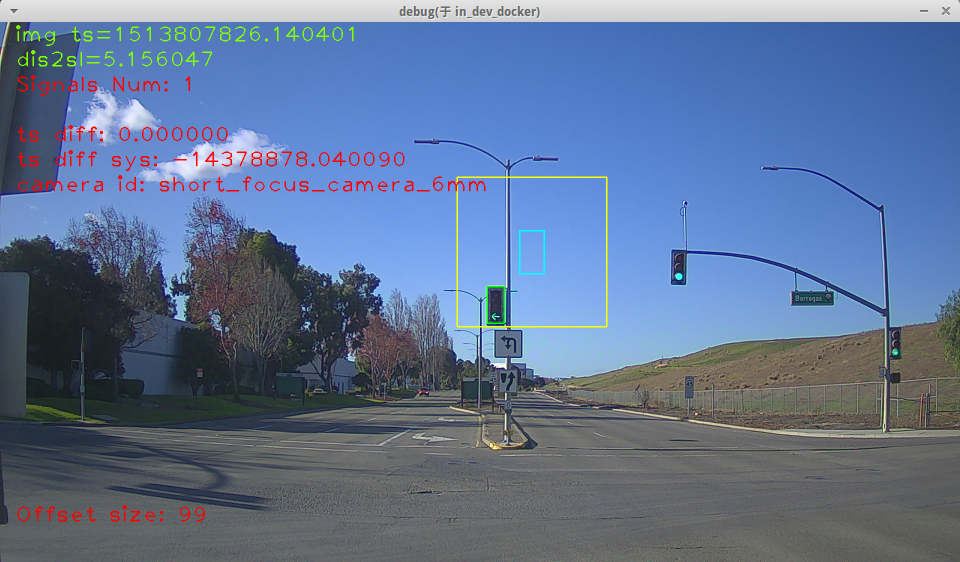
I can run detection with this bag. However, there is only one light at the beginning of bag, about 3 second. Then there is no light and you won't see any detection result.
ghdawn
on 5 Jun 2018
@ghdawn How did you manage to see the video output with detection on it?
 linux-devil
on 5 Jun 2018
linux-devil
on 5 Jun 2018
vim modules/perception/conf/perception.conf
find --output_debug_img
set to true
rerun perception , when querying hdmap successfully,you will see the video
ghdawn
on 6 Jun 2018
@ghdawn
Are you able to explain the difference between?
--output_debug_img and --output_raw_img ?
I tried toggling both of these, and still do not understand how to see the video/images?
when using a camera or by playing one of the demo rosbags
Can you help?
 snuffysasa
on 15 Jun 2018
snuffysasa
on 15 Jun 2018
@ghdawn Just want to know, do you run the apollo system in docker? And do you have apollo RT kernel on your computer?
hzdsdhr
on 19 Jun 2018
@snuffysasa
Hi, output_debug_img means : when traffic light module has query pose and hd-map successfully, a window (as I pasted) will show the image we choosed with some infomation.
output_raw_img means, write images received to disk. User should create the directories, which names are defined in modules/perception/traffic_light/base/image.h ("short_focus_camera_6mm" and "long_focus_camera_25mm")
ghdawn
on 21 Jun 2018
@hzdsdhr
I run the apollo system in docker following steps below:
*./docker/scripts/dev_start.sh *
*./docker/scripts/dev_into.sh *
I don't known what apollo RT kernel is .
ghdawn
on 21 Jun 2018
Thank you for your answer. And do you run /apollo/scripts/time_sync.sh before you run apollo?
hzdsdhr
on 21 Jun 2018
@ghdawn Should I re-build apollo after enabling --output_debug_img ?
 wujiyoung
on 18 Oct 2018
wujiyoung
on 18 Oct 2018
Related issues
 jamchen1025
·
3Comments
jamchen1025
·
3Comments
 westeast
·
3Comments
westeast
·
3Comments
 Triangle001
·
3Comments
Triangle001
·
3Comments
 c-xyli
·
3Comments
c-xyli
·
3Comments
 xinwf
·
3Comments
xinwf
·
3Comments
Most helpful comment
I can run detection with this bag. However, there is only one light at the beginning of bag, about 3 second. Then there is no light and you won't see any detection result.