Apollo: bootstrap cannot launch module monitor & dreamview
I just clone the newest code this morning and started the build command in dev docker
kkyiss@in_dev_docker:/apollo$ bash apollo.sh build
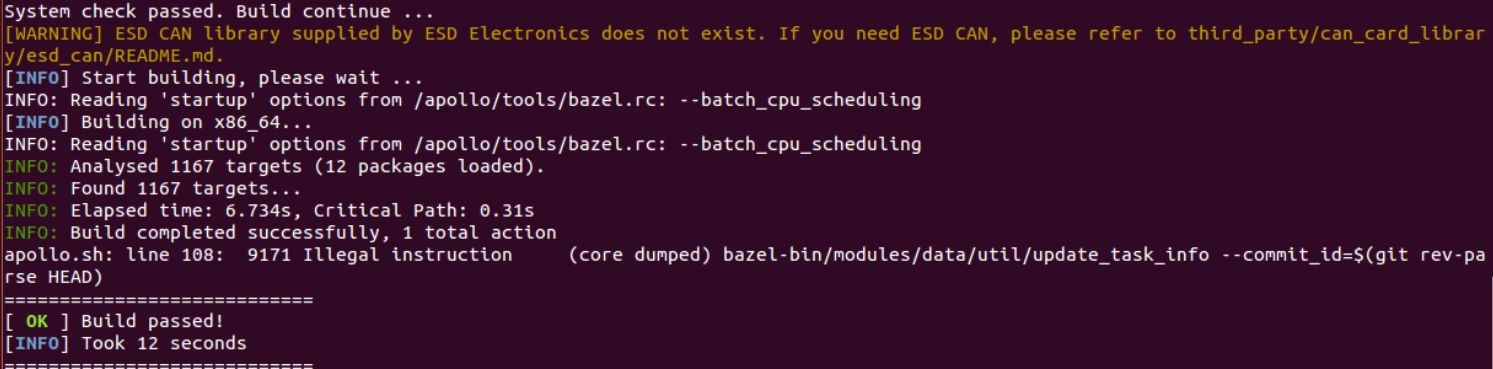
it showed build passed!
but with some info
apollo.sh: line 108: 5508 Illegal instruction (core dumped) bazel-bin/modules/data/util/update_task_info --commit_id=$(git rev-parse HEAD)
Then when i run
bash scripts/bootstrap.sh
it shows:
Start roscore...
Could not launch module monitor. Is it already built?
Could not launch module dreamview. Is it already build?
Dreamview is running at http://localhost:8888
but the webpage shows unable to connect
anyone have the same problem?
any hints will be appreciate
tks
 kkyiss
All 23 comments
The build looks incomplete.
There should be some abnormal logs when you run "apollo.sh build". Would you please post it here?
 xiaoxq
on 14 Dec 2017
xiaoxq
on 14 Dec 2017
@xiaoxq tks for the quick reply
in /data/log directory, there are three logs (dreamview.out, monitor.out, roscore.out)
but they are all empty
kkyiss
on 14 Dec 2017
Could you check if the file bazel-bin/modules/data/util/update_task_info exists?
And plz show the output of "git status".
xiaoxq
on 14 Dec 2017
Yes, the update_task_info do exists

kkyiss
on 14 Dec 2017
Then could you show me the output of
git status
git rev-parse HEAD
./bazel-bin/modules/data/util/update_task_info --commit_id=1
it tells
error while loading shared libraries: libactionlib.so: cannot open shared object file:
No such file or directory

kkyiss
on 14 Dec 2017
restart your pc , and rebuild the apollo.sh , then it will work ok
 gazige1981
on 14 Dec 2017
gazige1981
on 14 Dec 2017
It's a library from ROS, located at /home/tmp/ros/lib/libactionlib.so
Then I guess you are running new code on an old docker image. They don't match.
Just start a new container with ./docker/scripts/dev_start.sh (Please make sure the docker pull gets through successfully. Sometimes it just fails in bad networking condition.)
xiaoxq
on 14 Dec 2017
@gazige1981 : tks I restart my pc, but it's not working
@xiaoxq : I just remove the old docker container by
docker rm contain-id
and starting a new one
bash docker/scripts/dev_start.sh
bash docker/scripts/dev_into.sh
bash apollo.sh build
bash scripts/bootstrap.sh
and the build info still show the same, also bootstrap not running dreamview
I found the libactionlib.so on docker path /home/tmp/ros/lib
Since i am running a new docker image, is there any ways to know how to match them?
kkyiss
on 14 Dec 2017
Then how about the env $LD_LIBRARY_PATH?
In my system it contains "/home/tmp/ros/lib", which makes the "libactionlib.so" findable.
xiaoxq
on 14 Dec 2017
my system contains "/home/tmp/ros/lib" too
kkyiss@in_dev_docker:/apollo$ echo $LD_LIBRARY_PATH
/usr/local/cuda-8.0/lib64: /home/tmp/ros/lib: /apollo/lib: /apollo/bazel-genfiles/external/caffe/lib
that the "libactionlib.so" file is under the directory "/home/tmp/ros/lib/"
kkyiss
on 15 Dec 2017
Well, that's really weird. To my knowledge it couldn't happen like that.
Thank you for your report and we'll keep investigating. If you have any findings please also let us know!
xiaoxq
on 15 Dec 2017
tks @xiaoxq being patient
Ill try in another PC too
kkyiss
on 15 Dec 2017
I have the same issue,It very simple to deal with it,but I have not found the reason
bash apollo.sh clean
bash apollo.sh build
 gengqx
on 15 Dec 2017
gengqx
on 15 Dec 2017
@gengqx
i've already tried but the same result
Would you mind to tell me which commit version you are using
tks
kkyiss
on 16 Dec 2017
@kkyiss I you did not do too much code in your workspace, I stronglly suggest that you pull a newest master version ,build ,and open it .it should work.
I have try many version,but the same issue show in
Commit: f6f0cf0e3845e649183963541e53a8b6a03f5368
Date: Thu Dec 14 19:55:10 2017 -0600
Compile time is too short, does not meet the normal situation. Just delete the container is not enough, you also need to delete the Image, Follow these steps to perform, you can properly solve this problem:
- docker rm [container id]
- docker rmi [image id]
- git pull origin master
- bash docker/scripts/dev_start.sh
- bash docker/scripts/dev_into.sh
- bash apollo.sh build
So the normal compilation process takes 1331 seconds at least:
root@in_dev_docker:/apollo# bash apollo.sh  build
System check passed. Build continue ...
[WARNING] ESD CAN library supplied by ESD Electronics does not exist. If you need ESD CAN, please refer to third_party/can_card_library/esd_can/README.md.
[INFO] Start building, please wait ...
INFO: Reading 'startup' options from /apollo/tools/bazel.rc: --batch_cpu_scheduling
.
[INFO] Building on x86_64...
INFO: Reading 'startup' options from /apollo/tools/bazel.rc: --batch_cpu_scheduling
INFO: Analysed 1176 targets (12 packages loaded).
INFO: Found 1176 targets...
INFO: Elapsed time: 1313.708s, Critical Path: 50.02s
INFO: Build completed successfully, 1763 total actions
============================
[ OK ] Build passed!
[INFO] Took 1331 seconds
============================
 mickeyouyou
on 21 Dec 2017
mickeyouyou
on 21 Dec 2017
Thanks @gengqx
with apollo.sh clean & build
now I can launch the module & dreamview
But like #1907
I cannot access
http://localhost:8888
@mickeyouyou
Compile time is too short, does not meet the normal situation.
because i have already compiled before i screenshot the result.
The first compile time is 1317 seconds
and yes i did remove the docker images & container
but somehow still have problem about accessing localhost:8888
tks
kkyiss
on 21 Dec 2017
If your situation is the same as #1907, using the above steps can be solved. can you try again ?
mickeyouyou
on 21 Dec 2017
@mickeyouyou
I tried but the problem is not solved.
weird
kkyiss
on 21 Dec 2017
@kkyiss
Where did you clone the newest Apollo's code in your folder?
And ... how did you deal with your old Apollo's code?
 JKTesla
on 21 Dec 2017
JKTesla
on 21 Dec 2017
@JKTesla I created a directory named /work under /home/user/
just deleted the old apollo directory
kkyiss
on 21 Dec 2017
Closing this issue as it seems to be resolved. Feel free to open it if the issue persists.
 natashadsouza
on 23 Aug 2018
natashadsouza
on 23 Aug 2018
Related issues
 lyletbjohnson
·
3Comments
lyletbjohnson
·
3Comments
 chilihua
·
3Comments
chilihua
·
3Comments
 freeclouds
·
3Comments
freeclouds
·
3Comments
 zmsunnyday
·
3Comments
zmsunnyday
·
3Comments
 YaoQii
·
3Comments
YaoQii
·
3Comments
Most helpful comment
I have the same issue,It very simple to deal with it,but I have not found the reason