Apollo-tooling: Apollo GraphQL not appearing in VSCode output view dropdown
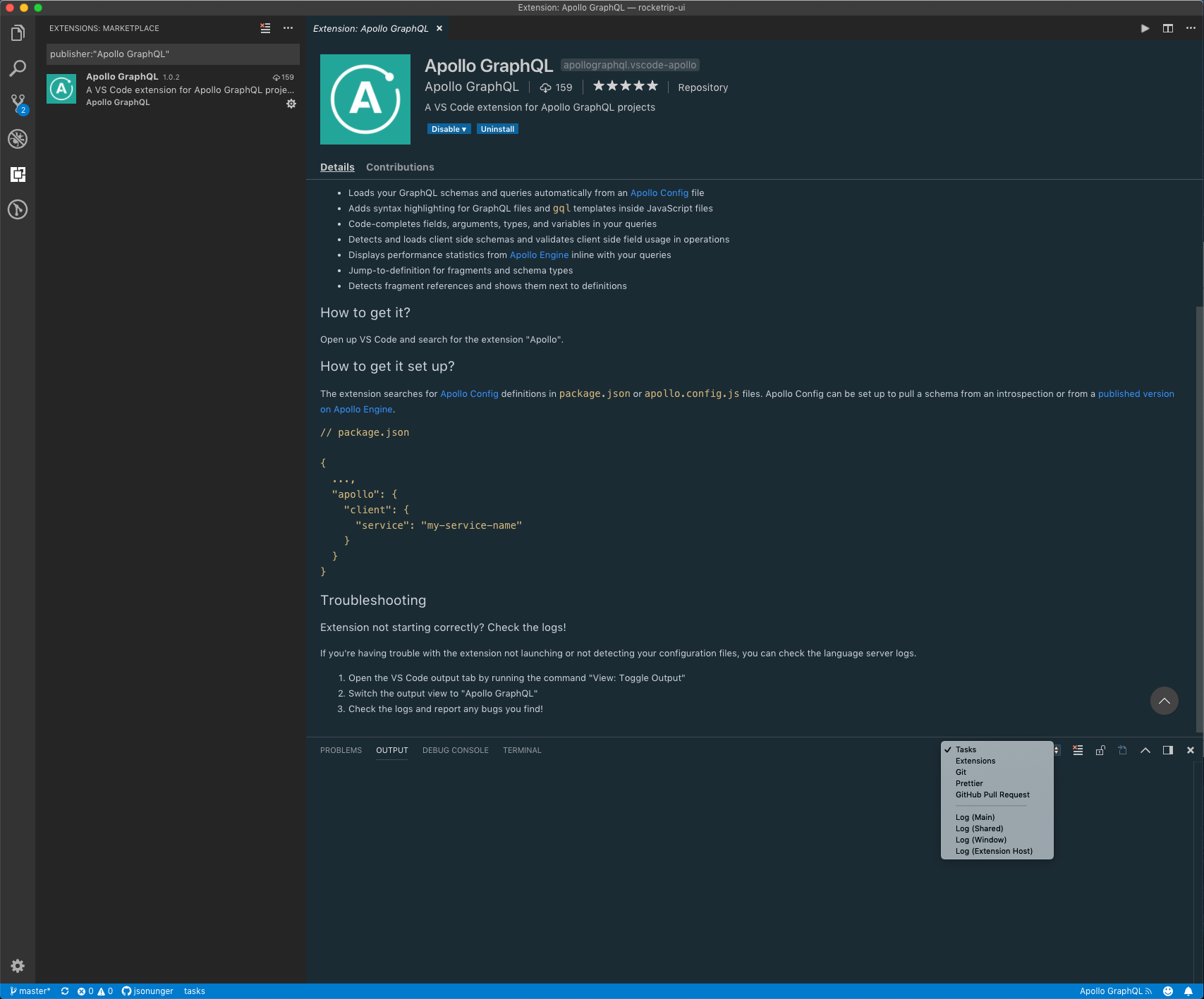
Was excited to start using the new Apollo GraphQL VSCode extension, but the extension didn't work and when I followed the troubleshooting instructions Apollo GraphQL was not listed as an option for the output view:
 jsonunger
All 20 comments
Yep, can't find it. Also doesn't seem to work either.
 chanlito
on 8 Nov 2018
chanlito
on 8 Nov 2018
Yah, the extension does not work at all, there is no output, all Apollo commands seem not to exist and throw errors. i guess some more final touch ups are needed. Thanks for the effort.
 tomitrescak
on 8 Nov 2018
tomitrescak
on 8 Nov 2018
Hi @jsonunger! Looking at your screenshot, it appears that the extension hasn't been activated. This is usually due to a missing or incorrectly formatted apollo.config.js file. For reference, it should look something like this:
module.exports = {
client: {
service: "SERVICE_NAME_HERE"
},
engine: {
apiKey: "APOLLO_ENGINE_KEY_HERE"
}
}
 shadaj
on 8 Nov 2018
shadaj
on 8 Nov 2018
@shadaj what if I am not using optics but a local schema file or a local endpoint? I tried all possible combinations of the apollo config file and no success:
module.exports = {
client: {
endpoint: {
url: 'http://localhost:3000/graphql'
}
},
};
I also tried this
module.exports = {
client: {
name: 'my-service-name'
},
service: {
name: 'my-service-name',
// this is the default endpoint info
endpoint: {
url: 'http://localhost:3000/graphql'
}
}
};
@tomitrescak could you try this config format?
module.exports = {
client: {
service: {
name: "my-service-name",
url: "http://localhost:3000/graphql"
}
}
}
@shadaj awesome! would you be so kind to post an example of working config ? Thanks
tomitrescak
on 8 Nov 2018
@tomitrescak see above ^^ it turned out to have been already fixed, but the docs are a bit out of date so I'm working on fixing that now.
shadaj
on 8 Nov 2018
Yah, I was too fast. Will wait for the fix. Thanks.
tomitrescak
on 8 Nov 2018
@tomitrescak there actually isn't any fix needed for this (just tested locally with the current published version). As long as you put the service object inside client and put your local endpoint config inside service, everything should work.
shadaj
on 8 Nov 2018
Well, that’s what I have what is shown above. Why it does not start?
tomitrescak
on 8 Nov 2018
What I mean is that with the Config format you mentioned it still does not start
[EDIT] Nope, I tried to put config to package.json or to apollo.config.js and both seem to have no effect on the service. This is what I have:
"apollo": {
    "client": {
      "service": {
        "name": "my-service",
        "url": "http://localhost:3000/graphql"
      }
    }
  }
Have you reloaded VS Code after updating the config?
shadaj
on 8 Nov 2018
Yes I did. Do you maybe have a repo which you can share with us, where we can test if problem is in our Config, or extension conflicts? ... I even tried to debug the extension but it is not hitting breakpoints after activation, meaning that the extension refuses to load.
tomitrescak
on 8 Nov 2018
[SOLVED] The problem was that I had *.js in my search ignore. Thus VS Code was not finding my config file. You may want to use "fs" directly and not vs code API.
Now I'm fighting #669
tomitrescak
on 9 Nov 2018
What about setting the config in package.json file? Instead of a dedicated
apollo.config.js?
On Fri, Nov 9, 2018, 9:31 AM Tomas Trescak <[email protected] wrote:
[SOLVED] The problem was that I had *.js in my search ignore. Thus VS Code
was not finding my config file. You may want to use "fs" directly and not
vs code API.Now I'm fighting #669
https://github.com/apollographql/apollo-tooling/issues/669—
You are receiving this because you commented.
Reply to this email directly, view it on GitHub
https://github.com/apollographql/apollo-tooling/issues/664#issuecomment-437228842,
or mute the thread
https://github.com/notifications/unsubscribe-auth/AO8QOwLHfXYfiRD3OAmZUfalEIDpM_tiks5utOkFgaJpZM4YTr1E
.
chanlito
on 9 Nov 2018
@chanlito looks like the plugin activate only when the config file is present.
tomitrescak
on 12 Nov 2018
@shadaj Is using the apiKey config field documented anywhere? Eventually, by using the config from your comment I managed to get the plugin working only with the Engine. However, is there any other way to pass the engine key e.g. through env variable? The config file is versioned in our public repo and storing keys in there doesn't sound like a good idea.
 maarcingebala
on 21 Nov 2018
maarcingebala
on 21 Nov 2018
@maarcingebala
I am pretty sure that you can do exactly that. You include a .env file next to your apollo.config.js with ENGINE_API_KEY=your_key_here
 Kresten
on 28 Nov 2018
Kresten
on 28 Nov 2018
@Kresten I was setting the variable manually in my shell which didn't work, but using .env file indeed does 🙂.
maarcingebala
on 28 Nov 2018
I believe everything here has been resolved, so I'm going to close this. Let me know if not :)
 JakeDawkins
on 25 Feb 2019
JakeDawkins
on 25 Feb 2019
Related issues
 pietmichal
·
4Comments
pietmichal
·
4Comments
 ajaymore
·
3Comments
ajaymore
·
3Comments
 m1010j
·
4Comments
m1010j
·
4Comments
 patrys
·
3Comments
patrys
·
3Comments
 u-ashish
·
4Comments
u-ashish
·
4Comments
Most helpful comment
What I mean is that with the Config format you mentioned it still does not start
[EDIT] Nope, I tried to put config to
package.jsonor toapollo.config.jsand both seem to have no effect on the service. This is what I have: