Apollo-server: Memory Leak Lambda
Hi, I have noticed a memory leak with the library apollo-server-lambda running a basic example.
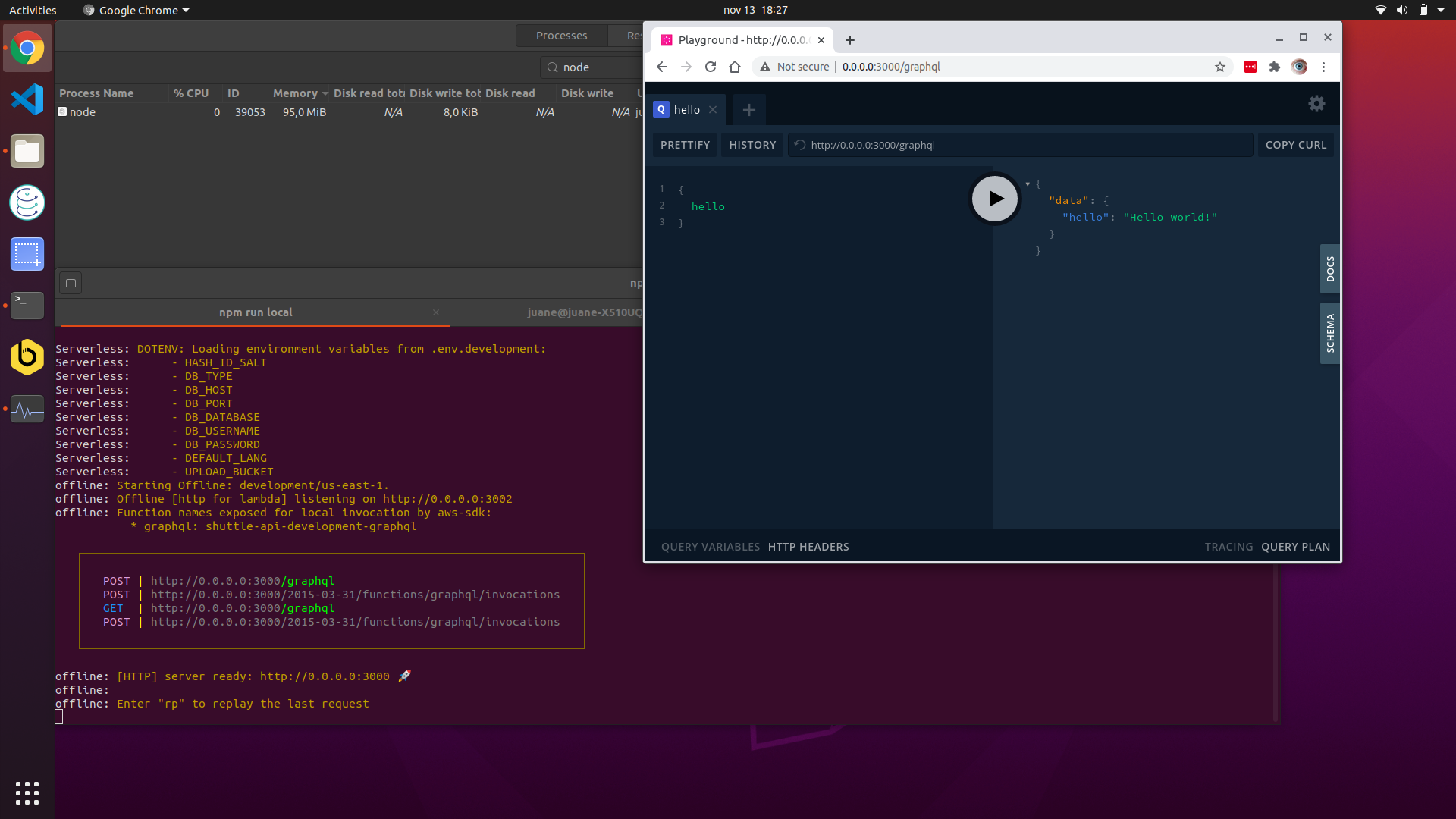
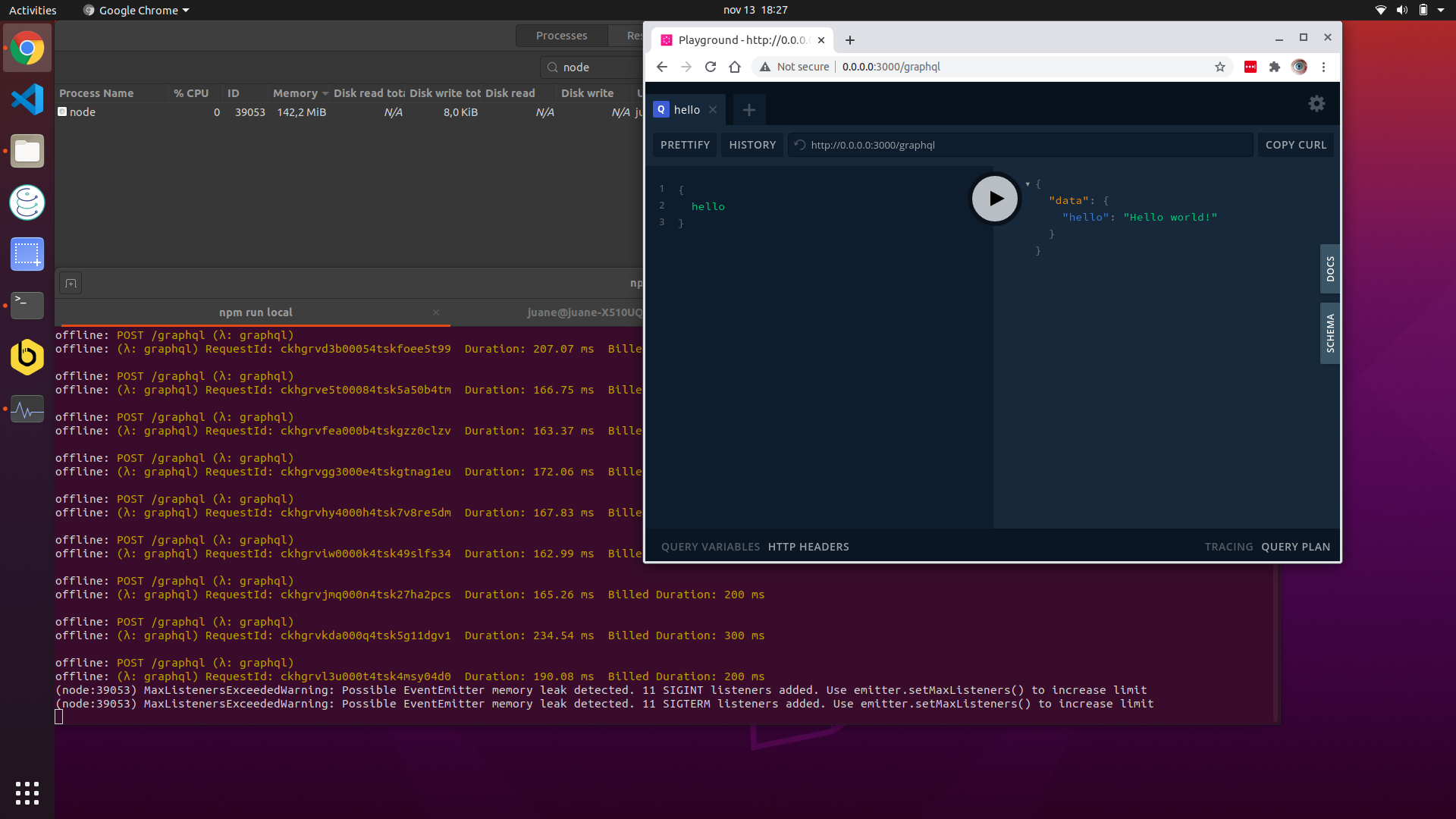
This is not happening if I use apollo-server. As you can see I ran 50 request and goes from 90MB to 376MB.
I'm using:
OS: Ubuntu 20.04.1 LTS
Node: v12.19.0
The code is:
const { ApolloServer, gql } = require('apollo-server-lambda')

const typeDefs = gql`
  type Query {
    hello: String
  }
`
const resolvers = {
  Query: {
    hello: () => 'Hello world!'
  }
}

const server = new ApolloServer({
  typeDefs,
  resolvers,
  playground: true,
  introspection: true
})

exports.graphqlHandler = server.createHandler()
The serverless.yml configuration is:
service: my-api

provider:
  name: aws
  runtime: nodejs12.x
  region: us-east-1
  stage: development

functions:
  graphql:
    handler: src/index.graphqlHandler
    events:
    - http:
        path: graphql
        method: post
        cors: true
    - http:
        path: graphql
        method: get
        cors: true

plugins:
  - serverless-dotenv-plugin
  - serverless-offline

 juanem1
All 9 comments
Same issue here with Node v12.18.3
The process is terminated with
FATAL ERROR: Ineffective mark-compacts near heap limit Allocation failed - JavaScript heap out of memory
Some useful output:
<--- Last few GCs --->

[23191:0x41b35d0]   405973 ms: Mark-sweep 1955.7 (2075.3) -> 1944.3 (2073.5) MB, 637.8 / 1.6 ms  (average mu = 0.227, current mu = 0.209) allocation failure scavenge might not succeed
[23191:0x41b35d0]   406742 ms: Mark-sweep 1959.1 (2075.7) -> 1950.2 (2075.4) MB, 646.1 / 1.6 ms  (average mu = 0.194, current mu = 0.159) allocation failure scavenge might not succeed


<--- JS stacktrace --->

==== JS stack trace =========================================

    0: ExitFrame [pc: 0x13cf019]
    1: StubFrame [pc: 0x13cfeed]
    2: StubFrame [pc: 0x142b5e4]
Security context: 0x0d791fd008d1 <JSObject>
    3: stringify(aka stringify) [0x12ea08044ff9] [/var/www/my_project/node_modules/fast-json-stable-stringify/index.js:54] [bytecode=0x177748bd6cc1 offset=404](this=0x2ff5287004b1 <undefined>,0x3871f4b6e381 <Object map = 0x1776ace84949>)
    4: stringify(aka stringify) [0x12ea08044ff9] [/var/www/...

FATAL ERROR: Ineffective mark-compacts near heap limit Allocation failed - JavaScript heap out of memory
 1: 0xa093f0 node::Abort() [/home/iamuser/.nvm/versions/node/v12.18.3/bin/node]
 2: 0xa097fc node::OnFatalError(char const*, char const*) [/home/iamuser/.nvm/versions/node/v12.18.3/bin/node]
 3: 0xb842ae v8::Utils::ReportOOMFailure(v8::internal::Isolate*, char const*, bool) [/home/iamuser/.nvm/versions/node/v12.18.3/bin/node]
 4: 0xb84629 v8::internal::V8::FatalProcessOutOfMemory(v8::internal::Isolate*, char const*, bool) [/home/iamuser/.nvm/versions/node/v12.18.3/bin/node]
 5: 0xd30fe5  [/home/iamuser/.nvm/versions/node/v12.18.3/bin/node]
 6: 0xd31676 v8::internal::Heap::RecomputeLimits(v8::internal::GarbageCollector) [/home/iamuser/.nvm/versions/node/v12.18.3/bin/node]
 7: 0xd3def5 v8::internal::Heap::PerformGarbageCollection(v8::internal::GarbageCollector, v8::GCCallbackFlags) [/home/iamuser/.nvm/versions/node/v12.18.3/bin/node]
 8: 0xd3eda5 v8::internal::Heap::CollectGarbage(v8::internal::AllocationSpace, v8::internal::GarbageCollectionReason, v8::GCCallbackFlags) [/home/iamuser/.nvm/versions/node/v12.18.3/bin/node]
 9: 0xd4185c v8::internal::Heap::AllocateRawWithRetryOrFail(int, v8::internal::AllocationType, v8::internal::AllocationOrigin, v8::internal::AllocationAlignment) [/home/iamuser/.nvm/versions/node/v12.18.3/bin/node]
10: 0xd0830b v8::internal::Factory::NewFillerObject(int, bool, v8::internal::AllocationType, v8::internal::AllocationOrigin) [/home/iamuser/.nvm/versions/node/v12.18.3/bin/node]
11: 0x1049f4e v8::internal::Runtime_AllocateInYoungGeneration(int, unsigned long*, v8::internal::Isolate*) [/home/iamuser/.nvm/versions/node/v12.18.3/bin/node]
12: 0x13cf019  [/home/iamuser/.nvm/versions/node/v12.18.3/bin/node]
Aborted (core dumped)
error Command failed with exit code 134.
info Visit https://yarnpkg.com/en/docs/cli/run for documentation about this command
 hayk-saryan
on 14 Jan 2021
hayk-saryan
on 14 Jan 2021
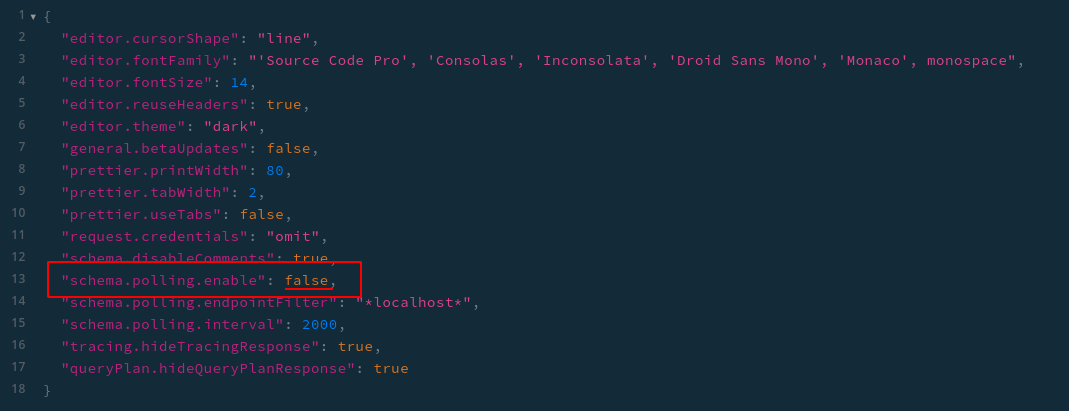
Disabling schema polling from GraphQL Playground settings (if used) may be a temporary workaround for termination problem.
hayk-saryan
on 26 Jan 2021
Are you able to see if this is still occurring in the latest version of apollo-server-lambda? We refactored the handler in v2.21.2 to be an async function which may have affected the details of what values get retained.
 glasser
on 1 Apr 2021
glasser
on 1 Apr 2021
TL;DR: use apollo-server in development. Store it in a separate file, and use it as the express server.
Don't use serverless-offline in development.
If you guys are using prisma, the problem is actually completely outside of the scope of apollo-server, and is related to serverless-offline.
Serverless offline does not reuse lambdas, it creates a new one with every request. What this means is that every time prisma client is intatiated (every request if you are doing things correctly) it spins up a new client to ping the database, and quickly runs out of connections. It also get's exposed as a memory leak issue, which is sort of the case in development.
Since Lambda containers are reused in production, this is not a problem. Any prisma client that exists (and really anything that would be a memory leak problem locally), will simply get reused, or will get cleaned up (disconnect of prisma from db) when the lambda instance cools down.
My solution has been to use apollo-server in development, and to maintain apollo-server-lambda with microscopically different configs for production. This can lead to problems, but we are just eyes wide open to QA/tests that takes place each time a change to the server itself happens, which is rare.
Hope this helps someone.
 hdngr
on 1 Apr 2021
hdngr
on 1 Apr 2021
There is definitely some sort of memory leak associated with this module (and not with serverless-offline) when instantiating a new ApolloServer instance. It appears to have been introduced in version 2.9.2. Every invocation of the lambda function increases the memory consumed. I'll see if I can put together an example project to illustrate the problem. For the time being, I've just pinned my version at 2.9.1
 mac-
on 7 Apr 2021
mac-
on 7 Apr 2021
That seems very surprising. There are no code changes in apollo-server-lambda or apollo-server-core between 2.9.1 and 2.9.2. Are you sure you aren't also changing something else (perhaps changing versions of the transitive dependency apollo-server-core more drastically than 2.9.1/2.9.2)?
glasser
on 7 Apr 2021
Admittedly, I have not spent a lot of time digging into the exact issue or looking at the dependency tree between those two versions. The only thing I've done is change my apollo-server-lambda version until I found one that did not produce memory issues and then the next one that did. I did not change any other direct dependency in my project. I will try to spend a little more time on it, but I just wanted to mention my findings in case it helps anyone else.
mac-
on 7 Apr 2021
I think the problem is with serverless-offline.
Downgrading serverless-offline to 6.5.0 fixed the issue for me.
See this discussion: https://github.com/dherault/serverless-offline/issues/1119
 bluedaniel
on 9 Apr 2021
bluedaniel
on 9 Apr 2021
The problem is definitely with serverless-offline. I've been using serverless (no graphql) for over a year now on a production application. The issue is that serverless functions in local offline don't free up their memory after invocation has ended. You can circumvent this using a utility function at the end of each request:
/**
 * Cleanup for serverless-offline memory leak
 * @returns {number}
 */
export const offlineExit = () =>
  setTimeout(() => {
    // add this to your local env
    if (process.env.CURRENT_ENV === "local") {
      exit()
    }
  }, 1000)
 R-Bower
on 10 May 2021
R-Bower
on 10 May 2021
Related issues
 nevyn-lookback
·
3Comments
nevyn-lookback
·
3Comments
 espoal
·
3Comments
espoal
·
3Comments
 danilobuerger
·
3Comments
danilobuerger
·
3Comments
 veeramarni
·
3Comments
veeramarni
·
3Comments
 bryanerayner
·
3Comments
bryanerayner
·
3Comments
Most helpful comment
Same issue here with Node v12.18.3
The process is terminated with
Some useful output: