Apollo-server: Express applyMiddleware needs Express.Application instead of Express.Express?
Upgraded from 2.13 to 2.18 and noticed that the applyMiddleware stopped working because of the type. Casting to any solve the issue.
Packages:
        "apollo": "^2.31.0",
        "apollo-server": "^2.18.0",
        "apollo-server-core": "^2.18.0",
        "apollo-server-express": "^2.18.0",
         "express": "^4.17.1",
        "@types/express": "^4.17.8"
The expected behavior is that the Appolo server could be used as before with the applyMiddleware:
const app = express(...);
const server = new ApolloServer(...);
server.applyMiddleware({app, ...})
The problem is the last line with an actual behavior of type exception:
Type 'Express' is not assignable to type 'Application'.
Fix: casting the app to any fixes the issue, it runs at runtime.
Reason: Looking at ApolloServer.ts is seem the app type is now set to express.Application
Related documentation: https://www.apollographql.com/docs/apollo-server/api/apollo-server/#applymiddleware
 MrDesjardins
All 12 comments
Hi, I don't believe that we've changed the name of the type we use for the app argument for several years. However, the @types/express package that is used to determine exactly what express.Application means has changed over time. Can you share a more detailed error message?
Specifically something I have run into is that @types/express depends on some other packages such as @types/express-serve-static-core using unversioned dependencies, but that the DefinitelyTyped project which maintains the @types packages actually made changes to those two packages in a way that newer versions of @types/express don't work unless you upgrade @types/express-serve-static-core. If you share your full error output I can see if it looks like the same issue, but my suggestion is that npm install @types/[email protected] may fix your issue. (at least if you've been appropriate npm dedup'd so that the version you explicitly install is what's used transitively.)
 glasser
on 24 Sep 2020
glasser
on 24 Sep 2020
Here is the exact error I am getting (only about type, if I cast to any it works).

MrDesjardins
on 25 Sep 2020
@MrDesjardins Thanks. I believe you are using @types/express 4.17.8 as that's the minimum version you specify in your package-lock.json and it's also the latest version. Can you tell me what version of @types/express-serve-static-core you are using? eg, npm ls | grep @types/express-server-static-core.
glasser
on 25 Sep 2020
I have set in my package.json the suggested version of the express-server-static-core:
"@types/express-serve-static-core": "^4.17.13",
Initially, I had no type for express-serve-static-core , only"@types/express": "^4.17.8",
I ran npm ls | grep @types/express-server-static-core which resulted to +20ish npm ERR! peer dep missing:
MrDesjardins
on 25 Sep 2020
Specifically it looks like this is related to https://github.com/DefinitelyTyped/DefinitelyTyped/pull/45352 which was released in @types/[email protected]
My mistake, I had a typo: npm ls | grep @types/express-serve-static-core
glasser
on 25 Sep 2020
but actually, how about just npm ls | grep @types/express, in case maybe you've got two of those.
glasser
on 25 Sep 2020
I have deleted the npm lock file and ran again npm install with the @types/express-server-static-core and the type issue is gone.
I am not sure why I never needed this package before, but you are right, it as needed!
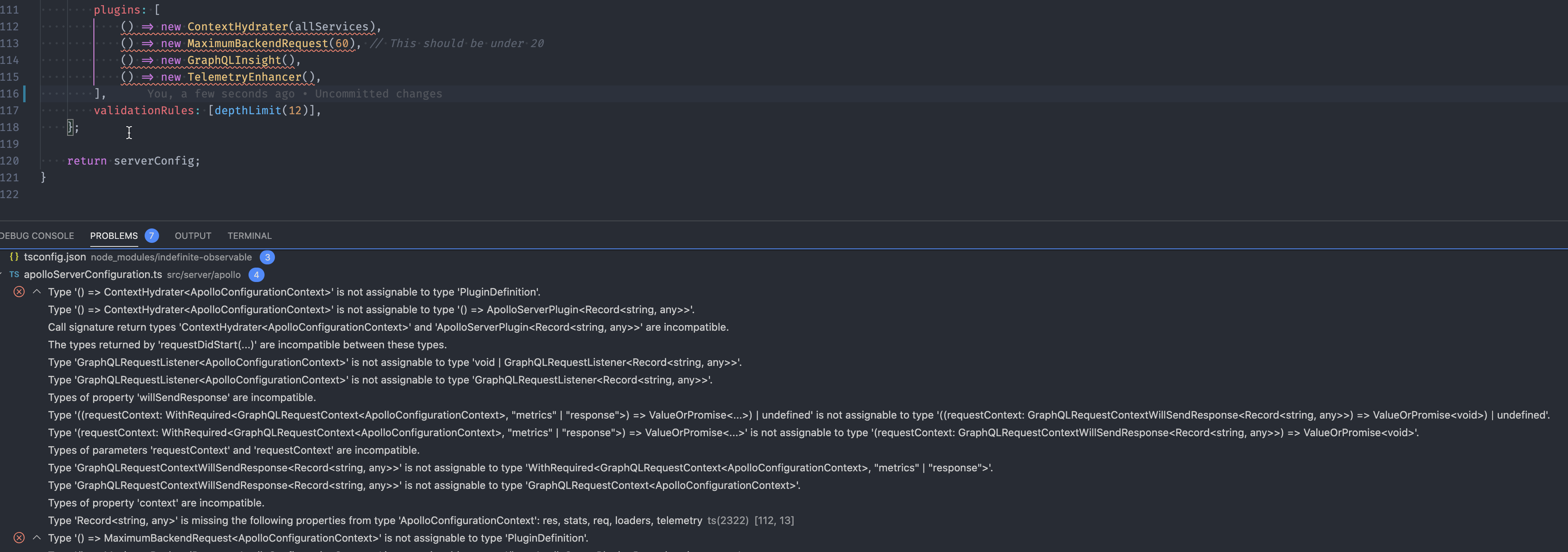
Similarly, when updating Apollo from 2.16 to 2.18 the second issue with type was related to Plugins. The PluginDefinition type is complaining. Casting to any also fixes the issue. Is there another type package that I am missing?
MrDesjardins
on 25 Sep 2020
Yeah it's a real pain that DefinitelyTyped makes backwards-incompatible changes but doesn't mark their dependencies in a way that it will work.
For the next one, first can you try using 2.18.1 instead of 2.18.0? I reverted something relating to the typing of ApolloServerPlugin in that one, though I don't think it's immediately relevant to that error.
glasser
on 25 Sep 2020
I cleaned up my lock file and node_modules folder. Installed 2.18.1
Here is the version I am running:
        "apollo": "^2.31.0",
        "apollo-datasource-rest": "^0.3.2",
        "apollo-server": "^2.18.1",
        "apollo-server-core": "^2.18.1",
        "apollo-server-express": "^2.18.1",
      "express": "^4.17.1",
     "@types/express": "^4.17.8",
        "@types/express-serve-static-core": "^4.17.13",
        "@types/graphql": "^14.5.0",
        "@types/graphql-depth-limit": "^1.1.0",
        "@types/graphql-fields": "^1.3.3",
  "typescript": "^4.0.2"
I still have the same error for the plugins. I tried to convert my _class_ into a function to see... does not help.
My plugins (that were all working before the update) have these shapes:
export class ContextHydrater<TContext extends ApolloConfigurationContext>
    implements AppoloPlugin.ApolloServerPlugin<TContext> { .....}

export interface ApolloConfigurationContext extends GraphQLCustomResolversContext { ... }

export interface GraphQLCustomResolversContext { ... }
Nothing very fancy 🤔
MrDesjardins
on 25 Sep 2020
Hi, I tried to reproduce this myself and was unable to do so. Is there a chance you can create a little git repo with an example of a program using plugins which builds with AS 2.13 and fails to build with AS 2.18.1? Start with your app and delete as much as possible until you end up with a minimal example. Ideally this is a full repo with package.json etc so that we're running TS in the same way.
glasser
on 25 Sep 2020
Encountered this issue as well but cleaning up both node_modules and lock file fixed it for me.
"apollo-server-express": "^2.18.1"
"express": "^4.17.1"
"@types/express": "^4.17.8"
 cerino-ligutom
on 27 Sep 2020
cerino-ligutom
on 27 Sep 2020
Thank you @cerino-ligutom
After deleting the package-lock.jsonl, deleting the content of thenode_modulesand executingnpm install` the typing issue disappeared.
MrDesjardins
on 28 Sep 2020
Related issues
 hiucimon
·
3Comments
hiucimon
·
3Comments
 dupski
·
3Comments
dupski
·
3Comments
 bryanerayner
·
3Comments
bryanerayner
·
3Comments
 danilobuerger
·
3Comments
danilobuerger
·
3Comments
 stevezau
·
3Comments
stevezau
·
3Comments
Most helpful comment
Thank you @cerino-ligutom
After deleting the
package-lock.jsonl, deleting the content of thenode_modulesand executingnpm install` the typing issue disappeared.