Apollo-server: Playground keeps receiving bad request when hosted on Heroku ("Server cannot be reached"), but everything else works
Hi everyone,
Problem:
- I am able to view the playground on my server URL (https://selformative-server.herokuapp.com/) AND I'm able to send a fetch via the console when viewing the page (No I'm not in production mode) =>
fetch('/graphql', {
  method: 'POST',
  headers: {
    'Content-Type': 'application/json',
    'Accept': 'application/json',
  },
  body: JSON.stringify({query: "{ hello }"})
})
  .then(r => r.json())
  .then(data => console.log('data returned:', data));
This fetch command returns the data as requested. So, everything works.
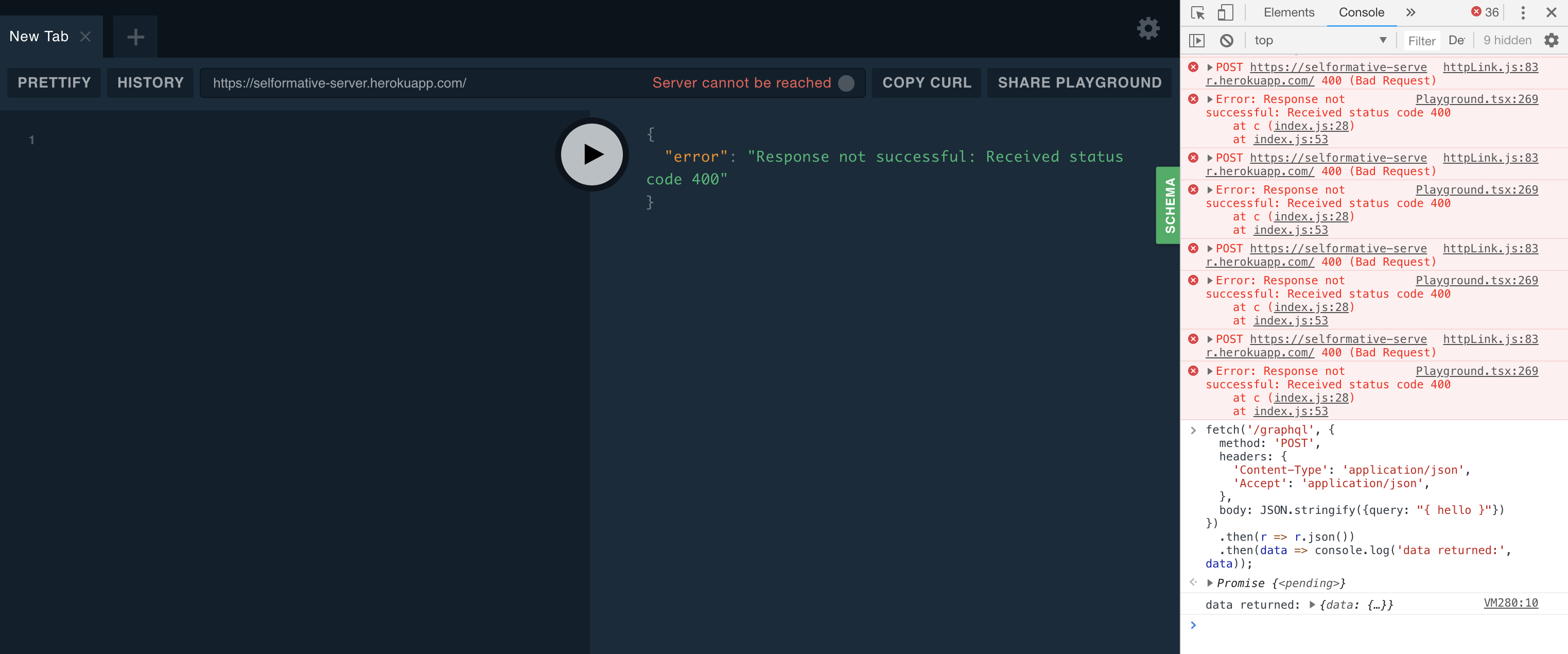
The problem is, for whatever reason, while it's sitting there on the playground page, it's constantly receiving a "bad request" (see image below). On the UI, you can also see a "Server cannot be reached"
Image:
Here's my server.js:
const { ApolloServer, gql } = require('apollo-server');

const books = [
  {
    id: 0,
    title: 'Harry Potter and the Chamber of Secrets',
    author: 'J.K. Rowling',
  },
  {
    id: 1,
    title: 'Jurassic Park',
    author: 'Michael Crichton',
  },
];

const typeDefs = gql`
  # Comments in GraphQL are defined with the hash (#) symbol.

  # This "Book" type can be used in other type declarations.have
  type Book {
    id: ID
    title: String
    author: String
  }

  # The "Query" type is the root of all GraphQL queries.
  # (A "Mutation" type will be covered later on.)
  type Query {
    books: [Book]
    hello: String
  }
`;

const resolvers = {
  Query: {
    books: () => books,
    hello: () => {
      return `hello world`
    }
  },
};

const server = new ApolloServer({ typeDefs, resolvers });

server.listen({ port: process.env.PORT || 4000 }).then(({ url }) => {
  console.log(`🚀 Server ready at ${url}`);
});
Here's my package.json
{
  "name": "selformative-server",
  "version": "1.0.0",
  "description": "",
  "main": "index.js",
  "scripts": {
    "test": "echo \"Error: no test specified\" && exit 1",
    "start": "node server.js"
  },
  "keywords": [],
  "author": "",
  "license": "ISC",
  "dependencies": {
    "apollo-server": "^2.1.0",
    "graphql": "^14.0.2"
  }
}
Note: Also, if I type in queries on the playground, they work, showing the correct data, but moments later it is then replaced again with "error": "Response not successful: Received status code 400"
Any ideas on the issue? Thanks
 bchehraz
All 3 comments
Duplicate/Ref - https://github.com/apollographql/apollo-server/issues/1718
Add introspection : true in graphql server configuration option
server = new ApolloServer({
// These will be defined for both new or existing servers
typeDefs,
resolvers,
context: async ({ req }) => {
let headers = {headers: req.headers}
if(req.headers.authorization){
let token = req.headers.authorization;
const user = (token != 'null' || null) ? await getUser(token) : null;
return user ? { headers,token, user } : { headers,token };
}else{
return {headers};
}
},
introspection:true // add this line to solve your problem, introspection is false by default on production
});
 digiwala
on 7 Oct 2018
digiwala
on 7 Oct 2018
Gasp! Thank you so much for this. Fixed my problem simply by adding in that 1 line
bchehraz
on 7 Oct 2018
Thanks so much @digiwala! For me, I had to set both playground: true (for the graphql server to render Graphql Playground) and introspection: true (for the graphql server to register my instance of Apollo Server) to use Graphql Playground with NODE_ENV=production. In my case I was just trying to make sure everything works locally (using most production settings) before deploying to the cloud. Maybe this will help someone with a similar issue.
 capndave
on 14 Dec 2020
capndave
on 14 Dec 2020
Related issues
 attdona
·
3Comments
attdona
·
3Comments
 jminz
·
3Comments
jminz
·
3Comments
 dupski
·
3Comments
dupski
·
3Comments
 danilobuerger
·
3Comments
danilobuerger
·
3Comments
 disyam
·
3Comments
disyam
·
3Comments
Most helpful comment
Duplicate/Ref - https://github.com/apollographql/apollo-server/issues/1718
Add introspection : true in graphql server configuration option
example:-------
server = new ApolloServer({
// These will be defined for both new or existing servers
typeDefs,
resolvers,
context: async ({ req }) => {
let headers = {headers: req.headers}
if(req.headers.authorization){
let token = req.headers.authorization;
const user = (token != 'null' || null) ? await getUser(token) : null;
return user ? { headers,token, user } : { headers,token };
}else{
return {headers};
}
},
introspection:true // add this line to solve your problem, introspection is false by default on production
});