Apollo-module: Query with union
Hi,
i've got a query with some union in it and i'm not quite sure how to configurate my client.
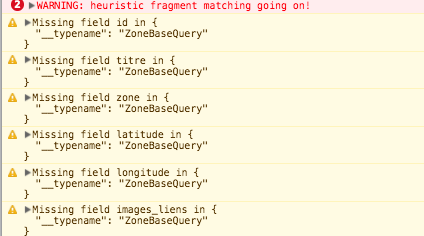
I've got a big warning that say : heuristic fragment matching going on!
Do i put my configuration for fragment in my default.js file ?
 yaki4
yaki4
All 26 comments
@yaki4 do you use *.gql files and there you import the fragments? Do you have any sideeffects or real errors?
 dohomi
on 24 Jan 2018
dohomi
on 24 Jan 2018
@dohomi yup i use .gql file. For now my query's got the fragment in the same file but i plan to put it in another file.
I've got warnings when some type doesn't contains data and big warning when all my data fit my query.
You can find my query and the warnings down there.

yaki4
on 25 Jan 2018
@yaki4 try following:
fragment.gql:
fragment zone on ZoneBaseQuery{
id
(...)
}
query.gql:
#import "./fragment.gql"
query someQery(..){
yourQuery(){
...zone
(...)
}
}
This is how I did it without any issues yet.
dohomi
on 25 Jan 2018
@dohomi : Sorry for the late response.
I've put in place your solution but i still got the same warning for heurisitc fragment matching going on.
yaki4
on 31 Jan 2018
@yaki4 do you have a repo where I could have a look? I am using fragments for long time without issues.
dohomi
on 5 Feb 2018
@dohomi : You can find a repo there https://gitlab.com/yaki4/fragment-exemple
yaki4
on 5 Feb 2018
@yaki4 a quick guess: you are using __typename quite frequently on both, the queries as well as inside the fragment. I have in mind that you don't need to do that, maybe try to remove them? As far as I know there is even maybe a default option or you can enable that the __typename is always passed in apollo.
dohomi
on 6 Feb 2018
@dohomi : I add those in hope that will fix the issue. i'll check for the default option.
Do i have to set up the fragment matcher in my config ?
yaki4
on 6 Feb 2018
@yaki4 not as far as I know, fragments should work simply like this:
fragment.gql
fragment client on Client{
id
email
firstName
}
query.gql
#import "./fragment.gql"
query {
Client{
...client
}
}
@dohomi Ok but it doesn't seem to be the case. I'll continue to investigate maybe i made a mistake.
yaki4
on 7 Feb 2018
@yaki4
You need to tell apollo about all the possible types in a union type.
Simply follow the instructions here: https://www.apollographql.com/docs/react/recipes/fragment-matching.html
 faroutchris
on 12 Feb 2018
faroutchris
on 12 Feb 2018
@faroutchris: thanks for the advice. It works now.
I was not sure that was mandatory for union.
Thanks @dohomi for your patience
yaki4
on 13 Feb 2018
will close this issue due to inactivity. Hope you got everything sorted
dohomi
on 5 Mar 2018
@yaki4 would you share how you implemented the IntrospectionFragmentMatcher?
Is this implemented in the apollo-module, or do I need to implement this manually? If latter: What would be the best practice for that?
 nelhop
on 15 Feb 2019
nelhop
on 15 Feb 2019
@yaki4 or @faroutchris Just curious if we could get a little help as to how to go about implementing this in Nuxt.
 bswank
on 19 Feb 2019
bswank
on 19 Feb 2019
Hey @nelhop and @bswank
My apollo client configuration:
import { InMemoryCache, IntrospectionFragmentMatcher } from 'apollo-cache-inmemory'
import schema from './schema.json' <= contain schema of my graphql api
const fragmentMatcher = new IntrospectionFragmentMatcher({
    introspectionQueryResultData: schema
  })

export default ({req, app}) => {
    let headersVal = {
        'Accept-Language': app.i18n.locale
    }
    return {
        httpEndpoint: 'https://mycoolgraphqlapi/api/queries',
        httpLinkOptions: {
            credentials: 'include',
            headers: headersVal
        },
        cache: new InMemoryCache({ fragmentMatcher }),
    }
}
You don't need to add apollo-cache-inmemory it comes with @nuxtjs/apollo. Just be sure to add includeNodeModules at true in your nuxt.config .
nuxt.config.js:
  apollo: {
    includeNodeModules: true,
    clientConfigs: {
      default: '@/apollo/client-configs/default.js'
    }
  },
You can populate your schema.json in two ways. The first w'll be at nuxtServerInit to make a query that'll get your schema and create the file locally. The lazy way(that i use) is to make the schema just once and create it locally. But you need to update your file every time your schema had new type.
The query to get your schema is :
query {
  __schema {
    types {
      name
      kind
      possibleTypes {
        name
        description
      }
    }
  }
}
Last time i needed to use fragment was with 4.0.0-rc2.3 but i think that it's still true.
yaki4
on 19 Feb 2019
Thank you @yaki4
@nelhop That solution worked perfectly for me – check it out if you're still stuck!
bswank
on 19 Feb 2019
Thanks @yaki4.
Unfortunately I can't get it to work.
As I apply your entries for the default.js config ist prompts a error: defaultClientConfig is not a function.
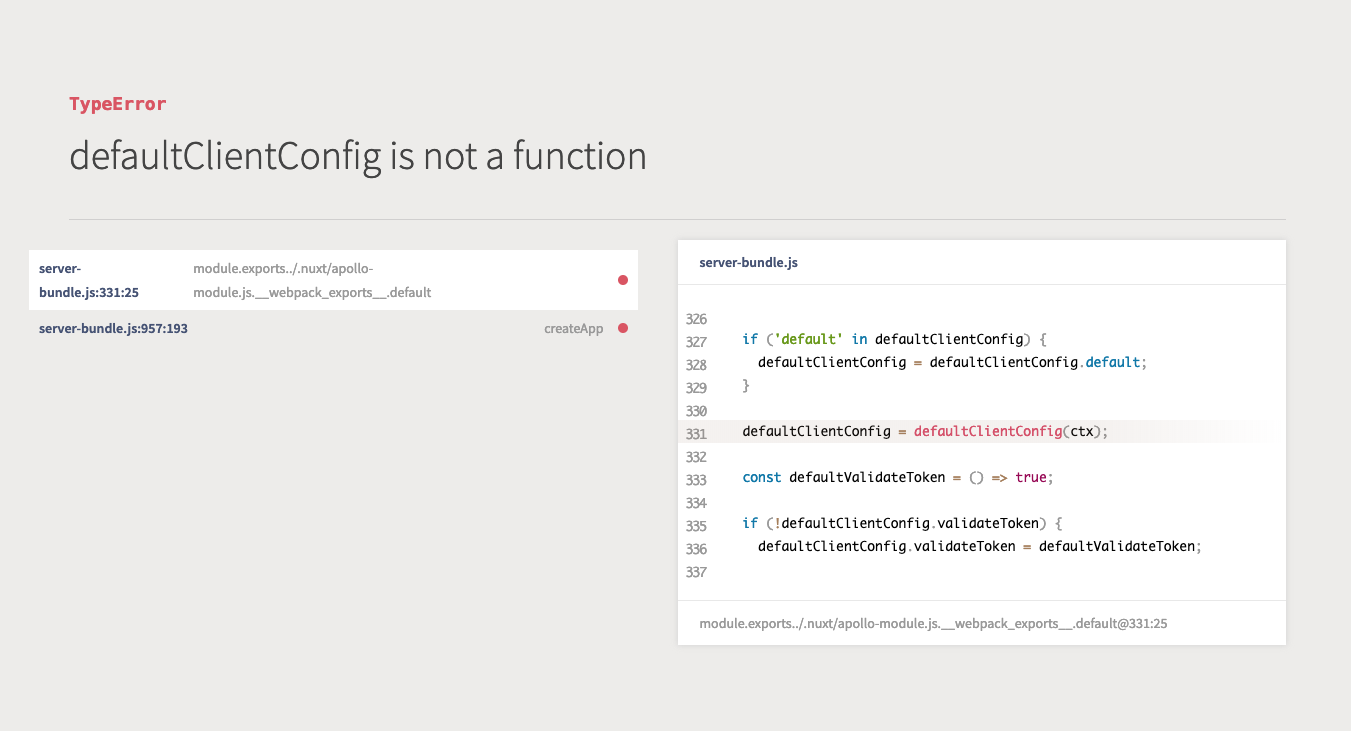
My config looks like this:
default.js:
import { InMemoryCache, IntrospectionFragmentMatcher } from 'apollo-cache-inmemory'
import schema from './schema.json'
const fragmentMatcher = new IntrospectionFragmentMatcher({
    introspectionQueryResultData: schema
  })

export default ({req, app}) => {
    return {
      httpEndpoint: 'https://mycoolgraphqlapi.com/api',
      getAuth:() => 'Bearer mytoken',
      tokenName: 'apollo-token',
      cache: new InMemoryCache({ fragmentMatcher }),
    }
}
nuxt.config.js:
apollo: {
  includeNodeModules: true,
  errorHandler (error) {
    console.log('%cError', 'background: red; color: white; padding: 2px 4px; border-radius: 3px; font-weight: bold;', error.message)
  },
  clientConfigs: {
    default: '@/apollo/config/default.js',
  }
},
Do I need to install something something or am I missing something?
nelhop
on 26 Feb 2019
Thanks @faroutchris, I am aware of the process. The defaultClientConfig is not a function error is kind of a blocker though...
I am glad for any suggestions how to fix this.
nelhop
on 28 Feb 2019
@nelhop Do you have a repo I can see your Nuxt project?
bswank
on 28 Feb 2019
@bswank I'll get in touch with you via email.
nelhop
on 28 Feb 2019
Solved! :)
After updating to Nuxt 2.4.5 I the defaultClientConfig is a function again.
Another Pitfall was the syntax of the schema.json:
My schema startet with { "data": { "__schema": {.... After deleting { "data": (and the corresponding closing }) it works.
nelhop
on 6 Mar 2019
do you have any idea on how to generate the schema.json automatically? at the moment I have run this as a node script manually, but others may forget about this, so I would prefer to do it automatically on nuxt startup. Although I tried using an async config with nuxt-apollo which leads to some errors ( described here https://cmty.app/nuxt/apollo-module/issues/c216 )
 mmintel
on 4 Jul 2019
mmintel
on 4 Jul 2019
Solved! :)
After updating to Nuxt 2.4.5 I the defaultClientConfig is a function again.
Another Pitfall was the syntax of the schema.json:
My schema startet with{ "data": { "__schema": {.... After deleting{ "data":(and the corresponding closing}) it works.
Yes. If u don't remove "data" in the schema.json (generated from graphiQL) throw an error :
TypeError
Cannot read property 'types' of undefined
 alfredarcifa
on 28 Jul 2019
alfredarcifa
on 28 Jul 2019
@mmintel
do you have any idea on how to generate the schema.json automatically? at the moment I have run this as a node script manually, but others may forget about this, so I would prefer to do it automatically on nuxt startup. Although I tried using an async config with nuxt-apollo which leads to some errors ( described here https://cmty.app/nuxt/apollo-module/issues/c216 )
I followed this guide: https://medium.com/commutatus/whats-going-on-with-the-heuristic-fragment-matcher-in-graphql-apollo-client-e721075e92be
to generate the schema.json.
Then just create a custom script in your package.json to first generate the schema.json and then start nuxt.
Something like:
(In my case I also have babel-node to help me execute the code within my schema generation file.)
  "scripts": {
    "dev": "yarn build-fragments && nuxt -o",
    "build-fragment": "babel-node --presets env -- apollo/schemaQuery.js"
  },
and then you run $ yarn dev to start nuxt for development.
Then you can also create scripts for the build task of course.
 Jones-S
on 16 Aug 2019
Jones-S
on 16 Aug 2019
@yaki4, thank you, man!
 souljorje
on 23 Mar 2020
souljorje
on 23 Mar 2020
Related issues
 lindesvard
·
7Comments
lindesvard
·
7Comments
 SuddenlyRust
·
5Comments
SuddenlyRust
·
5Comments
 Billybobbonnet
·
4Comments
Billybobbonnet
·
4Comments
 leviwheatcroft
·
5Comments
leviwheatcroft
·
5Comments
 Teeoo
·
4Comments
Teeoo
·
4Comments
Most helpful comment
Hey @nelhop and @bswank
My apollo client configuration:
You don't need to add apollo-cache-inmemory it comes with @nuxtjs/apollo. Just be sure to add includeNodeModules at true in your nuxt.config .
nuxt.config.js:
You can populate your schema.json in two ways. The first w'll be at nuxtServerInit to make a query that'll get your schema and create the file locally. The lazy way(that i use) is to make the schema just once and create it locally. But you need to update your file every time your schema had new type.
The query to get your schema is :
Last time i needed to use fragment was with 4.0.0-rc2.3 but i think that it's still true.