Apollo-ios: "The package dependency graph can not be resolved" when adding package dependency in Xcode.
Intended outcome: being able to add apollo-ios package dependency to the SwiftUI project via SPM (Swift Package Manager).
Actual outcome: "Package resolution failed" error.
Versions:
- macOS Catalina 10.15.3
- XCode 11.1 (11A1027)
- Swift 5.1.3
- Current version of apollo-ios that I'm trying to add: 0.25.0
How to reproduce the issue:
- Follow the steps from here
- On the part Add the Apollo iOS SDK to your project after step 4, instead of seeing what is described in the step 5, I get the following:
The package dependency graph can not be resolved; unable find any available tag for the following requirements:
https://github.com/apollographql/apollo-ios.git — 0.25.0..<0.26.0

Notes:
- In the aforementioned step 4, I tried setting _up to next Minor_ and _up to next Major_ as well, but it does not help
- It does not matter if I create storyboard project or the SwiftUI one.
Possible workaround:(didn't try it yet): Install package from CocoaPods or Carthage, as described here
Not sure if the error comes from the Xcode, something else, or apollo-ios itself, but searching for this error in other projects, there are situations where there is wrong setup in the repository for it to be used by SPM, e.g. mentioned here.
 zdzichukowalski
All 5 comments
We definitely have a 0.25.0 release tagged, and I was just able to get it to resolve correctly and build in a test project with the following settings:
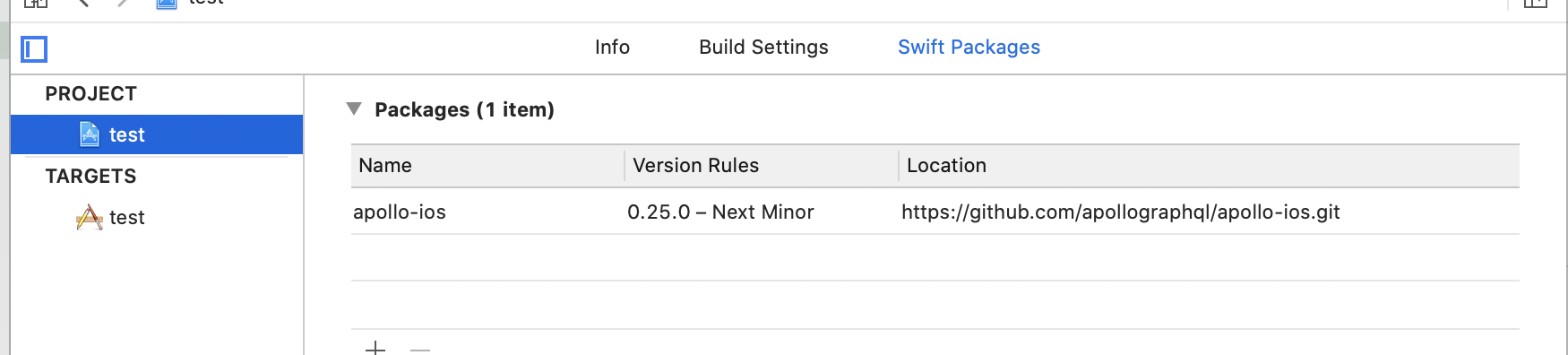
Can you share a screenshot of this setting on your project (or your Package.swift if you're using that)
 designatednerd
on 15 Apr 2020
designatednerd
on 15 Apr 2020
You also may want to try upgrading Xcode to 11.2, which has Swift 5.2 - in theory swift-tools 5.1 should still be able to parse a Package.swift written for 5.2, but in practice that could be an issue. If 0.24.0 works for you and 0.25.0 doesn't, that's almost certainly your problem.
designatednerd
on 15 Apr 2020
Update of Xcode helped so looks like the issue was there. Thanks for quick reaction :)
zdzichukowalski
on 15 Apr 2020
I ran into this issue with Xcode 11.2 and Apollo 0.27.1
I had just forgotten to use the right Xcode and using 11.5 fixed it.
 bwu-chwy
on 16 Jun 2020
bwu-chwy
on 16 Jun 2020
Changing it to Apollo version 0.24.1 fixed it for me, since I wasn't able to update my Xcode due to storage issues!
 tkumarAR
on 2 Jul 2020
tkumarAR
on 2 Jul 2020
Related issues
 ermik
·
4Comments
ermik
·
4Comments
 dchohfi
·
4Comments
dchohfi
·
4Comments
 jeromeDms
·
5Comments
jeromeDms
·
5Comments
 uericw
·
4Comments
uericw
·
4Comments
 ashiemke
·
5Comments
ashiemke
·
5Comments
Most helpful comment
I ran into this issue with Xcode 11.2 and Apollo 0.27.1
I had just forgotten to use the right Xcode and using 11.5 fixed it.