Apollo-ios: Apollo API.swift file not generating
Environment:
Xcode 10.1
Mac 10.13.6
apollo/2.5.1 darwin-x64 node-v10.15.1
npm 6.4.1
Having some issues generating the API.swift file from the schema.json. not sure if the command for this has been updated but not reflected in the docs. Since the script inside Xcode was not generating the API.swift file I decided to try it out manually
apollo codegen:generate --queries="$(find . -name '*.graphql')" --schema=schema.json API.swift
and i get the follow error:
› Error: Unexpected argument: API.swift
› See more help with --help
other errors I get in the more detailed build within Xcode is:
(node:1534) Error Plugin: apollo: files attribute must be specified in /Users/megaman/Developer/myProject/node_modules/apollo/package.json
(node:1534) Error Plugin: @oclif/plugin-not-found: files attribute must be specified in /Users/megaman/Developer/myProject/node_modules/@oclif/plugin-not-found/package.json
I have installed node and npm which reside at
/usr/local/bin/node
/usr/local/lib/node_modules/npm
directly installed from node.js website. I do NOT have it installed via homebrew. Apollo was installed via cocoapods instead of carthage.
any idea whats going on here? The API.swift file is not being generated at the end of all this so I end up getting graphql errors in Xcode obviously.
 geeksweep
All 18 comments
Did you find a solution?
 ghost
on 7 Mar 2019
ghost
on 7 Mar 2019
same issue here
 kukkadapukarthik
on 13 Mar 2019
kukkadapukarthik
on 13 Mar 2019
Did you installed Apollo cli global?
ghost
on 13 Mar 2019
Build failed. #474
kukkadapukarthik
on 13 Mar 2019
I'm having the same issue, did you make any headway on this?
 bmunge
on 30 Apr 2019
bmunge
on 30 Apr 2019
$APOLLO_FRAMEWORK_PATH/check-and-run-apollo-cli.sh codegen:generate --includes="./*/.graphql" --endpoint='https://xxx.com/graphql' --target=swift API.swift
the issue will be solved by using the above command on build phase.
kukkadapukarthik
on 3 May 2019
Seems like the $APOLLO_FRAMEWORK_PATH/check-and-run-apollo-cli.sh command doesn't actually run the local version of apollo.
_This is what is run under the hood._
npx --no-install apollo codegen:generate --queries="$(find . -name '*.graphql')" --schema=schema.json API.swift
They do this to make sure a known working version of the cli is used for the code-gen, which breaks with newer versions (https://github.com/apollographql/apollo-ios/issues/334).
@kukkadapukarthik posted a working command for the newest version of apollo-cli, but if you want to use the code-gen the way that's referenced on the docs, you'll have to stick with the npx version.
My issue was fixed by making sure schema.json and all .graphql files were inside the project folder. (ie. project_name/project_name/schema.json). NOT project_name/schema.json.
 PoeticPete
on 11 May 2019
PoeticPete
on 11 May 2019
Hey all, I've recently updated the setup instructions for the codegen build phase - please try those out and if you're still experiencing problems, open a new issue with details and I'll dig into it. Meanwhile, I'll close this issue out.
 designatednerd
on 15 Jul 2019
designatednerd
on 15 Jul 2019
No luck, the same error... Did anyone find some solution?
 radekcep
on 22 Jul 2019
radekcep
on 22 Jul 2019
@radekcep What is the command you are using within Xcode to run the build phase?
designatednerd
on 22 Jul 2019
@designatednerd I'm running exactly what is stated in the setup:
SCRIPT_PATH="${PODS_ROOT}/Apollo/scripts"
cd "${SRCROOT}/${TARGET_NAME}"
"${SCRIPT_PATH}"/check-and-run-apollo-cli.sh codegen:generate --target=swift --includes=./*.graphql --localSchemaFile="schema.json" API.swift
I have clean versions of Apollo CLI (-g 2.16.0) and pod (0.12.0) installed.
Yet I always end up with:
›   Warning: apollo update available from 1.9.2 to 2.16.0.
++ npx --no-install apollo codegen:generate --target=swift '--includes=./*.graphql' --localSchemaFile=schema.json API.swift
 ›   Warning: apollo update available from 1.9.2 to 2.16.0.
 ›   Error: Unexpected arguments: --localSchemaFile=schema.json, API.swift
 ›   See more help with --help
Command PhaseScriptExecution failed with a nonzero exit code
radekcep
on 22 Jul 2019
If you're on v0.12.0 of the pod, it'll ignore your global install and try to locally install 1.9.x of the CLI client. Please check out my response here on changes to the build script that are shipping with 0.13.0 (hopefully tomorrow 23 July) - if you use the build script linked there, that should work well with 0.12.0
My apologies, I'll try to figure out a better way to keep docs showing both old and new versions until a new version is released in the future.
designatednerd
on 22 Jul 2019
Yes, that seems to help a little, but now the script just hangs on different error: Cannot read property 'getMutationType' of undefined
radekcep
on 22 Jul 2019
Yeah that seems like a different error - can you open a new issue for that @radekcep and we'll try to figure out what's going on?
designatednerd
on 22 Jul 2019
@designatednerd you're right. And big thank you for your help with this one!
radekcep
on 22 Jul 2019
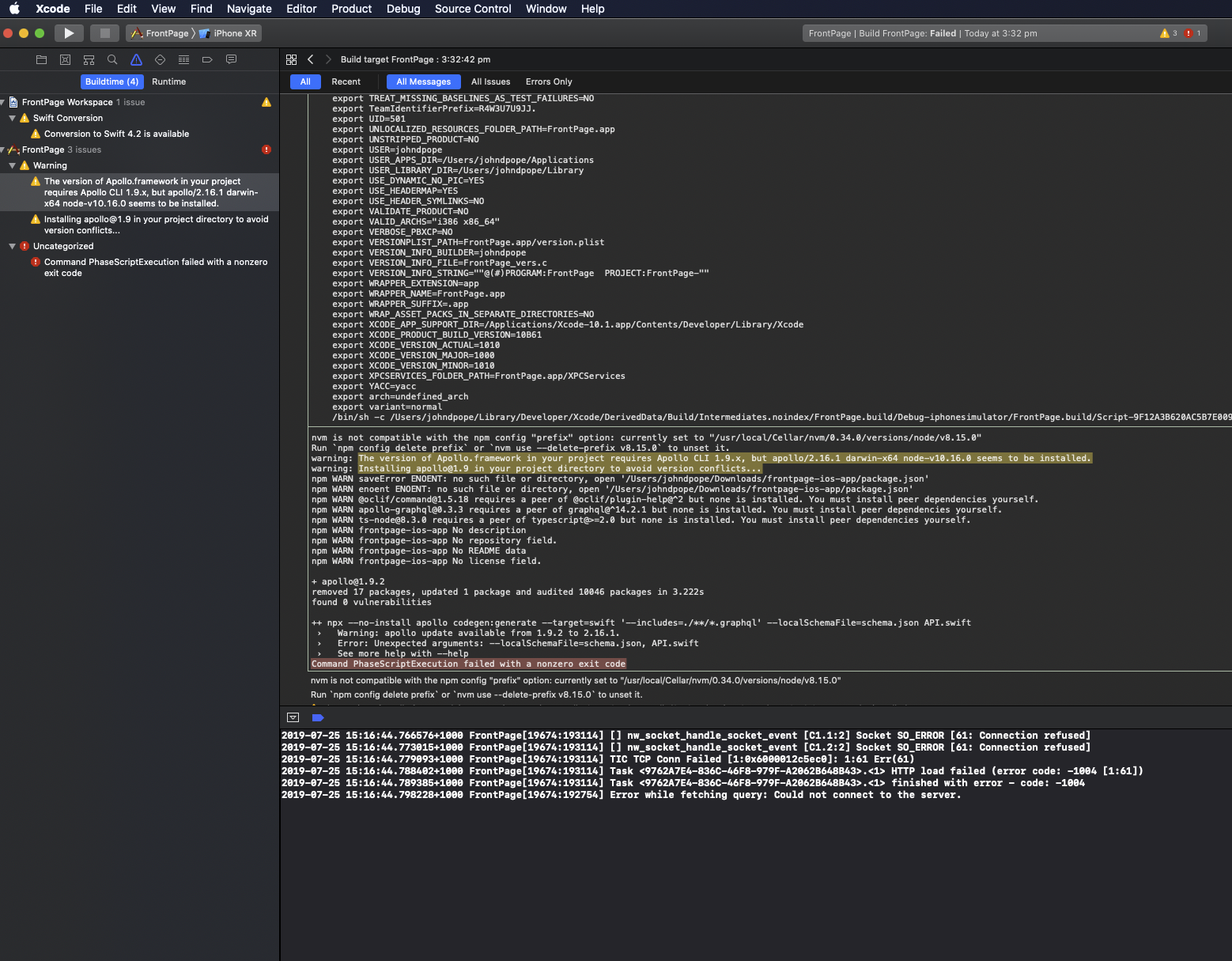
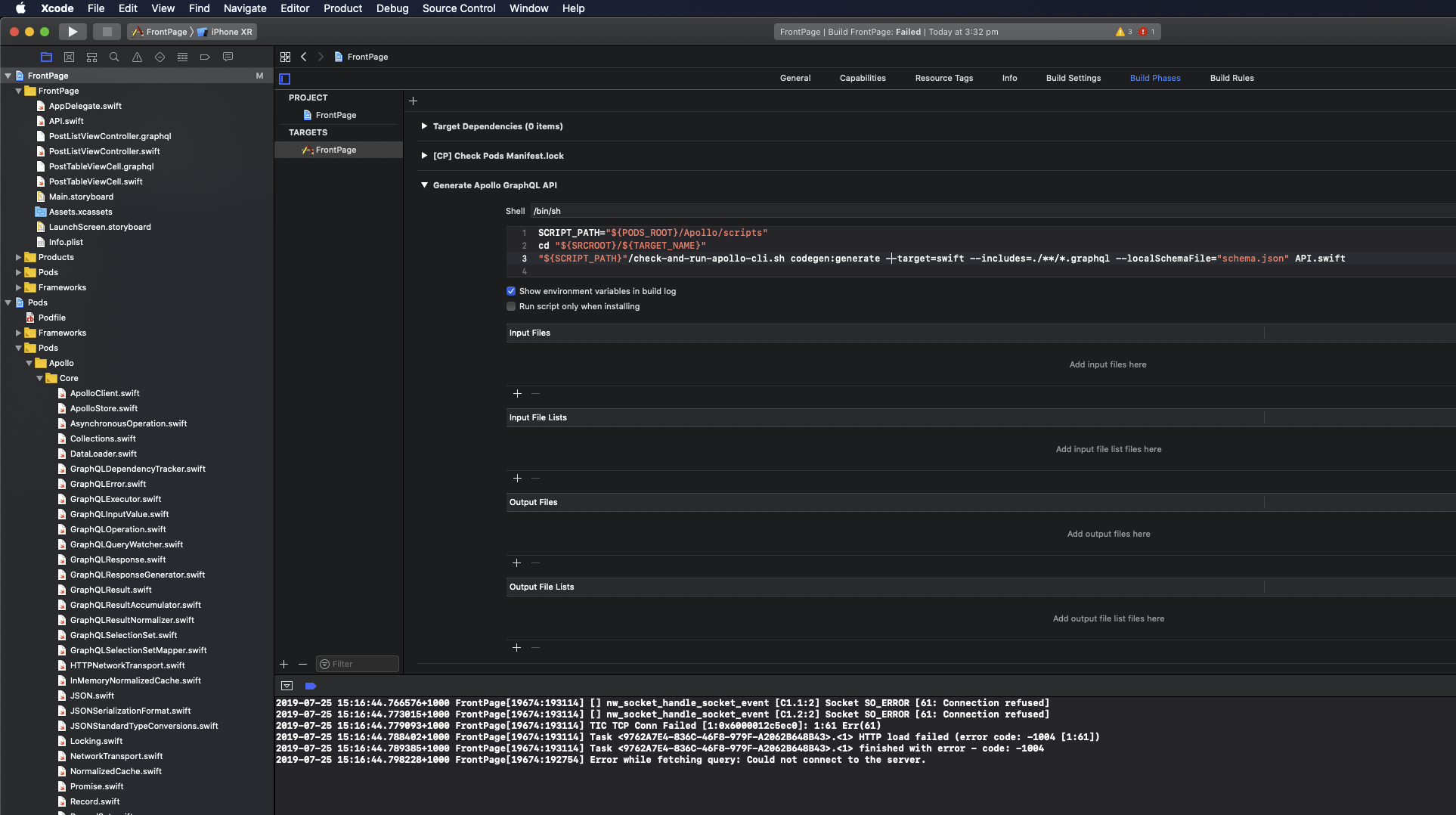
Can someone please check the front-page ios repo
this update fixes some things - but it's still not generating
https://github.com/apollographql/frontpage-ios-app/pull/16
I'm on xcode 10.1 -
 johndpope
on 25 Jul 2019
johndpope
on 25 Jul 2019
@johndpope Went through and updated all the things and closed all the PRs and issues today. Sorry it's been a bit abandoned - FYI we're probably going to switch to a new sample app at some point soonish, but I don't have an ETA on that.
designatednerd
on 26 Jul 2019
thank you
johndpope
on 26 Jul 2019
Related issues
 uericw
·
4Comments
uericw
·
4Comments
 wnagrodzki
·
4Comments
wnagrodzki
·
4Comments
 dchohfi
·
4Comments
dchohfi
·
4Comments
 maxsz
·
4Comments
maxsz
·
4Comments
 ermik
·
4Comments
ermik
·
4Comments
Most helpful comment
@johndpope Went through and updated all the things and closed all the PRs and issues today. Sorry it's been a bit abandoned - FYI we're probably going to switch to a new sample app at some point soonish, but I don't have an ETA on that.