Apollo-ios: Xcode 10- error: Couldn't find Apollo.framework in FRAMEWORK_SEARCH_PATHS; make sure to add the framework to your project.
When trying to build the project, I see this error error: Couldn't find Apollo.framework in FRAMEWORK_SEARCH_PATHS; make sure to add the framework to your project. I have tried adding the framework again under link binary with libraries and it's not working. I'm currently using Apollo 0.9.4.
Build Phase:
APOLLO_FRAMEWORK_PATH="$(eval find $FRAMEWORK_SEARCH_PATHS -name "Apollo.framework" -maxdepth 1 -print -quit)"
if [ -z "$APOLLO_FRAMEWORK_PATH" ]; then
echo "error: Couldn't find Apollo.framework in FRAMEWORK_SEARCH_PATHS; make sure to add the framework to your project."
exit 1
fi
cd "${SRCROOT}/${TARGET_NAME}"
$APOLLO_FRAMEWORK_PATH/check-and-run-apollo-codegen.sh generate $(find . -name '*.graphql') --schema schema.json --output API.swift
 zoufishanmehdi
All 13 comments
if you're integrating via Cocoapods, try replacing Apollo's build phase script with:
sh $PODS_ROOT/Apollo/scripts/check-and-run-apollo-codegen.sh generate $(find . -name '*.graphql') --schema 'path/to/your/schema.json' --output path/to/the/resulting/ApolloAPI.swift
Submitted a PR to update docs here: https://github.com/apollographql/apollo-ios/pull/420
 arielelkin
on 10 Dec 2018
arielelkin
on 10 Dec 2018
still not working AFAIK
 romainbiard
on 14 Feb 2019
romainbiard
on 14 Feb 2019
Still not working. Any solutions?
 ghost
on 6 Mar 2019
ghost
on 6 Mar 2019
Make sure there is no space in project path.
 oabdelkarim
on 14 Mar 2019
oabdelkarim
on 14 Mar 2019
Hey all, we've recently updated the build script phase setup instructions and the scripts so that you should not have to worry about things like whether your path has a space or not.
I'm going to close this issue out but if you have problems after following those instructions, please open a new issue. Thank you!
 designatednerd
on 15 Jul 2019
designatednerd
on 15 Jul 2019
path/to/the/resulting/ApolloAPI.swift
Hey Arieleelkin, I am currently having some issued with the script and I'm trying different stuff out. What do I need to put instead of this line? My script currently looks like this
$PODS_ROOT/Users/phillipeismark/sandbox/WatchOS6Apollo/Pods/Apollo/scriptscheck-and-run-apollo-codegen.sh generate $(find . -name '*.graphql') --schema '/Users/phillipeismark/sandbox/WatchOS6Apollo/WatchOS6Apollo WatchKit Extension' --output path/to/the/resulting/ApolloAPI.swift
 PhillipFraThailand
on 3 Sep 2019
PhillipFraThailand
on 3 Sep 2019
Apollo version 0.15 is working well with this script:
SCRIPT_PATH="${PODS_ROOT}/Apollo/scripts"
cd "${SRCROOT}/${TARGET_NAME}"
"${SCRIPT_PATH}"/check-and-run-apollo-cli.sh codegen:generate --target=swift --includes=./*/.graphql --localSchemaFile="API/GraphQL/schema.json" API/GraphQL/API.swift
romainbiard
on 3 Sep 2019
Apollo version 0.15 is working well with this script:
SCRIPT_PATH="${PODS_ROOT}/Apollo/scripts"
cd "${SRCROOT}/${TARGET_NAME}"
"${SCRIPT_PATH}"/check-and-run-apollo-cli.sh codegen:generate --target=swift --includes=./*/.graphql --localSchemaFile="API/GraphQL/schema.json" API/GraphQL/API.swift
Hey romainbiard thanks for your answer.
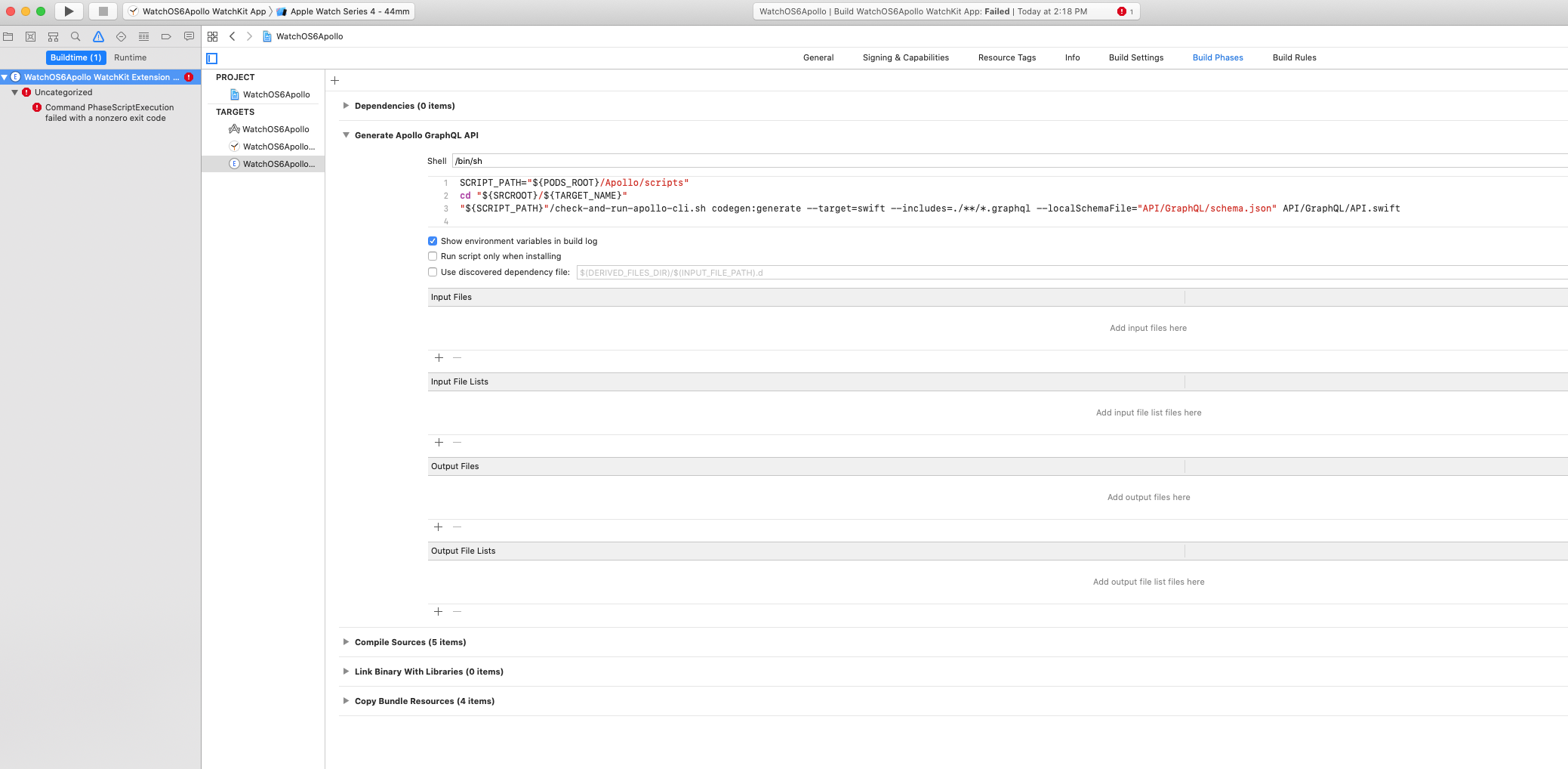
I currently have the script in my project and I get this error when I try to run the project.
/Users/phillipeismark/Library/Developer/Xcode/DerivedData/WatchOS6Apollo-dqrnbgiakvuyxrembpnzikwjposb/Build/Intermediates.noindex/WatchOS6Apollo.build/Debug-watchsimulator/WatchOS6Apollo WatchKit Extension.build/Script-76B59D0F231E5044006FA134.sh: line 4: /Apollo/scripts/check-and-run-apollo-cli.sh: No such file or directory
Do I need to change anything in the script? I have tried to change the variables in the script to the directories paths and stuff but I get the same error. Also it is a WatchOS6 project does that maybe do something to the script?
PhillipFraThailand
on 3 Sep 2019
I am starting to suspect that it might have something to do with it being a WatchOS6 project.
If any of you could please take a look at the picture in case anything is off?
PhillipFraThailand
on 3 Sep 2019
I have made a new project that's a normal SwiftUI project for the phone and not the watch.
I am getting these errors:
Showing All Messages
/Users/phillipeismark/sandbox/SwiftUIApollo/Pods/Apollo/scripts/check-and-run-apollo-cli.sh: line 61: npx: command not found
Apollo iOS requires version 2.17.x of the Apollo CLI to be installed either globally or in a local node_modules directory.
Installing [email protected] in your project directory to avoid version conflicts...
/Users/phillipeismark/sandbox/SwiftUIApollo/Pods/Apollo/scripts/check-and-run-apollo-cli.sh: line 76: npm: command not found
Command PhaseScriptExecution failed with a nonzero exit code
And this is the script I am running, I have made no changes to it I just copied directly from the guide
PhillipFraThailand
on 3 Sep 2019
1)Install Homebrew
/usr/bin/ruby -e "$(curl -fsSL https://raw.githubusercontent.com/Homebrew/install/master/install)"
2)Install node and npm
brew install node npm
romainbiard
on 3 Sep 2019
1)Install Homebrew
/usr/bin/ruby -e "$(curl -fsSL https://raw.githubusercontent.com/Homebrew/install/master/install)"2)Install node and npm
brew install node npm
Hey romainbiard, I have installed that and I am getting this warning when I install apollo with npm:
npm WARN [email protected] requires a peer of typescript@>=2.0 but none is installed. You must install peer dependencies yourself
do you know how to do this?
I have made a new project using SPM. It is a WatchOS6 project.
I have added the dependencies in the package.swift file and I have run this command in the terminal to make the project:
‘swift package init --type=executable’
this is the dependencies I added
package(url: "https://github.com/apollographql/apollo-ios.git", .exact("0.15.0"))
.target(
name:"Apollo",
dependencies:[]),
The script I am using is:
cd "${BUILD_ROOT}"
cd "../../SourcePackages/checkouts/apollo-ios/scripts"
APOLLO_SCRIPT_PATH="$(pwd)"
if [ -z "${APOLLO_SCRIPT_PATH}" ]; then
echo "error: Couldn't find the CLI script in your checked out SPM packages; make sure to add the framework to your project."
exit 1
fi
cd "${SRCROOT}/${TARGET_NAME}"
"${APOLLO_SCRIPT_PATH}"/check-and-run-apollo-cli.sh codegen:generate --target=swift --includes=./*/.graphql --localSchemaFile="schema.json" API.swift
The script Is named Generate Apollo GraphQL API and I dragged it over compile sources.
There is a scheme.json file and a .qraphql file in my project too.
But I am getting this error:
/Users/phillipeismark/Library/Developer/Xcode/DerivedData/ApolloOS6-bezgzvgntqbivvbapfewgxqetshn/Build/Intermediates.noindex/ApolloOS6.build/Debug-watchsimulator/ApolloOS6 WatchKit Extension.build/Script-76B153D6231FC77200CB4377.sh: line 15: /Users/phillipeismark/Library/Developer/Xcode/DerivedData/ApolloOS6-bezgzvgntqbivvbapfewgxqetshn/Build/Products/check-and-run-apollo-cli.sh: No such file or directory
PhillipFraThailand
on 4 Sep 2019
@PhillipFraThailand I've answered this question on your other issue - let's try to keep discussion on that issue for clarity please.
designatednerd
on 4 Sep 2019
Related issues
 uericw
·
4Comments
uericw
·
4Comments
 vishal-p
·
4Comments
vishal-p
·
4Comments
 MrAlek
·
3Comments
MrAlek
·
3Comments
 StanislavCekunov
·
3Comments
StanislavCekunov
·
3Comments
 plm75
·
4Comments
plm75
·
4Comments
Most helpful comment
Apollo version 0.15 is working well with this script:
SCRIPT_PATH="${PODS_ROOT}/Apollo/scripts"
cd "${SRCROOT}/${TARGET_NAME}"
"${SCRIPT_PATH}"/check-and-run-apollo-cli.sh codegen:generate --target=swift --includes=./*/.graphql --localSchemaFile="API/GraphQL/schema.json" API/GraphQL/API.swift