Apollo-ios: Command PhaseScriptExecution failed with a nonzero exit code
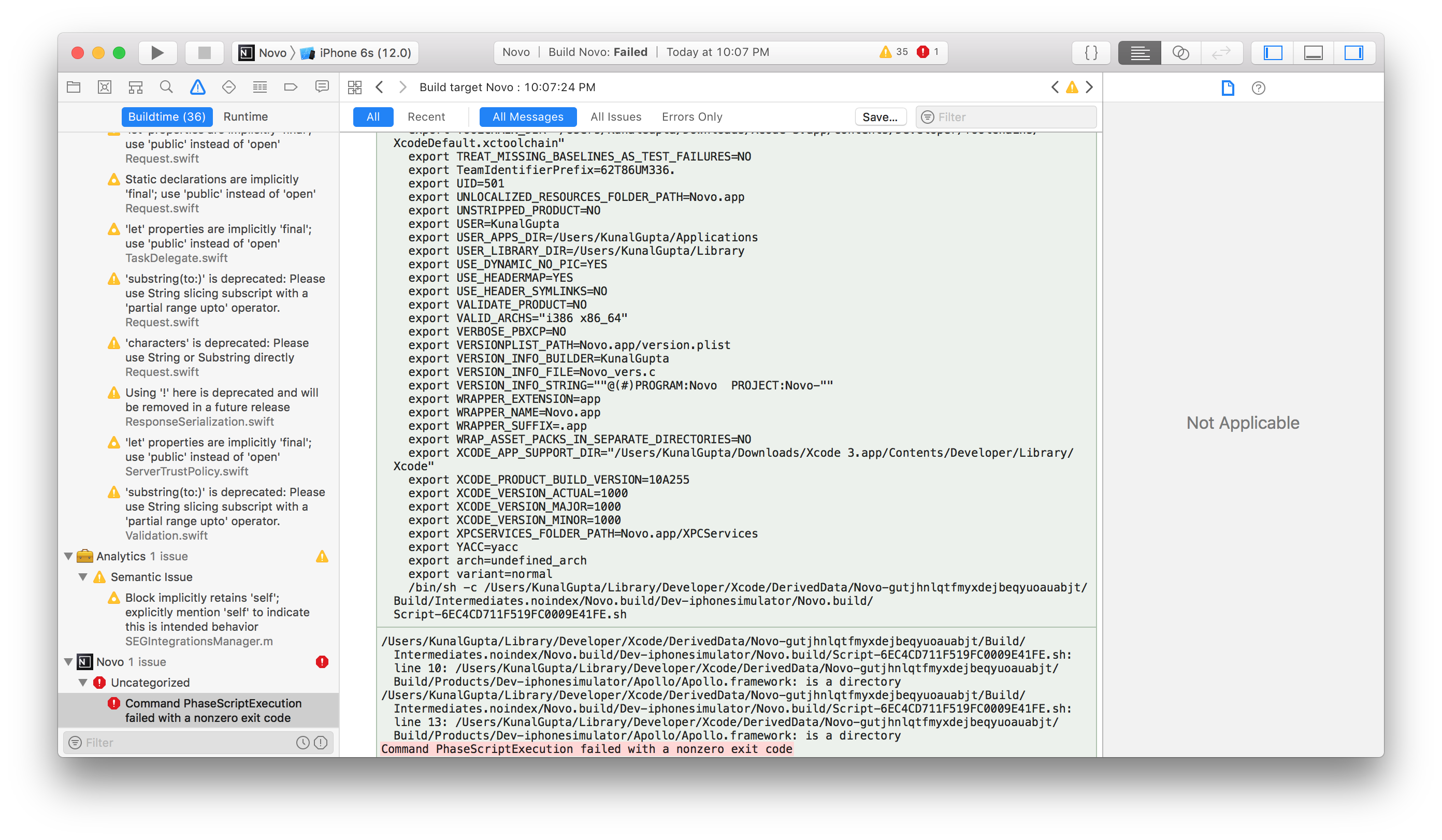
I am trying to run my project in Xcode 10.0, and while compiling the error pops up stating that the Command PhaseScriptExecution failed with a nonzero exit code.
I have updated my iPhone to iOS 12 and I am unable to run app into my own phone. Please help me. I am stuck for so long.
 ioskunal
All 28 comments
i have the same issue i already updated my Xcode 10.0 and my ipad to 12, the error still show up,
command phasescriptexecution failed with a nonzero exit code
but when i tried to build an older version of my source application it is working perfectly, anyone can help please !
 Mohammed-Sedawei
on 30 Oct 2018
Mohammed-Sedawei
on 30 Oct 2018
I feel helpless. I am running my application in simulator since that day.
ioskunal
on 30 Oct 2018
I ran into this trying to set up a project for the first time today!
I was able to fix it in project.pbxproj. There was a space at the beginning of the string
- " $(SRCROOT)/Carthage/Build/iOS/Apollo.framework",
+ "$(SRCROOT)/Carthage/Build/iOS/Apollo.framework"
When I removed the space my build succeeded.
 phlco
on 30 Oct 2018
phlco
on 30 Oct 2018
@ioskunal, @Mohammed-Sedawei Temporal fix: Go to the last path route from the error(/Users/.......) and delete the Apollo.framework file. Remember there are one file per product (simulator and device)
I think the problem is related with .dSYM files generated from Carthage vs .framework folders.
May help: https://github.com/Carthage/Carthage/issues/1070
 mkv27
on 11 Nov 2018
mkv27
on 11 Nov 2018
@mkv27 after deleting this I receive the same error and my Xcode Crashes. Any ideas? Also attaching the xcode Crash report for reference.
ioskunal
on 12 Nov 2018
Could you please paste the code you are using for generate the Apollo GraphQL API?
I'm using this
# Type a script or drag a script file from your workspace to insert its path.
APOLLO_FRAMEWORK_PATH="$(eval find $FRAMEWORK_SEARCH_PATHS -name "Apollo.framework" -maxdepth 1)"

if [ -z "$APOLLO_FRAMEWORK_PATH" ]; then
echo "error: Couldn't find Apollo.framework in FRAMEWORK_SEARCH_PATHS; make sure to add the framework to your project."
exit 1
fi

cd "${SRCROOT}/${TARGET_NAME}"
$APOLLO_FRAMEWORK_PATH/check-and-run-apollo-cli.sh codegen:generate --queries="$(find . -name '*.graphql')" --schema=schema.json API.swift
@mkv27 this is already in place. But still does not work.
@martijnwalraven Can you please help here?
This is a BLOCKER.
ioskunal
on 13 Nov 2018
This error occurred to me when I added Apollo to the project with cocoapods and tried to build it. I solved it by adding a .graphql query to the project. Created a simple ViewController.graphql and rebuilt the project. Then it worked.
XCode: 10.1
Pod Apollo/core: 0.9.4
node_modules/apollo: 1.9
MacOS: 10.14 Mojave
 parohy
on 10 Dec 2018
parohy
on 10 Dec 2018
Guys I had to take the tough decision to remove Apollo from my iOS Project. It took me 3 days to migrate the network layer completely which I think is far better than waiting on this threat to wait for someone to fix.
ioskunal
on 9 Jan 2019
This error was happening for me because I tried to use Carthage but ran into a different error... switched to CocoaPods, but the Carthage build artifacts were not cleaned up. To fix, I removed these 4 files/directories.
$ find . -name Apollo.framework
./Carthage/Build/watchOS/Apollo.framework
./Carthage/Build/iOS/Apollo.framework
./Carthage/Build/Mac/Apollo.framework
./Carthage/Build/tvOS/Apollo.framework
 semireg
on 28 Jan 2019
semireg
on 28 Jan 2019
I was able to resolve this error by moving my schema.json file to the same directory as the AppDelegate.swift file. Previously I had put the file in a nested folded for code organization. As soon a I moved it, the project built without error.
 the-scott-davis
on 17 Feb 2019
the-scott-davis
on 17 Feb 2019
I was able to resolve this error by moving my schema.json file to the same directory as the AppDelegate.swift file. Previously I had put the file in a nested folded for code organization. As soon a I moved it, the project built without error.
I'm still getting the error about 'not found: Apollo' but thanks anyways
 ghost
on 6 Mar 2019
ghost
on 6 Mar 2019
After wasting hours, I found out the fix.
Enable automatically manage signing and development signing in targets.
 shamshiranees
on 20 May 2019
shamshiranees
on 20 May 2019
@shamshiranees Hello , please can u tell me how to do it ?
 louaydhyeb
on 22 May 2019
louaydhyeb
on 22 May 2019
@louaydhyeb

shamshiranees
on 23 May 2019
I was able to resolve this error by remove file in Pods -> Targets Support Files -> Pods-_AppName_ -> Pods-_AppName_-frameworks.sh. After removing that file again install pod using command pod install.
 HareshGediya
on 24 May 2019
HareshGediya
on 24 May 2019
Its works:
-> quit xcode,
-> install pod(again),
-> start xcode
 hardikdarji
on 4 Jun 2019
hardikdarji
on 4 Jun 2019
Exec in your project "sudo chmod -R 777 YourProjectFolder"
 guilhermereis1
on 11 Jun 2019
guilhermereis1
on 11 Jun 2019
Hey everyone, we've recently updated the setup instructions for the codgen step in build phases, which should address issues like this without having to do anything bonkers with chmod or anything like that. I'm going to close this out, please open a new issue if you're having any problems from the new setup instructions. Thank you!
 designatednerd
on 15 Jul 2019
designatednerd
on 15 Jul 2019
Showing Recent Messages
Command PhaseScriptExecution failed with a nonzero exit code
Facing the same issue with Xcode 10.2 .
I have used below script. Please correct me if I am wrong.
APOLLO_FRAMEWORK_PATH="$(eval find $FRAMEWORK_SEARCH_PATHS -name "Apollo.framework" -maxdepth 1)"
if [ -z "$APOLLO_FRAMEWORK_PATH" ]; then
echo "error: Couldn't find Apollo.framework in FRAMEWORK_SEARCH_PATHS; make sure to add the framework to your project."
exit 1
fi
cd "${SRCROOT}/${TARGET_NAME}"
$APOLLO_FRAMEWORK_PATH/check-and-run-apollo-codegen.sh generate $(find . -name '*.graphql') --schema schema.json --output API.swift
 pradipwalghude
on 22 Aug 2019
pradipwalghude
on 22 Aug 2019
Hey @pradipwalghude please check out the updated instructions - if they are not working, please open a new issue and include info about a) What dependency management you're using and b) exactly what error you are receiving when the build fails. Thank you!
designatednerd
on 23 Aug 2019
I was able to resolve this error by carthage rebuild.
may be it works bellow.
carthage bootstrap --platform iOS
 faithYoshimura
on 25 Aug 2019
faithYoshimura
on 25 Aug 2019
@ioskunal Please check your provisioning profile and certificates
 sunilficode
on 17 Jan 2020
sunilficode
on 17 Jan 2020
 harsukhbir
on 6 Feb 2020
harsukhbir
on 6 Feb 2020
this take me around 4 hours of search but no one work. finally I think about it soo the error created after I move my project to other folder with multiple project. so when I drag it out to my desktop its work perfectly. i tried for other project also same issue there.
 Ashokkumarakg123
on 10 Jul 2020
Ashokkumarakg123
on 10 Jul 2020
Hi folks, if you are still having problems with this please a) Double-check the instructions, which do change from time to time with newer versions, and b) Open a new issue if that does not help. Thank you!
designatednerd
on 10 Jul 2020
I had this problem, did everything possible as cleaning the project and restarting mac but couldn't solve. At final the problem was my project directory. It has space in it. So try if there's any space in file where you've the project and do the clean with cmd+option+shift+k and cmd+b.
 ishanoor
on 17 Sep 2020
ishanoor
on 17 Sep 2020
Try this:
Build phases > Add > New Run Script Phase
Code:
# Type a script or drag a script file from your workspace to insert its path.
# skip if we run in debug
if [ "$CONFIGURATION" == "Debug" ]; then
echo "Skip frameworks cleaning in debug version"
exit 0
fi

APP_PATH="${TARGET_BUILD_DIR}/${WRAPPER_NAME}"

# This script loops through the frameworks embedded in the application and
# removes unused architectures.
find "$APP_PATH" -name '*.framework' -type d | while read -r FRAMEWORK
do
FRAMEWORK_EXECUTABLE_NAME=$(defaults read "$FRAMEWORK/Info.plist" CFBundleExecutable)
FRAMEWORK_EXECUTABLE_PATH="$FRAMEWORK/$FRAMEWORK_EXECUTABLE_NAME"
echo "Executable is $FRAMEWORK_EXECUTABLE_PATH"

EXTRACTED_ARCHS=()

for ARCH in $ARCHS
do
echo "Extracting $ARCH from $FRAMEWORK_EXECUTABLE_NAME"
lipo -extract "$ARCH" "$FRAMEWORK_EXECUTABLE_PATH" -o "$FRAMEWORK_EXECUTABLE_PATH-$ARCH"
EXTRACTED_ARCHS+=("$FRAMEWORK_EXECUTABLE_PATH-$ARCH")
done

echo "Merging extracted architectures: ${ARCHS}"
lipo -o "$FRAMEWORK_EXECUTABLE_PATH-merged" -create "${EXTRACTED_ARCHS[@]}"
rm "${EXTRACTED_ARCHS[@]}"

echo "Replacing original executable with thinned version"
rm "$FRAMEWORK_EXECUTABLE_PATH"
mv "$FRAMEWORK_EXECUTABLE_PATH-merged" "$FRAMEWORK_EXECUTABLE_PATH"

done
Check this answer: https://stackoverflow.com/a/64984008/7825015
 gurbela
on 24 Nov 2020
gurbela
on 24 Nov 2020
Related issues
 farice
·
4Comments
designatednerd
·
3Comments
farice
·
4Comments
designatednerd
·
3Comments
 Robuske
·
3Comments
Robuske
·
3Comments
 marcoreni
·
3Comments
marcoreni
·
3Comments
 Dmurph24
·
4Comments
Dmurph24
·
4Comments
Most helpful comment
Exec in your project "sudo chmod -R 777 YourProjectFolder"