Apollo-client: Cursor jumping to end of controlled input when using `writeQuery`.
Intended outcome:
Hey, y'all! We are using data from a query as the value for a controlled input and using apolloClient.writeQuery to update the data in the Apollo cache. In version 3.0.0-beta.44 and prior, this was working as we'd expect:
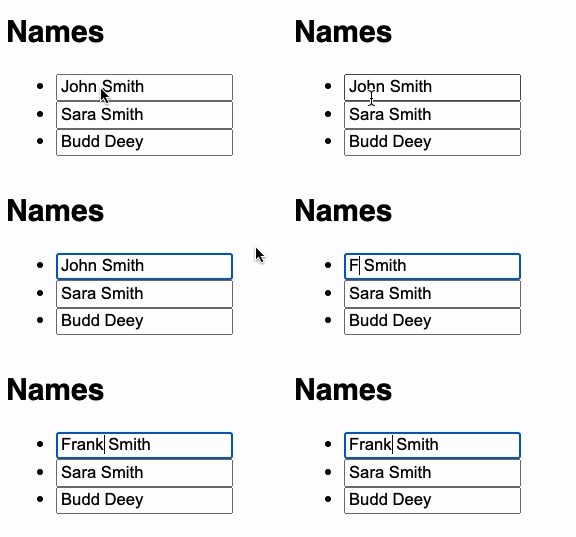
Notice the cursor remains in-place as new characters are added to the input.
The relevant change handler looks like this:
  const onHandleChange = (personId, value) => {
    const people = data.people.map((person) =>
      person.id === personId ? { ...person, name: value } : person
    );

    apolloClient.writeQuery({
      query: ALL_PEOPLE,
      data: { people },
    });
  };
And the code for the inputs:
{data.people.map((person) => (
  <li key={person.id}>
    <input
      value={person.name}
      onChange={(e) => onHandleChange(person.id, e.target.value)}
    />
  </li>
))}
Actual outcome:
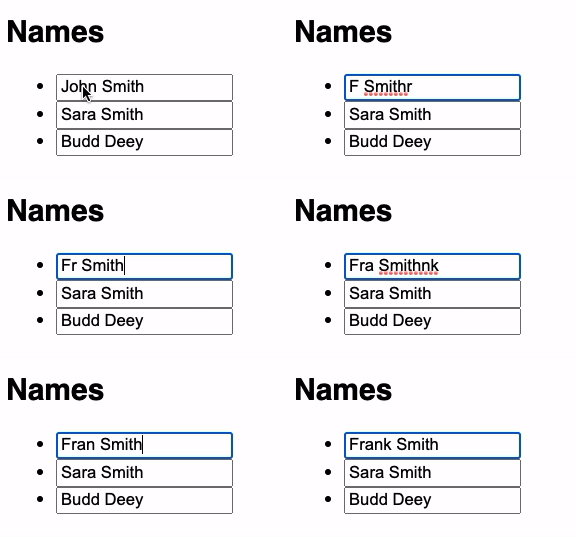
Since version 3.0.0-beta.45 (up to the most recent release), the same code results in a situation where each keystroke causes the cursor to jump to the end of the input:
How to reproduce the issue:
I've reproduced the issue in this fork of react-apollo-error-template: https://github.com/jkyle/react-apollo-error-template
Specifically in App.js:
- Use a property from a query as the
valueof a controlled input. - Use
apolloClient.writeQueryto update that value in the cache from theonChangeof the controlled input.
We've tried wrapping the controlled input in a component with a React.memo, and also using a useCallback (adding a readQuery to remove a dependency on data.people). Neither had any impact on the issue. My best guess so far is that something in PR #6107 is causing the problem, but we might be missing something obvious.
(Note: I created a v3.0.0-beta.44 branch that installs that version of v3.0.0-beta.44 of Apollo to compare.)
Versions
  System:
    OS: macOS Mojave 10.14.3
  Binaries:
    Node: 12.13.1 - ~/.nvm/versions/node/v12.13.1/bin/node
    Yarn: 1.22.4 - ~/.nvm/versions/node/v12.13.1/bin/yarn
    npm: 6.12.1 - ~/.nvm/versions/node/v12.13.1/bin/npm
  Browsers:
    Firefox: 79.0
    Safari: 12.0.3
  npmPackages:
    @apollo/client: ^3.1.0 => 3.1.0
 jkyle
jkyle
All 4 comments
This is likely the same issue as #3338, which was ultimately due to https://github.com/facebook/react/issues/955. The final recommendation to call setState synchronously from the event handler doesn't help here, because writing to the cache triggers a broadcast that ultimately causes the <input/> to rerender in a different tick of the event loop (asynchronously rather than synchronously).
Instead of trying to make the rerendering happen synchronously, you can make the selection state more robust to rerendering by wrapping your <input/> in a React component:
function SelectionPreservingInput({ value, onChange }) {
  const inputRef = React.useRef(null);
  const selectionRef = React.useRef({
    start: 0,
    end: 0,
  });

  function saveSelection() {
    selectionRef.current.start = inputRef.current.selectionStart;
    selectionRef.current.end = inputRef.current.selectionEnd;
  }

  function restoreSelection() {
    inputRef.current.selectionStart = selectionRef.current.start;
    inputRef.current.selectionEnd = selectionRef.current.end;
  }

  React.useEffect(restoreSelection);

  return <input
    value={value}
    ref={inputRef}
    onChange={function (event) {
      saveSelection();
      return onChange.call(this, event);
    }}
  />;
}
Given this wrapper component, try replacing your <input ... /> element with <SelectionPreservingInput ... />. Thanks to your reproduction, I can report that it seems to work pretty well, though I'm sure you can find ways to improve this code if you decide to keep using it.
If typing ever becomes too slow because you're writing to the cache on every keystroke, you might try using a tool to throttle the event handler, like debounce or react-debounce-input.
 benjamn
on 12 Aug 2020
benjamn
on 12 Aug 2020
Thanks for the reply @benjamn. That makes sense, and explains how the fix in #6107 (_Prevent new data re-render attempts during an existing render._) might be what started started causing this issue for us.
We were hoping to use Apollo as our primary solution for state management without needing to rely on React's various state hooks or Redux for local state (for editing forms and whatnot). That workaround for managing selection state does seem to work, but might a bit too much of a hack to use across our whole app.
The documentation makes it seem like managing local state like this is a goal of Apollo Client. I'm curious if there's a best practice for editing data in a form before calling a mutation to send changes back to the server that we might be missing?
Thanks again for all y'all's work!
jkyle
on 13 Aug 2020
@jkyle When I think about local state, I keep coming back to this talk by Jed Watson which proposes that there are a number of distinct types of local state, so different tools may be best to handle different kinds of local state.
Selection/cursor state is very closely tied to the <input> element itself, which is rendered by React. The way React _rerenders_ the <input> is ultimately the reason that the selection state can be lost (there would be no problem with the cursor if the <input> was never rerendered). That leads me to conclude that things will be simpler if you use the tools React provides to manage selection state within <input> boxes. In general, whenever you can use an abstraction that lets you forget about details like cursor position, that seems like a pretty good deal.
In short, Apollo Client is great for managing cross-component local state (and non-local application data, too, of course), whereas React is probably your best bet for certain kinds of per-component local state, especially when the state is closely tied to the DOM nodes that React is responsible for rendering.
I hope you'll watch that talk. For me, it has provided useful conceptual structure to the vague idea of local state.
benjamn
on 13 Aug 2020
Fan of that talk! I think someone mentioned it during Apollo Space Camp a couple months ago. Our best bet might be to transfer the data from the Apollo cache to Reactspace local state for editing, and then call a mutation later to update the cache. Something like a useState or useReducer:
  const { loading, data } = useQuery(ALL_PEOPLE);
  const [people, setPeople] = useState([]);

  useEffect(() => {
    if (data?.people) {
      setPeople(data.people);
    }
  }, [data]);

  const onHandleChange = (personId, value) => {
    setPeople((previousPeople) =>
      previousPeople.map((person) =>
        person.id === personId ? { ...person, name: value } : person
      )
    );
  };
Thanks again for the feedback!
jkyle
on 13 Aug 2020
Related issues
 nicolasxu-bg
·
3Comments
nicolasxu-bg
·
3Comments
 stubailo
·
3Comments
stubailo
·
3Comments
 skeithtan
·
3Comments
skeithtan
·
3Comments
 dispix
·
3Comments
stubailo
·
3Comments
dispix
·
3Comments
stubailo
·
3Comments
Most helpful comment
@jkyle When I think about local state, I keep coming back to this talk by Jed Watson which proposes that there are a number of distinct types of local state, so different tools may be best to handle different kinds of local state.
Selection/cursor state is very closely tied to the
<input>element itself, which is rendered by React. The way React _rerenders_ the<input>is ultimately the reason that the selection state can be lost (there would be no problem with the cursor if the<input>was never rerendered). That leads me to conclude that things will be simpler if you use the tools React provides to manage selection state within<input>boxes. In general, whenever you can use an abstraction that lets you forget about details like cursor position, that seems like a pretty good deal.In short, Apollo Client is great for managing cross-component local state (and non-local application data, too, of course), whereas React is probably your best bet for certain kinds of per-component local state, especially when the state is closely tied to the DOM nodes that React is responsible for rendering.
I hope you'll watch that talk. For me, it has provided useful conceptual structure to the vague idea of local state.