Apollo-client-devtools: Variables don't copy to graphQL playground tab on 'run in GraphQL' click
Intended outcome:
Clicking in 'Run in GraphQL' button copy query and variables to playground console.
Actual outcome:
Variables window remains empty.
How to reproduce the issue:
Select query/mutation => click 'Run in GraphQL' button
Desktop (please complete the following information):
- OS: MacOS Mojave
- Browser chrome
- Browser version 89.0.4389.82
- Extension version 3.0.0
 HGZdev
All 9 comments
Having the same problem.
Actually there's no variables shown in the queries history for me, and so clicking in "Run in GraphQL" can't copy the non existing variables.
OS: Windows 10
Browser chrome
Browser version 89.0.4389.82
Extension version 3.0.0
 danielb7390
on 15 Mar 2021
danielb7390
on 15 Mar 2021
Having the same problem.
OS: Ubuntu 20.04
Browser: Brave
Version 1.21.76 Chromium: 89.0.4389.86 (Official Build) (64-bit)
Extension version: 3.0.0
 bmviniciuss
on 15 Mar 2021
bmviniciuss
on 15 Mar 2021
I have the same issue, using a Vue.js app with [email protected]

Apollo devtools used to work fine before the recent update
OS: Ubuntu 20.04
Browser: Chrome
Version: 88.0.4324.150 (Official Build) (64-bit)
Extension version: 3.0.1
 michaelFrancisco
on 16 Mar 2021
michaelFrancisco
on 16 Mar 2021
I've tried to fix the problem by creating a graphiQLQueryVariables var and re-passing to the GraphiQL component. On the Mutations the mutation variables are passed to the RunInGraphQLButton and set onClick.
export const graphiQLQueryVariables = makeVar<any>(undefined);

 const query = useReactiveVar(graphiQLQuery);
 const queryVariables = useReactiveVar(graphiQLQueryVariables)

<GraphiQL
        ref={graphiQLRef}
        fetcher={(args) => executeOperation(args)}
        schema={schema}
        query={query}
        variables={queryVariables ? JSON.stringify(queryVariables, null,2) : ""}
....
 onClick={() => {
      graphiQLQuery(operation);
      graphiQLQueryVariables(variables)
      currentScreen(Screens.Explorer);
    }}
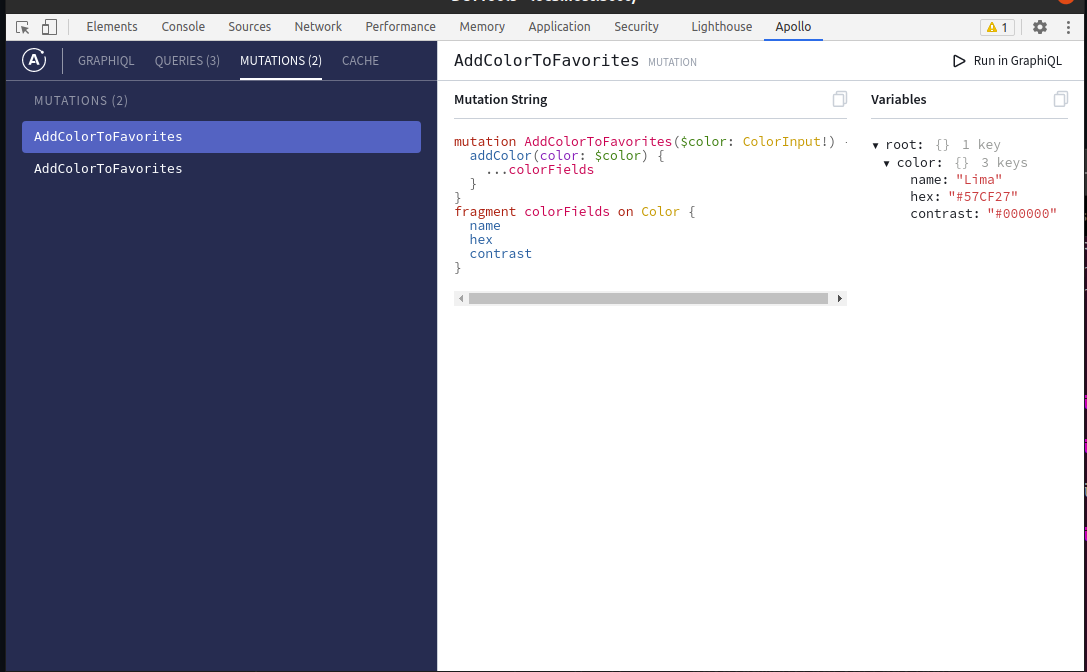
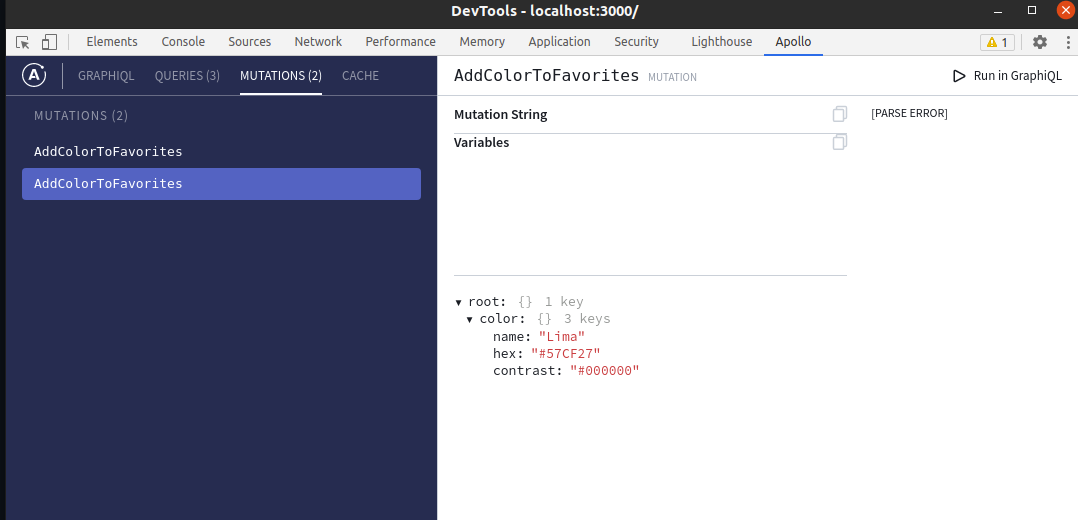
This makes the variables appear on the Explorer, but i don't know if this is the best solution to this problem. But i got stuck on another problem. On main if a re-run a mutation (even if i type the variables), i'm getting a Parse Error on the Mutations Tab. And it's caused because the second mutation on the list does have the source/mutationString as undefined.
bmviniciuss
on 16 Mar 2021
This is incredibly frustrating because hitting "Run in GraphiQL" to get the query/mutation with identical variables was the most useful feature in this extension. Wish I could downgrade until this is fixed.
 bmschwartz
on 22 Mar 2021
bmschwartz
on 22 Mar 2021
@bmschwartz you could clone the repo on the tag before the 3.0 version and build the extesion from there and install manually on the browser.
bmviniciuss
on 22 Mar 2021
@bmschwartz you could clone the repo on the tag before the 3.0 version and build the extesion from there and install manually on the browser.
Thanks, I'll do that!
bmschwartz
on 23 Mar 2021
+1 on "Run in GraphiQL" with identical variables being one of the most useful features of this extension. This seems like a fairly major regression that has impacted my workflow. It would be great if this could receive some attention soon. That said, thanks for everyone's amazing work on this extension thus far! The fact that so many people notice this just goes to show what a large impact this extension has.
 max-humu
on 25 Mar 2021
max-humu
on 25 Mar 2021
Hi all - definitely a regression; we're working on a fix. Thanks and sorry about the headache!
 hwillson
on 28 Mar 2021
hwillson
on 28 Mar 2021
Related issues
 glauberfc
·
5Comments
glauberfc
·
5Comments
 wildpow
·
6Comments
wildpow
·
6Comments
 robclouth
·
5Comments
robclouth
·
5Comments
 mvestergaard
·
6Comments
mvestergaard
·
6Comments
 meyer
·
3Comments
meyer
·
3Comments
Most helpful comment
+1 on "Run in GraphiQL" with identical variables being one of the most useful features of this extension. This seems like a fairly major regression that has impacted my workflow. It would be great if this could receive some attention soon. That said, thanks for everyone's amazing work on this extension thus far! The fact that so many people notice this just goes to show what a large impact this extension has.