Apollo-client-devtools: Apollo data not visible in devtools using Apollo client v2
Intended outcome: View local root cache structure, queries, mutations
Actual outcome: Apollo devtools frame appears, but no data is populated in any tab. Navigating to the graphiql tab seems to cause the extension to crash, only fixed by closing & reopening devtools.

How to reproduce the issue:
- Start local environment via yarn (vuejs application using apollo-client v2.6.10)
- Open browser tab and go to localhost URL
- Open devtools, navigate to Apollo tab
Desktop (please complete the following information):
- OS: Arch linux 5.11.6-arch1-1
- Browser Chromium
- Browser version: Version 89.0.4389.90 (Official Build)
- Extension version: 3.0.0
 timhere
All 14 comments
Thanks for letting us know @timhere. Which exact version of apollo-client are you using?
 hwillson
on 15 Mar 2021
hwillson
on 15 Mar 2021
I have same issue, i'm using [email protected]
 veeramarni
on 15 Mar 2021
veeramarni
on 15 Mar 2021
Thanks for letting us know @timhere. Which exact version of
apollo-clientare you using?
Thanks for the speedy response, I'm using [email protected].
timhere
on 15 Mar 2021
Having the same problem with [email protected]
Fixed on Apollo Client Devtools 3.0.2
 arascan35
on 16 Mar 2021
arascan35
on 16 Mar 2021
Same problem here, [email protected]
 jhoffmanqualified
on 18 Mar 2021
jhoffmanqualified
on 18 Mar 2021
Same problem here,
[email protected]
Try to install v3.0.2. Its worked for me.
arascan35
on 18 Mar 2021
Same problem here,
[email protected]Try to install v3.0.2. Its worked for me.
huh! I actually checked the chrome extension for an update and didn't see one, so assumed I was on v3.0.2.
I just did an uninstall-reinstall and that seemed to force an update from v3.0.0 -> v3.0.2, which fixed the issue for me.
Tyvm for the reply @arascan35 - you got me unstuck! :D
jhoffmanqualified
on 18 Mar 2021
Interesting - @timhere does 3.0.2 fix things for you by chance?
hwillson
on 19 Mar 2021
I have tried to remove and reinstall the extension. So now the version is exactly 3.0.2.

But still, it doesn't work for me.
:roll_eyes:
 gsofter
on 19 Mar 2021
gsofter
on 19 Mar 2021
Update on my end - it _kinda_ works, but appears very flaky. I haven't pinned down repro for what's breaking it, but uninstalling and reinstalling seems to fix me for a few page loads. Definitely strange.
Is there a straightforward way to install a version that's compatible with apollo-client 2.6.x?
jhoffmanqualified
on 19 Mar 2021
You can downgrade the apollo-client-devtool version.
I did build for the v2.3.5 and then installed it.
https://github.com/apollographql/apollo-client-devtools/tree/v2.3.5
Now it works for me.
gsofter
on 19 Mar 2021
Thanks all - we'll take a closer look.
hwillson
on 19 Mar 2021
@hwillson unfortunately it's still not working for me, I have the same issues with 3.0.2.
timhere
on 19 Mar 2021
It seems like the issue is queries with empty document property
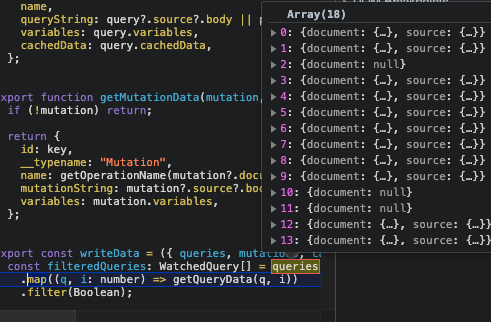


I've created two pull requests, please merge one of them
500 pull request hides the query completely
501 pull request displays query as "Unnamed"
chrome-500-pr-packed-extension.zip
chrome-501-pr-packed-extension.zip
firefox-500-pr-extension.zip
firefox-501-pr-extension.zip
To try extension in chrome, please download for example chrome-500-pr-packed-extension.zip, unpack it, uninstall the existing apollo extension, ensure Developer mode switch is on, click "load unpacked" button in the chrome installed extensions page, navigate to the unpacked folder and select it. Done.
 yrambler2001
on 1 Apr 2021
yrambler2001
on 1 Apr 2021
Related issues
 jeffdesign
·
5Comments
jeffdesign
·
5Comments
 glauberfc
·
5Comments
glauberfc
·
5Comments
 robclouth
·
5Comments
robclouth
·
5Comments
 stubailo
·
4Comments
stubailo
·
4Comments
 meyer
·
3Comments
meyer
·
3Comments
Most helpful comment
It seems like the issue is queries with empty document property



I've created two pull requests, please merge one of them
500 pull request hides the query completely
501 pull request displays query as "Unnamed"
chrome-500-pr-packed-extension.zip
chrome-501-pr-packed-extension.zip
firefox-500-pr-extension.zip
firefox-501-pr-extension.zip
To try extension in chrome, please download for example chrome-500-pr-packed-extension.zip, unpack it, uninstall the existing apollo extension, ensure Developer mode switch is on, click "load unpacked" button in the chrome installed extensions page, navigate to the unpacked folder and select it. Done.