Apollo-client-devtools: devtools keeps crashing
First time I open the devtools everything is fine, it just take sometime to load, but I can see my cache data. Sometimes if I make any change to my app and the browser reloads, then if I try to go to the cache it will automatically crash. Other times it just crash if I try to just move through the data.
I have to reload the chrome extension, close the inspector and re open it again.
I don't have much data in my dev env, so I don't think is related to that.
I wanna help to find what issue could be, is there any way to see logs or anything like that?
one difference I found is that after I write to the cache, my ROOT_QUERY changes
before

after
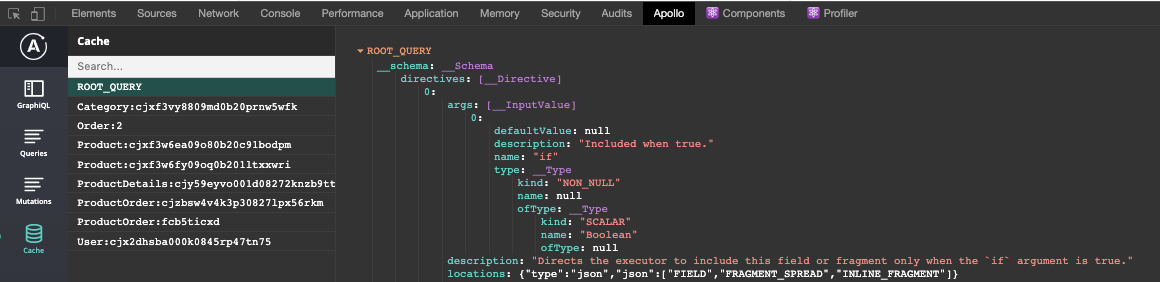
I'm on chrome Version 77.0.3865.90 (Official Build) (64-bit) and version 2.2.5 of the devtools
 tafelito
All 10 comments
I'm experiencing that exact same issue. Same Chrome version also.
 RichieMerchant
on 3 Oct 2019
RichieMerchant
on 3 Oct 2019
+1
 danielkv
on 11 Nov 2019
danielkv
on 11 Nov 2019
+1, when I refresh the page, I see connecting to Apollo Client message then crashes.
 dalkegama
on 6 Dec 2019
dalkegama
on 6 Dec 2019
Any resolutions for this issue? My Apollo Devtools crashed when 'cache' button is clicked after the data is recieved from API. tabs work just fine so long as I don't click on the cache button to view cache! Please help.
 kidtango
on 5 Mar 2020
kidtango
on 5 Mar 2020
I'm seeing this issue as well. For me it's new as of the latest Chrome update (83.0.4103.61). I'm on the latest appollo devtool client (2.3.0) and have the most recent apollo react packages.
I'm seeing the following when I debug the apollo devtools and then click on the cache tab:
12098devtools.js:1 TypeError: Cannot read property '__typename' of null
    at T (devtools.js:1)
    at Yi (devtools.js:1)
    at Io (devtools.js:1)
    at Ka (devtools.js:1)
    at za (devtools.js:1)
    at Cu (devtools.js:1)
    at Ou (devtools.js:1)
    at Pu (devtools.js:1)
    at On (devtools.js:1)
 soulfresh
on 29 May 2020
soulfresh
on 29 May 2020
@soulfresh I think this fixed in https://github.com/apollographql/apollo-client-devtools/pull/268 pr
Check https://github.com/apollographql/apollo-client-devtools/issues/266 issue
 eDubrovsky
on 29 May 2020
eDubrovsky
on 29 May 2020
Thanks @eDubrovsky 👏 I'll keep my eye out for that release.
soulfresh
on 29 May 2020
If anyone wants to test out this PR https://github.com/apollographql/apollo-client-devtools/pull/273, let me know if this fixes the issue!
 jcreighton
on 2 Jun 2020
jcreighton
on 2 Jun 2020
2.3.1 fixed this for me (from source)! Do releases happen automatically at some point?
 threehams
on 3 Jun 2020
threehams
on 3 Jun 2020
@threehams Glad it resolved the issue! Releases are a manual process but both the Firefox and Chrome extensions should be at 2.3.1 now.
jcreighton
on 3 Jun 2020
Related issues
 iki
·
7Comments
iki
·
7Comments
 konsumer
·
7Comments
konsumer
·
7Comments
 robclouth
·
5Comments
robclouth
·
5Comments
 kissu
·
4Comments
kissu
·
4Comments
 richburdon
·
4Comments
richburdon
·
4Comments