Apollo-client-devtools: Cache tab is empty even though Queries works as expected
I can see this issue has been reported previously but unfortunately a solution/workaround was not provided (it just resolved itself someone said) #215
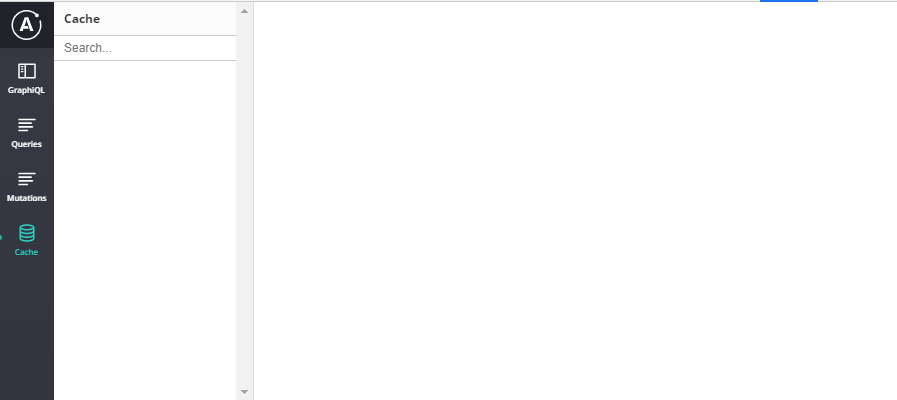
The Dev Tools extension successfully connects to the Apollo client and I view the requests in Queries tab. However, the cache tab remains empty. How can we fix this?
 stoich
All 14 comments
Same here. I have a very simple hello world React project, data gets loaded via hooks, but nothing shows in the Cache tab.
"@apollo/react-hooks": "3.0.1"
"apollo-cache-inmemory": "1.6.3",
"apollo-client": "2.6.4",
"apollo-link-http": "1.5.15",
 verekia
on 2 Sep 2019
verekia
on 2 Sep 2019
Also experiencing this issue. I am using the Web Socket Link, though have tried with the http one also.
 Dizzienoo
on 10 Sep 2019
Dizzienoo
on 10 Sep 2019
Update: moved machines and the issue hasn't persisted. Had restarted original (problem) machine before posting so it's not a child restart issue.
Dizzienoo
on 11 Sep 2019
Experiencing the same problem, cache is empty and I'm also using react hooks
 delgiudices
on 23 Oct 2019
delgiudices
on 23 Oct 2019
Same problem
 max10rogerio
on 28 Oct 2019
max10rogerio
on 28 Oct 2019
Also seeing this problem
 Schachte
on 29 Oct 2019
Schachte
on 29 Oct 2019
Had to wrap outside component with the apollo provider and it's working!
Schachte
on 2 Nov 2019
@Schachte "Had to wrap outside component with the apollo provider and it's working!
ApolloProvider from "@apollo/react-hooks" or ApolloProvider from "react-apollo" ?
Thx
 dijbi
on 3 Nov 2019
dijbi
on 3 Nov 2019
@dijbi react-apollo
Schachte
on 6 Nov 2019
For me, this happens if (and only if) my React app is wrapped in <React.StrictMode/> and the Apollo client is created inside one of the lifecycle functions of my root component.
The problem disappears and I can see "Cache" as well as the other tabs inside the devtools as soon as I either move new ApolloClient outside of the root component or disable strict mode.
My guess is that this has something to do with React intentionally double-invoking some of the component methods: https://reactjs.org/docs/strict-mode.html
 sgoll
on 12 Dec 2019
sgoll
on 12 Dec 2019
I ran into this issue, and my problem was a missing id field in the query. This might be documented somewhere but I couldn't find it, so I'll post this here in case it helps someone.
For example, this code results in an empty Cache tab.
const result = useQuery(gql`
  query {
    allBooks {
      title
    }
  }
`)
Whereas this code fills it with the results I'd expect.
const result = useQuery(gql`
  query {
    allBooks {
      title
      id
    }
  }
`)
Aside from the empty tab the caching seemed to work fine regardless. What also confused me was that with if I executed a different query that did have id, the data queried without id were in the Cache tab under the ROOT_QUERY, which is not there at all if only the id-less query is executed.
I'm using version 3.0.0-beta.39 of @apollo/client.
 Heliozoa
on 12 Mar 2020
Heliozoa
on 12 Mar 2020
Same here, Apollo 3.0 and apollo-client-devtools v2.3.1 and nothing shows up on my Cache tab.
 ghacosta
on 14 Aug 2020
ghacosta
on 14 Aug 2020
If you're like me, you may have missed the configuration section in the README. I was able to get the cache to populate after setting connectToDevTools: true in the ApolloClient constructor.
FWIW I'm using Apollo w/React Native and the React Native Debugger. Maybe that's why it needs to be set manually?
 nickyleach
on 25 Aug 2020
nickyleach
on 25 Aug 2020
The initial issue here as been resolved. If you're experiencing this issue as of the latest release (2.3.1), please open a new issue.
 jcreighton
on 18 Sep 2020
jcreighton
on 18 Sep 2020
Related issues
 kissu
·
4Comments
kissu
·
4Comments
 joesankey
·
5Comments
joesankey
·
5Comments
 bbrinx
·
6Comments
bbrinx
·
6Comments
 mvestergaard
·
6Comments
mvestergaard
·
6Comments
 robclouth
·
5Comments
robclouth
·
5Comments
Most helpful comment
I ran into this issue, and my problem was a missing
idfield in the query. This might be documented somewhere but I couldn't find it, so I'll post this here in case it helps someone.For example, this code results in an empty Cache tab.
Whereas this code fills it with the results I'd expect.
Aside from the empty tab the caching seemed to work fine regardless. What also confused me was that with if I executed a different query that did have id, the data queried without id were in the Cache tab under the
ROOT_QUERY, which is not there at all if only the id-less query is executed.I'm using version
3.0.0-beta.39of@apollo/client.