Apollo-client-devtools: Can't scroll in Chrome

As screenshot above, I cannot scroll down in Apollo's tab.
 robertu7
All 18 comments
Thanks @RoberMac ! That's totally a bug! When text is selected in the left pane I can't scroll the list either.
 justinanastos
on 25 Feb 2019
justinanastos
on 25 Feb 2019
I'm seeing this too which is making the Cache tab virtually useless right now 😬
 nick
on 8 Mar 2019
nick
on 8 Mar 2019
@nick Is this happening just when text in the list is selected?
justinanastos
on 8 Mar 2019
No it doesn't scroll for me whether text is selected or not. #145 looks to be related
nick
on 8 Mar 2019
I encountered this today and have a temporary fix.
- Open the tools and go to the cache view
- In the right half of the window, right click and inspect
<div class="inspector-main">should be selected.- Add height: 100%; to this element
Edit. I will fix this tonight
 scfoxcode
on 18 Mar 2019
scfoxcode
on 18 Mar 2019
👍
 keithrobichaud
on 29 Mar 2019
keithrobichaud
on 29 Mar 2019
https://github.com/apollographql/apollo-client-devtools/pull/193 has been merged and is now available via version 2.2.2 of the devtools. Thanks all!
 hwillson
on 9 Apr 2019
hwillson
on 9 Apr 2019
This issue is occurring again, version 2.2.3.
 azsuth
on 8 Aug 2019
azsuth
on 8 Aug 2019
This issue is occurring again, version 2.2.3.
I ran into this issue as well. As a temporary workaround I'm using Vivaldi, scrolling works fine in that browser.
 sam711
on 8 Aug 2019
sam711
on 8 Aug 2019
Happening here as well.
 AlexGodard
on 8 Aug 2019
AlexGodard
on 8 Aug 2019
Using version 2.2.3 on Chrome's Version 76.0.3809.87 (Official Build) (64-bit).
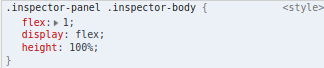
I've found a similar fix as @scfoxcode. Add height: 100% to the div <div class="inspector-body">.
 bmviniciuss
on 9 Aug 2019
bmviniciuss
on 9 Aug 2019
Cache tab is not scrollable using this settings
2.2.4 and chrome Version 76.0.3809.100 (Official Build) (64-bit)
Can you please fix it soon
 ghost
on 12 Aug 2019
ghost
on 12 Aug 2019
You also need to add overlow: scroll to .inspector-panel .inspector-body
 GasimGasimzada
on 28 Aug 2019
GasimGasimzada
on 28 Aug 2019
This is still a blocking issue.
 fgiarritiello
on 9 Sep 2019
fgiarritiello
on 9 Sep 2019
I am still getting this issue whether text is selected or no.
Version : 2.2.4
Chrome Version 76.0.3809.132 (Official Build) (64-bit)
 oumad
on 11 Sep 2019
oumad
on 11 Sep 2019
This is still an issue. Have to edit the inspector and add height: 100% to .inspector-body everytime I need to use the devtools.
 jdpaterson
on 14 Sep 2019
jdpaterson
on 14 Sep 2019
It's a bit more complicated than that for me since I'm using it with electron, so it's not that simple for me to just inspect and change the height to 100%.
oumad
on 14 Sep 2019
2.2.5 was released yesterday and should fix this issue. Thanks!
hwillson
on 14 Sep 2019
Related issues
 stubailo
·
4Comments
stubailo
·
4Comments
 jeffdesign
·
5Comments
jeffdesign
·
5Comments
 richburdon
·
4Comments
richburdon
·
4Comments
 nanandn
·
4Comments
nanandn
·
4Comments
 iki
·
7Comments
iki
·
7Comments
Most helpful comment
Cache tab is not scrollable using this settings
2.2.4 and chrome Version 76.0.3809.100 (Official Build) (64-bit)
Can you please fix it soon