Apollo-client-devtools: Cache Doesn't Update on Page Reload
Expected: When the page is refreshed or reloaded, the Cache displayed in the developer tools should be refreshed to reflect the changed application state.
Actual: The Apollo developer continue to show the cache state when the Chrome developer tools were initially loaded, even when the page is refreshed and the cache-state (presumably) returns to the initial application state. The only way to get the correct cache state to display in the extension is to close Chrome developer tools, then re-open.
Steps to reproduce:
- Open a web-app using Apollo Client in development mode (
NODE_ENV !== 'production'). - After the application loads, open Chrome developer tools, navigate to the Apollo tab and confirm that the Cache is visible.
- Interact with the application and observe the state of the cache change.
- Refresh the page: the cache state does not change.
In my steps to reproduce, I've actually submitted a form the executed a mutation... the results of which intersected the watched queries and therefore updated the cache state. Before reloading the page, I went into the local database and deleted the added records, guaranteeing that the state on refresh should change (when the queries are re-executed). However, I still see the mutation results in the displayed cache (even though they no longer exist in the database and the Network tab confirms they are not returned by the re-executed queries).
 zebulonj
All 16 comments
@zebulonj For a faster workflow, right click on the apollo section in the devtools and reload the frame. Still this should be correctly handled by the apollo devtools.
 stellarhoof
on 8 Jun 2018
stellarhoof
on 8 Jun 2018
I can't figure out how to clear cache at all sometimes. Even closing and restarting the dev tools sometimes caches content which I know I don't have in my local cache. Is someone working on this? Somehow not useful if it shows old data.
 richtera
on 11 Jul 2018
richtera
on 11 Jul 2018
same problem here.
cache not update even after refresh the page.
the only way I could see the updates is when i switch the whole chrome theme to dark / light.
I have to do it every time I want to see the updated content in cache.
Windows 10
Chrome Version 68.0.3440.84 (Official Build) (64-bit)
 saostad
on 3 Aug 2018
saostad
on 3 Aug 2018
@stellarhoof's method works intermittently for me. When it fails I get a connection timeout with the message "We couldn't detect Apollo Client in your app!"
OS X 10.11.6
Chrome: 68.0.3440.106 (Official Build) (64-bit)
 gihrig
on 18 Aug 2018
gihrig
on 18 Aug 2018
Any update on this?
 bschnelle
on 7 Sep 2018
bschnelle
on 7 Sep 2018
Yes this bug is really annoying literally wasted an hour because of this.
 sparshy
on 13 Sep 2018
sparshy
on 13 Sep 2018
There are a couple ways you can clear the cache more quickly:
(1) Chrome DevTools: on the application, select 'Local Storage' and the localhost env you're developing in. Then above the 'Key' column, you can 'clear' the cache.
(2) You can use client.resetStore() to refresh the cache or client.clearStore() to clear the cache within the componentWillMount Lifecycle Hook on your main app.
async componentWillMount() {
    await client.resetStore();
  }
https://www.apollographql.com/docs/react/api/apollo-client.html#ApolloClient.resetStore
note: these tips are for the general cache. @stellarhoof's work around for reloading the Apollo devtool is the best way I've found to fix the main bug in this thread.
 taylor-knapp
on 17 Sep 2018
taylor-knapp
on 17 Sep 2018
No updates on this one?
I am using Apollo with Nextjs and I always see old data. I think I might go back to Redux if I cannot easily see what's in cache :/
 silentlight
on 18 Oct 2018
silentlight
on 18 Oct 2018
It's not the best solution, but waiting for the fix I'm just checking the state from the chrome console:
> __APOLLO_CLIENT__.cache.data.data['Item:3066']
 alessandrodeste
on 26 Oct 2018
alessandrodeste
on 26 Oct 2018
I know its kind of crappy but it was just pointed out to me that in Chrome you can right click in the dev tool and click "reload frame" and it will fix the issue of it getting stuck.
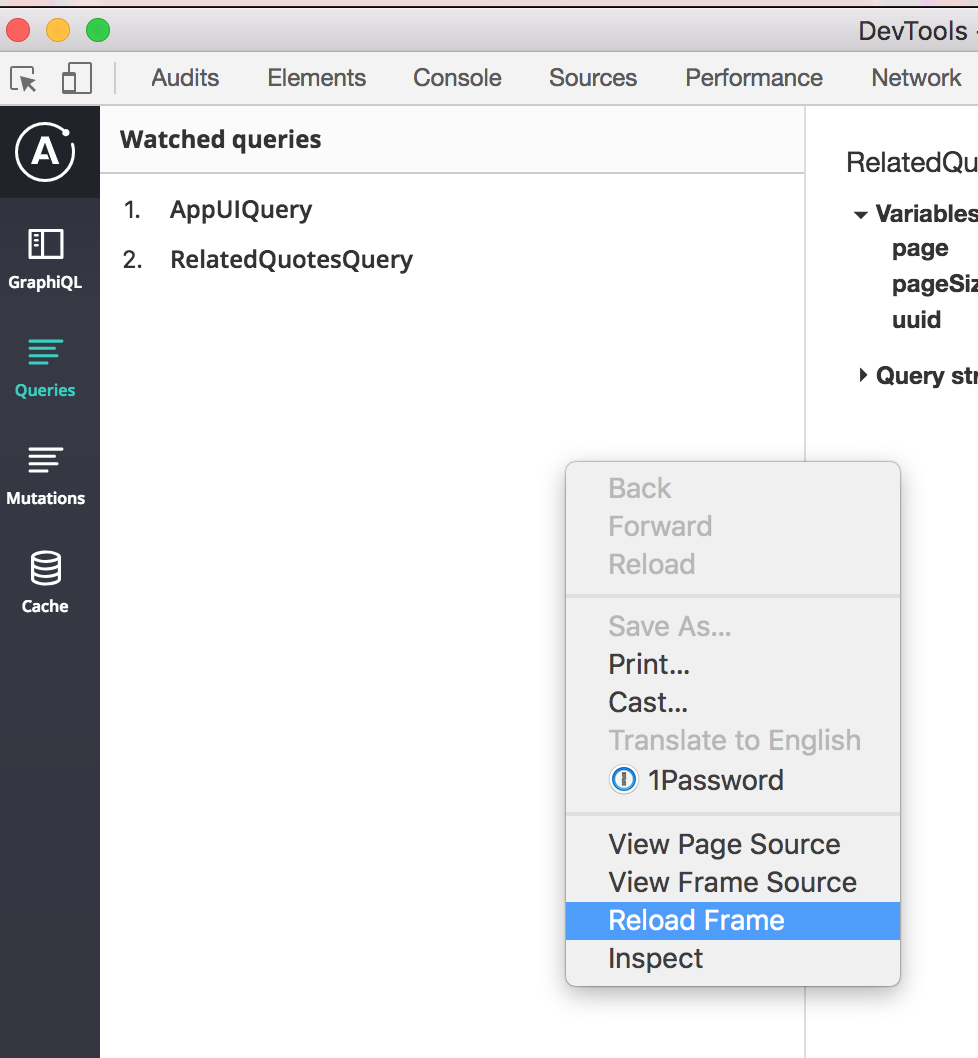
 realalexhomer
on 12 Nov 2018
realalexhomer
on 12 Nov 2018
At the very least we could add a "refresh" button like most plugins have to trigger a data reload instead of reloading the entire inspector frame.
 BenChirlin
on 11 Dec 2018
BenChirlin
on 11 Dec 2018
I just joined the devtools project, thanks for the bug report. This is something we'll be looking at soon.
 justinanastos
on 11 Feb 2019
justinanastos
on 11 Feb 2019
Unless I'm mistaken, this is a duplicate of #108. I'm going to close this issue. If I'm mistaken, please ping me and I'll re-open this.
justinanastos
on 11 Feb 2019
@justinanastos Yes it's the same issue as far as I can see as well.
richtera
on 12 Feb 2019
I wasted too much time on this.
 Stefano1990
on 16 May 2019
Stefano1990
on 16 May 2019
Any updates on this? This is a pretty big (bad) issue from a developer experience standpoint.
 meebix
on 19 May 2019
meebix
on 19 May 2019
Related issues
 jole78
·
7Comments
jole78
·
7Comments
 bbrinx
·
6Comments
bbrinx
·
6Comments
 joesankey
·
5Comments
joesankey
·
5Comments
 backjo
·
6Comments
backjo
·
6Comments
 kissu
·
4Comments
kissu
·
4Comments
Most helpful comment
@zebulonj For a faster workflow, right click on the apollo section in the devtools and reload the frame. Still this should be correctly handled by the apollo devtools.