Apollo-client-devtools: Queries get stuck after page refresh
Hey there,
I'm finding that once a refresh occurs in my app all of the previously made queries get "stuck" in the apollo devtools queries tab. When they get stuck there no other queries get added and nothing changes as I navigate around.
Here is a gif of this occurring from scratch. I'm on the latest version of apollo 2.
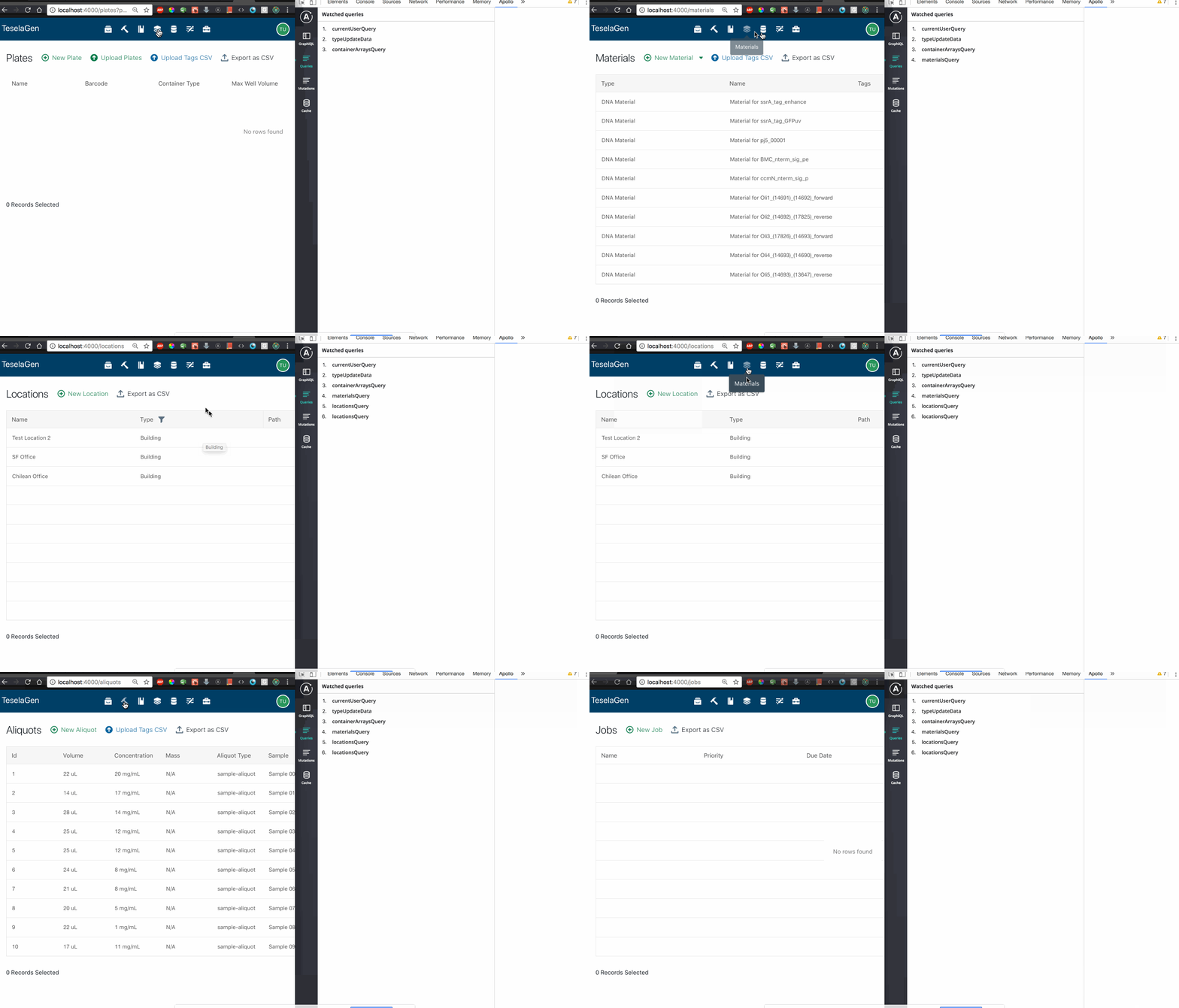
As you can see in the gif, on the initial load, everything seems to be working fine, but after refreshing no other queries get added. I can confirm that this occurs for all my colleagues as well.
I think this is very serious because it makes the devtools unusable after the initial page load.
 tnrich
All 20 comments
👍 happens to me too
 ramsaylanier
on 26 Feb 2018
ramsaylanier
on 26 Feb 2018
Happens to me when refreshing the page, and when manually modifying the URL. After I manually change the URL, I have to close the Apollo dev tools and open it back up again.
 seangransee
on 21 Mar 2018
seangransee
on 21 Mar 2018
I find my whole cache says with a page reload - I need to close dev tools and re-open it to see the correct data
 wesbos
on 6 Apr 2018
wesbos
on 6 Apr 2018
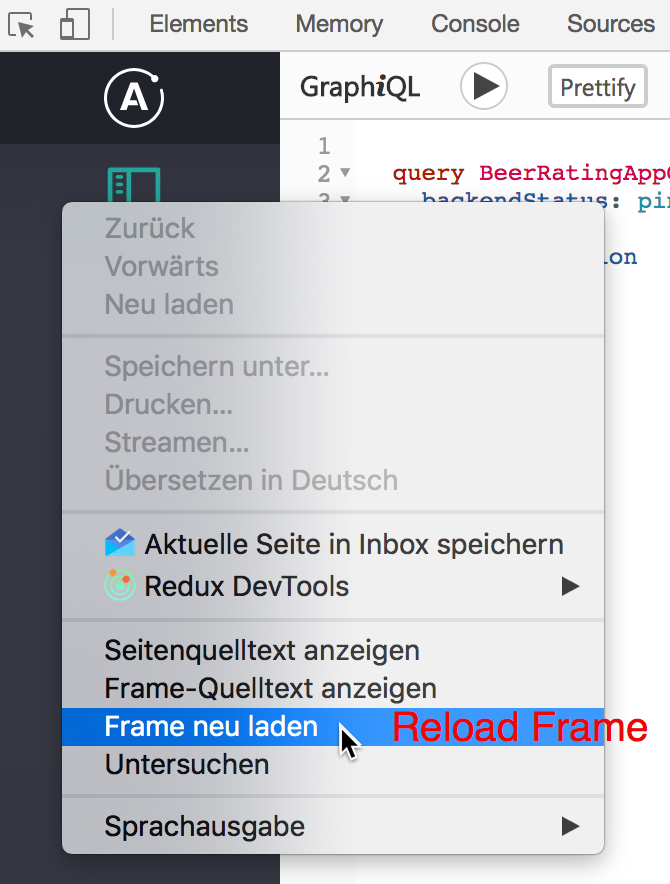
A stop-gap solution right now is to just reload the entire frame:
wesbos
on 6 Apr 2018
using the "reload" frame option made my life a whole lot easier for now
 jeffwillette
on 26 Apr 2018
jeffwillette
on 26 Apr 2018
As mentioned in #111 the problem also occures if you execute a query in the GraphiQL tab after a page reload.
The workaround from @wesbos works in that case by choosing "Reload Frame" in the Documentation Explorer column from GraphiQL or in the navigation tab at the left:
 nilshartmann
on 9 Jun 2018
nilshartmann
on 9 Jun 2018
Is this going to be fixed at some point? The workaround works but it adds a lot of extra clicks/overhead when debugging
 SeanRoberts
on 16 Aug 2018
SeanRoberts
on 16 Aug 2018
Agree with other commenters, this doesn't seem to be getting enough attention given how fundamental this functionality is. The devtools are unusable unless you reload the frame every time. During development where refreshing the page happens every few seconds, this is extremely painful.
 btorresgil
on 11 Sep 2018
btorresgil
on 11 Sep 2018
This issue is still there. Any updates on it?
 THPubs
on 10 Nov 2018
THPubs
on 10 Nov 2018
Still broken, now ten months. Is anybody monitoring these issues?
 ccpony
on 17 Jan 2019
ccpony
on 17 Jan 2019
Thank you everyone for your report and for your patience. I'm going to be looking into this very soon.
 justinanastos
on 11 Feb 2019
justinanastos
on 11 Feb 2019
Whats the progress of this issue?
 elioschmutz
on 27 Mar 2019
elioschmutz
on 27 Mar 2019
Out of interest, does anyone have a workaround that works in Firefox? (the devtools context menu in Firefox does not have the "refresh" option).
Edit: Going into devtool's Settings and un/checking the "Apollo Client Developer Tools" option under the "Developer Tools installed by add-ons" section achieves the same thing.
 thomasmichaelwallace
on 11 Apr 2019
thomasmichaelwallace
on 11 Apr 2019
Any updates on this issue? This is a pretty big (bad) issue from a developer experience standpoint.
 meebix
on 19 May 2019
meebix
on 19 May 2019
Walked away from Apollo and dev-tools. Project seems abandoned. Was never ready for prime time.
ccpony
on 20 May 2019
I'm sorry to respond with bad news and after such a long delay @elioschmutz , @theadactyl , @meebix , and @ccpony ; we haven't had the available resources to come back and make this change. We use this tool internally so we feel the same pain as you. I'm hoping that we'll have the resources to come up with a solution in the next few months; we're always trying to do better and are always happy to hear feedback, even if it's critical feedback.
justinanastos
on 21 May 2019
We're always looking for help with our open source libraries! Either with a PR or even an idea/recommendation on how to resolve the issue would be super helpful to me!
justinanastos
on 21 May 2019
@ccpony What did you move to? Been looking at alternative as well.
btorresgil
on 31 May 2019
This is still an issue for me, I have to reload the entire dev tools to see any updates to the cache. Any work around?
having to use console.table(__APOLLO_CLIENT__.cache.data.data) to see if the cache has changed
wesbos
on 30 Sep 2020
This is also still an issue for me [email protected], @hwillson can you re-open?
@wesbos tip is the only way to view cache in a stable and predictable way. Based on other tickets it seems to be some interaction with NextJs and Apollo
 coler-j
on 18 Nov 2020
coler-j
on 18 Nov 2020
Related issues
 mvestergaard
·
6Comments
mvestergaard
·
6Comments
 ryannealmes
·
5Comments
ryannealmes
·
5Comments
 wildpow
·
6Comments
wildpow
·
6Comments
 stubailo
·
4Comments
stubailo
·
4Comments
 meyer
·
3Comments
meyer
·
3Comments
Most helpful comment
A stop-gap solution right now is to just reload the entire frame: