Apollo-client-devtools: Crashes every time I click on Cache
Everytime I click on cache it just crashes. But only if there's anything stored in cache. I can open Cache tab when cache is empty, but it crashes as soon as something is added to it.
useragent
rawUa: Mozilla/5.0 (Macintosh; Intel Mac OS X 10_13_3) AppleWebKit/537.36 (KHTML, like Gecko) Chrome/66.0.3350.0 Safari/537.36
string:
family: Chrome
major: 66
minor: 0
patch: 3350
device: Other 0.0.0
OS
string: Mac OS X 10.13.3
family: Mac OS X
major: 10
minor: 13
patch: 3
 BorisTB
All 20 comments
I can second that this is happening for me as well:

Also, does anyone know what that
Refused to evaluate a string as JavaScript because 'unsafe-eval' is not an allowed source of script in the following Content Security Policy directive: "script-src 'self' <URL> <URL>".
error message is about?
 tnrich
on 21 Feb 2018
tnrich
on 21 Feb 2018
Same thing happens for me
Mac OS 10.13.3
Chrome 65.0.3325.162
 Herlevsen
on 15 Mar 2018
Herlevsen
on 15 Mar 2018
Same problem,
Mac OS 10.13.4
Chrome 65.0.3325.181
I wanted to check if firefox plugin crash as well but I couldn't find Apollo Client Devtools on addons.mozilla.org anymore.
 przemkow
on 26 Apr 2018
przemkow
on 26 Apr 2018
Same here.
Windows 10
Chrome Version 66.0.3359.181 (Official Build) (64-bit)
React App.
 codepunkt
on 24 May 2018
codepunkt
on 24 May 2018
same here
Chrome Version 66.0.3359.181 (Official Build) (64-bit)
Max OS 10.13.4 (17E202)
 AlexLi88
on 31 May 2018
AlexLi88
on 31 May 2018
Does anyone from the apollo-client-devtools team noticed this issue? Can you please give some statement? If MacOS is not (and will not be) supported, please let us know.
// I just noticed @codepunkt has this issue on Windows 10, I thought it's just macos thing
BorisTB
on 31 May 2018
I just got this issue as well, and it occurred in the middle of me using dev tools as I usually do. Anyone have an idea of how to fix this?
 jeffwillette
on 18 Jun 2018
jeffwillette
on 18 Jun 2018
I have the same issue using Mac OS
 lucianD
on 26 Jul 2018
lucianD
on 26 Jul 2018
I found a similar, but not the same problem.
While using Vue.js with Apollo the Cache tab crashed without any errors with basic configuration.
However adding
tokenName: 'apollo-token',
in the apollo client solved the issue for me
import VueApollo from 'vue-apollo';
import { ApolloClient } from 'apollo-client';
import { HttpLink } from 'apollo-link-http';
import { InMemoryCache } from 'apollo-cache-inmemory';

// Name of the localStorage item
const LOCAL_STORAGE_TOKEN = 'apollo-token';

const httpLink = new HttpLink({
  // You should use an absolute URL here
  uri: 'http://localhost:3020/graphql',
});

// Create the apollo client
const apolloClient = new ApolloClient({
  link: httpLink,
  tokenName: LOCAL_STORAGE_TOKEN,
  cache: new InMemoryCache(),
  connectToDevTools: true,
});

export default new VueApollo({
  defaultClient: apolloClient,
});
 rijulg
on 30 Jul 2018
rijulg
on 30 Jul 2018
I'm seeing the same thing. I tried @rijulg 's fix and the error went away but Queries, Mutations and Cache are empty windows.
Furthermore there's nothing in the inspector-cepted console window at all now to tip me off as to what's wrong.
One interesting thing is that the GraphiQL window works perfectly and I'm able to run queries and auto-complete just fine.
Update: Running Apollo Client Developer Tools 2.1.3 and apollo-client 2.3.4
 MattReimer
on 28 Aug 2018
MattReimer
on 28 Aug 2018
This is still an issue.
Edit: Including the id of every object into my queries fixed the crash for me!
 StefanFeederle
on 15 Oct 2018
StefanFeederle
on 15 Oct 2018
Still an issue for me, all my queries include ids.
 cs-miller
on 17 Oct 2018
cs-miller
on 17 Oct 2018
Same issue, macOS, triggered by adding apollo-link-error!
 nomadoda
on 14 Nov 2018
nomadoda
on 14 Nov 2018
I've got this, although it is fixed when a writeQuery is done successfully in my webapp and reloading the panel page.
Before it, the variable window.__APOLLO_CLIENT__.cache.data.data is an empty object {}.
I suspect the extension is expecting something else and cannot render without a populated object.
 faurehu
on 27 Nov 2018
faurehu
on 27 Nov 2018
I had to remove and reinstall the extension to get it working again.
FWIW , I tried client.clearStore() and client.resetStore() to remove cached data and the issue persisted.
 ianshea
on 5 Jan 2019
ianshea
on 5 Jan 2019
@peggyrayzis and team any responses to this?
 TejasQ
on 17 Jan 2019
TejasQ
on 17 Jan 2019
Hey y'all. Sorry for the very long response time. Can someone post a minimal reproduction?
I tried using Apollo's full stack tutorial both using the latest prod versions of react-apollo and apollo-client (https://github.com/justinanastos/fullstack-tutorial/tree/justin/apollo-pre-2.5) and pre-release alphas (https://github.com/apollographql/fullstack-tutorial).
I can see the cache in both cases.
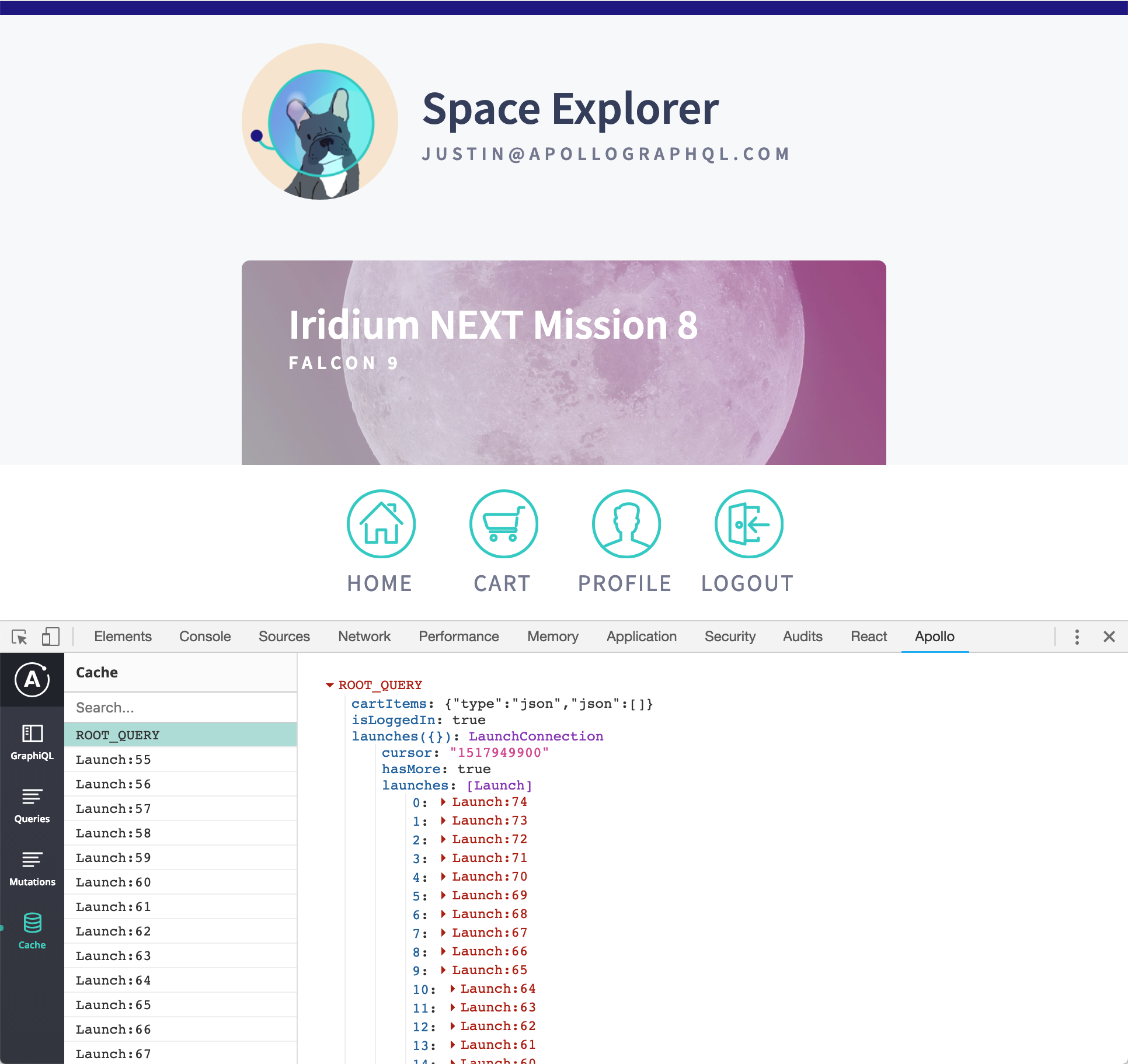
Obviously this is not some one-off error if so many people have commented on it. Can someone please post a minimal reproduction?
 justinanastos
on 11 Feb 2019
justinanastos
on 11 Feb 2019
In my case this is linked to clearing the cache. Everything works until the cache is cleared.
I've just removed the extension, restarted Chrome and re-added the extension. The problem persists.
So here's a reproduction:
- Open https://kry9my57o.codesandbox.io/ (the source: https://codesandbox.io/s/kry9my57o )
- Open Apollo Dev Tools
- Go to the Cache tab and check that everything is working (there should be a
ROOT_QUERYand a single cached object) - Click on the "Clear" button in the page. This calls
client.clearStore(). The cache tab in Dev Tools should now be empty. I don't think this ever worked, though. You can switch between different tabs and it will still work and show the populated cache. - Right-click within the extension window and choose "Reload Frame" (or close and re-open Apollo Dev Tools)
- Click on the Cache tab
The extension will now crash showing a blank screen as per the screenshot in https://github.com/apollographql/apollo-client-devtools/issues/107#issuecomment-367169597
I think I remember this working before - it would normally reload showing the empty cache.
There are errors in the browser console for the Apollo extension frame:
Uncaught TypeError: Cannot convert undefined or null to object
    at Function.keys (<anonymous>)

macOS 10.13.6
Chrome 72.0.3626.96 (Official Build) (64-bit)
Apollo Client Developer Tools 2.1.5
 jfrej
on 12 Feb 2019
jfrej
on 12 Feb 2019
Thank you @jfrej ! I ran through the reproduction and saw exactly what you explained. I'm actively working on Apollo Client Devtools for the time being so hopefully I have something to report soon :)
Thanks again!
justinanastos
on 12 Feb 2019
Resolved in v2.1.7
justinanastos
on 15 Feb 2019
Related issues
 raix
·
7Comments
raix
·
7Comments
 meyer
·
3Comments
meyer
·
3Comments
 ryannealmes
·
5Comments
ryannealmes
·
5Comments
 mvestergaard
·
6Comments
mvestergaard
·
6Comments
 robclouth
·
5Comments
robclouth
·
5Comments
Most helpful comment
Thank you @jfrej ! I ran through the reproduction and saw exactly what you explained. I'm actively working on Apollo Client Devtools for the time being so hopefully I have something to report soon :)
Thanks again!