Apollo-client-devtools: Devtools not showing up reliably.
Devtools sometimes shows up but mostly doesn't (race condition?)
Webpack: 2.3.3
Extension: 1.0.8.1
Chrome: 57.0.2987.133 (64-bit)
React/Redux/Apollo stack
The extension actually loads: Devtools/Sources shows that the hook.js Content Script has loaded, and indeed window.__APOLLO_DEVTOOLS_GLOBAL_HOOK__ shows the correct version (and of course, the Warning message doesn't appear).
Restarting Chrome sometimes fixes the problem.
Repeat of https://github.com/apollographql/apollo-client-devtools/issues/8
 richburdon
All 48 comments
Probably unrelated, but when I do get the extension to load (e.g., by resetting the browser), I often get the spinning loading indicator in the GQL results panel, and massive slowdown of Chrome (with only a single tab running).
richburdon
on 7 Apr 2017
 intellix
on 13 Apr 2017
intellix
on 13 Apr 2017
Same thing here, only rarely do the devtools show up for me, even though the "A" icon lights up.
 insidewhy
on 11 May 2017
insidewhy
on 11 May 2017
@ohjames Are you using React or Angular?
 rrdelaney
on 11 May 2017
rrdelaney
on 11 May 2017
React. It's really good when it works. Usually the Dev tools tab is there but the queries don't get listed. When it lists those queries I'm all like: "it would be so useful if I could rely on this". Maybe one in twenty loads it works.
insidewhy
on 11 May 2017
The initialization of Apollo might not be immediate. It's something we're working on a fix for in the dev tools 🙂 I'll update this when I'm closer to resolving the issue
rrdelaney
on 12 May 2017
might not be immediate
It's more like, it shows up on a few reloads until it stops showing up. When it stops showing up it never shows up again rather than just being delayed. Then you have to restart the browser to get it again.
insidewhy
on 12 May 2017
That's definitely weird. It might be related to a performance issue then. How large are the queries in your app?
rrdelaney
on 12 May 2017
Pretty small, I've just started porting components to use apollo-client. The issue started happening when I only had one query. Using the very latest chrome.
insidewhy
on 12 May 2017
Colleague here experiencing exactly the same issue as me, they are on Mac and I'm on Linux. They are also working on a different project to me.
insidewhy
on 12 May 2017
Good to know! Thanks for providing all this information 😄 The first step is to get a repro!
Are any of the codebases you're working with open source?
rrdelaney
on 12 May 2017
@rrdelaney The well known apollo example app on github: https://github.com/apollographql/GitHunt-React
She opened that, apollo tools worked, she reloaded the page about 5 times, then it wouldn't work again until she restarted it. It worked another few times and then the same story, she had to restart.
insidewhy
on 12 May 2017
We are both using Chrome 58, me on Linux and her on Mac. Our experiences are just about identical to each other.
insidewhy
on 12 May 2017
I noticed something else today... I opened up apollo-dev-tools after about one hundred reloads and it was working... I couldn't believe it given the number of reloads and how infrequently it works. From the next reload on it wouldn't work anymore.
So I'm pretty sure that using the dev tools one or more times (often just once) leads to a state where they can never be used again.
insidewhy
on 16 May 2017
Just adding my 2 cents: I've never been able to get the devtools working myself, nor my colleagues, afaik.
window.__APOLLO_CLIENT__ is set, production is development, connectToDevTools has been explicitly set to true and the tab is there, but it's just always empty. Pretty default apolloClient instance, using its own redux store (so 2 stores in total). Have it on both stable Chrome (58) and in Canary (60).
I'm happy to help you guys track down the issue, but I'm not sure where to start to debug this :).
 pleunv
on 29 May 2017
pleunv
on 29 May 2017
I'm working on a new connection mechanism right now 🙂 It should (hopefully?) fix a lot of these issues! When I have something ready for testing, would you mind if I sent it to you to test?
rrdelaney
on 29 May 2017
Sure, go ahead :)
pleunv
on 29 May 2017
Yeah... at the moment I have to restart chrome every time I want to use the tool, then restart again the next time etc. It's a drag.
insidewhy
on 31 May 2017
I would definitely be up for helping you test this @rrdelaney - have been experiencing the same issue!
 oliverwoodings
on 1 Jun 2017
oliverwoodings
on 1 Jun 2017
@oliverwoodings awesome to hear! I'll have a usable version hopefully soon, and I'll post a built version here.
rrdelaney
on 1 Jun 2017
We've completely rewritten the way we detect and load data, especially thanks to @ramyanaga and @rrdelaney! Please let me know if this has been resolved, and I'll reopen if not!
 stubailo
on 25 Jul 2017
stubailo
on 25 Jul 2017
@stubailo Can you let us know which version we should be on to see the improvements? Thanks!
 frehner
on 25 Jul 2017
frehner
on 25 Jul 2017
@frehner Version 2.0.2!
 ramyanaga
on 25 Jul 2017
ramyanaga
on 25 Jul 2017
I installed it first time 10m ago to use extension, A icon is active, no Apollo tab in devtools :-(
"apollo-client": "^1.4.2",
"react-apollo": "^1.4.2",
devtools 2.0.2
Ok, so I dont know if chrome update fixed it, but now I can see Apollo tab.
BUT if I open devtools before it was initialized it will not attach tab. React tab is being added with delay consistently, but not Apollo. I need to reopen devtools and than React and Apollo pop there after some delay at the same time.
 ShockiTV
on 26 Jul 2017
ShockiTV
on 26 Jul 2017
Running [email protected], [email protected], [email protected] and still just getting a blank tab I'm afraid :/
Is there anything I can do to help debug this?
pleunv
on 28 Jul 2017
@pleunv @ShockiTV Have you guys tried uninstalling and re-installing the devtools? (even if you just installed them for the first time). Also potentially try enabling the 'allow access to file URLs' setting in chrome. Are you getting any error messages in your console that you could share with us?
ramyanaga
on 28 Jul 2017
@pleunv if you could send over an app where it happens and/or a quick screen recording, that might help! It's been really hard to track this one down for some reason :[
stubailo
on 28 Jul 2017
I just removed and added extension. For me, 1 example would be.
1) open new chrome tab
2) open developer tools
3) write http://www.githunt.com/ in url
4) see there is no related error and no Apollo tab added, but React tab is added successfully
5) close and open developer tools
6) tab appear together with all the other extensions like react and redux
Checking the 'allow access to file URLs' did not change anything
Luckily for me the tab is working, just that devtools initialization is slightly bugged.
ShockiTV
on 28 Jul 2017
I'm seeing this on window.__APOLLO_DEVTOOLS_GLOBAL_HOOK__ = {version: "2.0.3"}, have there been any updates or workarounds that seem to fix this?
On rare occasions it has worked for me, on frequent occasions the A logo in the toolbar has darkened but there is no tab in devtools, and currently the A logo doesn't darken and there is also no tab.
 coffenbacher
on 4 Sep 2017
coffenbacher
on 4 Sep 2017
I completely forgot about this until a colleague asked me about it today. Had another look and noticed that Chrome now let me inspect the iframe of the apollo extension that failed to load (I swear it didn't before). And tadaaa:
Uncaught SecurityError: Failed to read the 'localStorage' property from 'Window': Access is denied for this document.
Turns out that blocking third party cookies & site data in Chrome's settings completely blocks extensions from accessing localStorage, thus also breaking apollo-client-devtools. Jesus. It's working perfectly now.
The setting can be found under Settings > Advanced > Content Settings > Cookies:

@coffenbacher @ShockiTV Does this help you guys out?
edit: Seems like it's been added to the README as well a couple months ago 😬
pleunv
on 25 Sep 2017
Unfortunately that setting was already disabled for me. And the non-deterministic initialization for me leads me to believe the problem I'm seeing is along the lines of a race condition.
Glad that worked for you though!
coffenbacher
on 25 Sep 2017
I also get a blank tab no matter what I do. Is there any solution to this?
 voodooattack
on 27 Sep 2017
voodooattack
on 27 Sep 2017
If you enable Developer mode in the Chrome Extensions menu you'll see links to specific dev tools instances for each extension. If you open up the correct one you should (hopefully) see some errors in your console log that might narrow down the issue.

pleunv
on 28 Sep 2017
@pleunv I see nothing. No errors (or any other output) at all.
voodooattack
on 28 Sep 2017
I have the 3rd party cookies block turned off also, so it is not that.
As mentioned in my step by step reproduction, it depends on the time when you open dev tools.
Somehow react/redux extensions are kinda waiting or polling so they react to being loaded. Not a case for apollo.
Feels like race condition due to not listening for some hook or something like that.
ShockiTV
on 9 Oct 2017
I've updated this plugin many times but I just see the same issues over and over.
We need to find a minimal example that can reproduce it so the developer can verify it's been fixed.
I've yet to find a project this devtool works reliably on, given that it should be pretty easy to come up with a test.
insidewhy
on 9 Oct 2017
It should be fairly easy, given that I see it all the time as well, but the
behavior I see feels like some sort of race condition. I've yet to find a
simple situation where it fails every time, only most times.
On Oct 9, 2017 08:15, "James Pike" notifications@github.com wrote:
I've updated this plugin many times but I just see the same issues over
and over.We need to find a minimal example that can reproduce it so the developer
can verify it's been fixed.I've yet to find a project this devtool works reliably on, given that it
should be pretty easy to come up with a test.—
You are receiving this because you were mentioned.
Reply to this email directly, view it on GitHub
https://github.com/apollographql/apollo-client-devtools/issues/29#issuecomment-335140319,
or mute the thread
https://github.com/notifications/unsubscribe-auth/AAPAa9-96mmxjJ8_l2LVLTnbK39TMxs_ks5sqg5LgaJpZM4M3ICB
.
coffenbacher
on 9 Oct 2017
From step by step reproduction I wrote above
1) open new tab
2) open devtools
3) enter URL of apollo enabled site
No Apollo tab ever in devtools (react and redux tabs would initialize).
If you open devtools after app apollo part is initiated it would load properly.
ShockiTV
on 9 Oct 2017
@coffenbacher Weird, I have an app here that takes out apollo dev tools forever until you restart the browser ;)
insidewhy
on 9 Oct 2017
I am seeing this problem now. I just enabled Apollo Dev Tools in this project, and it is showing these exact symptoms.
- I restarted Chrome, nothing
- I reinstalled the browser extension, the icon was darkened
- I pressed F5, and it went gray again
- I did some unknown and random steps and pressed F5 again and the icon was darkened again
- I went into the Apollo tab of dev tools, and it seemed to be working fine
- I pressed F5, and the icon went gray again
- I havent got it to work since after lots of keyboard ramming and refreshing
- I have window.__APOLLO_CLIENT__ loaded. I can see what looks like the client instance.
I had caching turned off while dev tools is open, so I disabled that, and it doesn't seem to have an effect. I did that because of the localStorage comment above.
I think ShockiTV's steps to reproduce and hypothesis are in the ballpark. Apollo Dev tools extension needs to try harder to detect that which is available to it.
It seems like if I leave everything alone, like walk away for a while and come back then press F5, it darkens the icon. Both times I got mine to work until the page reloaded, was because I did pretty much nothing for a while and then pressed F5. It's a small symptom but it may be indicatory of something.
 amackintosh
on 16 Nov 2017
amackintosh
on 16 Nov 2017
the same problem.
 vingrad
on 17 Nov 2017
vingrad
on 17 Nov 2017
still this problem (Chrome Version 59.0.3071.115 (Official Build) (64-bit))
 ynuska
on 11 Dec 2017
ynuska
on 11 Dec 2017
@ynuska do you mind opening a new issue about it? I think there are a lot of factors that might make them not show up, so I don't think the mega-issue is helping check all the boxes
stubailo
on 12 Dec 2017
I'm still seeing this issue in the latest version of Chrome with the latest version of this extension. The Apollo tab randomly hides the left menu (so I can't use it) and randomly shows wrong data (that I know is wrong because I can console.log to see the right data). I really need to use this tool but it is really unreliable ... any ideas?
 joelgetaction
on 2 Nov 2018
joelgetaction
on 2 Nov 2018
Multiple members of my team including my self are having this issue. Apollo dev tools either doesn't show up at all in the Chrome Dev Tools or only sporadically (maybe 1 in 20 tries). This issue doesn't seems to be resolved
 bcbane
on 25 Oct 2019
bcbane
on 25 Oct 2019
still experiencing issues with this. I see the Apollo tab it tries to load and then goes to a blank white screen.
- apollo-client 2.6.8
- webpack 4.41.0
- chrome 79
 bauwaerter
on 11 Jan 2020
bauwaerter
on 11 Jan 2020
I'm having a similar problem—the icon shows up darkened, but the tab in dev tools is no where to be seen. Should I open a new ticket?
Edit: open issue is https://github.com/apollographql/apollo-client-devtools/issues/213
 avinoamsn
on 16 Jul 2020
avinoamsn
on 16 Jul 2020
Multiple members of my team including my self are having this issue. Apollo dev tools either doesn't show up at all in the Chrome Dev Tools or only sporadically (maybe 1 in 20 tries). This issue doesn't seem to be resolved
The problem is probably a race condition. I found a stupid but working solution. I'm using Apollo + Apollo Vue wrapper, soo I added setTimeout between creating ApolloClient and VueApollo:
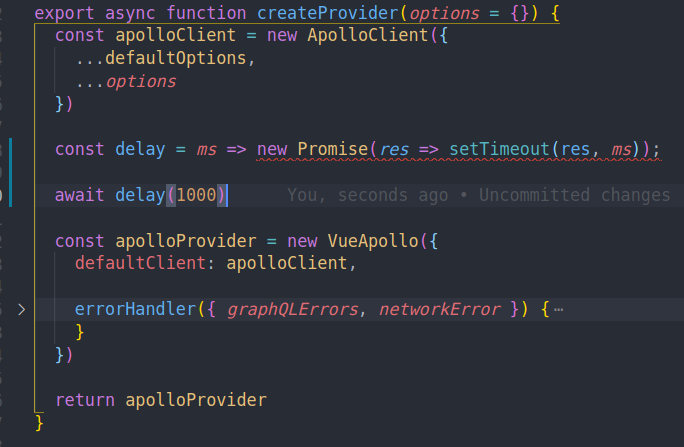
Obviously, that is not a correct solution, just a quick hack. I'll create a new bug report in free time
 TkaczykAdam
on 12 Mar 2021
TkaczykAdam
on 12 Mar 2021
Related issues
stubailo
·
4Comments
 raix
·
7Comments
raix
·
7Comments
 ryannealmes
·
5Comments
ryannealmes
·
5Comments
 konsumer
·
7Comments
konsumer
·
7Comments
 glauberfc
·
5Comments
glauberfc
·
5Comments
Most helpful comment
still this problem (Chrome Version 59.0.3071.115 (Official Build) (64-bit))