Apollo-android: 2.0.2 exposes in an Android project the jvm implementation of apollo-normalized-cache-sqlite module
Summary
When I upgrade to 2.0.2 I get the jvm implementation of apollo-normalized-cache-sqlite, instead of the android one.
Description
Trying to use SqlNormalizedCacheFactory(context.applicationContext, name = "my_db") will throw:
None of the following functions can be called with the arguments supplied:
internal constructor SqlNormalizedCacheFactory(driver: SqlDriver) defined in com.apollographql.apollo.cache.normalized.sql.SqlNormalizedCacheFactory
public constructor SqlNormalizedCacheFactory(url: String, properties: Properties = ...) defined in com.apollographql.apollo.cache.normalized.sql.SqlNormalizedCacheFactory
Version
2.0.2
 lucamtudor
All 19 comments
I guess the solution to this would be to revert changes to sqlite module and do 2.0.3 release.
 tasomaniac
on 6 May 2020
tasomaniac
on 6 May 2020
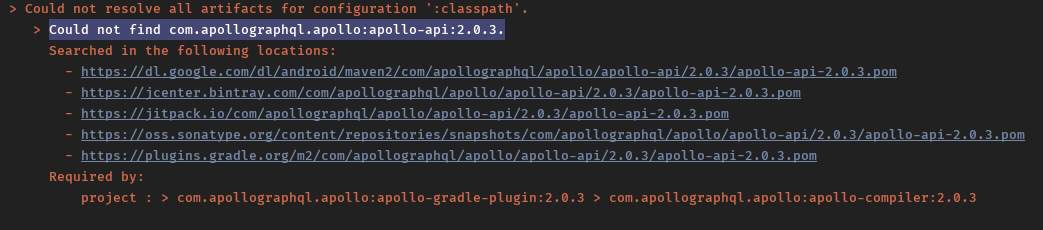
@tasomaniac there's still something wrong with 2.0.3 you just released
lucamtudor
on 7 May 2020
@lucamtudor can you try again? There was an error uploading on bintray so we had to do it twice. It should be all good now.
 martinbonnin
on 7 May 2020
martinbonnin
on 7 May 2020
@lucamtudor is it working with 2.0.3?
If you get a chance, can you post the results of ./gradlew :app:dependencies with 2.0.2 ? It should contain something like:
+--- com.apollographql.apollo:apollo-normalized-cache-sqlite:2.0.2
|    \--- com.apollographql.apollo:apollo-normalized-cache-sqlite-android-debug:2.0.2
The module file at https://jcenter.bintray.com/com/apollographql/apollo/apollo-normalized-cache-sqlite/2.0.2/apollo-normalized-cache-sqlite-2.0.2.module looks ok and should point to the android implementation so maybe there's something else that pull the JVM variant ?
martinbonnin
on 12 May 2020
@martinbonnin sorry for the delay, for some reason I forgot to click on "Comment" a few days ago. But yes, with 2.0.3 it's back on track.
lucamtudor
on 12 May 2020
The reason I'm asking is that ultimately, we will enable multiplatform support again for apollo-normalized-cache-sqlite so it migh be worth investigating a bit more what went wrong with 2.0.2 since the Gradle metadata look ok.
martinbonnin
on 12 May 2020
@martinbonnin Ok, so I looked into this.
I have 2 buildTypes inheriting from debug and basically, I get -jvm dependencies for those and -android for debug.
android {
    ...
    buildTypes {
        release {
            ...
        }
        staging {
            initWith debug
            ...
        }
        prodEnv {
            initWith staging
            ...
        }
    }

    flavorDimensions "default"
    productFlavors {
        _myProductFlavor_ {
            dimension "default"
            ...
        }
    }
}
./gradlew :app:dependencies will produce
_myProductFlavor_DebugCompileClasspath - Compile classpath for compilation '_myProductFlavor_Debug' (target  (androidJvm)).
...
+--- com.apollographql.apollo:apollo-normalized-cache-sqlite:2.0.2
|    \--- com.apollographql.apollo:apollo-normalized-cache-sqlite-android-debug:2.0.2
|         +--- com.apollographql.apollo:apollo-api:2.0.2 (*)
|         +--- com.apollographql.apollo:apollo-normalized-cache-api:2.0.2 (*)
|         +--- com.squareup.sqldelight:runtime:1.3.0
|         |    \--- com.squareup.sqldelight:runtime-jvm:1.3.0
|         \--- androidx.sqlite:sqlite:2.1.0
|              \--- androidx.annotation:annotation:1.0.0 -> 1.1.0
...

_myProductFlavor_ProdEnvCompileClasspath - Compile classpath for compilation '_myProductFlavor_ProdEnv' (target  (androidJvm)).
...
+--- com.apollographql.apollo:apollo-normalized-cache-sqlite:2.0.2
|    \--- com.apollographql.apollo:apollo-normalized-cache-sqlite-jvm:2.0.2
|         +--- com.apollographql.apollo:apollo-api:2.0.2 (*)
|         +--- com.apollographql.apollo:apollo-normalized-cache-api:2.0.2 (*)
|         \--- com.squareup.sqldelight:runtime:1.3.0
|              \--- com.squareup.sqldelight:runtime-jvm:1.3.0
...
Thanks ! I can reproduce with https://github.com/martinbonnin/github-graphql-sample/commit/fe3c5717885511bbb28cafc590b504b4d6ab4683.
I wonder where the actual bug is though. I would expect anything android to have a higher precedence than jvm.
martinbonnin
on 12 May 2020
Digging a bit more into this, what's happening is that Gradle is looking for a BuildTypeAttr == prodEnv attribute while apollo-normalized-cache-sqlite-android-debug declares BuildTypeAttr == debug. apollo-normalized-cache-sqlite-jvm on the other hand doesn't declare anything, which explains why it becomes selected.
I believe a fix would be to explicit the buildTypes fallbacks:
    buildTypes {
        create("staging") {
            initWith(getByName("debug"))
            matchingFallbacks = listOf("debug")
        }
        create("prodEnv") {
            initWith(getByName("debug"))
            matchingFallbacks = listOf("debug")
        }
    }
This way, Gradle will map prodEnv to the apollo-normalized-cache-sqlite-android-debug
martinbonnin
on 13 May 2020
Would it be possible to just release the release version. Initially I had that but we changed to publish all variants to fix the sample project. I wonder what would happen if we do that. That's what is normally done in regular Android libraries, isn't it? We never had debug version published.
tasomaniac
on 13 May 2020
Would it be possible to just release the release version.
I just tried and it produces the below module file:
    {
      "name": "android-releaseRuntimeElements",
      "attributes": {
        "com.android.build.api.attributes.BuildTypeAttr": "release",
        "com.android.build.api.attributes.VariantAttr": "release",
        "com.android.build.gradle.internal.dependency.AndroidTypeAttr": "Aar",
        "org.gradle.usage": "java-runtime",
        "org.jetbrains.kotlin.platform.type": "androidJvm"
      }
As long as BuildTypeAttr is there and doesn't match what the consumer (the app here) is asking, the app will fallback to using the JVM version.
martinbonnin
on 13 May 2020
I am wondering what would happen if you remove buildType and variant attributes there.
tasomaniac
on 13 May 2020
We just upgraded to 2.0.2.
And our using this
SqlNormalizedCacheFactory(context.applicationContext, name = "my_db"
But didn't encounter the above error mentioned. Are we missing something. We are still in debug mode is that why this didn't occur for us.
Can someone please clarify if everyone needs to upgrade to 2.0.3 if using sqlite cache ?
 ahetawal-p
on 14 May 2020
ahetawal-p
on 14 May 2020
@ahetawal-p I would recommend using 2.0.3 for the time being.
If you're not using custom BuildTypes, Gradle will resolve the correct artefact. But it's still unclear how come @lucamtudor had a runtime exception and not a compile time error.
martinbonnin
on 14 May 2020
Got it, thanks @martinbonnin
ahetawal-p
on 14 May 2020
I filed an issue in the Kotlin bugtracker to see if something can be done in the Kotlin MPP plugin: https://youtrack.jetbrains.com/issue/KT-38954
martinbonnin
on 15 May 2020
@ahetawal-p I would recommend using 2.0.3 for the time being.
If you're not using custom BuildTypes, Gradle will resolve the correct artefact. But it's still unclear how come @lucamtudor had a runtime exception and not a compile time error.
@martinbonnin I don't think I said I got a runtime error... It's failing to compile when it can't find the android version of the module.
lucamtudor
on 15 May 2020
@lucamtudor sorry I misunderstood and glad to hear that it wasn't a runtime error 😃 . It all makes sense then and 2.0.2 can be declared safe to use. To avoid the compilation error, one should either:
- have no custom build type
- or provide matchingFallbacks for their custom build types
Let's wait a bit to see if we can find a solution that would make consuming the multiplatform library easier. Else matchingFallback might be required.
martinbonnin
on 16 May 2020
I guess we will have to close this as working as intended and do better documentation for the case where people have extra buildTypes.
I tried in our project and couldn't reproduce it. And then realized later that we already define matchingFallbacks
tasomaniac
on 17 May 2020
Related issues
 mmahesh2019
·
4Comments
mmahesh2019
·
4Comments
 TonnyL
·
3Comments
TonnyL
·
3Comments
 itarato
·
3Comments
itarato
·
3Comments
 RageshAntony
·
3Comments
RageshAntony
·
3Comments
 gmrandom
·
4Comments
gmrandom
·
4Comments