Apollo-android: Remove or Feature to silence code gen output
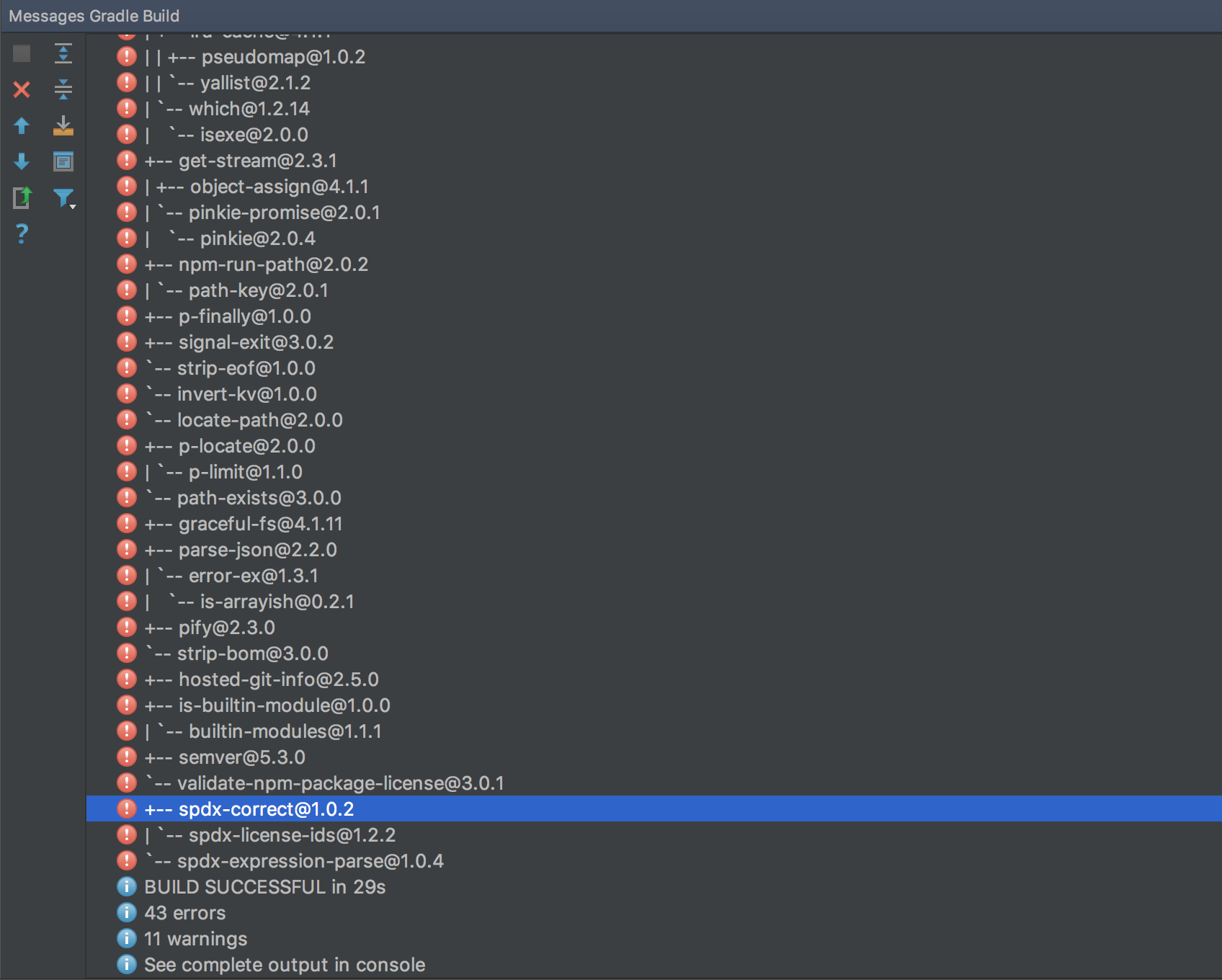
How can we remove/silence this tasks's output? Can you all no print this out when your plugin runs or add an option to the gradle extension to suppress this verbose out?
Here is an example via command line:
> Task :installApolloCodegen
[email protected] /<>/build/apollo-codegen
`-- [email protected]
  +-- [email protected]
  | +-- [email protected]
  | +-- [email protected]
  | +-- [email protected]
  | +-- [email protected]
  | +-- [email protected]
  | +-- [email protected]
  | +-- [email protected]
  | +-- [email protected]
  | +-- [email protected]
  | +-- [email protected]
  | +-- [email protected]
  | +-- [email protected]
  | +-- [email protected]
  | +-- [email protected]
  | +-- [email protected]
  | +-- [email protected]
  | +-- [email protected]
  | `-- [email protected]
  +-- [email protected]
  +-- [email protected]
  | +-- [email protected]
  | +-- [email protected]
  | | `-- [email protected]
  | +-- [email protected]
  | +-- [email protected]
  | | `-- [email protected]
  | |   +-- [email protected]
  | |   `-- [email protected]
  | +-- [email protected]
  | `-- [email protected]
  +-- [email protected]
  | `-- [email protected]
  +-- [email protected]
  +-- [email protected]
  | `-- [email protected]
  +-- [email protected]
  | +-- [email protected]
  | | `-- [email protected]
  | `-- [email protected]
  +-- [email protected]
  | `-- [email protected]
  `-- [email protected]
    +-- [email protected]
    +-- [email protected]
    | +-- [email protected]
    | | +-- [email protected]
    | | `-- [email protected]
    | |   `-- [email protected]
    | +-- [email protected]
    | | `-- [email protected]
    | `-- [email protected]
    |   `-- [email protected]
    +-- [email protected]
    +-- [email protected]
    +-- [email protected]
    | +-- [email protected]
    | | +-- [email protected]
    | | | +-- [email protected]
    | | | | +-- [email protected]
    | | | | `-- [email protected]
    | | | `-- [email protected]
    | | |   `-- [email protected]
    | | +-- [email protected]
    | | | +-- [email protected]
    | | | `-- [email protected]
    | | |   `-- [email protected]
    | | +-- [email protected]
    | | | `-- [email protected]
    | | +-- [email protected]
    | | +-- [email protected]
    | | `-- [email protected]
    | +-- [email protected]
    | | `-- [email protected]
    | `-- [email protected]
    |   `-- [email protected]
    +-- [email protected]
    | +-- [email protected]
    | | `-- [email protected]
    | |   +-- [email protected]
    | |   | `-- [email protected]
    | |   `-- [email protected]
    | `-- [email protected]
    |   +-- [email protected]
    |   | +-- [email protected]
    |   | +-- [email protected]
    |   | | `-- [email protected]
    |   | |   `-- [email protected]
    |   | +-- [email protected]
    |   | `-- [email protected]
    |   +-- [email protected]
    |   | +-- [email protected]
    |   | +-- [email protected]
    |   | | `-- [email protected]
    |   | +-- [email protected]
    |   | `-- [email protected]
    |   |   +-- [email protected]
    |   |   | `-- [email protected]
    |   |   `-- [email protected]
    |   `-- [email protected]
    +-- [email protected]
    +-- [email protected]
    +-- [email protected]
    +-- [email protected]
    | +-- [email protected]
    | `-- [email protected]
    |   `-- [email protected]
    +-- [email protected]
    +-- [email protected]
    `-- [email protected]
And via Intellij:
 jaredsburrows
All 32 comments
@marwanad I know you mentioned smth about this behaviour, but can we do anything here?
 sav007
on 7 Jul 2017
sav007
on 7 Jul 2017
@sav007 It would be nice to remove that print out entirely as it shows up as errors in Intellij.
jaredsburrows
on 7 Jul 2017
It's not us it's the upstream nodejs gradle plugin. They seem to put successful logs into error Logger
 digitalbuddha
on 7 Jul 2017
digitalbuddha
on 7 Jul 2017
I thought I fixed that with #323. I'll double check tonight.
 marwanad
on 7 Jul 2017
marwanad
on 7 Jul 2017
@jaredsburrows what version of apollo-android are you running?
marwanad
on 7 Jul 2017
Sorry about that. I forgot to include that in the original post, version 0.3.2.
jaredsburrows
on 7 Jul 2017
Seems to be the latest: https://mvnrepository.com/artifact/com.apollographql.apollo/gradle-plugin.
jaredsburrows
on 7 Jul 2017
@jaredsburrows just ran it on a clean project and those messages were hidden.
Are you overriding the task logging options by any chance? Running gradle installApolloCodegen --info would show these messages.
marwanad
on 8 Jul 2017
@marwanad I do not override the logging and I am not using --info.
I am using this plugin in an android library module with Gradle 4.0.
jaredsburrows
on 9 Jul 2017
Any update on this? This is showing up as "errors" in Android Studio and Intellij confusing developers.
jaredsburrows
on 12 Jul 2017
I'll take another look at this tonight.
I didn't see any of those errors on a clean project build (and none of those dependencies showed in the output of gradle installApolloCodegen). We're also capturing stdout and forwarding to Gradle logging under INFO level.
@sav007 are you also still seeing this in your project?
marwanad
on 12 Jul 2017
@marwanad I am not calling that task directly. It is automatically called when compiling the android app in another module. The app is also being built with Gradle's parallel option. Wasn't that fix that was mentioned here added just recently?
jaredsburrows
on 12 Jul 2017
@jaredsburrows The fix has been there for a while.
Would you be able to provide a sample project so I can try it on that?
Since it is automatically called, I think whatever is calling gradle build on that app module runs a gradle build --info.
marwanad
on 13 Jul 2017
I am not using gradlew build. I am using this with an Android project. And nothing is calling --info, I am simply running gradlew assembleDebug.
jaredsburrows
on 13 Jul 2017
Cleaning the project via gradlew clean and then running gradlew installApolloCodegen directly outputs nothing but running gradlew assembleDebug from the root does show the output of gradlew installApolloCodegen.
jaredsburrows
on 13 Jul 2017
@sav007 @marwanad Turning off --parallel, I no longer see the output of the gradlew installApolloCodegen. So either this is a problem with this plugin trying to silence npm or something wrong with Gradle 4.0.1?
jaredsburrows
on 13 Jul 2017
See https://discuss.gradle.org/t/logging-capturestandardoutput-does-not-capture-all-stdout-when-running-in-parallel/1147
which leads to https://issues.gradle.org/browse/GRADLE-3000.
I am thinking we might have to file another issue for Gradle in it's Github.
jaredsburrows
on 13 Jul 2017
It looks like you might have to use this newer API: https://github.com/gradle/gradle/blob/master/design-docs/features/composite-build/tooling-api/capture-output.md#overview.
ModelBuilder and BuildLauncher API through the composite interface should support
LongRunningOperation.setStandardOutput
LongRunningOperation.setStandardError
LongRunningOperation.setStandardInput
LongRunningOperation.setColorOutput
This allows a user to capture standard output or standard error with their own OutputStream.
This also allows a user to enable/disable colorized output.
jaredsburrows
on 13 Jul 2017
I made a Github issue for Gradle here: https://github.com/gradle/gradle/issues/2466.
jaredsburrows
on 13 Jul 2017
Yeah, there were some changes introduced with Gradle 4.0 Logging, so I might have to revisit that. I'll take a look later tonight.
also fyi: The dependencies showing as errors part is coming from the upstream gradle-node plugin.
marwanad
on 13 Jul 2017
@marwanad Yeah I know its coming from gradle-node. Is there a reason why we need to use that plugin for this plugin?
jaredsburrows
on 13 Jul 2017
Apollo has js code gen that builds an intermediate representation. That IR is used within apollo iOS and android. So before we run our kotlin code gen we take the IR as an input.
digitalbuddha
on 13 Jul 2017
@digitalbuddha Alright thanks.
@marwanad I am glad we got this issue narrowed down to gradlew --parallel. Hopefully they can provide some insight on the issue I filed with them. Hopefully it is just a bug or API usage issue.
jaredsburrows
on 13 Jul 2017
Just confirmed that this is still an issue in 0.3.3, the latest version.
jaredsburrows
on 14 Jul 2017
After upgrading to Gradle 4.1-rc-1, here is what I see:
> Task :yammer-data:installApolloCodegen
[email protected] /Users/<>/repo/android2/yammer-data/build/apollo-codegen
`-- [email protected]
@jaredsburrows Is that on a parallel build as well? It seems like it's caused by GRADLE-3000, as you suggested, which should go away with the improved console changes.
marwanad
on 26 Jul 2017
@marwanad Yes and let's hope!
jaredsburrows
on 26 Jul 2017
Just to bump this, I am still seeing this with Gradle 4.2.1.
jaredsburrows
on 28 Oct 2017
Ping on this, with the newer kotlin integration in intelliJ for build details, it's become a lot more annoying.

 ZacSweers
on 26 Nov 2017
ZacSweers
on 26 Nov 2017
I'd be happy to help contribute if y'all have any sense of how you want this to work implementation-wise
ZacSweers
on 26 Nov 2017
@hzsweers It should not print any of that stuff at all. It shows up as errors in the IDE.
jaredsburrows
on 26 Nov 2017
Please try latest version with a new code generation engine https://github.com/apollographql/apollo-android/releases/tag/1.1.0
If you see the same issue pls reopen.
sav007
on 23 Aug 2019
Related issues
 tasomaniac
·
4Comments
tasomaniac
·
4Comments
 doums
·
3Comments
doums
·
3Comments
 itarato
·
3Comments
itarato
·
3Comments
 TonnyL
·
3Comments
TonnyL
·
3Comments
 rnitame
·
3Comments
rnitame
·
3Comments
Most helpful comment
Apollo has js code gen that builds an intermediate representation. That IR is used within apollo iOS and android. So before we run our kotlin code gen we take the IR as an input.