Apktool: Kotlin Sample App - Build not working
Information
- Apktool Version (
apktool -version) -
2.2.3-dirty & 2.2.2 - Operating System (Mac, Linux, Windows) -
Windows - APK From? (Playstore, ROM, Other) -
Kotlin Sample App. (https://github.com/JetBrains/kotlin-examples/tree/master/gradle/android-mixed-java-kotlin-project)
Stacktrace/Logcat
I: Using Apktool 2.2.3-dirty
I: Checking whether sources has changed...
I: Smaling smali folder into classes.dex...
I: Checking whether resources has changed...
I: Building resources...
W: A/        (15044): First type is not attr!
W:
W: This application has requested the Runtime to terminate it in an unusual way.
W: Please contact the application's support team for more information.
Exception in thread "main" brut.androlib.AndrolibException: brut.androlib.AndrolibException: brut.common.BrutException: could not exec (exit code = 3): [C:\Users\USER\AppData\Local\Temp\brut_util_Jar_4058827053303104259.tmp, p, --forced-package-id, 127, --min-sdk-version, 14, --target-sdk-version, 23, --version-code, 1, --version-name, 1.0, --no-version-vectors, -F, C:\Users\USER\AppData\Local\Temp\APKTOOL142551802667663674.tmp, -0, arsc, -0, arsc, -I, C:\Users\USER\AppData\Local\apktool\framework\1.apk, -S, C:\Users\USER\Test\app-debugkotlin\res, -M, C:\Users\USER\Test\app-debugkotlin\AndroidManifest.xml]
        at brut.androlib.Androlib.buildResourcesFull(Androlib.java:493)
        at brut.androlib.Androlib.buildResources(Androlib.java:427)
        at brut.androlib.Androlib.build(Androlib.java:326)
        at brut.androlib.Androlib.build(Androlib.java:264)
        at brut.apktool.Main.cmdBuild(Main.java:231)
        at brut.apktool.Main.main(Main.java:84)
Caused by: brut.androlib.AndrolibException: brut.common.BrutException: could not exec (exit code = 3): [C:\Users\USER\AppData\Local\Temp\brut_util_Jar_4058827053303104259.tmp, p, --forced-package-id, 127, --min-sdk-version, 14, --target-sdk-version, 23, --version-code, 1, --version-name, 1.0, --no-version-vectors, -F, C:\Users\USER\AppData\Local\Temp\APKTOOL142551802667663674.tmp, -0, arsc, -0, arsc, -I, C:\Users\USER\AppData\Local\apktool\framework\1.apk, -S, C:\Users\USER\Test\app-debugkotlin\res, -M, C:\Users\USER\Test\app-debugkotlin\AndroidManifest.xml]
        at brut.androlib.res.AndrolibResources.aaptPackage(AndrolibResources.java:441)
        at brut.androlib.Androlib.buildResourcesFull(Androlib.java:479)
        ... 5 more
Caused by: brut.common.BrutException: could not exec (exit code = 3): [C:\Users\USER\AppData\Local\Temp\brut_util_Jar_4058827053303104259.tmp, p, --forced-package-id, 127, --min-sdk-version, 14, --target-sdk-version, 23, --version-code, 1, --version-name, 1.0, --no-version-vectors, -F, C:\Users\USER\AppData\Local\Temp\APKTOOL142551802667663674.tmp, -0, arsc, -0, arsc, -I, C:\Users\USER\AppData\Local\apktool\framework\1.apk, -S, C:\Users\USER\Test\app-debugkotlin\res, -M, C:\Users\USER\Test\app-debugkotlin\AndroidManifest.xml]
        at brut.util.OS.exec(OS.java:95)
        at brut.androlib.res.AndrolibResources.aaptPackage(AndrolibResources.java:435)
        ... 6 more
Steps to Reproduce
- Make a decode of the apk
- Try to build the folder again
APK
 TheHighriser
All 31 comments
kotlinfolder at root should not be treated as unknown. It seems to contain annotations and more. Should be handled with copy likelibfolder.public.xmlgeneration is creating a malformed file, thus that error.
Confirmed.
 iBotPeaches
on 31 May 2017
iBotPeaches
on 31 May 2017
Started a PR on this with the easy stuff - https://github.com/iBotPeaches/Apktool/issues/1528 .
The public.xml problems don't make much sense, resources are saying from apktool's point of view that they are of type Y, but in fact type X. I also need to write a unit-test suite for the kotlin files. Updates will be in PR as I finish up that code.
iBotPeaches
on 8 Jun 2017
Okay, I began looking into this and things don't make much sense. Historically in previous Android applications (among the types - attr, drawable, color, etc) attr would always be associated as the first type in the system.
This is actually greatly enforced in AOSP as shown by
sp<Type> attr = p->getType(String16("attr"), unknown);
sp<Type> t = p->getOrderedTypes().itemAt(ti);
LOG_ALWAYS_FATAL_IF(ti == 0 && attr != t, "First type is not attr!");
Relevant lines.
Which ti is the first type in system, comparing it against the type known as attr which is referenced as attr variable. As you can imagine, this application and more now no longer have attr as the first type in the system. We can see directly from aapt (thus not apktool decoding incorrectly)
Package Groups (1)
Package Group 0 id=0x7f packageCount=1 name=org.example.kotlin.mixed
  Package 0 id=0x7f name=org.example.kotlin.mixed
    type 0 configCount=1 entryCount=10
      spec resource 0x7f010000 org.example.kotlin.mixed:anim/abc_fade_in: flags=0x00000000
      ...
      config (default):
        resource 0x7f010000 org.example.kotlin.mixed:anim/abc_fade_in: t=0x03 d=0x00000282 (s=0x0008 r=0x00)
        ...
Type 0 = anim as shown above. Grabbing random applications, this is never the case in others
Package Group 0 id=0x7f packageCount=1 name=net.appbounty.android
  Package 0 id=0x7f name=net.appbounty.android
    type 0 configCount=1 entryCount=398
      spec resource 0x7f010000 net.appbounty.android:attr/: flags=0x00000000
Package Group 0 id=0x7f packageCount=1 name=com.digibites.accubattery
  Package 0 id=0x7f name=com.digibites.accubattery
    type 0 configCount=1 entryCount=500
      spec resource 0x7f010000 com.digibites.accubattery:attr/: flags=0x00000000
This is very difficult to fix without removing this check from aapt, as it wants the first type to always be attr, yet this is no longer the case.
iBotPeaches
on 29 Jun 2017
I honestly have no idea at this point. I could intentionally detect anim as the first type and record it as typeId + 1, which then would allow the next type (hopefully attr to be recorded as the first but that would introduce some real problems I foresee.
I've reported a bug in AOSP in hopes to get one of the devs more familiar with the aapt engine to put a comment on it - https://issuetracker.google.com/issues/63139950, in the past Adam has helped as he appeared to be the lead on aapt2. We will hold for now and await a response.
iBotPeaches
on 29 Jun 2017
Ugh. I figured it out. Lots of work ahead of me. It appears since a related bug to this was Magisk, I took a look at their GitHub.
https://github.com/topjohnwu/MagiskManager/blob/master/gradle.properties#L25
They use aapt2, which we use aapt1 in apktool. It seems applications built in aapt2 cannot be rebuilt in aapt1 - https://developer.android.com/studio/preview/features/new-android-plugin.html
Options
1) Hack around these checks in aapt1 and hope it works.
2) Port apktool to aapt2.
iBotPeaches
on 30 Jun 2017
We might have to detect if the application was built in aapt2 or aapt1 and use the corresponding binary on rebuild. We can't strictly switch to aapt2 because of these known issues.
    Generating multi-apks using the splits {} block doesn’t work; use the latest stable version of the plugin instead.
    While using this plugin with Android Studio, dependencies on local AAR files are not yet supported.
    Does not currently work with the Protobuf plugin.
    Does not currently work with the Retrolambda plugin. However, you should instead use the plugin's built-in support for Java 8 language features.
    This plugin breaks the third party android-apt plugin. Switch to the built-in annotation processor support which has been improved to handle resolving dependencies lazily.
and we can't exactly patch aapt1 forever as we'd be responsible for backward porting changes which seems like a nightmare. As a temporary hotfix, I'm going to remove the enforcement of this type assertion and see if anything goes crazy while simultaneously exploring an aapt2 port.
iBotPeaches
on 30 Jun 2017
I confirmed that attr isn't being decoded. Unfortunately aapt2 source is not only behind compared build tools with sdk, but also is pretty complex. There's been two major overhauls of aapt2 already (see the diff between master and old here https://github.com/Surge1223/android_frameworks_base_aopt2) I almost don't think aapt2 is worth editing until they update the source. I edited aapt2 heavily once in my refactoring branch but it seems they remove/add/change it considerably between various revisions.
I did port it to android and Linux, the complicated bit is that some of its source uses the proto intermediates, so you need protoc from protobuf to make sure the final files are arch compatible.
 Surge1223
on 2 Jul 2017
Surge1223
on 2 Jul 2017
Thanks for the investigation so far. As this bug also affects newer builds I tried to come up with a workaround and use: "android.enableAapt2=false" in the gradle.properties. But when I use this with API26 (Android O) I get the following error:
W: C:\Users\user\Downloads\app-debug\res\layout-v26\abc_screen_toolbar.xml:5: error: No resource identifier found for attribute 'keyboardNavigationCluster' in package 'android'
Is this also APKTool related or is API 26 using something which aapt v1 is not capable of?
Thanks for your expertise!
TheHighriser
on 3 Jul 2017
@TheHighriser That seems like a framework issue more so than anything. If you try apktool empty-framework-dir and give that another shot, it may work.
As for this, I patched the removal of two aapt1 restrictions and the build completed.
[1]https://github.com/iBotPeaches/platform_frameworks_base/commit/c63ec7c0978ff30e135c3b3243a806c73ed0dae1
➜  Bug1520 apktool d app-debugkotlin.apk -f
I: Using Apktool 2.2.4-988fd1-SNAPSHOT on app-debugkotlin.apk
I: Loading resource table...
I: Decoding AndroidManifest.xml with resources...
I: Loading resource table from file: /home/ibotpeaches/.local/share/apktool/framework/1.apk
I: Regular manifest package...
I: Decoding file-resources...
I: Decoding values */* XMLs...
I: Baksmaling classes.dex...
I: Copying assets and libs...
I: Copying unknown files...
I: Copying original files...
➜  Bug1520 apktool b app-debugkotlin
I: Using Apktool 2.2.4-988fd1-SNAPSHOT
I: Checking whether sources has changed...
I: Smaling smali folder into classes.dex...
I: Checking whether resources has changed...
I: Building resources...
I: Building apk file...
I: Copying unknown files/dir...
➜  Bug1520
However, we are far from done. The application loads and works, but logcat glore.
apktool (2.2.4 w/ patched aapt1)
07-03 07:25:22.710   794  1563 W WindowManager: Token{7d26099 ActivityRecord{db535e0 u0 org.example.kotlin.mixed/.JavaActivity t133}} failed creating starting window
07-03 07:25:22.710   794  1563 W WindowManager: android.view.InflateException: Binary XML file line #40: Binary XML file line #40: Error inflating class com.android.internal.widget.ActionBarView
07-03 07:25:22.710   794  1563 W WindowManager:     at android.view.LayoutInflater.inflate(LayoutInflater.java:539)
07-03 07:25:22.710   794  1563 W WindowManager:     at android.view.LayoutInflater.inflate(LayoutInflater.java:423)
07-03 07:25:22.710   794  1563 W WindowManager:     at android.view.LayoutInflater.inflate(LayoutInflater.java:374)
07-03 07:25:22.710   794  1563 W WindowManager:     at com.android.internal.policy.PhoneWindow.generateLayout(PhoneWindow.java:4169)
07-03 07:25:22.710   794  1563 W WindowManager:     at com.android.internal.policy.PhoneWindow.installDecor(PhoneWindow.java:4241)
07-03 07:25:22.710   794  1563 W WindowManager:     at com.android.internal.policy.PhoneWindow.getDecorView(PhoneWindow.java:2019)
07-03 07:25:22.710   794  1563 W WindowManager:     at com.android.server.policy.PhoneWindowManager.addStartingWindow(PhoneWindowManager.java:2791)
07-03 07:25:22.710   794  1563 W WindowManager:     at com.android.server.wm.WindowManagerService$H.handleMessage(WindowManagerService.java:7892)
07-03 07:25:22.710   794  1563 W WindowManager:     at android.os.Handler.dispatchMessage(Handler.java:102)
07-03 07:25:22.710   794  1563 W WindowManager:     at android.os.Looper.loop(Looper.java:148)
07-03 07:25:22.710   794  1563 W WindowManager:     at android.os.HandlerThread.run(HandlerThread.java:61)
07-03 07:25:22.710   794  1563 W WindowManager:     at com.android.server.ServiceThread.run(ServiceThread.java:46)
07-03 07:25:22.710   794  1563 W WindowManager: Caused by: android.view.InflateException: Binary XML file line #40: Error inflating class com.android.internal.widget.ActionBarView
07-03 07:25:22.710   794  1563 W WindowManager:     at android.view.LayoutInflater.createView(LayoutInflater.java:645)
07-03 07:25:22.710   794  1563 W WindowManager:     at android.view.LayoutInflater.createViewFromTag(LayoutInflater.java:764)
07-03 07:25:22.710   794  1563 W WindowManager:     at android.view.LayoutInflater.createViewFromTag(LayoutInflater.java:704)
07-03 07:25:22.710   794  1563 W WindowManager:     at android.view.LayoutInflater.rInflate(LayoutInflater.java:835)
07-03 07:25:22.710   794  1563 W WindowManager:     at android.view.LayoutInflater.rInflateChildren(LayoutInflater.java:798)
07-03 07:25:22.710   794  1563 W WindowManager:     at android.view.LayoutInflater.rInflate(LayoutInflater.java:838)
07-03 07:25:22.710   794  1563 W WindowManager:     at android.view.LayoutInflater.rInflateChildren(LayoutInflater.java:798)
07-03 07:25:22.710   794  1563 W WindowManager:     at android.view.LayoutInflater.inflate(LayoutInflater.java:515)
07-03 07:25:22.710   794  1563 W WindowManager:     ... 11 more
07-03 07:25:22.710   794  1563 W WindowManager: Caused by: java.lang.reflect.InvocationTargetException
07-03 07:25:22.710   794  1563 W WindowManager:     at java.lang.reflect.Constructor.newInstance(Native Method)
07-03 07:25:22.710   794  1563 W WindowManager:     at android.view.LayoutInflater.createView(LayoutInflater.java:619)
07-03 07:25:22.710   794  1563 W WindowManager:     ... 18 more
07-03 07:25:22.710   794  1563 W WindowManager: Caused by: android.view.InflateException: Binary XML file line #17: Binary XML file line #17: Error inflating class <unknown>
07-03 07:25:22.710   794  1563 W WindowManager:     at android.view.LayoutInflater.inflate(LayoutInflater.java:539)
07-03 07:25:22.710   794  1563 W WindowManager:     at android.view.LayoutInflater.inflate(LayoutInflater.java:423)
07-03 07:25:22.710   794  1563 W WindowManager:     at com.android.internal.widget.ActionBarView.<init>(ActionBarView.java:178)
07-03 07:25:22.710   794  1563 W WindowManager:     ... 20 more
07-03 07:25:22.710   794  1563 W WindowManager: Caused by: android.view.InflateException: Binary XML file line #17: Error inflating class <unknown>
07-03 07:25:22.710   794  1563 W WindowManager:     at android.view.LayoutInflater.createView(LayoutInflater.java:645)
07-03 07:25:22.710   794  1563 W WindowManager:     at com.android.internal.policy.PhoneLayoutInflater.onCreateView(PhoneLayoutInflater.java:58)
07-03 07:25:22.710   794  1563 W WindowManager:     at android.view.LayoutInflater.onCreateView(LayoutInflater.java:694)
07-03 07:25:22.710   794  1563 W WindowManager:     at android.view.LayoutInflater.createViewFromTag(LayoutInflater.java:762)
07-03 07:25:22.710   794  1563 W WindowManager:     at android.view.LayoutInflater.createViewFromTag(LayoutInflater.java:704)
07-03 07:25:22.710   794  1563 W WindowManager:     at android.view.LayoutInflater.inflate(LayoutInflater.java:492)
07-03 07:25:22.710   794  1563 W WindowManager:     ... 22 more
07-03 07:25:22.710   794  1563 W WindowManager: Caused by: java.lang.reflect.InvocationTargetException
07-03 07:25:22.710   794  1563 W WindowManager:     at java.lang.reflect.Constructor.newInstance(Native Method)
07-03 07:25:22.710   794  1563 W WindowManager:     at android.view.LayoutInflater.createView(LayoutInflater.java:619)
07-03 07:25:22.710   794  1563 W WindowManager:     ... 27 more
07-03 07:25:22.710   794  1563 W WindowManager: Caused by: android.content.res.Resources$NotFoundException: File res/drawable/item_background_holo_dark.xml from drawable resource ID #0x1080450
07-03 07:25:22.710   794  1563 W WindowManager:     at android.content.res.Resources.loadDrawableForCookie(Resources.java:2735)
07-03 07:25:22.710   794  1563 W WindowManager:     at android.content.res.Resources.loadDrawable(Resources.java:2635)
07-03 07:25:22.710   794  1563 W WindowManager:     at android.content.res.TypedArray.getDrawable(TypedArray.java:870)
07-03 07:25:22.710   794  1563 W WindowManager:     at android.view.View.<init>(View.java:3954)
07-03 07:25:22.710   794  1563 W WindowManager:     at android.view.ViewGroup.<init>(ViewGroup.java:573)
07-03 07:25:22.710   794  1563 W WindowManager:     at android.widget.LinearLayout.<init>(LinearLayout.java:203)
07-03 07:25:22.710   794  1563 W WindowManager:     at android.widget.LinearLayout.<init>(LinearLayout.java:199)
07-03 07:25:22.710   794  1563 W WindowManager:     at android.widget.LinearLayout.<init>(LinearLayout.java:195)
07-03 07:25:22.710   794  1563 W WindowManager:     ... 29 more
07-03 07:25:22.710   794  1563 W WindowManager: Caused by: android.content.res.Resources$NotFoundException: Unable to find resource ID #0x5f030007
07-03 07:25:22.710   794  1563 W WindowManager:     at android.content.res.Resources.getResourceName(Resources.java:2329)
07-03 07:25:22.710   794  1563 W WindowManager:     at android.content.res.Resources.loadDrawableForCookie(Resources.java:2697)
07-03 07:25:22.710   794  1563 W WindowManager:     at android.content.res.Resources.
07-03 07:25:22.761 16394 16394 W System  : ClassLoader referenced unknown path: /data/app/org.example.kotlin.mixed-1/lib/arm
The good news however, is after testing the original application it has the same error.
clean app (untouched)
07-03 07:27:03.288   794  1563 W ResourceType: No known package when getting value for resource number 0x5f030007
07-03 07:27:03.288   794  1563 W ResourceType: No known package when getting name for resource number 0x5f030007
07-03 07:27:03.291   794  1563 W WindowManager: Token{84ba4bf ActivityRecord{291fade u0 org.example.kotlin.mixed/.KotlinActivity t135}} failed creating starting window
07-03 07:27:03.291   794  1563 W WindowManager: android.view.InflateException: Binary XML file line #40: Binary XML file line #40: Error inflating class <unknown>
07-03 07:27:03.291   794  1563 W WindowManager:     at android.view.LayoutInflater.inflate(LayoutInflater.java:539)
07-03 07:27:03.291   794  1563 W WindowManager:     at android.view.LayoutInflater.inflate(LayoutInflater.java:423)
07-03 07:27:03.291   794  1563 W WindowManager:     at android.view.LayoutInflater.inflate(LayoutInflater.java:374)
07-03 07:27:03.291   794  1563 W WindowManager:     at com.android.internal.policy.PhoneWindow.generateLayout(PhoneWindow.java:4169)
07-03 07:27:03.291   794  1563 W WindowManager:     at com.android.internal.policy.PhoneWindow.installDecor(PhoneWindow.java:4241)
07-03 07:27:03.291   794  1563 W WindowManager:     at com.android.internal.policy.PhoneWindow.getDecorView(PhoneWindow.java:2019)
07-03 07:27:03.291   794  1563 W WindowManager:     at com.android.server.policy.PhoneWindowManager.addStartingWindow(PhoneWindowManager.java:2791)
07-03 07:27:03.291   794  1563 W WindowManager:     at com.android.server.wm.WindowManagerService$H.handleMessage(WindowManagerService.java:7892)
07-03 07:27:03.291   794  1563 W WindowManager:     at android.os.Handler.dispatchMessage(Handler.java:102)
07-03 07:27:03.291   794  1563 W WindowManager:     at android.os.Looper.loop(Looper.java:148)
07-03 07:27:03.291   794  1563 W WindowManager:     at android.os.HandlerThread.run(HandlerThread.java:61)
07-03 07:27:03.291   794  1563 W WindowManager:     at com.android.server.ServiceThread.run(ServiceThread.java:46)
07-03 07:27:03.291   794  1563 W WindowManager: Caused by: android.view.InflateException: Binary XML file line #40: Error inflating class <unknown>
07-03 07:27:03.291   794  1563 W WindowManager:     at android.view.LayoutInflater.createView(LayoutInflater.java:645)
07-03 07:27:03.291   794  1563 W WindowManager:     at android.view.LayoutInflater.createViewFromTag(LayoutInflater.java:764)
07-03 07:27:03.291   794  1563 W WindowManager:     at android.view.LayoutInflater.createViewFromTag(LayoutInflater.java:704)
07-03 07:27:03.291   794  1563 W WindowManager:     at android.view.LayoutInflater.rInflate(LayoutInflater.java:835)
07-03 07:27:03.291   794  1563 W WindowManager:     at android.view.LayoutInflater.rInflateChildren(LayoutInflater.java:798)
07-03 07:27:03.291   794  1563 W WindowManager:     at android.view.LayoutInflater.rInflate(LayoutInflater.java:838)
07-03 07:27:03.291   794  1563 W WindowManager:     at android.view.LayoutInflater.rInflateChildren(LayoutInflater.java:798)
07-03 07:27:03.291   794  1563 W WindowManager:     at android.view.LayoutInflater.inflate(LayoutInflater.java:515)
07-03 07:27:03.291   794  1563 W WindowManager:     ... 11 more
07-03 07:27:03.291   794  1563 W WindowManager: Caused by: java.lang.reflect.InvocationTargetException
07-03 07:27:03.291   794  1563 W WindowManager:     at java.lang.reflect.Constructor.newInstance(Native Method)
07-03 07:27:03.291   794  1563 W WindowManager:     at android.view.LayoutInflater.createView(LayoutInflater.java:619)
07-03 07:27:03.291   794  1563 W WindowManager:     ... 18 more
07-03 07:27:03.291   794  1563 W WindowManager: Caused by: android.view.InflateException: Binary XML file line #17: Binary XML file line #17: Error inflating class <unknown>
07-03 07:27:03.291   794  1563 W WindowManager:     at android.view.LayoutInflater.inflate(LayoutInflater.java:539)
07-03 07:27:03.291   794  1563 W WindowManager:     at android.view.LayoutInflater.inflate(LayoutInflater.java:423)
07-03 07:27:03.291   794  1563 W WindowManager:     at com.android.internal.widget.ActionBarView.<init>(ActionBarView.java:178)
07-03 07:27:03.291   794  1563 W WindowManager:     ... 20 more
07-03 07:27:03.291   794  1563 W WindowManager: Caused by: android.view.InflateException: Binary XML file line #17: Error inflating class <unknown>
07-03 07:27:03.291   794  1563 W WindowManager:     at android.view.LayoutInflater.createView(LayoutInflater.java:645)
07-03 07:27:03.291   794  1563 W WindowManager:     at com.android.internal.policy.PhoneLayoutInflater.onCreateView(PhoneLayoutInflater.java:58)
07-03 07:27:03.291   794  1563 W WindowManager:     at android.view.LayoutInflater.onCreateView(LayoutInflater.java:694)
07-03 07:27:03.291   794  1563 W WindowManager:     at android.view.LayoutInflater.createViewFromTag(LayoutInflater.java:762)
07-03 07:27:03.291   794  1563 W WindowManager:     at android.view.LayoutInflater.createViewFromTag(LayoutInflater.java:704)
07-03 07:27:03.291   794  1563 W WindowManager:     at android.view.LayoutInflater.inflate(LayoutInflater.java:492)
07-03 07:27:03.291   794  1563 W WindowManager:     ... 22 more
07-03 07:27:03.291   794  1563 W WindowManager: Caused by: java.lang.reflect.InvocationTargetException
07-03 07:27:03.291   794  1563 W WindowManager:     at java.lang.reflect.Constructor.newInstance(Native Method)
07-03 07:27:03.291   794  1563 W WindowManager:     at android.view.LayoutInflater.createView(LayoutInflater.java:619)
07-03 07:27:03.291   794  1563 W WindowManager:     ... 27 more
07-03 07:27:03.291   794  1563 W WindowManager: Caused by: android.content.res.Resources$NotFoundException: File res/drawable/item_background_holo_dark.xml from drawable resource ID #0x1080450
07-03 07:27:03.291   794  1563 W WindowManager:     at android.content.res.Resources.loadDrawableForCookie(Resources.java:2735)
07-03 07:27:03.291   794  1563 W WindowManager:     at android.content.res.Resources.loadDrawable(Resources.java:2635)
07-03 07:27:03.291   794  1563 W WindowManager:     at android.content.res.TypedArray.getDrawable(TypedArray.java:870)
07-03 07:27:03.291   794  1563 W WindowManager:     at android.view.View.<init>(View.java:3954)
07-03 07:27:03.291   794  1563 W WindowManager:     at android.view.ViewGroup.<init>(ViewGroup.java:573)
07-03 07:27:03.291   794  1563 W WindowManager:     at android.widget.LinearLayout.<init>(LinearLayout.java:203)
07-03 07:27:03.291   794  1563 W WindowManager:     at android.widget.LinearLayout.<init>(LinearLayout.java:199)
07-03 07:27:03.291   794  1563 W WindowManager:     at android.widget.LinearLayout.<init>(LinearLayout.java:195)
07-03 07:27:03.291   794  1563 W WindowManager:     ... 29 more
07-03 07:27:03.291   794  1563 W WindowManager: Caused by: android.content.res.Resources$NotFoundException: Unable to find resource ID #0x5f030007
07-03 07:27:03.291   794  1563 W WindowManager:     at android.content.res.Resources.getResourceName(Resources.java:2329)
07-03 07:27:03.291   794  1563 W WindowManager:     at android.content.res.Resources.loadDrawableForCookie(Resources.java:2697)
07-03 07:27:03.291   794  1563 W WindowManager:     at android.content.res.Resources.loadDrawable(Resources.java:2635)
07-03 07:27:03.291   794  1563 W WindowManager:     at android.content.res.Type
I think this hotfix to aapt is a good step. I only have unix aapt1 binaries right now. Patch inbound when mac/win aapt1 binaries are complete.
iBotPeaches
on 3 Jul 2017
@iBotPeaches : Great news! How does the untouched App look like? I created a new API 26 application with Android Studio 3.0 Canary 5 and I don't get those logs. Sorry, I think you tested with the Kotlin application of course.
Here is the APK if you want to see the error yourself: app-debug.zip
It's a API 26 App build with Android Studio 3.0 Canary 5 and AAPT 1. I tried to use the empty-framework-dir function but it didn't work. Maybe that's a different problem. The problem does not occur with API 25 apps and AAPT 1. (But here I have the problem that they dont even start because of a AppCombat Style exception)
TheHighriser
on 3 Jul 2017
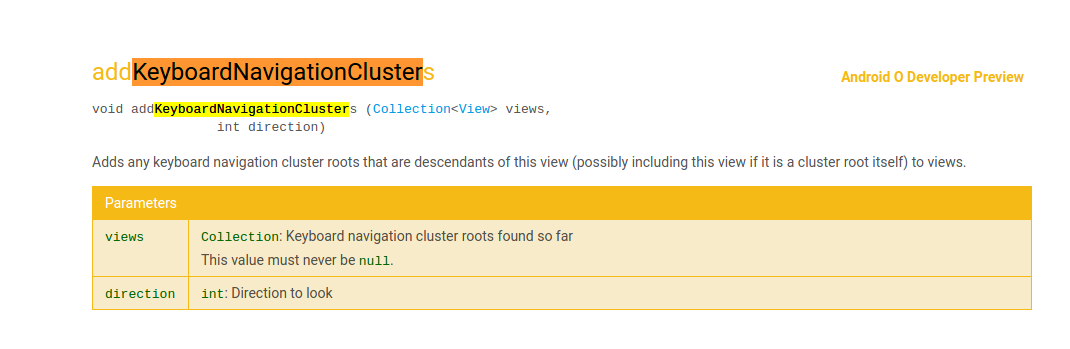
Appears that is a new resource added in O Dev Preview. Apktool only has Dev Preview 1. I will update it to Dev Preview 2 shortly.
iBotPeaches
on 3 Jul 2017
Okay that worked.
➜  Bug1520 apktool d app-debug.apk -f
I: Using Apktool 2.2.4-988fd1-SNAPSHOT on app-debug.apk
I: Loading resource table...
I: Decoding AndroidManifest.xml with resources...
I: Loading resource table from file: /home/ibotpeaches/.local/share/apktool/framework/1.apk
I: Regular manifest package...
I: Decoding file-resources...
I: Decoding values */* XMLs...
I: Baksmaling classes.dex...
I: Baksmaling classes2.dex...
I: Copying assets and libs...
I: Copying unknown files...
I: Copying original files...
➜  Bug1520 apktool b app-debug
I: Using Apktool 2.2.4-988fd1-SNAPSHOT
I: Checking whether sources has changed...
I: Smaling smali folder into classes.dex...
I: Checking whether sources has changed...
I: Smaling smali_classes2 folder into classes2.dex...
I: Checking whether resources has changed...
I: Building resources...
I: Building apk file...
I: Copying unknown files/dir...
➜  Bug1520
Interesting things to notice. This is known internally as API26, the dev preview was just called preview-o, so I believe APIs are finalized. The API25 internal framework was 17.2MB, API26 is 9.2MB. I wonder if aapt2 was responsible for the smaller size.
Two incoming commits (listed above) will reference this ticket, but not close this bug. I'm heading out of town, will leave it for people to confirm/test.
iBotPeaches
on 3 Jul 2017
I have tested your latest commits and they work for me with Kotlin and API26/AAPT2. I don't see the logs you listed above, or are they from an older version?
TheHighriser
on 3 Jul 2017
With #1528, I'm closing this as everything should be resolved after some July 4th tests. If another issue crops up related to this, lets open a new report to organize this more. The commits related to this bug fixed
- New resources in Dev Preview 2 (O)
- Kotlin decoding (without treating it as unknown)
- Removing the restrictions on
attrtype being first in resource table (aapt2) - Adding the
$as an allowed character for resource names.
iBotPeaches
on 4 Jul 2017
I tested 2.2.4-26512c-SNAPSHOT for the apk I had an issue with https://github.com/iBotPeaches/Apktool/issues/1540.
And it worked for my app as well
 gilhartman
on 4 Jul 2017
gilhartman
on 4 Jul 2017
Anywhere to download a nightly? I don't want to set up the whole toolchain.
 forkoz
on 6 Jul 2017
forkoz
on 6 Jul 2017
@forkoz We do not have any nightly support. Since this bug is a bit major, I've attached a SNAPSHOT release
--removed--
iBotPeaches
on 6 Jul 2017
Heh, what previously decompiled does not :(
Exception in thread "main" java.lang.IllegalArgumentException: Property 'http://javax.xml.XMLConstants/property/accessExternalDTD' is not recognized.
    at com.sun.org.apache.xerces.internal.jaxp.DocumentBuilderFactoryImpl.setAttribute(DocumentBuilderFactoryImpl.java:116)
    at brut.androlib.res.xml.ResXmlPatcher.loadDocument(ResXmlPatcher.java:261)
    at brut.androlib.res.xml.ResXmlPatcher.removeManifestVersions(ResXmlPatcher.java:203)
    at brut.androlib.res.AndrolibResources.decodeManifestWithResources(AndrolibResources.java:220)
    at brut.androlib.Androlib.decodeManifestWithResources(Androlib.java:137)
    at brut.androlib.ApkDecoder.decode(ApkDecoder.java:113)
    at brut.apktool.Main.cmdDecode(Main.java:166)
    at brut.apktool.Main.main(Main.java:80)
Process exited with code 1
forkoz
on 7 Jul 2017
ehh. Thats why I don't do nightly. Please report a bug.
iBotPeaches
on 7 Jul 2017
ok, I made a separate issue, same app that wouldn't build before. maybe I should try to decompile with the old and build with the new to see what happens.
After updating JDK I am able to build and decompile.
forkoz
on 8 Jul 2017
Hi!
I try to use the last version, to decompile works fine but to compile the apk again it give error:
"
Start building New.apk...
I: Using Apktool 2.2.4
Exception in thread "main" brut.androlib.AndrolibException: brut.directory.Direc
toryException: java.io.FileNotFoundException: decfolder (O sistema não conseguiu
localizar o ficheiro especificado)
at brut.androlib.Androlib.readMetaFile(Androlib.java:262)
at brut.androlib.Androlib.build(Androlib.java:274)
at brut.androlib.Androlib.build(Androlib.java:267)
at brut.apktool.Main.cmdBuild(Main.java:230)
at brut.apktool.Main.main(Main.java:83)
Caused by: brut.directory.DirectoryException: java.io.FileNotFoundException: dec
folder (O sistema não conseguiu localizar o ficheiro especificado)
at brut.directory.ZipRODirectory.
at brut.directory.ZipRODirectory.
at brut.directory.ExtFile.getDirectory(ExtFile.java:52)
at brut.androlib.Androlib.readMetaFile(Androlib.java:258)
... 4 more
Caused by: java.io.FileNotFoundException: decfolder (O sistema não conseguiu loc
alizar o ficheiro especificado)
at java.util.zip.ZipFile.open(Native Method)
at java.util.zip.ZipFile.
at java.util.zip.ZipFile.
at java.util.zip.ZipFile.
at brut.directory.ZipRODirectory.
... 7 more
Prima qualquer tecla para continuar . . .
"
Can you see what is wrong?
2.2.2 works fine!
Thanks
 Persona78
on 9 Aug 2017
Persona78
on 9 Aug 2017
Is it possible to upload the apk?
TheHighriser
on 9 Aug 2017
Sure!
For what i can see, apk tool can´t find the folder where it was decompiled!
In 2.2.2 works fine! 2.2.3 fails to.
It says that can´t find the folder!
Persona78
on 9 Aug 2017
I use to bat files:
this to work with apk:
@echo off
@echo.
@echo.
set PATH=%CD%;%PATH%;
java -jar "%~dp0\apktool.jar" %1 %2 %3 %4 %5 %6 %7 %8 %9
this to compile it :
@echo off
del /F New.apk
cls
@echo.
@echo.
@echo.
@echo Start building New.apk...
apktool b -c -f -o New.apk decfolder
pause
Persona78
on 9 Aug 2017
Oh!
Sorry! I think is the anti-vírus... -.-
I will try again...
Persona78
on 9 Aug 2017
Yep! It was... sorry!
"
Start building New.apk...
I: Using Apktool 2.2.4
W: Could not find sources
I: Building resources...
W: warning: string 'numeric_date_template' has no default translation.
W: warning: string 'switch_locale_button_text' has no default translation.
W: warning: string 'switch_locale_confirm_msg' has no default translation.
W: Warning: AndroidManifest.xml already defines versionCode (in http://schemas.a
ndroid.com/apk/res/android); using existing value in manifest.
W: Warning: AndroidManifest.xml already defines versionName (in http://schemas.a
ndroid.com/apk/res/android); using existing value in manifest.
W: Warning: AndroidManifest.xml already defines minSdkVersion (in http://schemas
.android.com/apk/res/android); using existing value in manifest.
W: Warning: AndroidManifest.xml already defines targetSdkVersion (in http://sche
mas.android.com/apk/res/android); using existing value in manifest.
I: Copy original files...
I: Copy AndroidManifest.xml...
I: Copy META-INF...
I: Building apk file...
I: Copying unknown files/dir...
Prima qualquer tecla para continuar . . .
"
Persona78
on 9 Aug 2017
Is this issue fixed ? Because I am facing a similar problem with apktool 2.3.1 unspecified\resdrawable-v21$avd_hide_password__0.xml: Error: '$' is not a valid file-based resource name character: File-based resource names must contain only lowercase a-z, 0-9, or underscore
And when I rename the resource files in the apk this error gets resolved but I get this error
A/ (15044): First type is not attr!
 neilmahaseth
on 15 Mar 2018
neilmahaseth
on 15 Mar 2018
Same error as @neilmahaseth. Anyone's getting a clue?
 m-menon
on 17 Mar 2018
m-menon
on 17 Mar 2018
apktool 2.3.1
Same problem here :
W: res/drawable-v21/$avd_hide_password__0.xml: Invalid file name: must contain only [a-zA-Z0-9_.]. Ignoring...
W: res/drawable-v21/$avd_hide_password__1.xml: Invalid file name: must contain only [a-zA-Z0-9_.]. Ignoring...
W: res/drawable-v21/$avd_hide_password__2.xml: Invalid file name: must contain only [a-zA-Z0-9_.]. Ignoring...
W: res/drawable-v21/$avd_show_password__0.xml: Invalid file name: must contain only [a-zA-Z0-9_.]. Ignoring...
W: res/drawable-v21/$avd_show_password__1.xml: Invalid file name: must contain only [a-zA-Z0-9_.]. Ignoring...
W: res/drawable-v21/$avd_show_password__2.xml: Invalid file name: must contain only [a-zA-Z0-9_.]. Ignoring...
W: A/ (25236): First type is not attr!
 mateusz-as
on 17 Mar 2018
mateusz-as
on 17 Mar 2018
Well, you can fix a "part of the problem" by getting rid of the $ sign in front of the filename. It's not going to help much because it will then stop at this error: A/ (25236): First type is not attr!
m-menon
on 17 Mar 2018
This issue was fixed already. Please open a new issue.
iBotPeaches
on 17 Mar 2018
Related issues
 bensh
·
3Comments
bensh
·
3Comments
 rafinetiz
·
3Comments
rafinetiz
·
3Comments
 alexeikh
·
3Comments
alexeikh
·
3Comments
 mildsunrise
·
3Comments
mildsunrise
·
3Comments
 harshkuttu
·
3Comments
harshkuttu
·
3Comments
Most helpful comment
Ugh. I figured it out. Lots of work ahead of me. It appears since a related bug to this was Magisk, I took a look at their GitHub.
https://github.com/topjohnwu/MagiskManager/blob/master/gradle.properties#L25
They use
aapt2, which we useaapt1in apktool. It seems applications built inaapt2cannot be rebuilt inaapt1- https://developer.android.com/studio/preview/features/new-android-plugin.htmlOptions
1) Hack around these checks in
aapt1and hope it works.2) Port apktool to
aapt2.