Apisix-dashboard: The route imported through Apisix's interface using Export OpenAPI exported file is empty
Issue description
I want to synchronize old data, the old apisix version is 1.4.0, and now I use apisix with version 2.4 and apisix-dashboard with version 2.4, etcd with version v3.4.15.
I use Apisix's interface '/apisix/admin/route' to import my route data, I see it work by apisix-dashboard.
When I use Export OpenAPI to export this route data, the file which I export was empty.
But another route which I create by apisix-dashboard I can export full data to file.
Expected behavior
I want to export full json data to file using Export OpenAPI function.
The route data is imported by Apisix's interface and not only create by apisix-dashboard.
How to Reproduce
1、imported route data by Apisix's route api
2、find it on apisix-dashboard
3、choose this route, click Export OpenAPI to export json data
4、see this json file
Screenshots

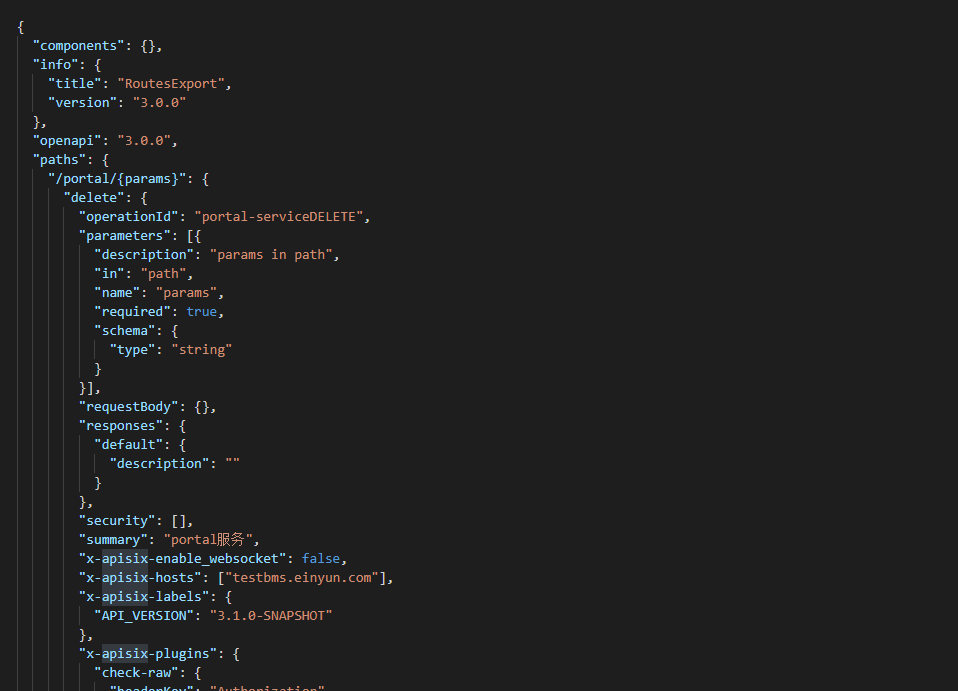
which one I wish to see:
Environment
- apisix version (cmd:
apisix version): 2.4 (docker) - OS (cmd:
uname -a): centos - OpenResty / Nginx version (cmd:
nginx -Voropenresty -V): - etcd version, if have (cmd: run
curl http://127.0.0.1:9090/v1/server_infoto get the info from server-info API): - apisix-dashboard version, if have: 2.4 (docker)
- Browser version, if have: Chrome
Additional context
 wangruozhu
All 5 comments
Hi @Jaycean @nic-chen , please take a look when you have time :)
 juzhiyuan
on 25 Mar 2021
juzhiyuan
on 25 Mar 2021
@wangruozhu
Hi,Is it convenient to provide the data of the route created by APISIX?
This will help to reproduce the problem and solve it. Thks.
 Jaycean
on 25 Mar 2021
Jaycean
on 25 Mar 2021
$ curl http://127.0.0.1:9080/apisix/admin/upstreams/00000000000000000058 -H 'X-API-KEY: edd1c9f034335f136f87ad84b625c8f1' -i -X PUT -d '
{"name":"UC-EUREKA", "desc": "UC-EUREKA", "enable_websocket": false, "hash_on": "vars", "nodes": {"172.16.0.123:18088": 1}, "type": "roundrobin"}'
$ curl http://127.0.0.1:9080/apisix/admin/routes/00000000000000000027 -H 'X-API-KEY: edd1c9f034335f136f87ad84b625c8f1' -X PUT -i -d '
{"name":"uc服务", "priority": 0, "upstream_id": "00000000000000000058", "desc": "uc服务", "hosts": ["testbms.einyun.com"],
"uris": ["/uc/"], "plugins": {"proxy-rewrite": {"regex_uri": ["/uc/", "/"]}}}'
wangruozhu
on 25 Mar 2021
$ curl http://127.0.0.1:9080/apisix/admin/upstreams/00000000000000000058 -H 'X-API-KEY: edd1c9f034335f136f87ad84b625c8f1' -i -X PUT -d '
{"name":"UC-EUREKA", "desc": "UC-EUREKA", "enable_websocket": false, "hash_on": "vars", "nodes": {"172.16.0.123:18088": 1}, "type": "roundrobin"}'$ curl http://127.0.0.1:9080/apisix/admin/routes/00000000000000000027 -H 'X-API-KEY: edd1c9f034335f136f87ad84b625c8f1' -X PUT -i -d '
{"name":"uc服务", "priority": 0, "upstream_id": "00000000000000000058", "desc": "uc服务", "hosts": ["testbms.einyun.com"],
"uris": ["/uc/_"], "plugins": {"proxy-rewrite": {"regex_uri": ["/uc/_", "/"]}}}'
- Thank you for your reply. I have located the problem.
- When the
methodsfield data is empty or [], the route supports all methods, but the export does not do relevant adaptation. This is a bug, and I will fix it in the near future. - The fastest way to solve this problem is to add the
methodsfield corresponding to the route, such as"methods": ["DELETE"], to ensure that the methods data is not empty, which will not affect the use of the export function. Thks.
For example
$ curl http://127.0.0.1:9080/apisix/admin/upstreams/00000000000000000058 -H 'X-API-KEY: edd1c9f034335f136f87ad84b625c8f1' -i -X PUT -d '
{"name":"UC-EUREKA", "desc": "UC-EUREKA", "enable_websocket": false, "hash_on": "vars", "nodes": {"172.16.0.123:18088": 1}, "type": "roundrobin", "methods": ["GET"]}'
I try add the method field corresponding and it work. Thks
wangruozhu
on 25 Mar 2021
Related issues
 moonming
·
6Comments
moonming
·
6Comments
 nic-chen
·
6Comments
nic-chen
·
6Comments
 Firstsawyou
·
5Comments
Firstsawyou
·
5Comments
 aiyiyi121
·
4Comments
aiyiyi121
·
4Comments
 qian0817
·
4Comments
qian0817
·
4Comments