Apicurio-studio: Previewing documentation is giving an error that it is not a valid JSON Schema
When previewing documentation for this API, getting the error:
Something went wrong...
"https://studio.apicur.io/download?type=api&format=json&dereference=true&id=24175" is not a valid JSON Schema
Stack trace
SyntaxError: "https://studio.apicur.io/download?type=api&format=json&dereference=true&id=24175" is not a valid JSON Schema
    at Function.syntax (https://cdn.jsdelivr.net/npm/redoc@next/bundles/redoc.standalone.js:29:28049)
    at https://cdn.jsdelivr.net/npm/redoc@next/bundles/redoc.standalone.js:49:54299

ReDoc Version: 2.0.0-rc.48
Commit: 7b78e75
Can edit fine and editing shows 0 issues
Looks like this is a recurring issue as it's the same as #1036 and #1087
 rwilkins108
All 16 comments
Could you either download and attach the API design to this GH issue or (better) add me as a collaborator to the failing API?
Also, hitting that url ( https://studio.apicur.io/download?type=api&format=json&dereference=true&id=24175 ) in your browser might reveal some interesting result.
 EricWittmann
on 6 Jan 2021
EricWittmann
on 6 Jan 2021
@EricWittmann Thanks, we've added you as a collaborator.
Going to that URL gives an HTTP 200 with the message "Internal Server Error".
Thanks for your help.
rwilkins108
on 6 Jan 2021
No problem. I looked at it, but you have a few external $refs in the document (I'm super happy to see that feature being used), so you will need to add me as a collaborator on any documents referenced by this one. It looks like it's only #39013.
EricWittmann
on 6 Jan 2021
But hey - at least you know I haven't given myself back-door/admin access to everyone's content. :)
EricWittmann
on 6 Jan 2021
@EricWittmann added you to 39013.
Question here: Can I make a project at least readOnly visible for anyone? 39013 is a Schema definition for jsCalendar which is a draft RFC which would be nice to show
 Stwissel
on 6 Jan 2021
Stwissel
on 6 Jan 2021
OK I can reproduce the issue and it has something to do with these references. I will need to dig into this and figure out what's going on. I'll report back here when I know more.
EricWittmann
on 6 Jan 2021
Also regarding your question about Read Only - you can use the "Share Docs" feature to generate a read-only and public link to the documentation for an API:

However, ReDoc doesn't separately display the schemas, so that probably isn't very helpful to this use-case. So I guess unfortunately no, there is no way to do what you ask right now. Good feature request though if you want to open another issue. :)
EricWittmann
on 6 Jan 2021
Fixed by https://github.com/Apicurio/apicurio-data-models/pull/223
This will be corrected in the next release.
EricWittmann
on 13 Jan 2021
@EricWittmann just checked, still having the same issue:
Something went wrong...
"https://studio.apicur.io/download?type=api&format=json&dereference=true&id=24175" is not a valid JSON Schema
Stack trace
SyntaxError: "https://studio.apicur.io/download?type=api&format=json&dereference=true&id=24175" is not a valid JSON Schema
    at Function.syntax (https://cdn.jsdelivr.net/npm/redoc@next/bundles/redoc.standalone.js:29:28051)
    at https://cdn.jsdelivr.net/npm/redoc@next/bundles/redoc.standalone.js:49:54299

ReDoc Version: 2.0.0-rc.50
Commit: 8bee3d5
Yes - you will get this error until we do another upstream release of Studio. I'll try to get this done as soon as I can.
EricWittmann
on 19 Feb 2021
Bug still persists, including a "Server Error" when trying to download with "Dereference all external $refs"
Stwissel
on 26 Feb 2021
Try now.
EricWittmann
on 26 Feb 2021
Actually try now - I believe the server has been updated to version 0.2.48.Final now.
EricWittmann
on 26 Feb 2021
Yes, works for me. Thanks!
rwilkins108
on 26 Feb 2021
Updated to 2.48 and still receiving error when Preview Doc.
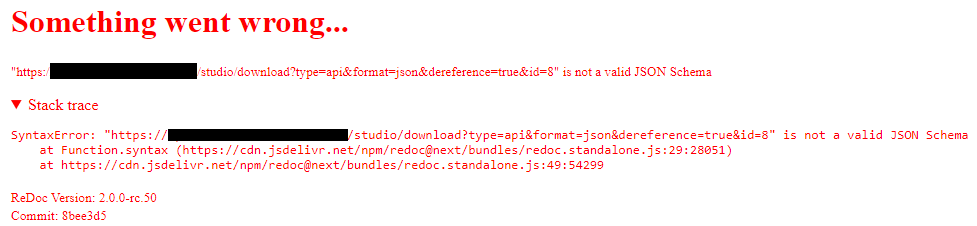
Following the URL in browser displays only "Internal Server Error"
Our server is not public-facing, what is the best way to get you the information you need in order to debug the issue?
EDIT: I opened the Problem project, Source View as JSON, copied the text to clipboard. Then I created a new project, opened source, pasted the JSON text, saved the project. The new project renders documentation properly.
 partialinfinity
on 26 Feb 2021
partialinfinity
on 26 Feb 2021
@partialinfinity
When you get the "Internal Server Error" on the server can you check the output logs from the application? I would also suggest checking the browser console - there is a chance that some helpful debug information can be found there.
EricWittmann
on 1 Mar 2021
Related issues
 0x218
·
5Comments
EricWittmann
·
4Comments
0x218
·
5Comments
EricWittmann
·
4Comments
 cvgaviao
·
6Comments
cvgaviao
·
6Comments
 bodograumann
·
3Comments
bodograumann
·
3Comments
 bpeterm
·
6Comments
bpeterm
·
6Comments