Apicurio-studio: On click "Edit API" - Failed to construct 'WebSocket': The URL's scheme must be either 'ws' or 'wss'. 'https' is not allowed.
Hi Eric
I am trying to deploy Apicurio using docker images on openshift and all 4 components are deployed successfully . But when i am trying to click on edit API after importing API definition (json file ) i am getting "Unexpected Error on Page()" and when i checked the console logs i see below error.
Error: DOMException: Failed to construct 'WebSocket': The URL's scheme must be either 'ws' or 'wss'. 'https' is not allowed
In the environment variable i am passing https route url for APICURIO_UI_EDITING_URL .
Kindly let me know what can be done here as Routes in Openshift supports on 80 and 443 ports? Thanks!
 VIjayHP
All 9 comments
Websocket connections happen over port 80/443 - so you should just change the value of the APICURIO_UI_EDITING_URL ENV var you are setting to use "wss" instead of "https" as the protocol. Should be fine after that.
 EricWittmann
on 10 Sep 2020
EricWittmann
on 10 Sep 2020
For example, the value of that ENV var for the cloud/eval version of Studio (which is running on OpenShift) is this:
EricWittmann
on 10 Sep 2020
I have tried using your template : https://github.com/Apicurio/apicurio-studio/tree/master/distro/openshift
provided above link and it worked fine .
Thanks!
VIjayHP
on 10 Sep 2020
Can you please let me why Microcks option is not coming after selecting Open API 2.0 ?(after adding the Microcks environment variables). Perhaps it works fine for Open API 3.0
VIjayHP
on 10 Sep 2020
Microcks doesn't support OpenAPI 2, so that option is not enabled for OAI 2 designs.
One thing you could do is use the Apicurio Studio feature to convert an OpenAPI 2 design into an OpenAPI 3 design. You can do that by making a copy of the OAI2 design - when you do that there is an option to convert.
EricWittmann
on 10 Sep 2020
Is it possible to deploy "apicurio-studio-auth" (keycloak server) component in some different cluster and make use of the "AUTH_ROUTE" , "KC_REALM" , "KC_USER" , "KC_PASS" env variable to connect from existing cluster where api, ws , and ui component are running ?
VIjayHP
on 8 Oct 2020
Yes that is possible. The auth component (KC server) does not have to be running in the same cluster, or in any cluster. Just provide the public URL to the keycloak server. Here is how I've configured the UI component in the public cloud eval version:
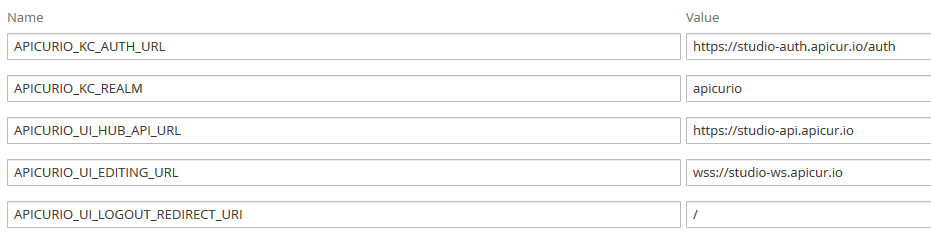
EricWittmann
on 8 Oct 2020
Okay Thanks, Also when we have to link our Apicurio instance with Github (not official one github.com) instead say( github.abc.com) how can we do the linking ? Any workaround or reference on this ?
VIjayHP
on 9 Oct 2020
That is possible but unfortunately I see I don't have specific documentation for it! I wrote an article about configuring a local GitLab server, which you can find here:
https://www.apicur.io/studio/docs/using-a-local-installation-of-gitlab
The instructions are basically the same, but with the details slight different (basically find/replace gitlab with github). Have a look at that and see if it helps. I'll try to create a separate article for GitHub.
EricWittmann
on 9 Oct 2020
Related issues
 0x218
·
5Comments
0x218
·
5Comments
 bpeterm
·
6Comments
bpeterm
·
6Comments
 jsenko
·
6Comments
jsenko
·
6Comments
 indiealexh
·
4Comments
indiealexh
·
4Comments
 yuanhuiliu
·
4Comments
yuanhuiliu
·
4Comments