Apicurio-studio: Cannot publish to GitLab subgroup
Apicurio 0.2.43.Final (on Openshift 3.11)
GitLab 12.5.0-ee
Hi there,
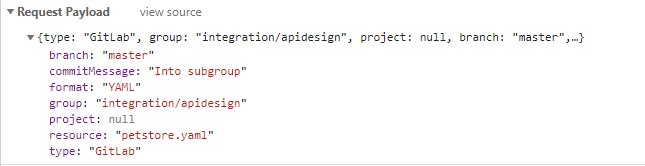
I have an issue to publish APIs into our local Gitlab when the project sits in a subgroup. While the Apicurio UI complains not being able to connect to the server, the real reason seems that the publish request does not carry a project value. Apicurio UI correctly populates the fields in the browser though.
Example: Uploading petstore.yaml into project "petstore" sitting in subgroup "apidesign" below top-level group" integration". Project value is null.
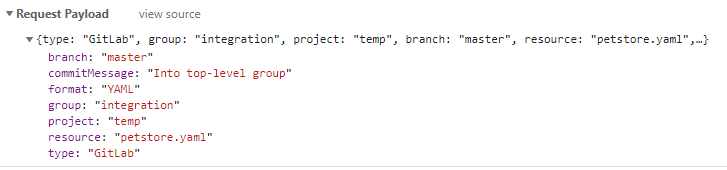
Publishing to a project that sits in a root group works fine (here project "temp" is directly below "integration"). Project value is populated as expected.
Do I miss something here? I have found a similar issue only once in this newsgroup, so others do not really seem to have experienced this.
 fab66m
All 11 comments
More than likely this is a bug. Any chance you could record a video of your exact steps to reproduce? I'll have to set up GitLab locally to test this out...
 EricWittmann
on 3 Dec 2019
EricWittmann
on 3 Dec 2019
@EricWittmann if GitLab is correctly linked with Apicurio this is easy to replicate: just create a group in GitLab, then a subgroup and a project in that subgroup. Publish any test API.
I forgot to add the part in the log that matches the missing project entry, if this of any help:
Caused by: java.lang.NullPointerException
    at java.lang.String.replace(String.java:2240)
    at io.apicurio.hub.api.gitlab.GitLabResourceResolver.create(GitLabResourceResolver.java:142)
    at io.apicurio.hub.api.gitlab.GitLabResourceResolver$Proxy$_$$_WeldClientProxy.create(Unknown Source)
    at io.apicurio.hub.api.rest.impl.DesignsResource.toResourceUrl(DesignsResource.java:1326)
    at io.apicurio.hub.api.rest.impl.DesignsResource.publishApi(DesignsResource.java:774)
    at io.apicurio.hub.api.rest.impl.DesignsResource$Proxy$_$$_WeldClientProxy.publishApi(Unknown Source)
If a project is in a top-level group then it is no problem to commit to any (even multiple nested) subfolder within that project,.
The main reason to have subgroups in place is that in our organisation I have to follow a certain namespace hierarchy.
fab66m
on 3 Dec 2019
Out of curiosity, are you using the Apicurio Keycloak extension for GitLab? https://github.com/Apicurio/apicurio-keycloak-extensions
EricWittmann
on 4 Dec 2019
Another question I have - is there only ONE project in the sub-group? If so, is the UI automatically selecting it for you?
EricWittmann
on 4 Dec 2019
1) No, just the standard openid-connect. Btw, Apicurio connects to RH SSO 7.3 which maps to Keycloak 4.8.15
2) Yes to both questions.
fab66m
on 4 Dec 2019
In that case, could you perhaps test the latest version of Apicurio? That would be 0.2.44.final - there were some changes made in this area:
https://github.com/Apicurio/apicurio-studio/commit/865f39e5d611a3b950fb18b287576bb63a198292
Another thing to try (before upgrading) would be to add a 2nd project to the group (at least temporarily) and then try to actually select one of them in the drop-down when publishing.
EricWittmann
on 4 Dec 2019
Nice...adding a second project works. UI lets me select the project and now populates the request body as expected.
I'll test 0.2.44 but I need to send an image update request to our admin first. Thanks so far!
fab66m
on 4 Dec 2019
OK great - I'm hoping that the latest version fixes this issue. Even though I do have GitLab installed and running locally now. It would save me some time setting up Keycloak and configuring them to work together. :)
EricWittmann
on 4 Dec 2019
So, I did the upgrade to 0.2.44 and it's working with a single project, i.e. UI populates the drop-downs and request json is correct. :)
Thanks for your efforts!
fab66m
on 5 Dec 2019
Best news I've heard all week! :)
EricWittmann
on 5 Dec 2019
@fab66m - if everything with local GitLab is working for you, then that's great. But you might want to check out this old discussion here:
https://github.com/Apicurio/apicurio-studio/issues/711
There is a lot of information in there regarding using a local GitLab installation.
EricWittmann
on 5 Dec 2019
Related issues
 ceefour
·
5Comments
ceefour
·
5Comments
 askfor
·
7Comments
askfor
·
7Comments
 indiealexh
·
4Comments
indiealexh
·
4Comments
 jinlxz
·
4Comments
jinlxz
·
4Comments
 bodograumann
·
3Comments
bodograumann
·
3Comments
Most helpful comment
So, I did the upgrade to 0.2.44 and it's working with a single project, i.e. UI populates the drop-downs and request json is correct. :)
Thanks for your efforts!