Api: Question: CORS request did not succeed for Browser Based Apps
Hello!
I filled out the Origin Header section where we register our application:

Though when I hit the https://www.bungie.net/Platform/App/OAuth/Token/ endpoint:

I'm getting a Cross-Origin Request Blocked error in the console:
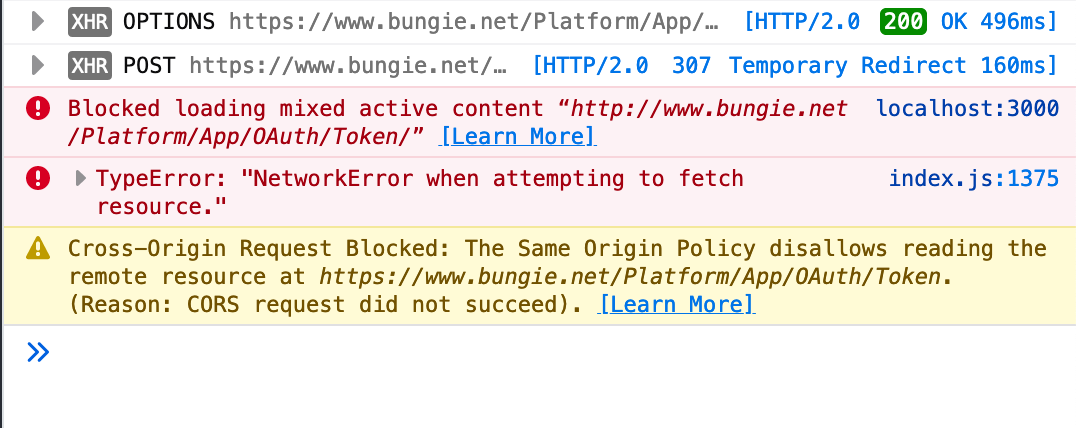

Don't know what I'm doing wrong here. Any help appreciated.
 juwanpetty
All 7 comments
I removed the X-API-Key from the header
juwanpetty
on 20 Oct 2019
You need X-API-Key in the header for the requests to succeed.
Assuming you're just developing locally for now, I think it's safe to set the origin header to *. Once you deploy your code to the internet you'd want that to match your domain name, of course.
 andyschott
on 20 Oct 2019
andyschott
on 20 Oct 2019
I thought Bungie doesn’t allow * in the site admin settings?
On Oct 20, 2019, at 13:18, Andy Schott notifications@github.com wrote:
You need X-API-Key in the header for the requests to succeed.Assuming you're just developing locally for now, I think it's safe to set the origin header to *. Once you deploy your code to the internet you'd want that to match your domain name, of course.
—
You are receiving this because you are subscribed to this thread.
Reply to this email directly, view it on GitHub, or unsubscribe.
 floatingatoll
on 20 Oct 2019
floatingatoll
on 20 Oct 2019
@andyschott I added back the X-API-Key and changed the Origin Header to: *
I'm still getting a 307 | Temporary Redirect
juwanpetty
on 20 Oct 2019
@floatingatoll I've used it frequently, but I'm using the keys in a server app, not a browser based one. Maybe that's the difference?
@juwanpetty I'm not sure what else to suggest - I haven't personally seen that error. :( Maybe someone else here will have some ideas.
andyschott
on 20 Oct 2019
add the trailing / to https://www.bungie.net/Platform/App/OAuth/Token
 delphiactual
on 21 Oct 2019
delphiactual
on 21 Oct 2019
@delphiactual That fixed my problem, thanks!
juwanpetty
on 21 Oct 2019
Related issues
andyschott
·
3Comments
 mikewojtkiewicz
·
3Comments
mikewojtkiewicz
·
3Comments
 as-com
·
3Comments
as-com
·
3Comments
 ghost
·
3Comments
ghost
·
3Comments
 dcaslin
·
3Comments
dcaslin
·
3Comments
Most helpful comment
add the trailing
/tohttps://www.bungie.net/Platform/App/OAuth/Token