Apexcharts.js: Chart height on mobile chrome/brave not correct (depending on number of lines in legend)
Codepen
https://codepen.io/guybrush-the-bold/full/LoXdgN
Explanation
- What is the behavior you expect?
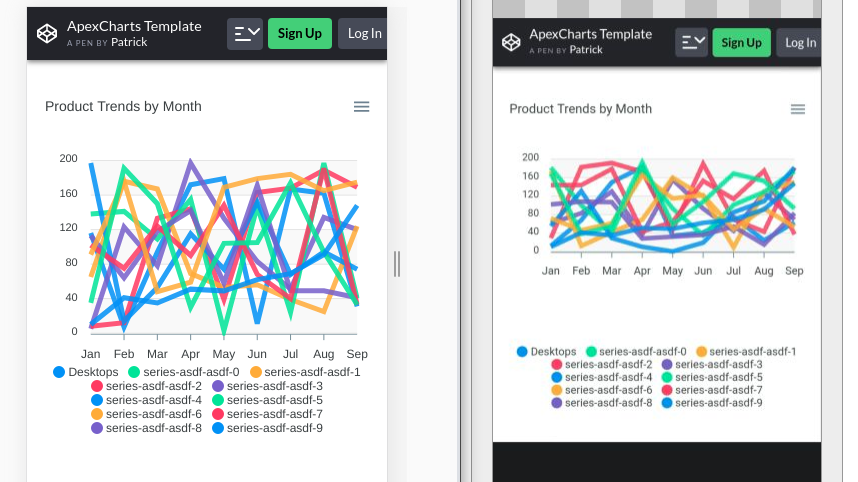
The chart should look the same on all devices - What is happening instead?
On chrome (and brave) the height of the chart-plot is much less than on other devices - depending on the amount of lines in the legend. - What error message are you getting?
None
Here is a screenshot: (on the left its chrome on desktop, on the right its chrome on android)
 guybrush
👍7
All 6 comments
I am facing the same problem. Have you been able to fix this since posting?
 OneWebDev
on 12 Jul 2019
OneWebDev
on 12 Jul 2019
😕1
Sorry no, I am now using another charting-lib.
guybrush
on 15 Jul 2019
Any news about this?
 astronati
on 23 Nov 2019
astronati
on 23 Nov 2019
Yes, the issue is fixed. Please wait for the release of apexcharts@v3.16.2
 junedchhipa
on 16 Mar 2020
junedchhipa
on 16 Mar 2020
👎1
Using 3.20.0 the issue still persists. Are there any updates or workaround on this?
 jan-nick
on 13 Sep 2020
jan-nick
on 13 Sep 2020
I'm facing the same problem.
I'm using android, tried on chrome, and brave.
The problem doesn't appear in Firefox mobile
Showed in version 3.20.0 and also updated to 3.20.2. If it also helps you debug I'm using react to go along with that using react-apexcharts 1.3.7
 RenierC
on 16 Sep 2020
RenierC
on 16 Sep 2020
Was this page helpful?
0 / 5 - 0 ratings
Related issues
 georgehardy
·
3Comments
georgehardy
·
3Comments
 artfulrobot
·
3Comments
artfulrobot
·
3Comments
 tcarlsen
·
3Comments
tcarlsen
·
3Comments
 ordago
·
3Comments
ordago
·
3Comments
 drummad
·
3Comments
drummad
·
3Comments