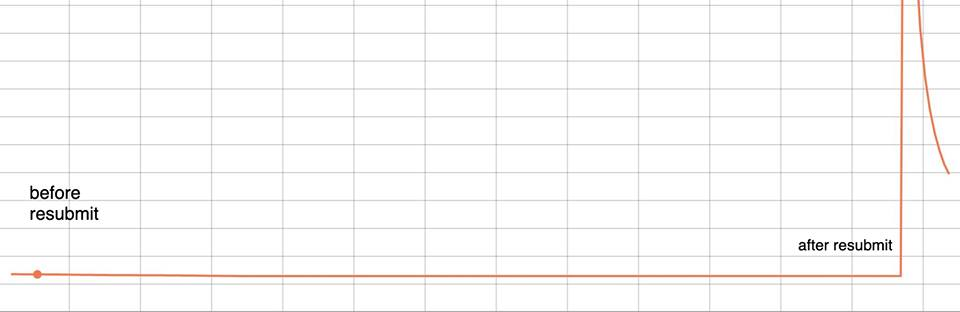
When running a model using apex+ddt my loss spikes dramatically after the model restarts.
If i disable apex, it works fine.
Currently, I've set up apex this way:
optimizer = Adam()
schedulers= LR

torch.cuda.set_device(gpu_nb)
model.cuda(gpu_nb)

# apex
model, optimizer = amp.initialize(model, optimizer, opt_level='O2')

# ddp
model = DDP(model)

# restore state
ckpt = torch.load(path)
model.load_state_dict(ckpt['state_dict'])
optimizer.load_state_dict(ckpt['opt_dict'])
LR.load_state_dict(ckpt['lr_dict'])
amp.load_state_dict(ckpt['amp'])

# continue ....
Actual code is here:
 williamFalcon
All 26 comments
williamFalcon
on 6 Sep 2019
@ptrblck
williamFalcon
on 6 Sep 2019
Thanks for the code @williamFalcon!
We'll try to reproduce and debug it.
Do you see this loss spike only using LightningDistributedDataParallel or also PyTorch's DDP?
 ptrblck
on 6 Sep 2019
ptrblck
on 6 Sep 2019
lightning’s ddp is pytorch ddp. except it routed the forward call to train_step or val_step. but otherwise the same
williamFalcon
on 6 Sep 2019
You can replicate this by doing the following:
model = MNISTModel()

trainer = Trainer(gpus=[0,1], use_amp=True)
trainer.fit(model)
Run the above script using a slurm script on a node with 2 gpus (i used 2 v100s with 32gb each). set the walltime to 10 mins (so the loss can go down). At 7 mins it'll resubmit itself and you'll see the problem.
Although MNIST might be too trivial. I'd try cifar-10 perhaps?
williamFalcon
on 6 Sep 2019
Here's a full working example to replicate. Make sure to install lightning from master:
import torch
from torch.nn import functional as F
from torch.utils.data import DataLoader
from torchvision.datasets import CIFAR100
import torchvision.transforms as transforms
from test_tube import Experiment, SlurmCluster, HyperOptArgumentParser
import numpy as np

import pytorch_lightning as pl


PORT = np.random.randint(12000, 20000, 1)[0]
SEED = 2334
torch.manual_seed(SEED)
np.random.seed(SEED)

"""
To run in interactive node:
python issue.py

To run as a cluster job (submits job to cluster):
python issue.py --cluster

"""


class CIFAR100LM(pl.LightningModule):

    def __init__(self, save_path):
        super(CIFAR100LM, self).__init__()

        self.save_path = save_path
        self.l1 = torch.nn.Linear(32 * 32*3, 1028)
        self.l2 = torch.nn.Linear(1028, 2048)
        self.l3 = torch.nn.Linear(2048, 100)

    def forward(self, x):
        x = x.view(x.size(0), -1)

        x = F.relu(self.l1(x))
        x = F.relu(self.l2(x))
        x = self.l3(x)

        return x

    def training_step(self, batch, batch_nb):
        x, y = batch
        y_hat = self.forward(x)
        return {'loss': F.cross_entropy(y_hat, y)}

    def validation_step(self, batch, batch_nb):
        x, y = batch
        y_hat = self.forward(x)
        return {'val_loss': F.cross_entropy(y_hat, y)}

    def validation_end(self, outputs):
        avg_loss = torch.stack([x['val_loss'] for x in outputs]).mean()
        return {'avg_val_loss': avg_loss}

    def configure_optimizers(self):
        # can return multiple optimizers and learning_rate schedulers
        return torch.optim.Adam(self.parameters(), lr=0.0002)

    @pl.data_loader
    def tng_dataloader(self):
        return DataLoader(CIFAR100(self.save_path, train=True, download=True,
                                   transform=transforms.ToTensor()), batch_size=32)

    @pl.data_loader
    def val_dataloader(self):
        return DataLoader(CIFAR100(self.save_path, train=True, download=True,
                                   transform=transforms.ToTensor()), batch_size=32)


def main(*args, **kwargs):

    log_path = '/log/path'
    exp = Experiment(
        name='apex_bug_test',
        save_dir=log_path,
        autosave=False,
        description='amp test'
    )
    exp.save()

    data_path =  '/data/CIFAR100'
    model = CIFAR100LM(data_path)
    trainer = pl.Trainer(
        gpus=[0, 1],
        use_amp=True,
        experiment=exp,
        min_nb_epochs=200,
        distributed_backend='ddp'
    )
    trainer.fit(model)


def launch_cluster_job(args):
    # enable cluster training
    slurm_log_path = '/log/path'
    cluster = SlurmCluster(
        log_path=slurm_log_path,
        hyperparam_optimizer=args
    )

    # email for cluster coms
    cluster.notify_job_status(email='[email protected]', on_done=True, on_fail=True)

    # configure cluster
    cluster.per_experiment_nb_nodes = 1
    cluster.per_experiment_nb_gpus = 2
    cluster.job_time = '00:10:00'
    cluster.memory_mb_per_node = 0
    cluster.per_experiment_nb_cpus = 2

    # any modules for code to run in env
    cluster.add_command('source activate your_conda_env')
    cluster.add_command('export NCCL_SOCKET_IFNAME=^docker0,lo')
    cluster.add_command('export NCCL_DEBUG=INFO')
    cluster.add_command('export PYTHONFAULTHANDLER=1')
    cluster.add_command(f'export MASTER_PORT={PORT}')
    cluster.load_modules(['NCCL/2.4.7-1-cuda.10.0'])

    cluster.python_cmd = 'python'
    cluster.add_slurm_cmd(cmd='constraint', value='volta32gb', comment='use 32gb gpus')
    cluster.add_slurm_cmd(cmd='ntasks-per-node', value=2, comment='1 task per gpu')

    # name of exp
    job_display_name = 'apex_bug_test'

    # run hopt
    print('submitting jobs...')
    cluster.optimize_parallel_cluster_gpu(
        main,
        nb_trials=1,
        job_name=job_display_name
    )


if __name__ == '__main__':
    parser = HyperOptArgumentParser()
    parser.add_argument('--cluster', dest='cluster', action='store_true')
    args = parser.parse_args()

    if args.cluster:
        launch_cluster_job(args)
    else:
        main()
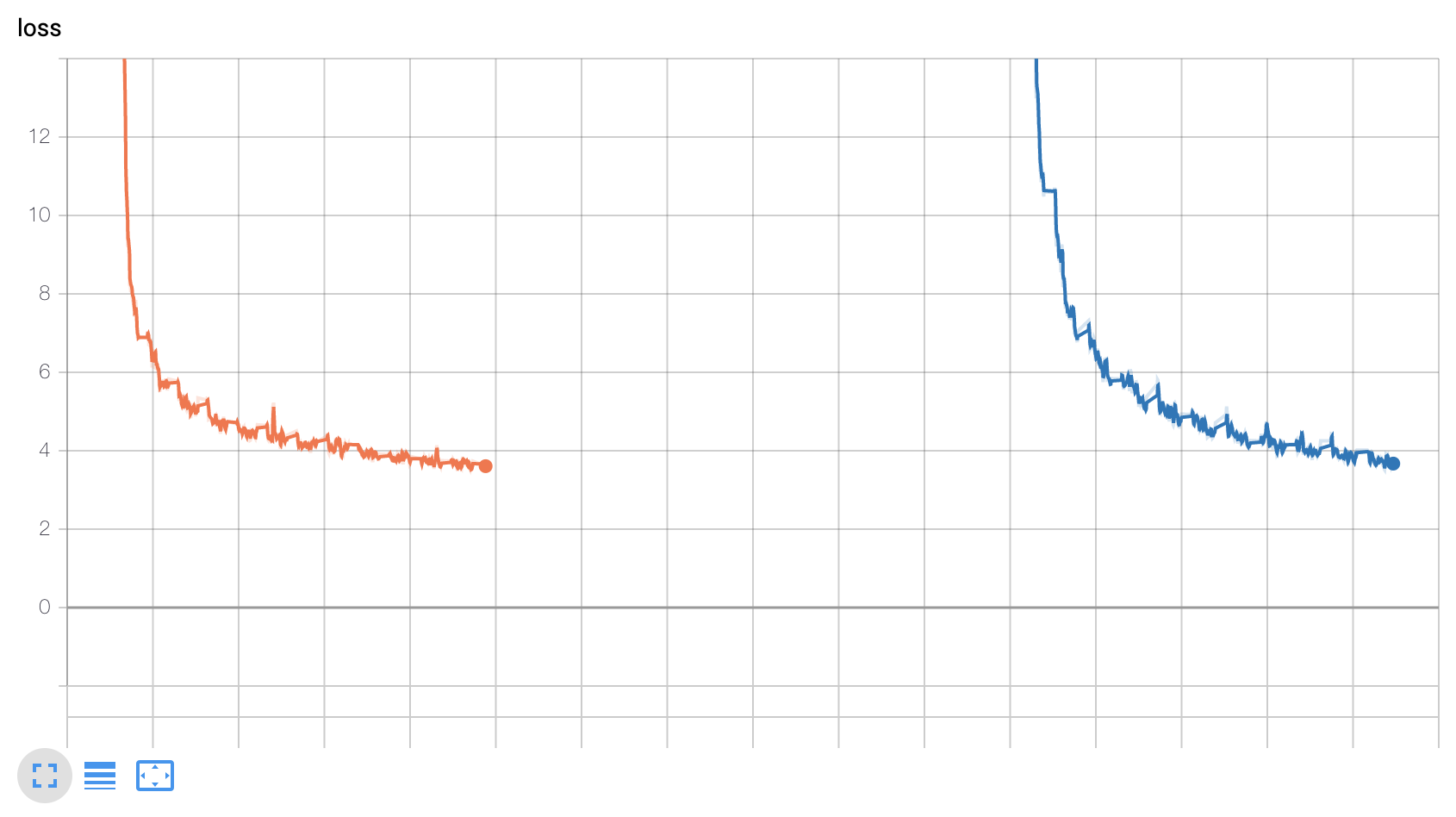
This is from the above example.
orange before checkpointing blue after resuming training
williamFalcon
on 7 Sep 2019
ok, digging into this more...
Here is the loss after 3 reloads (each color a different reload).

However, when tracking the training accuracy i see that it remains high even after reload even when the loss spikes.

This suggests that the model loads correctly, but the scaling is off (which has to do with amp.load_state_dict()).
In this simple model it's not a problem, but on more complex ones with losses sensitive to scaling, it nans out the losses after the model restarts.
williamFalcon
on 7 Sep 2019
@williamFalcon, @ptrblck did you guys figure this out? we are having the same problem.
 ibeltagy
on 22 Oct 2019
ibeltagy
on 22 Oct 2019
Turns out the problem is related to reloading the optimizer. When you amp.initialize, the optimizer.state needs to be an empty dictionary, or this problem occurs. As a workaround, we empty optimizer.state before amp.initialize and use a short warmup for the Adam optimizer to recover its moving averages (thanks to @yaroslavvb for the warmup suggestion)
ibeltagy
on 23 Oct 2019
@ibeltagy Could you please explain how you're warming up the optimizer? All that is coming to mind for me is calling optim.step(), but that would actually apply the gradients to the model, which seems like exactly what I don't want to happen. Are you saving the original state of your model, stepping the optimizer a few times, and then restoring the model back to the original?
I'm dealing with a model that explodes after the first step upon reload, so aside from reloading and training with optim level O0, I'm not sure what to do.
 mranzinger
on 23 Jan 2020
mranzinger
on 23 Jan 2020
I mean slowly increasing learning rate from zero to the value you want.
ibeltagy
on 24 Jan 2020
We also encountered the same issue for PyTorch's DDP. @ptrblck The loss becomes quite large when we reload the checkpoint.
 donglixp
on 11 Feb 2020
donglixp
on 11 Feb 2020
Same issues here. Loss spikes after loading checkpoint . Not loading the optimizer helps sometimes but not always. Nvidia needs to fix this asap.
I don't see quick responses from them in GitHub.
Is it time to search for an alternative to apex!
 krishansubudhi
on 17 Feb 2020
krishansubudhi
on 17 Feb 2020
I found an ugly hack but it seems to work. It goes like this,
# load optimizer from file
optimizer = torch.optim.AdamW(...)
optimizer_state_dict = torch.load(f_opt)
optimizer.load_state_dict(optimizer_state_dict)

# then remove optimizer state to make amp happy
optimizer.state = {}

# init amp and load it from file
model, optimizer = amp.initialize(model, optimizer, opt_level=opt_level)
amp.load_state_dict(torch.load(f_amp))

# forward, backward, optimizer step, zero_grad
loss = model(random_input)
with amp.scale_loss(loss, optimizer) as scaled_loss:
    scaled_loss.backward()
optimizer.step()
model.zero_grad()

# then load optimizer state_dict again (this time without removing optimizer.state)
optimizer.load_state_dict(optimizer_state_dict)
So amp is expecting one optimizer step before loading the checkpoint smoothly?
Has anyone looked into the source code to find the root cause ?
krishansubudhi
on 18 Feb 2020
no, amp.initialize is expecting an optimizer with an empty optimizer.state. With the first optimizer.step, the optimizer initializes its optimizer.state and it gets registered with apex somehow. At this step, replacing optimizer.state with a state from the checkpoint seems to work.
ibeltagy
on 18 Feb 2020
Unfortunately, I cannot get the workaround to work. I may have to disable fp16 entirely - unless I find that the loss spike is harmless in terms of actual model improvement.
I am grateful for fp16, but this does seem like a nearly show-stopping issue! It should be possible to restart from a checkpoint and continue where you left off - right? I'm a bit surprised this isn't a bigger issue - are folks not using fp16?
 daniel347x
on 19 Feb 2020
daniel347x
on 19 Feb 2020
i don’t remember how we solved this but we did in pytorch lightning. you could try running it there with fp16 enabled
williamFalcon
on 19 Feb 2020
@williamFalcon, couldn't find the relevant code (not here https://github.com/PyTorchLightning/pytorch-lightning/blob/master/pytorch_lightning/trainer/training_io.py#L374), and also didn't find amp.load_state_dict (which is needed for loss scale)
ibeltagy
on 19 Feb 2020
@daniel347x FWIW, I've found the severity of the bug to be somewhat task dependent. For some tasks, the loss spike disappears quickly, and it's indiscernible whether or not it had a lasting effect on convergence. For others, it will legitimately ruin the model.
My current best rule of thumb is that classification tasks are most affected, and particularly, as the number of possible classes increases, the worse the spike affects the model.
mranzinger
on 20 Feb 2020
Can this be because model params are actually FP16 when they are saved. After loading optimizer gets the FP16 params as FP32 which causes loss in precission?
krishansubudhi
on 21 Feb 2020
I have also encountered the same problem, and the loss diverged at O2 level. But I found @ibeltagy 's hack is useful.
I suspect the problem is with scale_loss and amp.initialize not correctly handling optimizer when it is already loaded. Maybe a simple fix can be done here.
 qywu
on 22 Mar 2020
qywu
on 22 Mar 2020
@ptrblck Any updates on this?
 enijkamp
on 17 May 2020
enijkamp
on 17 May 2020
we’re now using native amp with pt 1.6+ on pytorch lightning. I would just switch to that.
williamFalcon
on 17 May 2020
Add optimizer.load_state_dict right before the first optimizer.step works for me too. (I basically add a manual checkpoint loading in optimizer_step of LightningModule)
For general pytorch user, this is what I have:
state_dict = torch.load(optimizer_ckpt)
optimizer.load_state_dict(state_dict)
....
with amp.scale_loss(loss, optimizer) as scaled_loss:
    scaled_loss.backward()
optimizer.load_state_dict(state_dict)
optimizer.step()
optimizer.zero_grad()
It seems the reason is when you load the first time, the saved states will be cast to fp16, while at this time the states are not properly initialized because of the lazy_init. After the first time to call amp.scale_loss, the states of optimizer are properly initialized and the states will be recast to fp32, and the precision difference here will cause the problem.
However if amp_lazy_init earlier, the loss still spikes (but not that bad.)
 ruotianluo
on 25 Sep 2020
ruotianluo
on 25 Sep 2020
Related issues
 TheRevanchist
·
3Comments
TheRevanchist
·
3Comments
 yangkky
·
4Comments
yangkky
·
4Comments
 chccgiven
·
4Comments
chccgiven
·
4Comments
 xmyqsh
·
3Comments
xmyqsh
·
3Comments
 ccoulombe
·
3Comments
ccoulombe
·
3Comments
Most helpful comment
@williamFalcon, @ptrblck did you guys figure this out? we are having the same problem.