Anysoftkeyboard: Repeated first letter after autocomplete select and backspace
Steps to reproduce
1.Start typing a word, select from autocomplete then press space
2.press delete [backspace]
Expected behaviour
Should delete the space and leave the auto-suggest word intact
Actual behaviour
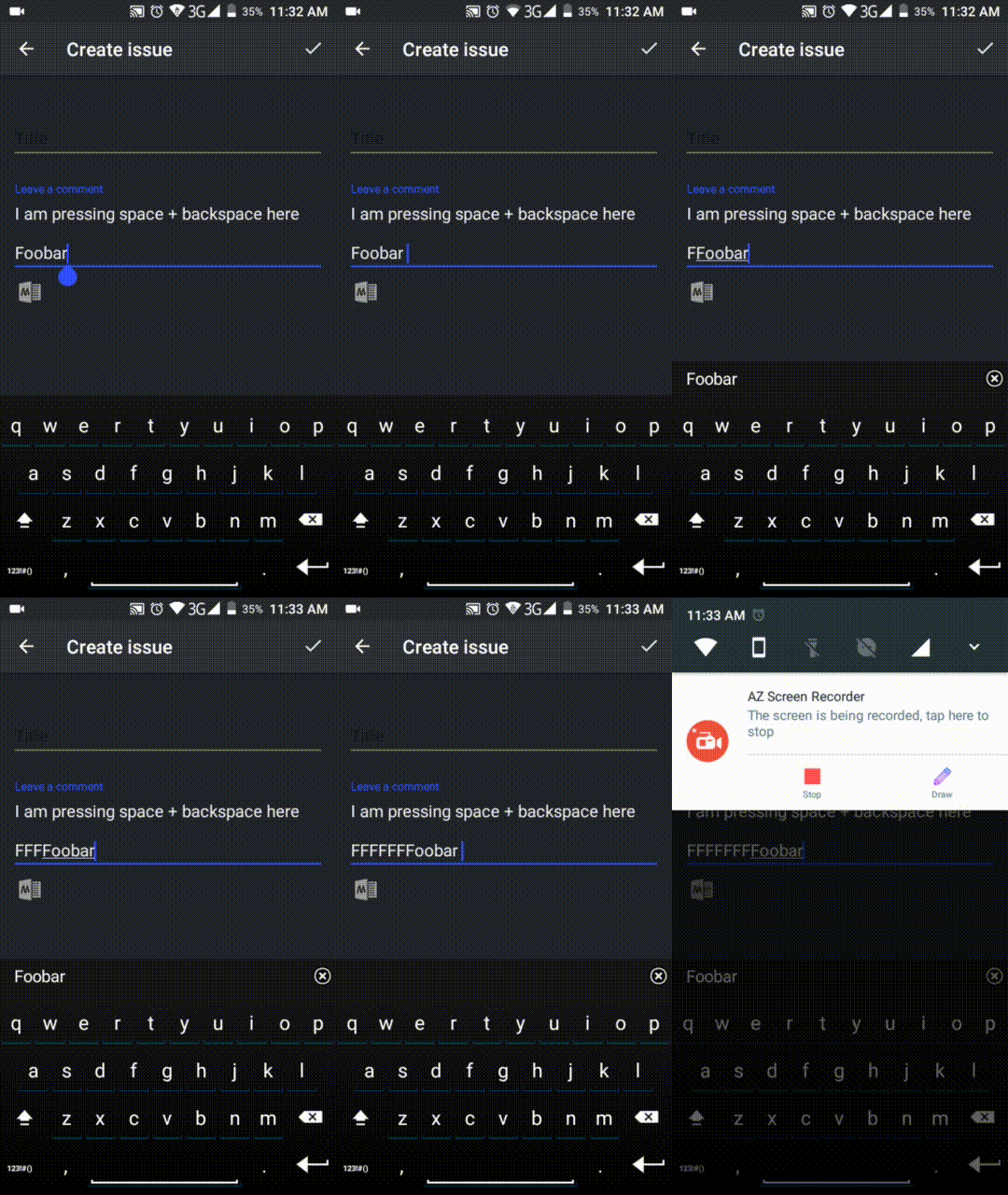
Reapeats the first letter of the autocompleted word and deletes the space
Android OS version:
8.0
Device manufacturer and model:
Xiaomi Mi A1
List of installed add-ons (like languages, or themes):
Spanish Language pack, Yochees Dark theme
V1.9.1735 release 4310
 worg
worg
All 22 comments
Autocomplete doesn't even matter. Just typing random letters, pressing space and then backspace makes the first letter appear again.
 passcheck
on 27 Apr 2018
passcheck
on 27 Apr 2018
Nevermind, it does matter in a way. If autocomplete is disabled the bug doesn't occure. As long as the word is underlined you can't press space and go back without doubling the first letter of the word.
But you don't have to actually use autocompleted words for the bug to occure.
passcheck
on 4 May 2018
This issue is independent on autocomplete. For me, if you type any combination of letters, then space and then delete - the first lettet is always doubled. Autocomplete is disabled.
This is a major issue which is a huge disadvantage of this keyboard.
 karpadbugatone
on 9 May 2018
karpadbugatone
on 9 May 2018
I have the same problem.
If _Show suggestions_ is disabled it doesn't happen.
If enabled, it always happens regardless if the word was manually typed or inserted through the suggestions.
Here is a GIF for reference.
 raniesantos
on 13 May 2018
raniesantos
on 13 May 2018
Same here. Xiaomi Redmi Note 4, Lineage 14.1
 Bendingrobot
on 5 Jun 2018
Bendingrobot
on 5 Jun 2018
This annoy me to hell, how the fck can I turn this shit-ass doubling option off?! It's not just unlogical and no use but friggin make my life hell, makes typing anything much longer
 LugiaDepression
on 8 Jun 2018
LugiaDepression
on 8 Jun 2018
Please lets keep the talk respectful.
First things first: this is (obviously) not a feature, but a bug, so it
should be fixed, there's not an option (AFAIK) to disable it.
This is an open source project and so far I think is a one man's effort, so
please consider the amount of time/work required to triage and fix a bug
before coming to request a fix ASAP, if you're in a hurry you can fix it by
yourself the code is available.
We all understand how anoying could this particular bug can be (trust me, I
am the original reporter) but being kind or at least respectful doesn't
hurt.
On Thu, 7 Jun 2018, 5:13 pm LugiaDepression, notifications@github.com
wrote:
This annoy me to hell, how the fck can I turn this shit-ass doubling
option off?! It's not just unlogical and no use but friggin make my life
hell, makes typing anything much longer—
You are receiving this because you authored the thread.
Reply to this email directly, view it on GitHub
https://github.com/AnySoftKeyboard/AnySoftKeyboard/issues/1323#issuecomment-395582421,
or mute the thread
https://github.com/notifications/unsubscribe-auth/AApOG8Y88JUBNvqbIGbkjVL4MXTqtpaGks5t6aWXgaJpZM4TSGtB
.
worg
on 8 Jun 2018
You think a two months period counts as "hurry"? Because it's not for me. Also, no, it's really not obvious if it's an added option or another bug, because I didn't see any offical reply here that would clear it up and would say 'hey, this is it for now but I noticed and will look into this'.
I should have much clever and not to refresh the app, I don't even know what I thought, because this happens literally every time I dare to refresh.. I would buy an error-free version if I could, one where you don't have wait month to get a bug fixed, but there isn't one.
LugiaDepression
on 8 Jun 2018
I'm very sorry about this issue you are experiencing.
I will need you help to triage the cause of this bug as I was unable to reproduce this bug on any of my devices.
A few questions:
Which OS version are you using?
Which manufacturer?
Is there any specific app that you see this behavior happening in?
 menny
on 9 Jun 2018
menny
on 9 Jun 2018
Android 8
Mi A1
Any application
On Fri, 8 Jun 2018, 9:54 pm Menny Even Danan, notifications@github.com
wrote:
I'm very sorry about this issue you are experiencing.
I will need you help to triage the cause of this bug as I was unable to
reproduce this bug on any of my devices.A few questions:
Which OS version are you using?
Which manufacturer?
Is there any specific app that you see this behavior happening in?—
You are receiving this because you authored the thread.
Reply to this email directly, view it on GitHub
https://github.com/AnySoftKeyboard/AnySoftKeyboard/issues/1323#issuecomment-395934355,
or mute the thread
https://github.com/notifications/unsubscribe-auth/AApOG5yTnH93c1nJ2VrMY3E_oEilLz8Tks5t6zjwgaJpZM4TSGtB
.
worg
on 9 Jun 2018
Android 7.0 Nougat
Its a bug in the keyboard so no matter which app I am in, the bug always occurs.
raniesantos
on 9 Jun 2018
Xiaomi Redmi Note 5A
Android 7.1.2
Happens in any app
The issue disappears if you disable "show suggestions".
Generally if you press space and then backspace, the first letter is always doubled.
karpadbugatone
on 9 Jun 2018
Can everyone verify that disabling "show suggestions" fixes the issue?
menny
on 10 Jun 2018
Also, I'll need a few of you to send me your AnySoftKeyboard settings backup.
You can create a backup file by going to AnySoftKeyboard Settings app, click the options icon (top-right, three vertical dots icon) in the HELLO section. Then pick "Tweaks"
In the new screen (Tweaks) again press the options icon (top-right, three vertical dots icon) and pick "Backup".
Ensure you are only backing up the "App Settings". Attach here this file.
The file should not include any personal information about you. But you find that it is and change/remove anything, please let me know what you changed so I'll be aware.
Thank you all.
menny
on 10 Jun 2018
I can verify, that disabling "show suggestions" fixes the issue.
AnySoftKeyboardPrefs.zip
Bendingrobot
on 10 Jun 2018
Also confirm that disabling show suggestions fixes the issue.
Thanks.
On Sun, 10 Jun 2018, 1:22 pm Menny Even Danan, notifications@github.com
wrote:
Also, I'll need a few of you to send me your AnySoftKeyboard settings
backup.
You can create a backup file by going to AnySoftKeyboard Settings app,
click the options icon (top-right, three vertical dots icon) in the HELLO
section. Then pick "Tweaks"
In the new screen (Tweaks) again press the options icon (top-right, three
vertical dots icon) and pick "Backup".
Ensure you are only backing up the "App Settings". Attach here this file.
The file should not include any personal information about you. But you
find that it is and change/remove anything, please let me know what you
changed so I'll be aware.Thank you all.
—
You are receiving this because you authored the thread.
Reply to this email directly, view it on GitHub
https://github.com/AnySoftKeyboard/AnySoftKeyboard/issues/1323#issuecomment-396070190,
or mute the thread
https://github.com/notifications/unsubscribe-auth/AApOG_GrpBcu0mWojGKjexV3mvMuqw3mks5t7WPegaJpZM4TSGtB
.
worg
on 10 Jun 2018
@Bendingrobot thank you. I was able to reproduce this issue.
The cause is improper revert when "Space after candidate pick" (pref key 'insert_space_after_word_suggestion_selection')is disabled.
menny
on 10 Jun 2018
So you basically solved the issue and don't need my details too? I have the _autospace_ feature off .
Thanx for your efforts, be glad to help!
 NitroNils
on 10 Jun 2018
NitroNils
on 10 Jun 2018
I think I have the bug fixed. I will release an Alpha version to the Play Store very shortly.
menny
on 10 Jun 2018
Awesome !
NitroNils
on 10 Jun 2018
Thanks!!
On Mon, 11 Jun 2018, 00:02 NitroNils, notifications@github.com wrote:
Awesome !
—
You are receiving this because you commented.
Reply to this email directly, view it on GitHub
https://github.com/AnySoftKeyboard/AnySoftKeyboard/issues/1323#issuecomment-396081740,
or mute the thread
https://github.com/notifications/unsubscribe-auth/Agn0gPHZ6VYHebXmeQtG03eFblZOuAOKks5t7YlRgaJpZM4TSGtB
.
karpadbugatone
on 10 Jun 2018
menny, great that you've been able to fix this bug!
Any information when the fixed release will be available in F-Droid? Longingly waiting :)
 michaelof
on 25 Jun 2018
michaelof
on 25 Jun 2018
Related issues
 afrey15
·
6Comments
afrey15
·
6Comments
 Krzmbrzl
·
5Comments
Krzmbrzl
·
5Comments
 Kaljurand
·
3Comments
Kaljurand
·
3Comments
 ghost
·
5Comments
ghost
·
5Comments
 bobolea
·
7Comments
bobolea
·
7Comments
Most helpful comment
Please lets keep the talk respectful.
First things first: this is (obviously) not a feature, but a bug, so it
should be fixed, there's not an option (AFAIK) to disable it.
This is an open source project and so far I think is a one man's effort, so
please consider the amount of time/work required to triage and fix a bug
before coming to request a fix ASAP, if you're in a hurry you can fix it by
yourself the code is available.
We all understand how anoying could this particular bug can be (trust me, I
am the original reporter) but being kind or at least respectful doesn't
hurt.
On Thu, 7 Jun 2018, 5:13 pm LugiaDepression, notifications@github.com
wrote: