Antennapod: Automatic download doesn't work
App version: 1.7.1 (from F-Droid)
Android version: 8.1.0 - LineageOS with microG
Device model: Nexus 5X
Expected behaviour: When Automatic Download is enabled, I'd expect the episodes to be downloaded automatically. I did disable battery optimizations and enabled Automatic Downloads in app settings.
Current behaviour: A few days have passed and no episode has been downloaded automatically
First occured: It's been like that for two months now
Steps to reproduce: doesn't really apply here, see expected/current behavior
Environment: Nothing out of ordinary. Auto Download enabled, Episode Cache set to 100, Update Interval/Time of Day set to "every 24 hours"
 kuba-orlik
All 19 comments
Same issue here on Lineage 16 (Android 9), I switched over from pocket casts since their new redesign is terrible. Now I have Antennapod which won't auto download even if the setting is checked to do so.
 silvernode
on 13 Mar 2019
silvernode
on 13 Mar 2019
I'm sorry to hear that - could you first clarify what is not working, given there are 2 related but different types of "automatic downloads"?
- automatic podcast feeds refresh: new episodes will then be shown in Episodes > New Tab, e.g., refresh feeds every 4 hours.
- automatic download of podcast episodes: episodes will be downloaded (and added to the queue, if enabled in app settings), e.g., download up to 100 episodes (Episode Cache)
@kuba-orlik it seems you have enabled both, but are they both not working?
 orionlee
on 13 Mar 2019
orionlee
on 13 Mar 2019
Automatic podcast feeds refresh seems to work fine. But I get no automatic downloads of podcast episodes. It used to work (I got a notification every morning), but now it does not
kuba-orlik
on 14 Mar 2019
On Automatic download of podcast episodes: hmm, the logic hasn't been changed for quite some time, and is (largely) immune to things like battery optimization, background restrictions, etc., on Android 8 / 9.
I suggest you try the following:
- Set Automatic Download Episode Cache to Unlimited.
- Then go to Episodes > New Tab, where you'll see episodes available for auto download (unless you've disabled automatic download on the podcast feed).
- Press Refresh button at the action bar to refresh the feeds.
- After the feeds have been refreshed, AntennaPod should try to attempt auto-download podcast episodes (and you'll see some episodes are being downloaded on Episodes > New tab).
If the above works (but setting Episode Cache to 100 does not), it'd indicate that
- a) you have too many downloaded episodes, or
- b) somehow AntennaPod incorrectly thinks you have too many downloaded episodes.
For (b), go to Downloads > Completed tab, which lists all the episodes that have been downloaded (in AntennaPod's own tracking). If there are more than what you think (e.g., previously downloaded but has been deleted), then we know where the problem is. It could happen if one tried to export / import AntennaPod database from one device to another.
orionlee
on 14 Mar 2019
Set Automatic Download Episode Cache to Unlimited.
Then go to Episodes > New Tab, where you'll see episodes available for auto download (unless you've disabled automatic download on the podcast feed).
Press Refresh button at the action bar to refresh the feeds.
After the feeds have been refreshed, AntennaPod should try to attempt auto-download podcast episodes (and you'll see some episodes are being downloaded on Episodes > New tab).
This didn't work. The app did not attempt to download any episodes.
There are 44 episodes in Downloads > Completed
kuba-orlik
on 16 Mar 2019
Setting the cache to unlimited and then refreshing worked for me.
silvernode
on 17 Mar 2019
@silvernode in your case, it's likely there are more downloaded episodes than the Episode Cache . You can find all downloaded episodes in Downloads > Completed Tab
orionlee
on 17 Mar 2019
@kuba-orlik I'm stumped about your case. There are two more things I could suggest:
If you're comfortable with installing a
debugbuild on your device, you can install one (side by side with your existing installation). Re-run the steps. Then appropriate logs can be extracted, so that we have a clearer idea on what's going on. (Production builds have logcat output disabled so it'll be of no help.)Just in case, verify a few other settings, to ensure auto downloaded is indeed enabled in your environment.
In automatic download preference, Ensure "Download when not charging" is enabled, and "Enable Wi-Fi Filter" is disabled.
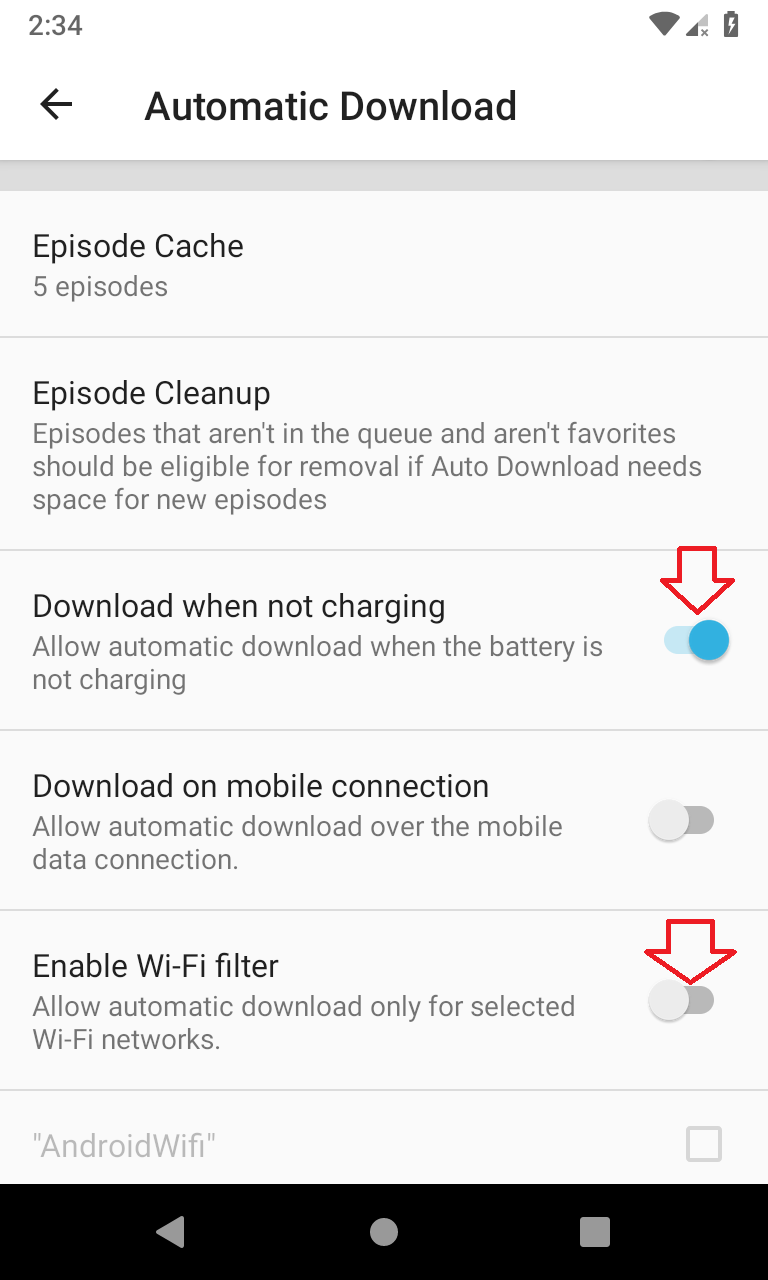
Open the settings screen of any one of the subscribed podcast, ensure "Include in Auto downloads" is checked.
orionlee
on 17 Mar 2019
After enabling "Download when not charging" and refreshing the episodes list, the download did start.
I assumed that if I set the app to download once every 24 hours it should wait until it's connected and then start downloading. Was my assumption wrong?
kuba-orlik
on 18 Mar 2019
@kuba-orlik I assumed that if I set the app to download once every 24 hours it should wait until it's connected and then start downloading.
It's not quite so, but your use case does surface some bugs for Android 8/9.
By "Download once every 24 hours", I believe you refer to "Update Interval or Time of Day" preference: it is for podcast feeds refresh, not podcast episode automatic download.
Podcast Automatic downloads are triggered not by schedules, but by a variety of criteria: changes in queue, podcast feeds refresh, etc.
One of the criteria is when device is plugged into / unplugged from the power. So with your settings, when a device is connected to power (and network is available), AntennaPod should attempt to auto download podcast episodes.
However, AntennaPod's logic for detecting device is connected to a power source (source), however, is not working for Android 8+. (It uses an implicit BrocastReceiver , which no longer works on Android 8+).
orionlee
on 18 Mar 2019
AntennaPod code changes needed to support Android 8+:
PowerConnectionReceiver- needs a replacement for Android 8+ (probablyJobService)ConnectivityActionReceiver- needs a replacement for Android 8+ (probablyJobService)AlarmUpdateReceiver- needs to replace intent filterandroid.intent.action.PACKAGE_REPLACEDwithandroid.intent.action.ACTION_MY_PACKAGE_REPLACED(API >=12, works on all AntennaPod-supported Android version)
orionlee
on 18 Mar 2019
1. If you're comfortable with installing a `debug` build on your device, you can install one (side by side with your existing installation). Re-run the steps. Then appropriate logs can be extracted, so that we have a clearer idea on what's going on. (Production builds have logcat output disabled so it'll be of no help.)
Is there an easy way to get a recent debug build? I'm not an Android developer so I don't have the SDKs and Build tools installed. But I would be happy to provide some log messages.
 fabolhak
on 23 Mar 2019
fabolhak
on 23 Mar 2019
@fabolhak I'm afraid someone will need to send you a debug build apk. Do you have some issues in automatic download, and not yet covered in this issue? If so, please describe the problem, before going down the path of getting a debug build.
orionlee
on 23 Mar 2019
Changing the cache limit to "unlimited" also solved the problem of automatic download for me. As it turns out, there is even an icon for that: https://github.com/AntennaPod/AntennaPod/issues/2414. I originally thought the cache limit is per podcast (like here https://github.com/AntennaPod/AntennaPod/pull/2806), but then realized that it is based on the sum of all downloaded elements (or queue elements?).
Maybe the description of this setting ("Episode Cache") could be improved in order to prevent future confusion.
fabolhak
on 26 Mar 2019
@fabolhak the limit is on all downloaded episodes - Think of it as an approximation of quota so that AntennaPod does take too much of your device's memory.
If you have any specific suggestion, e.g., descriptions to add, wordings to change, etc., feel free to provide it.
orionlee
on 27 Mar 2019
@orionlee I created a PR (https://github.com/AntennaPod/AntennaPod/pull/3213). I hope it is correct. I'm not an Android programmer.
fabolhak
on 1 Jun 2019
The settings screen will have a better description in the next update. That should help to make it more clear what the episode cache size does.
 ByteHamster
on 25 Jul 2019
ByteHamster
on 25 Jul 2019
Please reopen the issue . The actual bugs automatic download on Android 8+ have not been resolved. See:
https://github.com/AntennaPod/AntennaPod/issues/3053#issuecomment-474054748
https://github.com/AntennaPod/AntennaPod/issues/3053#issuecomment-474059913
orionlee
on 7 Sep 2019
I'm not sure how to replicate this problem and if anyone is seeing a problem with auto downloading?
 tonytamsf
on 7 Jan 2021
tonytamsf
on 7 Jan 2021
Related issues
 Rotzbua
·
4Comments
Rotzbua
·
4Comments
 yosefmizrahi
·
3Comments
yosefmizrahi
·
3Comments
 keunes
·
4Comments
keunes
·
4Comments
 reverse-unina
·
5Comments
fabolhak
·
3Comments
reverse-unina
·
5Comments
fabolhak
·
3Comments