Antennapod: FR: easily access the podcast of an episode on queue, playback history, and player
App version: 1.7.1
Current behaviour: on Queue screen, if one wants to go to the podcast of an episode, one has to i) click the episode, ii) on the subsequent episode screen, click the podcast image cover. Ditto for playback history
Desirable behaviour: it'd be great to reduce the current two-step process into one. See [*] for the larger usage scenario that I find myself doing this somewhat regularly.
One option is:
- On the queue and playback history screens: add it as an option on episode item context menu
(For playback history, it will be the first item as there is no existing context menu.) - On player screen: add it as a new action bar menu item (e.g., below visit website)
Related: #2928 also addresses episode item context menu on the queue screen.
[*] Usage scenario: I do this to manually download the next unplayed episode on some lower-priority, serial podcasts.
- I typically leave 1 or 2 episodes at the end of the queue that are serial in nature. I listen to them when I have time.
- When I get to listen to them, I want to open the podcast to download the next one.
- To do so, I tend to find the episode played / playing from the queue, player, or playback history (depending on the state). Click the episode. Then the podcast.
- Finding the podcast from the long list in the drawer (or subscription screen) is more difficult.
1077 is about the general wish to be able to autodownload serial podcasts (that will work for end users). The scenario here is my manual workflow.
 orionlee
All 10 comments
To be honest, I don't like the idea of adding more items to the menus. They are already too long. Does adding an item to the context menu even save a click? With an overflow menu you would have to long-press and select the menu item instead of short-pressing and then tapping the cover. This actually feels slower to me because long-pressing needs more time than short-pressing.
 ByteHamster
on 2 Dec 2018
ByteHamster
on 2 Dec 2018
I don't believe adding more context menu item to queue screen is ideal either.
Another possibility for queue screen is to make clicking mage thumbnail go to podcast. In this case, the behavior will be a new user preference.
(I understand the thumbnail technically refers to the episode itself. But in practice, for many podcasts it is the image of the podcast itself. I myself don't realize the image refers to the episode until I have used AntennaPod for months.)
orionlee
on 2 Dec 2018
I do this to manually download the next unplayed episode on some lower-priority, serial podcasts.
To be honest, this sounds like an ugly work-around, with a fix that doesn't address the actual problem. As OP notes, #1077 would be the proper fix (additionally, #2806 might help in the OP's case also).
 keunes
on 2 Dec 2018
keunes
on 2 Dec 2018
For me the issue is scrolling down for a solid 20 seconds and relying on spotting visually the episode being played or the last episode played. It would be nice to have a button or option in the feed screen to "go to last played episode" or "go to current episode" (if an ep from the feed is playing).
One has to think of long, chronological podcasts as an audiobook, the user needs a way to 'bookmark' their progress, the same way the app already does within episodes, it should be possible to do the same for the larger context of the whole podcast.
Assuming that the format of the podcast is one of news or interviews and hence why you'd want to prioritize newest content is an old fashion notion. It can be the default but it shouldn't be the only format available.
 indeedwatson
on 8 Jan 2019
indeedwatson
on 8 Jan 2019
@indeedwatson I suggest you open a separate issue for "go to last played episode" to detail what you suggest. #2524 (sorting on podcast screen) plus the existing filter (see below) might also satisfy your requirement.
In the meantime, for chronological podcasts, one suggestion is to use the filter on podcast screen to show unplayed episodes only. You still need to scroll all the way down to get to the next unplayed episode (to download presumably), but it will reliably be at the bottom without the clutter of the played episodes.
If #2524 is implemented, the next unplayed episode will then be at the top.
orionlee
on 8 Jan 2019
It's true this feature will overcrowd context menu but to offer quick access :
- in episode view will it not be better to have open podcast instead of visit website ? (I mean as a button)
- and to have in player menu "open podcast". (Right now the menu has only 2 main items) It's strange not to be able to from the player.
 Matth7878
on 8 Sep 2019
Matth7878
on 8 Sep 2019
have in player menu "open podcast". (Right now the menu has only 2 main items) It's strange not to be able to from the player.
+1.
Episode view: tapping the thumbnail / podcast title already provides access to podcast.
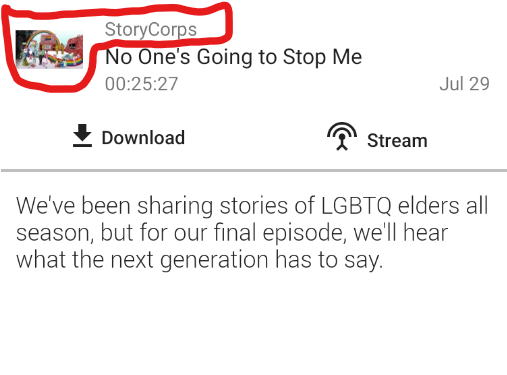
orionlee
on 8 Sep 2019
Waouh didn't knew you could tap thumbnail or podcast name in episode view.
I feel like it's not very discoverable and so I still think it would better to have open podcast as a button instead of visit site.
Or maybe podcast title should be displayed as a link (underlined and blue) to hint you can tap it.
Thinking more about it maybe each screen menu should have a "hint menu" which would tell you what is possible but hard to know.
In player it could be you can long press back and forward to change jump length or duration to the right of time bar to switch between episode length and time left for episode to end.
Sorry about the off topic! But I think it shows how there is a lot of things you can do and that are not obvious.
Matth7878
on 8 Sep 2019
have in player menu "open podcast". (Right now the menu has only 2 main items) It's strange not to be able to from the player.
+1 also from me
Thinking more about it maybe each screen menu should have a "hint menu" which would tell you what is possible but hard to know.
Personally not in favour, but off-topic indeed so I won't go into the why here. Could use a separate issue. Happy to contribute if you create one.
keunes
on 21 Sep 2019
A menu item for the player screen was added. I don't want to add new context menu items to the episode details screen. You can press the cover or podcast title there.
ByteHamster
on 22 Sep 2019
Related issues
 chaulo
·
4Comments
chaulo
·
4Comments
 Rotzbua
·
4Comments
keunes
·
3Comments
Rotzbua
·
4Comments
keunes
·
3Comments
 ggshuini
·
4Comments
ggshuini
·
4Comments
 yosefmizrahi
·
3Comments
yosefmizrahi
·
3Comments