Antennapod: Allow exact control of download location
Currently, trying to set the Download location only allows users to select a "base location". It would be nice to be able to create the necessary file structure on an SD card and point to that.
 shsorbom
All 33 comments
see my comment on issue #1628
shsorbom
on 1 Aug 2017
The other issue is closed, i.e. we will continue here.
You probably created this issue/request on a mobile device so that you did not see our template
Most importantly: Which Android version are you using? Pre-4.4, 4.4 and post-4.4 work quite different in this regard and we even use different UI elements to set the data folder.
 mfietz
on 1 Aug 2017
mfietz
on 1 Aug 2017
App version: 1.6.23 (Play Store)
Android version: 4.4.4
Device model: Coolpad 3300A
Sorry about the template, I thought that was specifically for bugs.
shsorbom
on 1 Aug 2017
Sorry for dragging this up. Freely customizable folders aside, is there a specific reason for AntennaPod not downloading into a public folder, i.e. DIRECTORY_PODCASTS or _MUSIC? If I would want to send a Podcast to a UPnP/DLNA renderer, the apps cannot access the current download directory.
Or is AntennaPod conceptually considered as single stop player, i.e. downloaded files are considered application cache?
For my personal use, I use a rather hacky but simple fix: 3141007.
 freiform
on 26 Jan 2018
freiform
on 26 Jan 2018
@freiform's patch to change the default directory to the DIRECTORY_PODCASTS provided by the OS's Environmental Variables is exactly the change I came to propose. For me what that would enable is being able to play the Podcasts on a Sonos system from my phone. The closed source Sonos app checks the DIRECTORY_PODCASTS but cannot be set to look in a custom location.
Would a PR based off of the above change be considered if it provided appropriate fallbacks and checks if the environmental variable was not available?
 dkozel
on 16 Nov 2018
dkozel
on 16 Nov 2018
@dkozel of course
mfietz
on 17 Nov 2018
I would like to set the storage location individually, too, because I need to share the storage location between different apps: I want to synchronize the folder on several devices using my NextCloud, and I need to access the download folder with a different player when I am driving my car.
I am sure there are more good reasons why an individual path makes sense.
For my personal use, I use a rather hacky but simple fix: 3141007.
Could you provide a short instruction how to use this patch, eg what SDK is needed? (I am using Linux on my machine.) I have neither written nor compiled any Android app myself yet, but one is never too old to learn something new. ;)
 wehkah
on 3 Feb 2019
wehkah
on 3 Feb 2019
As an update, I am now using a custom build that uses the system DIRECTORY_PODCASTS directory hardcoded and this works well with the Sonos app. I do not feel competent to add in checks to migrate existing files. I could work on a PR that handles new installations.
If DIRECTORY_PODCASTS exists and is writable, use it for all files, else fallback to current behavior. Is that a sufficient improvement to merge? I don't have the time to figure out migrating existing files and updating databases etc.
dkozel
on 21 Apr 2020
If DIRECTORY_PODCASTS exists and is writable, use it for all files, else fallback to current behavior. Is that a sufficient improvement to merge?
Unfortunately not, sorry. Starting with Android 11, apps can only write to their specific data folder. If they want to write to other folders (such as podcasts), they need to use the storage access framework, which basically means AntennaPod needs a rewrite of its file handling to support that.
 ByteHamster
on 21 Apr 2020
ByteHamster
on 21 Apr 2020
Apps can request legacy behavior for Android 11, but that is likely to be removed in a later release.
https://developer.android.com/reference/android/R.attr#requestLegacyExternalStorage
Is there interest in the project of moving to the storage access framework or even to the MediaStore API? If not, it sounds like custom download directories are a feature that it will not be possible to support and this issue can be closed.
Thanks for all your work on AntennaPod, it's a great app!
dkozel
on 22 Apr 2020
@ByteHamster Thanks for the clear explanation in #4415
I have a pretty good appreciation of how hard it would be to update this.
For my use case an option may be to use Antenna Pod on my mobile device with a local gPodder instance on a headless machine and gpodder.net to sync everything up. This makes the whole chain of services a lot more complex, but offers an excellent workaround for keeping everything in sync.
Keep up the good work. This is by far the best podcast app out there.
 txoof
on 10 Sep 2020
txoof
on 10 Sep 2020
In #2920 it was requested to 'add possibility to cast/stream to Sonos'. According to @geraldo:
Actually Sonos looks up the device default podcast folder, usually /storage/emulated/0/Podcasts/. So it would be enough if AP would offer this location as an option in "Choose Data Folder" Settings.
So maybe we should have several options (if possible, idk if it is): default (in-app), 'Podcasts', custom.
 keunes
on 2 Oct 2020
keunes
on 2 Oct 2020
In #2920 it was requested to 'add possibility to cast/stream to Sonos'. According to @geraldo:
Actually Sonos looks up the device default podcast folder, usually /storage/emulated/0/Podcasts/. So it would be enough if AP would offer this location as an option in "Choose Data Folder" Settings.
So maybe we should have several options (if possible, idk if it is): default (in-app), 'Podcasts', custom.
Would sharing the folder with the Sonos app also share the listening progress of the podcast (how much/little you have listened through the podcast)?
 returntrip
on 17 Oct 2020
returntrip
on 17 Oct 2020
At the very least, the fixed storage location should be changed from /storage/emulated/0/Android/data to /storage/emulated/0/Android/media to allow a wider scope.
 cryobry
on 23 Oct 2020
cryobry
on 23 Oct 2020
Would sharing the folder with the Sonos app also share the listening progress of the podcast (how much/little you have listened through the podcast)?
@returntrip Not if they simply have access to the media files - there would need to be an actual interaction between the two software packages (Sonos internal & AntennaPod). Don't know if Sonos supports this. If they do, this could be another, separate feature request for AntennaPod.
keunes
on 3 Nov 2020
I would just like to also express the desire for additional media locations (/storage/emulated/0/Podcasts or DIRECTORY_PODCASTS at least; honestly anywhere that can be r/w from file managers would suffice for me). I understand the difficulty (and significant rewriting) that this would involve, but I'd like to offer $25 towards a "bounty" on this getting done.
 Corey-Keller
on 5 Nov 2020
Corey-Keller
on 5 Nov 2020
anywhere that can be r/w from file managers
AntennaPod's folder on the external storage is readable and writable from file managers.
ByteHamster
on 5 Nov 2020
anywhere that can be r/w from file managers
AntennaPod's folder on the external storage is readable and writable from file managers.
I'm assuming you're referring to the Android/data/de.danoeh.antennapod/ folder being r/w when on an external SD card? That's great, but useless to those of us with devices without SD card slots (for example myself on a Pixel 5).
Corey-Keller
on 5 Nov 2020
I have a phone without an sd card slot but the data is still accessible. It is stored on /sdcard/Android/data/de.danoeh.antennapod/ (that path is there for historical reasons and actually is stored on the device flash memory).
ByteHamster
on 5 Nov 2020
I would bet that a lot of the people affected by this are using syncthing
to share the podcast storage directory (AntennaPod has the sanest storage
layout of any podcast app). The /Android/data directory is not accessible
by Syncthing, while /Android/media is after granting the all storage access
in Android 11.
On Thu, Nov 5, 2020, 2:43 PM ByteHamster notifications@github.com wrote:
I have a phone without an sd card slot but the data is still accessible.
It is stored on /sdcard/Android/data/de.danoeh.antennapod/ (that path is
there for historical reasons and actually is stored on the device flash
memory).—
You are receiving this because you commented.
Reply to this email directly, view it on GitHub
https://github.com/AntennaPod/AntennaPod/issues/2379#issuecomment-722601994,
or unsubscribe
https://github.com/notifications/unsubscribe-auth/AJD7KCHOXDOXP7OXPRUPNSLSOL55NANCNFSM4DVFUBIQ
.
cryobry
on 5 Nov 2020
I have a phone without an sd card slot but the data is still accessible. It is stored on
/sdcard/Android/data/de.danoeh.antennapod/(that path is there for historical reasons and actually is stored on the device flash memory).
I assume you aren't on Android 11 then (or you're rooted)? Because on 11 the Android/data folder is 100% empty from a file managers perspective
Corey-Keller
on 5 Nov 2020
I can see files in Android/data using OnePlus file manager in Android 11,
unrooted. They just aren't accessible from some non-system applications,
which is why it would be better to keep them in Podcasts/ or Android/media.
On Thu, Nov 5, 2020, 3:01 PM Corey Keller notifications@github.com wrote:
I have a phone without an sd card slot but the data is still accessible.
It is stored on /sdcard/Android/data/de.danoeh.antennapod/ (that path is
there for historical reasons and actually is stored on the device flash
memory).I assume you aren't on Android 11 then (or you're rooted)? Because on 11
the Android/data folder is 100% empty from a file managers perspective—
You are receiving this because you commented.
Reply to this email directly, view it on GitHub
https://github.com/AntennaPod/AntennaPod/issues/2379#issuecomment-722611667,
or unsubscribe
https://github.com/notifications/unsubscribe-auth/AJD7KCC7D4CICQYJN5BJO6DSOMAALANCNFSM4DVFUBIQ
.
cryobry
on 5 Nov 2020
Oh, right. I am not using Android 11.
Maybe, alternatively, AntennaPod can still use its own folder without a rewrite but make it accessible to other apps. That can be done using a file provider. Something like Termux does here:
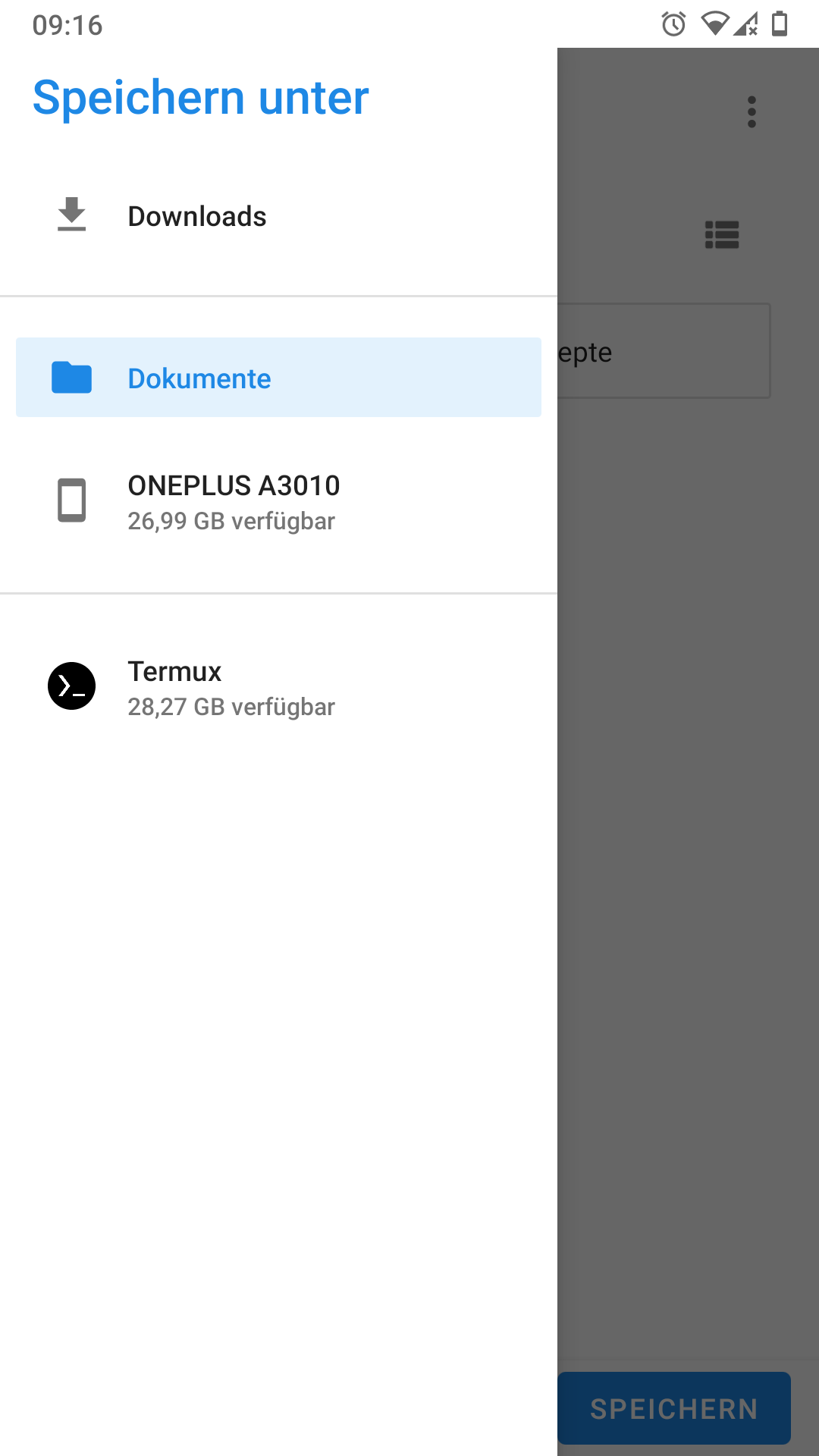
ByteHamster
on 6 Nov 2020
@ByteHamster that could work if it is r/w. My specific use case for this is that a podcast I support only makes their ad free episodes available as direct downloads. I still want to listen to them in AntennaPod so I have to replace the regular episode with the ad free episode
Corey-Keller
on 6 Nov 2020
I still want to listen to them in AntennaPod so I have to replace the regular episode with the ad free episode
That sounds like a strange work-around :D AntennaPod is not meant to be used that way :smile: That makes the displayed durations of the episodes wrong. If they add chapter marks, they would also break.
How about contacting the podcast host and asking if they could make the ad free episodes available as a password protected feed? That would be a lot easier than having to download twice and then replacing AntennaPod's file structures for every single episode. Alternatively, you can use AntennaPod's new "Local folders" feature that will be available in version 2.1.0 where you can select a folder on the sd card that then becomes a "virtual" podcast.
ByteHamster
on 6 Nov 2020
How about contacting the podcast host and asking if they could make the ad free episodes available as a password protected feed?
Already barked up that tree to no avail, but thanks for the suggestion.
Alternatively, you can use AntennaPod's new "Local folders" feature that will be available in version 2.1.0 where you can select a folder on the sd card that then becomes a "virtual" podcast.
OOH! That is EXACTLY what I'm needing! Can't wait for 2.1 then.
Corey-Keller
on 6 Nov 2020
@ByteHamster How does "local folders" select what to add? Does it use a folder picker (that could also be used for setting the download location)? Or is the location hardcoded?
Corey-Keller
on 11 Nov 2020
@Corey-Keller with version 2.1.0 which is on beta you can go to add a podcast and select "add local folder"
 Matth7878
on 11 Nov 2020
Matth7878
on 11 Nov 2020
Does it use a folder picker (that could also be used for setting the download location)?
It does use a folder picker but the same can not be used for setting the download location. The picker actually returns a URI that could be located anywhere (within an app, on the storage, etc). AntennaPod interacts with a file provider - those files can not directly be read/written like we do it for downloads.
ByteHamster
on 11 Nov 2020
@ByteHamster Is there any plan to make beta releases available outside of Google Play? I had to uninstall the F-Droid version after joining the beta on GP to be able to use 2.1. I don't know if F-Droid supports beta channels, but I know Github supports beta releases.
Corey-Keller
on 12 Nov 2020
F-Droid does sometimes do beta builds (they're not automatically recommended as upgrades though). It might take an issue on the F-Droid side to make them aware to make beta builds for AntennaPod available though.
 mathstuf
on 12 Nov 2020
mathstuf
on 12 Nov 2020
F-Droid has beta versions but it does not have a way to automatically check for beta versions based on tags. That means that all beta releases have to be added to F-Droid manually. I can tag beta releases as soon as they are ready (when the Google beta does not expose a really bad crash) but someone else has to do the pull requests for F-Droid. This needs to be a person who is experienced with git (but no Android development needed). The reason is that just filing an issue for F-Droid increases the workload of their maintainers and is probably slow. If there is something important to fix, an update needs to be rolled out instantly.
So, beta releases on F-Droid basically just need someone who does the work and agrees to continue doing that over a longer time period to ensure that this does not fall back to me, in the end.
ByteHamster
on 12 Nov 2020
This issue has been mentioned on AntennaPod Forum. There might be relevant details there:
 antennapod-bot
on 14 Nov 2020
antennapod-bot
on 14 Nov 2020
Related issues
 matthiasroos
·
3Comments
matthiasroos
·
3Comments
 ggshuini
·
4Comments
ggshuini
·
4Comments
 reverse-unina
·
5Comments
keunes
·
4Comments
reverse-unina
·
5Comments
keunes
·
4Comments
 thom-github
·
3Comments
thom-github
·
3Comments
Most helpful comment
Sorry for dragging this up. Freely customizable folders aside, is there a specific reason for AntennaPod not downloading into a public folder, i.e. DIRECTORY_PODCASTS or _MUSIC? If I would want to send a Podcast to a UPnP/DLNA renderer, the apps cannot access the current download directory.
Or is AntennaPod conceptually considered as single stop player, i.e. downloaded files are considered application cache?
For my personal use, I use a rather hacky but simple fix: 3141007.