Antennapod: Android back button: Open menu instead closing the app
For me (and maybe for others) the behaviour of the back button is unexpected. It would be nice, if touching the back button once would open the sidebar menu instead of closing/minimizing the app. A second press would then close the app.
1.6.2.2
Moto G (2013)
CM 14.1 (Android 7.1)
 nima5jneb
All 10 comments
Have you used the search?
There should either be a discussion why the app has the current behaviour or an already open issue.
 mfietz
on 28 Nov 2016
mfietz
on 28 Nov 2016
As i am often wondering about this behaviour as well i added a +1.
@mfietz i did a search on open issues for some keywords but unfortunately without success.
 yafp
on 21 Dec 2016
yafp
on 21 Dec 2016
+1 for me too. Maybe, instead of opening the sidebar menu, a confirmation dialog ("Really exit?") should be displayed.
Also, sometimes when navigating antennapod features that have multiple nested levels, I press the back button and I expect to go back to the previous level, instead the app exits (and I have to restart the whole sequence). Very annoying. An example:
- add podcast
- do a search for podcasts
- browse search results
- subscribe a podcast
- press "back": here it's ok, I get back to the search results
- subscribe another podcast
- click on "open podcast" and download an episode
- press "back": now I would expect to go back to the podcast item in search results, but no, the app exits and I have to re-do the search from the start
 Vrihub
on 1 Jan 2017
Vrihub
on 1 Jan 2017
Another example, even more annoying: in the "Add podcast" screen, pressing "Back" closes the app.
It should bring you back to the screen you were just before selecting "Add podcast"
Vrihub
on 1 Jan 2017
Google apps like GMail or the Play Store close when I press the back button. So I can only assume that this is the intended behavior in Android.
mfietz
on 18 Jan 2017
Another example, even more annoying: in the "Add podcast" screen, pressing "Back" closes the app.
It should bring you back to the screen you were just before selecting "Add podcast" [@Vrihub]
That doesn't happen in my case. Sounds like a bug in your instance?
sometimes when navigating antennapod features that have multiple nested levels...
In your example, yes, I would also expect the AP to return to the previous screen.
instead of opening the sidebar menu, a confirmation dialog ("Really exit?") should be displayed.
No dialogs please for these minor details! Nothing is lost, the window can be easily restored via multi-tasking.
 keunes
on 20 Jan 2017
keunes
on 20 Jan 2017
Another example, even more annoying: in the "Add podcast" screen, pressing "Back" closes the app. It should bring you back to the screen you were just before selecting "Add podcast" [@Vrihub]
I can confirm this behaviour running the latest version from the Play Store on Android 7.x
yafp
on 23 Jan 2017
+1. The behavior of the back button is not intuitive. An option to change it would be appreciated.
 F4Phantom5657
on 9 Feb 2017
F4Phantom5657
on 9 Feb 2017
Just started using AntennaPod and have found I keep leaving the app unexpectedly. Don't know about opening the sidebar but a "Press back again to exit" popup like some other apps have would be nice.
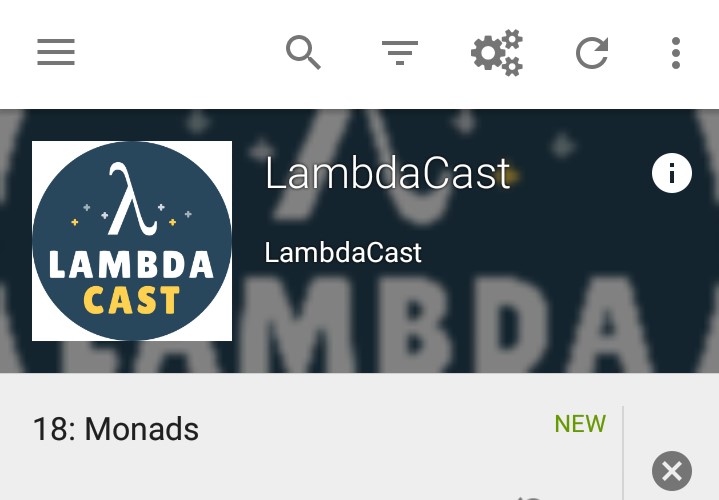
Now to add something useful: screenshots of this bug:
Another example, even more annoying: in the "Add podcast" screen, pressing "Back" closes the app.
It should bring you back to the screen you were just before selecting "Add podcast"
I found this was one of the reasons I kept exiting the app unexpectedly when setting up podcasts.
Normal podcast screen (from subscriptions), top-left has back arrow, pressing back takes you back as expected.

After adding a new podcast (click "Subscribe" and then "Open"), looks like you're in a normal podcast screen again, except no arrow top-left, and pressing back exits the app.
 stkb
on 15 Feb 2018
stkb
on 15 Feb 2018
+1
Also, I would like to suggest using the subscriptions page as root page to which to return to (and only exit the app when the back button was pressed on the subscriptions page). This behaviour would be similar to other podcast players I've been using.
 sukamare
on 5 Sep 2018
sukamare
on 5 Sep 2018
Related issues
 mamehacker
·
3Comments
mamehacker
·
3Comments
 chaulo
·
4Comments
chaulo
·
4Comments
 ggshuini
·
4Comments
ggshuini
·
4Comments
 gappleto97
·
3Comments
keunes
·
4Comments
gappleto97
·
3Comments
keunes
·
4Comments
Most helpful comment
+1
Also, I would like to suggest using the subscriptions page as root page to which to return to (and only exit the app when the back button was pressed on the subscriptions page). This behaviour would be similar to other podcast players I've been using.